Hopper – Agentic TN3270 Emulator for Mainframe COBOL
Hopper is an agentic terminal that lets AI agents navigate ISPF, write JCL, debug mainframe jobs, and query VSAM inside IBM z/OS.
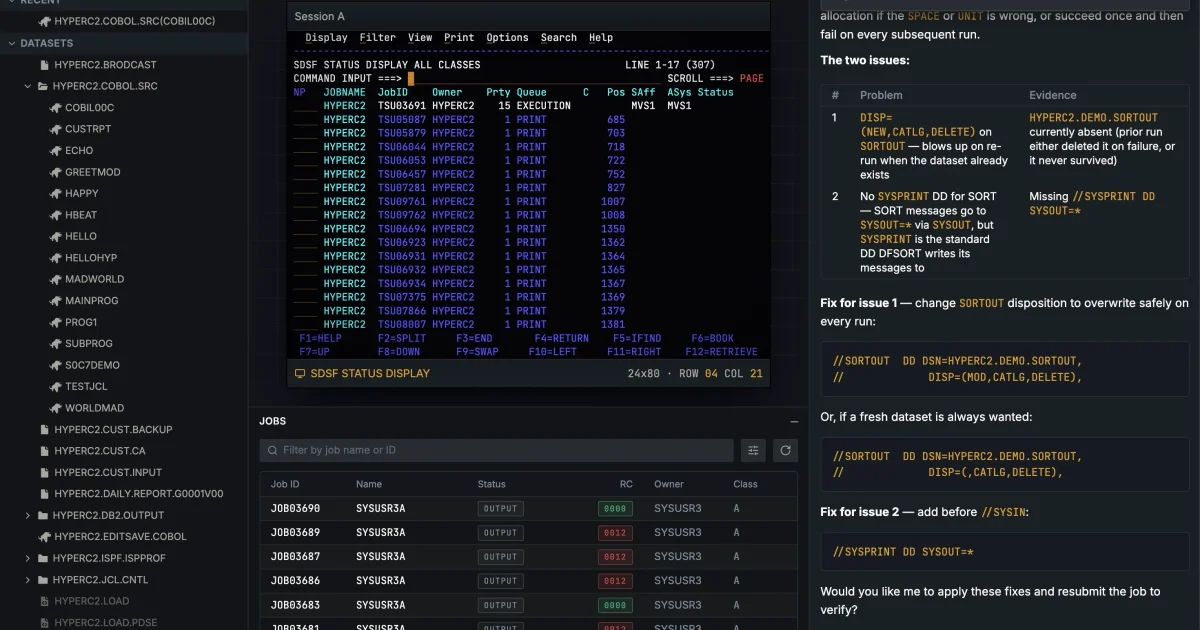
TL;DR
TL;DR: Hopper is an agentic TN3270 terminal emulator that lets AI agents work inside IBM mainframes — navigating ISPF, writing JCL, debugging batch jobs, and querying VSAM files on z/OS.
Source and Accuracy Notes
- Project page: hypercubic.ai/hopper
- Company page: hypercubic.ai
- HN launch thread: news.ycombinator.com/item?id=48111143 ← verified (97 points)
What Is Hopper?
Mainframes still run a massive slice of global infrastructure: banking, payments, insurance, airlines, government programs, and logistics. Much of that software runs on IBM z/OS and was written in COBOL decades ago. The development workflow for these systems looks nothing like modern cloud development — there is no GitHub, no shell, no package manager. Developers work through TN3270 terminal sessions, ISPF panels, partitioned datasets, JCL, JES queues, spool output, return codes, VSAM files, and CICS transactions.
Hopper, built by Hypercubic, is an agentic development environment designed specifically for this world. Rather than placing a chatbot next to a terminal, Hopper lets an AI agent operate inside the mainframe environment itself.
The product combines three things:
- A real TN3270 terminal — the standard interface for IBM mainframes
- Mainframe-aware panels — for browsing datasets, members, jobs, and spool output
- An AI agent that operates across those z/OS surfaces
Setup Workflow
Step 1: Request Access
Visit hypercubic.ai/hopper and request access. The team grants immediate mainframe user accounts so you can start experimenting without setting up your own z/OS environment.
Step 2: Connect to the Mainframe
Hopper presents a GUI with a real TN3270 connection. You authenticate against your mainframe account (or the provided demo account) and the interface surfaces ISPF panels, dataset browsers, and job queues directly.
Step 3: Issue a Task to the Agent
Tasks are expressed in natural language. The agent then navigates the mainframe environment autonomously — opening panels, editing members, submitting jobs, reading output — while keeping the terminal visible at all times.
Step 4: Approve Sensitive Operations
Any operation that touches production data or modifies critical datasets requires human approval. The agent proposes the action and waits for confirmation before proceeding.
Deeper Analysis
Why Mainframe Development Is Hard to Automate
A typical COBOL change involves: finding the right source member in a partitioned dataset, checking copybooks, locating the compile JCL, submitting a batch job, reading JES/SYSPRINT output, interpreting condition codes, patching fixed-width source, and resubmitting. Each step has its own conventions, error modes, and retry logic.
The challenge is not the individual steps — they are well-defined and repetitive. The challenge is that AI agents cannot operate in this environment through a chat interface alone. The agent must be able to read screens (with their specific field layouts), submit jobs, parse spool output, and navigate ISPF menus programmatically.
What Hopper Gets Right
Hopper does not try to abstract away the mainframe or wrap it in a generic cloud-like interface. The design philosophy, per the HN launch post, is: “preserve the fidelity of the mainframe environment, but make it accessible to AI agents.”
This means agents work with the actual ISPF panels, JCL syntax, and JES output formats they would encounter in production — not simplified proxies.
Potential Workflows Enabled
Once agents can operate inside the mainframe environment, the authors suggest several use cases:
- Faster job debugging — agents find and fix return-code failures autonomously
- Automated documentation — map COBOL programs, copybooks, and data structures
- Safer code changes — agents propose and validate modifications before human review
- Test generation — generate and run test cases against batch jobs
- Migration planning — analyze and plan modernization steps
- Traffic replay — replay production workloads against test systems
Practical Evaluation Checklist
- Agent navigates ISPF panels and executes function keys autonomously
- JCL is generated with correct column-strict formatting
- Job submission, JES output reading, and return-code interpretation work end-to-end
- Sensitive operations pause for human approval before executing
- Terminal state remains visible throughout the agent’s run
- Works against real IBM z/OS (not a simulated environment)
Security Notes
- Human approval gates are required for sensitive operations — agents cannot bypass these
- Terminal output is visible at all times, so a human can audit what the agent is doing
- No open-source repo was identified for Hopper; the product is proprietary
- If you are connecting to a production mainframe, follow your organization’s change management and access control policies
FAQ
Q: Does Hopper work against any mainframe, or only IBM z/OS? A: The product targets IBM z/OS environments using TN3270 and ISPF, which covers the majority of production mainframe deployments.
Q: Is there an open-source version? A: No. Hypercubic is a commercial product. A previous HN launch from the team covered their broader COBOL modernization work.
Q: Can I try it without a mainframe account? A: Yes — the access request form grants an immediate demo mainframe account so you can experiment without setting up your own z/OS environment.
Q: How does this compare to using a chatbot with a terminal? A: A chatbot cannot reliably navigate ISPF menus, interpret 3270 screen field states, or parse JES spool output. Hopper embeds the agent inside the terminal session so it operates on the actual interfaces a COBOL developer uses.
Q: What models does Hopper use? A: The HN story does not specify which LLM backs the agent. The product page does not document this in publicly accessible content.
Conclusion
Hopper is a well-targeted solution to a real problem: enterprise mainframes run critical infrastructure in COBOL, but the developer experience has not caught up with the agentic AI era. By building an agent that operates directly inside TN3270/ISPF rather than alongside it, Hypercubic sidesteps the abstraction problem that makes most “AI + legacy systems” demos unconvincing.
If you work with COBOL codebases, IBM z/OS, or legacy modernization projects, Hopper is worth watching — and the immediate demo access makes it easy to evaluate without a multi-week procurement cycle.
Related Posts
ai-setup
Recall – Persistent Memory for Claude Code via MCP Hooks
Recall gives Claude Code a permanent memory store that survives session restarts and context compaction. Four hooks capture and restore context automatically — with cloud SaaS or self-hosted options.
2/28/2026
dev-tools
Automotive Skills Suite for AI Engineering
Evaluate Automotive Skills Suite for APQP, ASPICE, HARA, safety-plan, and DIA workflows with setup notes, governance risks, and SME review guidance.
5/28/2026
dev-tools
awesome-agentic-ai-zh Roadmap Guide
Explore awesome-agentic-ai-zh as a Chinese agentic AI learning roadmap, with setup notes, track selection, study workflow, and evaluation guidance.
5/28/2026