HTTP Toolkit: intercept and rewrite any HTTP traffic
HTTP Toolkit is an open-source desktop proxy that intercepts, inspects and rewrites HTTP traffic from browsers, Node.js, Docker and mobile apps.
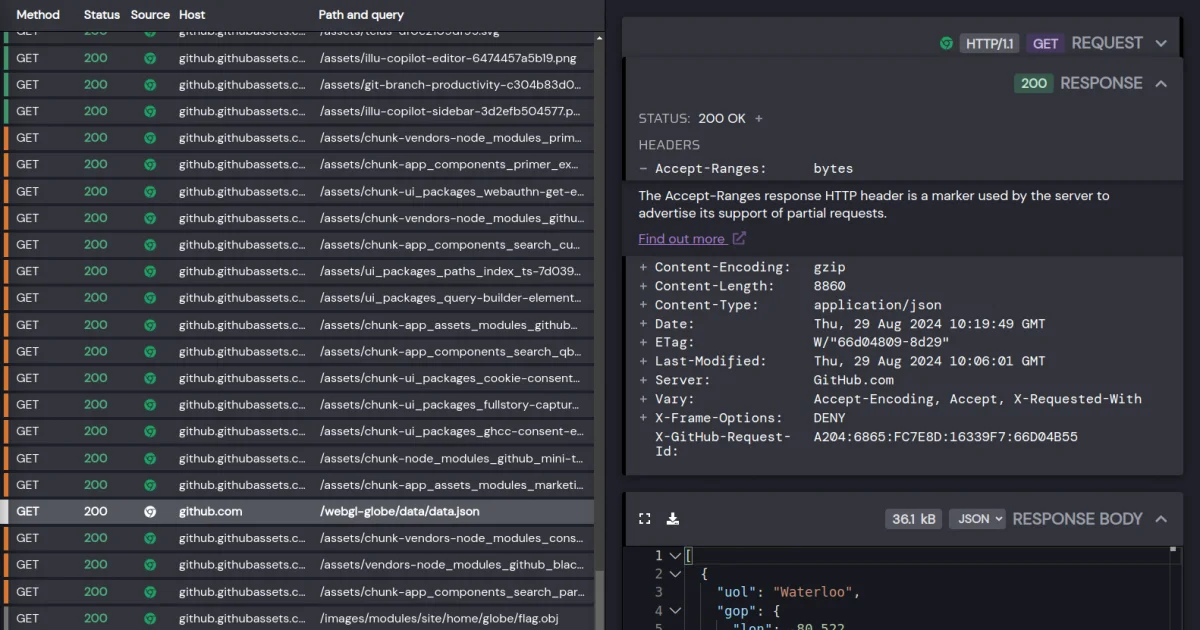
TL;DR: HTTP Toolkit is an open-source desktop proxy that sits between your apps and the network so you can watch every HTTP request they make and change it on the way through. Interception is one click for Chrome, Node.js, Python, Docker and mobile devices, the free tier covers inspection and manual breakpoints, and a built-in MCP server lets an AI agent read the captured traffic directly.
What it is
HTTP Toolkit is three tools sharing one interface: a proxy that intercepts traffic, an analyzer that turns captured exchanges into something readable, and an HTTP client for sending requests by hand.
The desktop build is an Electron shell around a Node.js server, and the server is a standalone CLI. That split is more than packaging trivia. You can run the server on its own and open the UI in any browser, hosted at app.httptoolkit.tech, which makes HTTP Toolkit usable on a remote box or inside a container without dragging a GUI along with it.
The interception layer is where the tool earns its keep. Rather than asking you to configure proxy settings in every app, the Intercept page offers one-click targets for a long list of clients, plus a “Fresh Terminal” option that opens a shell with the right environment variables already in place. Anything started in that shell gets intercepted without further setup.
Why it matters
Charles and Fiddler have been the default picks for years, and both are commercial with closed cores. Browser dev tools show you what a browser tab did, but not what your service worker, your Node client or your mobile app did, so the moment the interesting traffic comes from something other than a tab you are back to hand-configuring a proxy.
HTTP Toolkit also leans harder into the mocking side than most proxies do. Editing a response by hand is a debugging tool. Responding with a mock instead of forwarding upstream, injecting a 500 or a timeout, patching a JSON body on the way through, then saving those rules as a file you can hand to a colleague, that is a testing tool. The rules are stored in the app and exported as JSON, so a set of mock behaviours can live next to your test fixtures instead of being retyped by hand every week.
Getting it running
Package managers cover the three big platforms. macOS is a cask:
brew install --cask http-toolkitWindows goes through winget, where the package id is not the product name:
winget install HTTPToolKit.HTTPToolKitArch Linux has an AUR package, and Debian and Ubuntu take the .deb from the download page installed with dpkg:
yay -S httptoolkitdpkg -i httptoolkit_latest_amd64.debIf you would rather not install anything, the Linux build ships as a standalone zip. Unpack it and run the httptoolkit binary inside the extracted folder.
Whichever route you take, open the app and hit the Intercept page. There is a built-in check page at AmIUsing.httptoolkit.tech that tells you whether your traffic is actually flowing through the proxy, which saves a lot of guessing when a certificate is not being trusted.
Intercepting traffic
The Intercept page lists the clients it can attach to, and search finds them by name. The ones that matter most for day to day work:
- Chrome, and other Chromium browsers, each launched in a separate profile so your normal browsing stays untouched
- Node.js, Python, Java, Ruby, PHP and cURL, all picked up automatically inside a Fresh Terminal
- Docker containers and other backend processes, including native binaries
- Android and iOS apps, over USB or Wi-Fi, with guides for each platform
- Anything else, via the “Anything” option, which prints the proxy address and certificate path to paste into your own client config
The Fresh Terminal is the feature worth internalising. It is an ordinary shell with the proxy environment already exported, so the whole toolchain inside it is covered:
node -e "require('https').get('https://example.com').on('response', r => console.log(r.statusCode))"Run that in the intercepted terminal and the request shows up in the View page, headers, body and all.
Inspecting traffic
Captured requests land in the View page as a list on the left, with the full detail of the selected one on the right. Filtering works by content type and by source, so you can narrow a noisy capture down to the JSON calls a specific service made.
The body viewer parses JSON, Protobuf, Base64, HTML, XML, JavaScript and hex, and renders them through Monaco, the editor behind VS Code, so you can read a payload the way you would read a file. Standard headers come with a link to the relevant MDN page, which quietly removes a lot of guessing when a header is doing something unfamiliar.
The Send page is a full HTTP client for building a request by hand, handling body compression and message framing for you, and it reuses the same inspection tools for the response.
Rewriting traffic
The Modify page is where HTTP Toolkit stops being a passive observer. Breakpoints pause a request in flight and let you change the method, headers, status or body before it continues. You can also redirect a request to a different URL, answer it without forwarding it at all, or close the connection outright to simulate a hard failure.
On a Pro plan those manual edits become rules that run automatically:
| Capability | Free | Pro |
|---|---|---|
| Breakpoints and manual edits | Yes | Yes |
| Mock responses and local file mapping | No | Yes |
| Inject errors, timeouts and connection resets | No | Yes |
| Redirect production traffic to a local server | No | Yes |
| Inject headers, for example to clear CORS | No | Yes |
| Rule groups, aliases, import and export | No | Yes |
Rules can be built from traffic you already captured in one click, then grouped and aliased so you can toggle whole behaviours on and off. Exporting to JSON is what makes this shareable with a team.
Driving it from an AI agent
The MCP guide is the part most blogs about HTTP debugging skip, and it changes how useful the tool is if you work with a coding assistant. The app exposes an MCP server over stdio, so an agent can list the exchanges you have captured, read request and response bodies, check the proxy configuration, and control the rules on the Modify page.
Setup is a dialog in the left sidebar. Click MCP, pick your harness, copy the snippet. Claude Code, Claude Desktop, Codex, VS Code with GitHub Copilot and Cursor all have ready-made entries, and there is a generic tab for anything else.
| MCP capability | What the agent gets |
|---|---|
| List exchanges | Captured requests and responses, with filtering and pagination |
| Exchange outline | Method, URL, status and headers without the bodies |
| Read a body | Request or response body, with offset and length limits for large payloads |
| Clear events | Wipe the captured session |
| List interceptors | Available interception targets and their current status |
| Activate an interceptor | Switch an interception on, where it needs no further input |
| Proxy configuration | The proxy port and certificate path, so the agent can configure other tools |
| Manage rules | Read and change the Modify page rules |
There is a catch in the free tier. Reading exchange outlines is capped at 500 calls per session and reading bodies at 100 calls per session, and bodies are truncated at 100,000 characters. Activating interceptors and changing rules are Pro only. For a one-off debugging session that is plenty, but an agent left running against a live capture will hit the limits.
HTTP Toolkit has to be running for the connection to work. If it is not, the only tool the agent gets is one that launches it, and the rest appear once it is up.
The engine underneath
Everything in the app runs on mockttp, an Apache-2.0 licensed proxy and mocking library that also works standalone as a headless scriptable proxy. It has almost a thousand GitHub stars and ships on npm as mockttp, currently version 4.6.5.
That matters if you want the HTTP Toolkit behaviour inside a test suite rather than in a GUI:
const superagent = require('superagent');
const mockServer = require('mockttp').getLocal();

describe('mockttp', () => {
    beforeEach(() => mockServer.start(8080));
    afterEach(() => mockServer.stop());

    it('mocks an endpoint and asserts on the response', async () => {
        await mockServer.forGet('/mocked-path').thenReply(200, 'A mocked response');

        const response = await superagent.get('http://localhost:8080/mocked-path');

        expect(response.text).to.equal('A mocked response');
    });
});
It intercepts HTTPS with generated self-signed certificates, handles requests from outside your own process, and works the same in Node and in the browser. The companion package @httptoolkit/httpsnippet generates ready-to-use request code for more than twenty languages, which is what backs the export-to-code option for intercepted traffic.
Pricing
| Plan | Cost | What it adds |
|---|---|---|
| Hobbyist | Free | Intercept supported clients, inspect raw HTTP, filter and prune sessions, manual request and response breakpoints, send your own requests |
| Professional | Subscription, 25% off if paid yearly | Automated mocking and rewriting, reusable rules with import and export, HAR and code export, compression and caching analysis, resend, validation and docs for 2600+ built-in APIs, TLS passthrough and upstream proxy configuration |
| Team | Per user, per month | Centralized billing, licenses tied to the team rather than a person, team workspaces listed as coming soon, optional self-hosted infrastructure and private support |
A Professional license is permanently attached to one individual and cannot be shared between colleagues, which is why the Team tier exists.
What to watch for
The desktop app, server and UI are AGPL-3.0. The downloadable binaries are also offered under CC BY-ND 4.0 for people who just want to run the tool without taking on AGPL obligations, and the reusable pieces are more permissively licensed, with mockttp under Apache-2.0 and httpsnippet under MIT.
The free tier is a real tool, not a trial. Inspection, filtering and manual breakpoints are all included, and only the automated rewriting rules are paywalled.
Team workspaces are described as coming soon, so a Team subscription buys centralized billing and licensing today rather than collaboration features. If shared rulesets across a group are the reason you wanted it, that part is still on the roadmap.
Full scripting support, gRPC and GraphQL integration, and request diffing are all listed as upcoming. None of them are in the current build, so if your debugging depends on them, budget for waiting.
The company behind it is Toolshed Labs SLU, and the winget package is published under the name Tim Perry, which is the same person listed as the open-source author on the repositories.
Source and Accuracy Notes
- Project page: https://httptoolkit.com/ (verified via direct visit)
- Documentation: https://httptoolkit.com/docs/ (verified via direct visit)
- MCP guide: https://httptoolkit.com/docs/guides/mcp/ (verified via direct visit)
- Installing guide: https://httptoolkit.com/docs/getting-started/installing/ (verified via direct visit)
- Interception guide: https://httptoolkit.com/docs/getting-started/intercepting/ (verified via direct visit)
- HN launch thread: https://news.ycombinator.com/item?id=29624319 (538 points, 2021-12-20)
- Source repositories: https://github.com/httptoolkit/httptoolkit-desktop, https://github.com/httptoolkit/httptoolkit-server, https://github.com/httptoolkit/httptoolkit-ui, https://github.com/httptoolkit/mockttp
- License: AGPL-3.0 for the desktop, server and UI source; binaries also available under CC BY-ND 4.0; mockttp is Apache-2.0; httpsnippet is MIT
- npm package: https://www.npmjs.com/package/mockttp (version 4.6.5)
- Winget package id: HTTPToolKit.HTTPToolKit, publisher listed as Tim Perry
- Company: Toolshed Labs SLU, listed in the site footer
Related Posts
ai-setup
Recall – Persistent Memory for Claude Code via MCP Hooks
Recall gives Claude Code a permanent memory store that survives session restarts and context compaction. Four hooks capture and restore context automatically — with cloud SaaS or self-hosted options.
2/28/2026
dev-tools
Automotive Skills Suite for AI Engineering
Evaluate Automotive Skills Suite for APQP, ASPICE, HARA, safety-plan, and DIA workflows with setup notes, governance risks, and SME review guidance.
5/28/2026
dev-tools
awesome-agentic-ai-zh Roadmap Guide
Explore awesome-agentic-ai-zh as a Chinese agentic AI learning roadmap, with setup notes, track selection, study workflow, and evaluation guidance.
5/28/2026