Gitingest - Turn Any GitHub Repo into a Prompt-Friendly
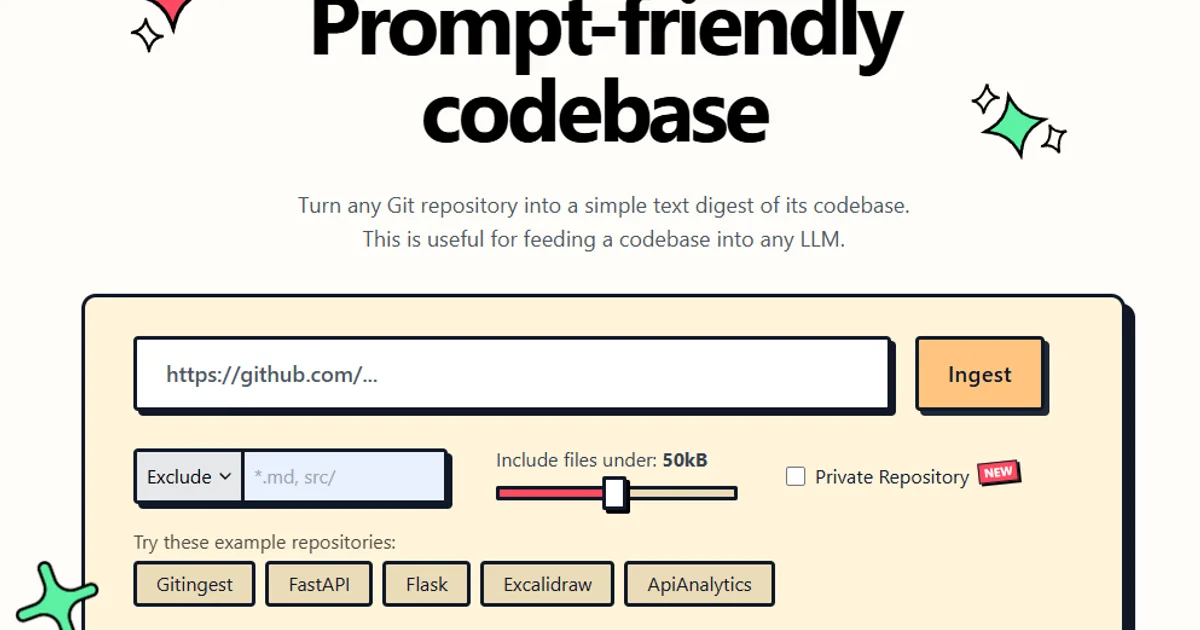
Replace 'hub' with 'ingest' in any GitHub URL to instantly get a codebase digest optimized for LLMs. No sign-up, free, open-source.
TL;DR
TL;DR: Gitingest lets you instantly convert any GitHub repository into a compact, LLM-readable text digest by simply changing
hubtoingestin the URL — no sign-up, no API key, completely free.
Source and Accuracy Notes
- Project page: gitingest.com
- Source repository: github.com/coderamp-labs/gitingest
- License: MIT (verified via GitHub API
license.spdx_id) - PyPI package: pypi.org/project/gitingest
- Chrome Extension: chromewebstore.google.com/detail/gitingest
- HN launch thread: news.ycombinator.com/item?id=42329071 (185 points)
What Is Gitingest?
Gitingest is an open-source tool that converts any Git repository into a compact, LLM-friendly text digest. The core insight is simple: replace github.com with gitingest.com in any repository URL, and the site returns a structured text extract of the entire codebase — ready to paste into an LLM prompt.
The tool is built by coderamp-labs and has accumulated over 15,000 GitHub stars since its launch. It is completely free to use via the web interface, and also ships as:
- A Python package on PyPI (
pip install gitingest) - A Chrome browser extension
- A Firefox add-on
- A Ruby gem (
gem install gitingest)
How It Works
The URL Trick
The fastest way to use Gitingest requires no install at all. Take any GitHub repository URL:
https://github.com/owner/repo
```bash

Change `hub` to `ingest`:

```yaml
https://gitingest.com/owner/repo
```bash

Gitingest returns a structured text digest of the repository, including file paths, relevant code snippets, and dependency information — optimized for context windows.

### Python API

For programmatic use, install the PyPI package:

```bash
pip install gitingest
```bash

Then use it in a Python script:

```python
from gitingest import ingest

# Ingest a local repository
result = ingest(repo_path="./my-project")
print(result)

# Or ingest from a GitHub URL
result = ingest(repo_url="https://github.com/owner/repo")
print(result)
The function returns a string that can be streamed directly to an LLM.
Browser Extension
The Chrome extension adds a button to GitHub’s interface, letting you ingest any repository without leaving GitHub. The Firefox add-on provides the same functionality.
Deeper Analysis
Why This Is Useful for AI-Assisted Development
When working with LLMs on codebase-related tasks, pasting the full repository is usually impractical — context windows are limited and noise abounds. Gitingest solves this by intelligently extracting the most relevant parts of a codebase:
- File structure preserved as a navigable outline
- Relevant code sections included, with context
- Dependency files like
package.json,requirements.txt,Cargo.tomlincluded - Git metadata removed to reduce noise
This makes it ideal for tasks like:
- Asking an LLM to explain an unfamiliar codebase
- Generating tests or documentation for a repo you do not maintain
- Code review requests where you want LLM context without sharing the whole repo
- Onboarding onto a new project with AI assistance
What Gitingest Is Not
Gitingest is not a code search engine or a GitHub replacement. It does not:
- Index repositories for public search
- Store or cache ingested content permanently
- Provide API access with rate limiting (it is a free web tool)
For CI/CD or scripted use cases, the Python package is the appropriate route.
Practical Evaluation Checklist
- Works entirely in-browser with no sign-up required
- Python package installs cleanly via
pip install gitingest - URL-based workflow (replace
hubwithingest) works for any public GitHub repo - Chrome and Firefox extensions provide one-click access from GitHub’s UI
- MIT-licensed, open-source under coderamp-labs/gitingest
- No API key or authentication required
Security Notes
Gitingest processes repositories on-demand and does not appear to store ingested content permanently. However:
- Only use it with repositories you have the right to share with an LLM
- For private repositories, clone locally and use the Python package instead of the web interface
- Review the open-source code if you want to self-host or audit the processing logic
FAQ
Q: Does Gitingest work with private repositories? A: The web interface only works with public GitHub repositories. For private repos, clone the repository locally and use the Python package.
Q: Is there a size limit on repositories? A: Very large repositories may be truncated to fit context windows. For specific use cases, consider using the Python package to ingest specific subdirectories.
Q: How is this different from copying code into an LLM directly? A: Direct copying includes Git metadata, binary assets, and unrelated boilerplate. Gitingest intelligently extracts only the relevant text content, preserving structure while removing noise.
Q: Can I self-host Gitingest? A: The core engine is open-source, and the repository is public. Self-hosting options are documented in the GitHub repo.
Conclusion
Gitingest fills a specific but common gap in the AI-assisted development workflow: quickly getting a codebase into an LLM’s context without the noise. The URL-based workflow is genuinely clever — it requires zero friction to use. For developers already working with LLMs for code tasks, it is a natural addition to the toolkit.
The 15,000-star community adoption and availability as PyPI package, browser extensions, and Ruby gem signal that this is a production-grade tool, not a weekend project.
Try it now: open any GitHub repository and change the URL from github.com to gitingest.com.
Related Posts
ai-setup
Recall – Persistent Memory for Claude Code via MCP Hooks
Recall gives Claude Code a permanent memory store that survives session restarts and context compaction. Four hooks capture and restore context automatically — with cloud SaaS or self-hosted options.
2/28/2026
dev-tools
Automotive Skills Suite for AI Engineering
Evaluate Automotive Skills Suite for APQP, ASPICE, HARA, safety-plan, and DIA workflows with setup notes, governance risks, and SME review guidance.
5/28/2026
dev-tools
awesome-agentic-ai-zh Roadmap Guide
Explore awesome-agentic-ai-zh as a Chinese agentic AI learning roadmap, with setup notes, track selection, study workflow, and evaluation guidance.
5/28/2026