Frame0 – Balsamiq Alternative for Sketch-Style Wireframes
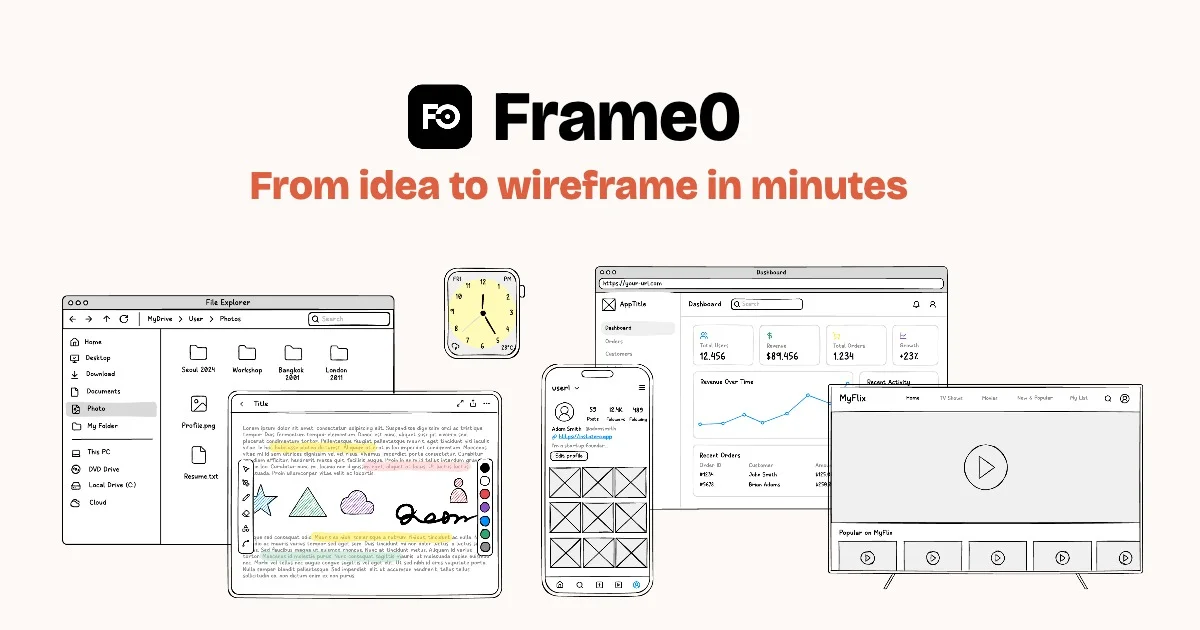
Frame0 is a free, offline-first wireframing tool with hand-drawn style components, 1,500 sketch icons, and AI-assisted generation to go from idea to prototype in minutes.
TL;DR
TL;DR: Frame0 is a free, offline-first wireframing tool that delivers hand-drawn style wireframes with AI assistance, 1,500 sketch icons, and a one-time purchase model — positioning it as a modern open alternative to Balsamiq.
Source and Accuracy Notes
- Project page: frame0.app
- Documentation: docs.frame0.app
- HN launch thread: news.ycombinator.com/item?id=41517312 (392 points, 4 comments)
- License: Proprietary (free tier available)
What Is Frame0?
Frame0 is a wireframing tool focused on hand-drawn style visuals. Its core pitch is simple: move fast from idea to wireframe without wrestling with pixel-perfect design tools. The app runs offline, ships with over 1,500 sketch-style icons, and includes an AI Agent mode that can generate wireframe sections from text prompts.
The product launched on Hacker News as “Konty” in 2025, rebranded to Frame0, and has gained traction as a Balsamiq replacement for teams that want the lo-fi sketch aesthetic without the Java applet baggage.
Key capabilities from the product page:
- Offline-first — works without an internet connection
- AI Agent — describe a section and the AI builds a wireframe block
- 1,500+ sketch icons — covers common UI patterns and data visualizations
- Adjustable component states — switches, progress bars, modals with on/off variants
- Exportable — download wireframes as images or share via link
- Free tier — all non-premium features, no time or size limit at no cost
Setup Workflow
Frame0 is available as a desktop download. There is no web app that requires sign-up for the free tier.
Step 1: Download and Install
Visit frame0.app and click “Download.” The site offers builds for major desktop platforms. The free tier includes all non-premium features with no time limit.
Step 2: Create Your First Wireframe
Launch the app and start a new project. The interface presents a blank canvas with a component library sidebar.
- Drag components from the sidebar onto the canvas — buttons, inputs, navigation bars, cards, modals, and data visualizations are available
- Adjust component states by selecting an element and toggling its variant (for example, a switch between on/off)
- Use the search bar to filter the 1,500-icon library by keyword
- Add text labels directly on the canvas
Step 3: Use the AI Agent (Optional)
The AI Agent panel is accessible from the toolbar. Type a description of the UI section you want, and the agent generates a wireframe block that you can place directly on the canvas. This is useful for quickly scaffolding layouts you would otherwise build component-by-component.
Step 4: Export
When your wireframe is ready, use the export menu to save it as an image or generate a shareable link.
Deeper Analysis
Where It Fits in the Toolchain
Frame0 sits between thought and high-fidelity design. It is not a Figma competitor — it does not do interactive prototyping or design tokens. Its sweet spot is:
- Kickoff meetings — sketch an idea in minutes, share before the meeting ends
- PRDwireframing — illustrate user flows without pixel commitment
- Client communication — lo-fi visuals reduce the “this looks finished” problem
Comparing the Sketch Aesthetic
Balsamiq established the hand-drawn wireframe genre, but its Java applet delivery and dated UI have aged poorly. Frame0 modernizes the aesthetic with:
- Native desktop performance instead of a browser plugin
- SVG-based icon rendering at any zoom level
- AI-assisted generation for rapid iteration
- One-time pricing model (versus Balsamiq’s subscription)
Other modern alternatives include Whimsical (subscription, web-first) and Figma’s FigJam (high-fidelity, collaborative but not sketch-native). Frame0’s one-time purchase and offline-first nature make it stand out for individuals and small teams who want to avoid recurring costs.
Pricing Model
Frame0 uses a one-time payment model (no monthly or annual fees):
| Plan | Price | Notes |
|---|---|---|
| Free | $0 | All non-premium features, no time/size limit |
| Solo | $99 (VAT excl.) | For 1 device |
| Team | Not listed on site | Contact for volume pricing |
Practical Evaluation Checklist
- Download and install from frame0.app
- Create a new project and drag at least 5 different component types onto the canvas
- Test the AI Agent by typing a section description and placing the result
- Filter the icon library by a keyword relevant to your project
- Adjust a component’s state variant (e.g., toggle a switch component)
- Export the wireframe as an image
Security Notes
- Frame0 runs as a native desktop application — review its network permissions before installing on a managed device
- The AI Agent feature sends wireframe descriptions to Frame0’s servers for generation — avoid inputting proprietary UI specifications you cannot share externally
- The free tier does not require an account or email — no credential data is stored
FAQ
Q: Is Frame0 open source? A: No. Frame0 is proprietary software with a free tier. It is not open source.
Q: Does Frame0 work on Linux? A: Check the download page at frame0.app for the full list of supported platforms.
Q: Can I use Frame0 commercially? A: Yes. The free tier includes commercial use. Paid plans are per-device, one-time purchases with no recurring fees.
Q: How does the AI Agent work? A: You type a description of a UI section and the AI generates a wireframe block that you place on the canvas. It is a generation辅助工具, not an autonomous agent — you control placement and can edit the result.
Q: What is the difference between Frame0 and Balsamiq? A: Frame0 is a modern, offline-first desktop app with AI-assisted generation and a one-time pricing model. Balsamiq is an older, web-plugin-based tool with a subscription model. Both produce sketch-style wireframes, but Frame0’s UI, icon library, and pricing reflect 2025-era expectations.
Conclusion
Frame0 fills a specific gap: Balsamiq without the Java applet, Figma without the learning curve, and a subscription without the recurring bill. The offline-first model and one-time pricing make it practical for solo developers and small teams who need quick wireframes without committing to a monthly SaaS fee. The AI Agent feature is a useful shortcut for generating initial layout blocks, though it is not a replacement for arranging components by hand.
Try the free tier at frame0.app before considering the one-time purchase.
Related Posts
ai-setup
Recall – Persistent Memory for Claude Code via MCP Hooks
Recall gives Claude Code a permanent memory store that survives session restarts and context compaction. Four hooks capture and restore context automatically — with cloud SaaS or self-hosted options.
2/28/2026
dev-tools
Automotive Skills Suite for AI Engineering
Evaluate Automotive Skills Suite for APQP, ASPICE, HARA, safety-plan, and DIA workflows with setup notes, governance risks, and SME review guidance.
5/28/2026
dev-tools
awesome-agentic-ai-zh Roadmap Guide
Explore awesome-agentic-ai-zh as a Chinese agentic AI learning roadmap, with setup notes, track selection, study workflow, and evaluation guidance.
5/28/2026