Flowtest.ai – AI Agent for Website Uptime Monitoring
Flowtest.ai is an AI agent that browses your website like a real user, detects issues, and self-heals when layouts change.
TL;DR
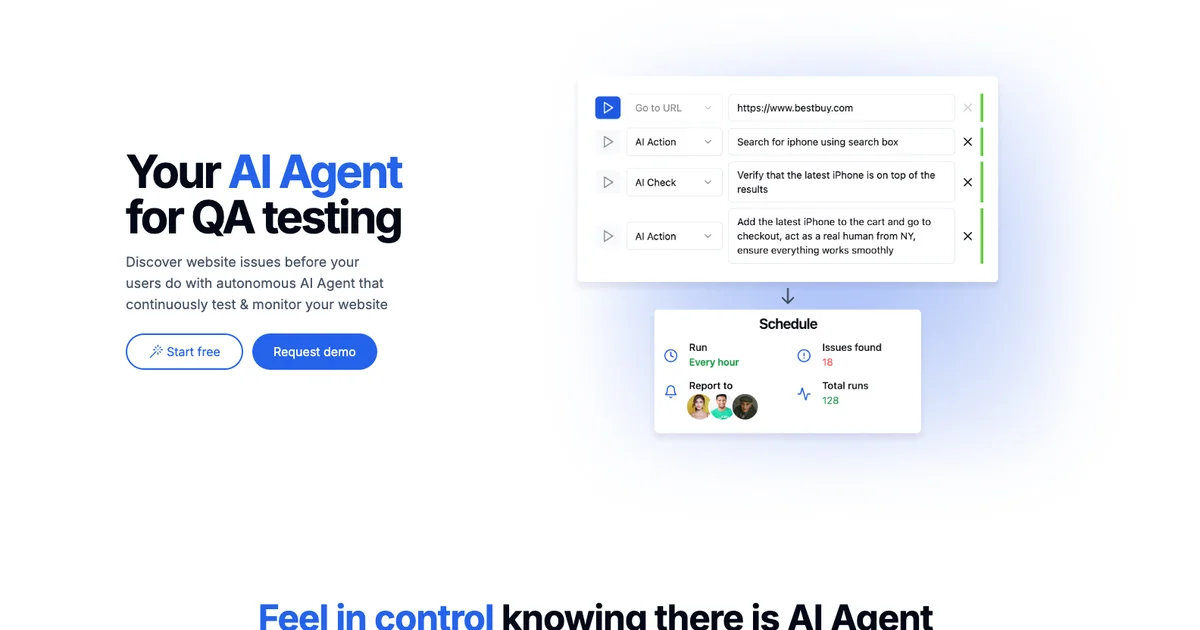
TL;DR: Flowtest.ai is an AI agent that continuously browses your website like a real user, detects downtime and UI regressions, and self-heals when page layouts change — no scripts required.
Source and Accuracy Notes
- Official site: https://flowtest.ai
- HN Thread: Show HN: Flowtest.ai – AI agent that performs E2E testing in your website
What Is Flowtest.ai?
Flowtest.ai is an AI-powered website uptime monitoring tool that simulates real user interactions to detect issues. Unlike traditional uptime monitors that just ping a URL, Flowtest.ai uses a real web browser under the hood — it navigates pages, fills forms, clicks buttons, and reads content exactly like a human would.
The agent is built for developers and DevOps teams who want synthetic monitoring with agentic intelligence. It follows simple natural-language prompts to define test scenarios: “Add product to cart,” “Log in and check the dashboard,” “Verify pricing page loads correctly.”
Key Capabilities
- Real browser simulation — AI agent navigates your site using a real web browser, not a headless DOM simulator
- Self-healing checks — When page layouts change, the agent adapts without breaking your monitoring config
- Below-the-surface monitoring — Detects issues that ping-based tools miss: slow API calls, rendering errors, element visibility
- Instant alerting — Sends alerts with full diagnostic reports when issues are detected
- Pingdom alternative with AI — Think of it as an agentic, action-driven alternative to Pingdom or other traditional uptime monitors
Setup Workflow
Step 1: Sign Up and Connect Your Website
- Go to https://flowtest.ai and create an account
- Add your first website by entering the URL
- Configure the monitoring interval (every 5 minutes is a good starting point)
Step 2: Define Your First Prompt
# Example: Monitor your pricing page
Navigate to https://yourapp.com/pricing
Verify the pricing table loads within 3 seconds
Check that the "Pro" plan card shows $29/month
Alert if any plan price is missing
Step 3: Set Up Alerts
Connect your preferred notification channel:
- Slack — Send alerts to a channel when issues are detected
- Email — Get email reports with diagnostic screenshots
- Webhook — Integrate with your existing incident management stack
Step 4: Review the Dashboard
The Flowtest.ai dashboard shows:
- Active monitoring runs and their pass/fail status
- Issue history with screenshots and DOM snapshots
- Response time trends across all monitored pages
- AI-generated root cause analysis for each failure
Deeper Analysis
How It Differs from Traditional Uptime Monitoring
Traditional tools like Pingdom, Datadog, or UptimeRobot work at the network layer — they check if a server responds and measure DNS/TCP/TTFB metrics. They miss everything that happens after the HTML loads: JavaScript rendering, API calls made by client-side code, DOM mutations, and user-facing UI errors.
Flowtest.ai bridges this gap by running a real browser that executes your full page stack. It detects:
- JavaScript errors that prevent page rendering
- API failures (e.g., a payment API timing out)
- Broken SPA navigation (client-side routes that fail silently)
- Visual regressions (text missing from key pages)
- Form submission failures
Self-Healing Mechanism
The self-healing capability is the standout feature. Traditional synthetic monitoring tools use CSS selectors or XPath locators that break the moment a developer renames a class or restructures a div. Flowtest.ai’s agent reads page content semantically — it understands that “the Pro plan costs $29/month” even if the DOM structure changes between checks.
This makes it much more resilient than Selenium-based scripts that require constant maintenance.
Pricing
Flowtest.ai offers a free tier for personal projects. Paid plans start at $15/month for 5 monitored URLs with 15-minute intervals. Team plans with custom intervals and Slack/Teams integrations are available at higher tiers.
Practical Evaluation Checklist
- Real browser simulation (not just HTTP pings)
- Natural language prompt configuration
- Self-healing when page layouts change
- Alert channels: Slack, email, webhook
- Free tier available
- Historical dashboard with screenshots on failure
- API access for CI/CD integration
Security Notes
- Flowtest.ai runs monitoring from their cloud infrastructure — your site is accessed from their IP ranges
- Alerts can be configured to include or exclude sensitive page content
- For internal/private sites behind auth, use IP allowlisting or VPN tunneling
- Webhook integrations use signed secrets — rotate periodically
FAQ
Q: Does it support single-page applications (SPAs)? A: Yes. Since Flowtest.ai uses a real browser, it fully executes client-side JavaScript and can monitor SPAs built with React, Vue, Angular, or Next.js.
Q: How does self-healing work exactly? A: The AI agent uses semantic understanding of page content rather than hardcoded CSS selectors. When a page is redesigned, the agent re-reads the DOM and adapts its checks automatically.
Q: Can I integrate this with GitHub Actions or CI/CD pipelines? A: Yes. Flowtest.ai provides a REST API and webhook endpoints for CI/CD integration. You can trigger checks on deployment and block pipelines on failure.
Q: What happens if my site goes down completely? A: The agent detects HTTP 5xx errors and connection failures just like a traditional uptime monitor, but also captures the full error context including screenshots and console logs.
Q: Is there a self-hosted option? A: Currently Flowtest.ai is cloud-only. Self-hosted deployment is on the roadmap according to their HN thread.
Conclusion
Flowtest.ai fills the gap between simple ping-based uptime monitoring and full end-to-end testing suites. Its AI agent runs real browser sessions, adapts to page changes automatically, and gives you alerts that actually explain what went wrong — not just “site is down.”
If you’re tired of maintaining fragile Selenium scripts or missing critical bugs because ping checks don’t catch JavaScript errors, Flowtest.ai is worth evaluating. The free tier makes it easy to try on a personal project before scaling to team monitoring.
Related Posts
ai-setup
Recall – Persistent Memory for Claude Code via MCP Hooks
Recall gives Claude Code a permanent memory store that survives session restarts and context compaction. Four hooks capture and restore context automatically — with cloud SaaS or self-hosted options.
2/28/2026
dev-tools
Automotive Skills Suite for AI Engineering
Evaluate Automotive Skills Suite for APQP, ASPICE, HARA, safety-plan, and DIA workflows with setup notes, governance risks, and SME review guidance.
5/28/2026
dev-tools
awesome-agentic-ai-zh Roadmap Guide
Explore awesome-agentic-ai-zh as a Chinese agentic AI learning roadmap, with setup notes, track selection, study workflow, and evaluation guidance.
5/28/2026