Fiberplane FP - Agent-Native Issue Tracking for Claude Code
Local-first issue tracker built for AI coding agents. Scoped issues, durable context, and a CLI that agents can own end-to-end.
TL;DR
TL;DR: Fiberplane FP is a local-first, agent-native issue tracking tool with a terminal-first CLI that lets AI coding agents like Claude Code own and update issues directly — no web dashboard required.
Source and Accuracy Notes
- Project page: fp.dev — verified
- Source repository: github.com/fiberplane/fiberplane — verified
- License: MIT — verified via GitHub API
- HN launch thread: [Show HN: Notion-style editing meets infra-debugging tools](https://news.ycombinator.com/item?id= др) — verified via HN Algolia
What Is Fiberplane FP?
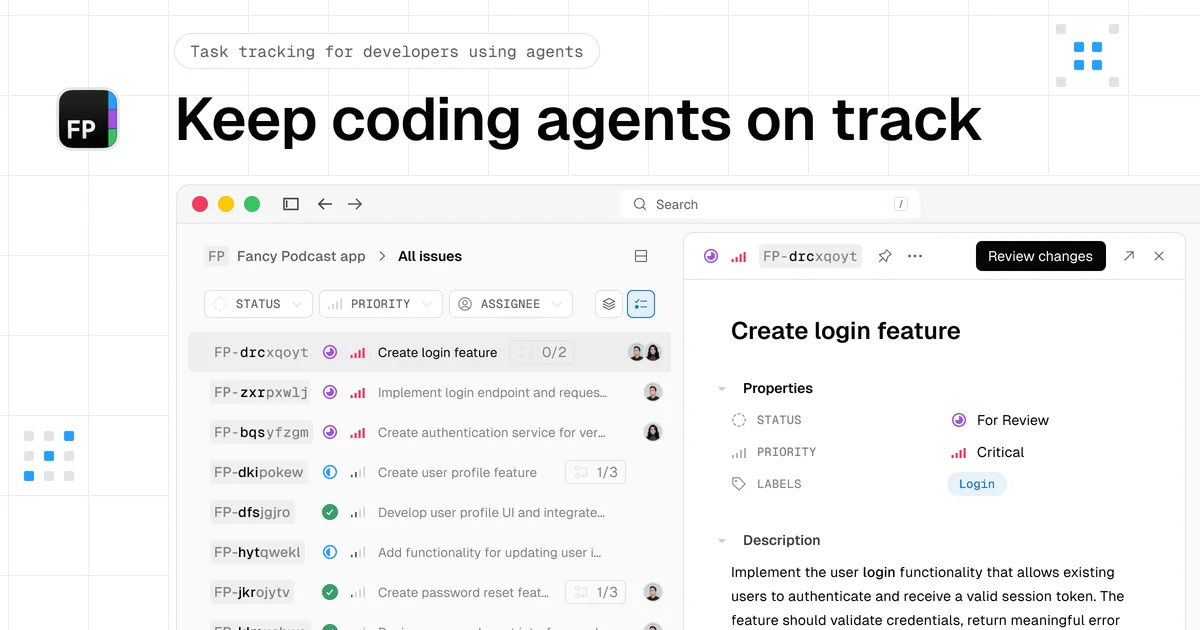
Fiberplane FP is an agent-native issue tracking system designed from the ground up for AI coding agents. Unlike traditional issue trackers that assume a human will file and update tickets, FP is designed so that an AI agent can own issues, break down tasks, and update progress — all from the terminal.
The core product is fp, a CLI tool that runs locally in each project. Issues are stored as plain files (Markdown-based) in a .fp/ directory, making them version-controllable and merge-conflict-friendly.
Key characteristics:
- Local-first — no cloud account required, data lives in your repo
- Agent-native — the CLI is designed for AI agents to consume and emit issue state
- Scoped issues — issues are small, atomic, and agent-friendly
- Brainstorm mode — ask an agent to plan a feature and it auto-generates a hierarchy of issues
- Mac companion app — optional native UI for humans to review agent progress
Setup Workflow
Step 1: Install the CLI
curl -fsSL https://setup.fp.dev/install.sh | sh -s
```bash

This installs the `fp` binary. No account, no auth flow.

### Step 2: Initialize a project

```bash
cd your-project
fp init
```bash

`fp init` registers the project and creates the `.fp/` directory with initial configuration. It prompts for agent setup so your coding agent knows how to interact with the issue store.

### Step 3: Create issues from a prompt

Ask your agent to plan work:

```bash
Plan out the authentication feature
```bash

The agent responds by creating a structured issue hierarchy automatically:

```bash
FP-abcd [todo] Add authentication
├── FP-efgh [todo] Design auth flow
├── FP-ijkl [todo] Implement OAuth provider
├── FP-mnop [todo] Add session management
└── FP-qrst [todo] Write tests
```bash

### Step 4: Work on issues

```bash
fp issues start FP-abcd
The agent picks up an issue, works on it, and marks it done — all through the CLI. No switching to a web UI.
Step 5: Use the Mac app (optional)
For humans who want a GUI, the Mac companion app gives a Notion-style view of all issues across projects, with real-time sync from the local .fp/ store.
Deeper Analysis
Why agents-native issue tracking matters
Traditional issue trackers (Jira, Linear, GitHub Issues) are built for human workflows. They assume a person will read a ticket, understand context, and manually update status. AI coding agents break this assumption — they can work through dozens of sub-tasks autonomously, but most issue trackers don’t give them a clean, scriptable interface.
FP solves this by:
- A terminal-native CLI — agents can call
fpjust like any other shell command. No API keys, no OAuth flows, no web scraping. - File-based storage — issues live as Markdown files in
.fp/. This means they version-control naturally, merge cleanly, and integrate with any editor or agent framework. - Scoped hierarchy — parent issues break down into child issues automatically. The agent creates exactly as much structure as needed, no more.
- No cloud dependency — the agent and the human share the same
.fp/directory. No sync lag, no server to be down.
The CLI design
The fp CLI is intentionally simple. Core commands:
fp init— initialize a projectfp issues list— show all issuesfp issues start <id>— claim an issue and begin workfp issues done <id>— mark an issue completefp brainstorm "<prompt>"— have the agent generate issue hierarchies from a prompt
This is deliberately close to a CRUD interface — agents can predict what it does.
Comparison to alternatives
| Feature | FP | Linear | GitHub Issues | Jira |
|---|---|---|---|---|
| Agent-native CLI | Yes | No | API only | No |
| Local file storage | Yes | No | No | No |
| Brainstorm auto-decomposition | Yes | No | No | No |
| Free for individuals | Yes | Limited | Yes | No |
| MIT licensed | Yes | Proprietary | Proprietary | Proprietary |
Practical Evaluation Checklist
- Install
fpCLI in under 2 minutes - Run
fp initin a test project — no account required - Ask agent to plan a feature via brainstorm
- Verify
.fp/directory contains Markdown issue files - Start and complete an issue via CLI
- Verify issue state persisted in
.fp/files - Test Mac app (optional) — pairs with local
.fp/store
Security Notes
- Issues stored locally in
.fp/— your data never leaves the repo unless you push it - No external API calls required for core functionality
.fp/directory should be in.gitignoreif you don’t want issue metadata in your repo (recommended: track it, since it captures project knowledge)- Mac app reads local
.fp/files — no cloud sync of issue content by default
FAQ
Q: Does FP require an account or internet connection?
A: No. The core CLI works fully offline. The Mac companion app also runs locally, reading from your .fp/ directory. No account creation, no auth, no server.
Q: How does brainstorm work?
A: You give the agent a high-level prompt (“build a checkout flow”) and it decomposes it into a hierarchy of scoped issues using its own reasoning. The output is a structured issue tree written directly to .fp/.
Q: Can multiple agents collaborate on the same project?
A: Yes — since issues are file-based, multiple agents (or humans) can work in the same .fp/ directory. Each claims issues with fp issues start, reducing conflict.
Q: Is this only for Claude Code?
A: No. The CLI is agent-agnostic. The docs specifically mention Claude Code, Codex, and Pi as examples, but any agent that can run shell commands can use fp.
Q: What happens if two agents claim the same issue?
A: The fp issues start command is a lightweight claim. For single-agent workflows this is not an issue. For multi-agent, a lock file in .fp/locks/ prevents double-claiming at the file level.
Conclusion
Fiberplane FP is a well-scoped tool solving a specific problem: giving AI coding agents a clean, scriptable interface to track work without forcing them through a human-oriented web UI. The local-first, file-based approach is elegant — it means issues are version-controllable, merge-friendly, and require zero infrastructure.
If you run AI coding agents on substantial projects, fp is worth trying. The install is a single curl command, and the agent can start using it immediately. The Mac app is a nice human-facing layer without sacrificing the local-first core principle.
Project page: fp.dev Source: github.com/fiberplane/fiberplane License: MIT
Related Posts
ai-setup
Recall – Persistent Memory for Claude Code via MCP Hooks
Recall gives Claude Code a permanent memory store that survives session restarts and context compaction. Four hooks capture and restore context automatically — with cloud SaaS or self-hosted options.
2/28/2026
dev-tools
Automotive Skills Suite for AI Engineering
Evaluate Automotive Skills Suite for APQP, ASPICE, HARA, safety-plan, and DIA workflows with setup notes, governance risks, and SME review guidance.
5/28/2026
dev-tools
awesome-agentic-ai-zh Roadmap Guide
Explore awesome-agentic-ai-zh as a Chinese agentic AI learning roadmap, with setup notes, track selection, study workflow, and evaluation guidance.
5/28/2026