Dropbase AI - Prompt-Based Python Web App Builder
Dropbase is a local-first, self-hosted web app builder that uses AI to generate app code in Python. Build admin panels, dashboards, and internal tools without the constraints of traditional low-code
TL;DR
TL;DR: Dropbase is a local-first, self-hosted web app builder that uses AI to generate Python code for admin panels, dashboards, and internal tools — no forms-only constraints of traditional low-code platforms.
Source and Accuracy Notes
- Project page: dropbase.io ← verified via README link
- Source repository: github.com/DropbaseHQ/dropbase ← README fetched and read
- License: NOASSERTION (verified via GitHub API
license.spdx_id) - HN launch thread: news.ycombinator.com/item?id=40947415 (141 points, 11 comments)
What Is Dropbase?
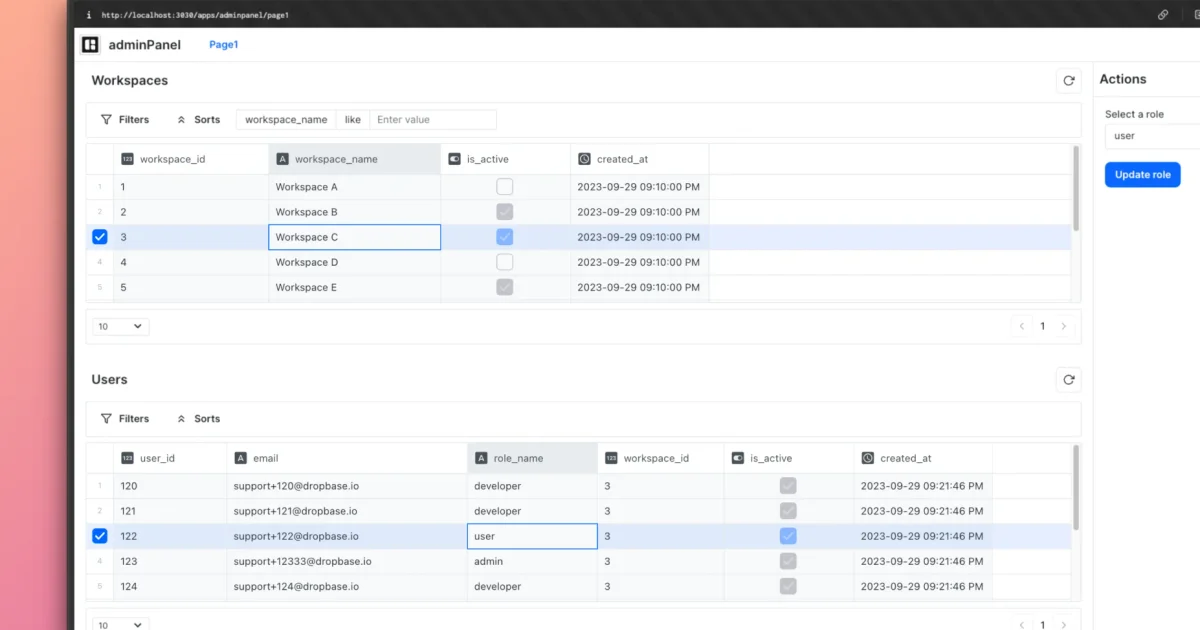
Dropbase helps developers build and prototype web apps faster with AI. Unlike traditional low-code/no-code platforms that constrain you to filling up UI forms, Dropbase uses AI to generate app code that you can verify and edit. It combines the convenience of a drag-and-drop app builder with the flexibility of handwritten code.
The project positions itself as “local-first and self-hosted” — no credentials are shared with any external service. Dropbase lives in your codebase, making it easy to import or reuse custom scripts and libraries. Apps are portable: app folders can be zipped and shared to other Dropbase users.
Key Differentiators
From the README’s own comparison:
- Write or generate any custom business logic with code — no form-based constraints
- Built-in web framework with pre-built UI components — no need to wrestle with frontend libraries
- Local-first, self-hosted — no creds are shared externally
- Lives in your codebase — import custom scripts or libraries directly
- Portable app folders — zip and share to other Dropbase users
- Built on Python — import any PyPI package
Setup Workflow
Prerequisites
- Install Docker. The README recommends Docker Desktop, especially for Apple M chips. Alternatively, install
dockeranddocker-compose.
Step 1: Clone the Repository
git clone https://github.com/DropbaseHQ/dropbase.git
```bash

### Step 2: Start the Server

Make the start script executable and run it:

```bash
chmod +x start.sh
./start.sh
```bash

On first startup, the server initializes the local environment.

### Step 3: Create Your First App

Open your browser and navigate to:

```yaml
http://localhost:3030/apps
Click the “Create app” button to start building. The interface lets you define data models, build UI components, and connect integrations — all backed by AI-generated Python code you can inspect and modify.
Supported Use Cases
The README documents several concrete examples:
- Admin panels — customer data management interfaces
- Back-office tools — internal operational dashboards
- Billing dashboards — subscription and invoice tracking
- Internal engineering tools — tooling that sits on top of internal APIs
- CRM integrations — Salesforce leads editor, HubSpot contacts editor (spreadsheet-style editing)
- Notification workflows — sending order info via email or Slack channels
How AI Code Generation Works
Dropbase’s AI features assist with generating boilerplate and business logic. You describe what you want in natural language or prompts, and Dropbase produces Python code for the data layer, API routes, and UI components. You review the generated code before it goes live — it’s a co-pilot model, not a fully autonomous one.
The generated apps use Dropbase’s own web framework under the hood, which ships with pre-built UI components so you don’t need to bring your own frontend stack.
Self-Hosted Architecture
Dropbase runs entirely on your infrastructure via Docker. There is no SaaS offering that routes your data through Dropbase’s servers. This makes it suitable for teams that need to keep internal tools behind a firewall or within a VPC.
Practical Evaluation Checklist
- Local-first, self-hosted with no external data sharing
- AI code generation as a co-pilot (you review and edit)
- Built-in Python web framework and UI components
- Portable app format (zip and share)
- Integrations with Slack, Mailgun, Salesforce, HubSpot documented
- No cloud-hosted option — Docker only
Security Notes
Because Dropbase is self-hosted and local-first:
- Credentials never leave your infrastructure
- Database connections, API keys, and business logic stay within your Docker network
- The README explicitly states “No creds are shared with us”
- You control the network boundary entirely
For production deployments, follow standard Docker networking best practices: bind to a private interface rather than 0.0.0.0, use Docker networks for isolation, and manage secrets through environment variables or a secrets manager rather than hardcoding.
FAQ
Q: How is Dropbase different from low-code platforms like Retool or Internal?
A: Traditional low-code tools force you to build app logic through UI forms and drag-and-drop blocks. Dropbase generates actual Python code that you can read, edit, or replace. You are not locked into Dropbase’s visual logic layer — the output is code in your codebase.
Q: Is there a cloud-hosted or SaaS version?
A: No. Dropbase is self-hosted only. You run it on your own infrastructure via Docker. There is no hosted offering.
Q: What database does Dropbase use?
A: Dropbase itself runs in Docker. The README does not prescribe a specific database — apps built with Dropbase can connect to any data source your infrastructure can reach (Postgres, MySQL, SQLite, external APIs, etc.).
Q: Can I use my own frontend code?
A: Yes. Dropbase provides pre-built UI components but generated code is plain Python. You can bring your own frontend components if needed.
Q: Does Dropbase require an AI API key?
A: The README mentions “enabling AI features” as a separate step but does not require an OpenAI or similar key for the basic app-building flow. The AI features assist with code generation.
Conclusion
Dropbase fills a gap between full hand-coding and rigid low-code platforms. If you want the speed of AI-assisted development but need full control over the resulting code, it is worth a look. The self-hosted architecture means it stays within your infrastructure, which matters for internal tools that touch sensitive data.
For runany.dev readers: if you have been looking for a local-first Python web app builder with AI-assisted code generation that does not lock you into a form-based logic layer, Dropbase is worth evaluating.
HN launch thread: news.ycombinator.com/item?id=40947415
Related Posts
ai-setup
Recall – Persistent Memory for Claude Code via MCP Hooks
Recall gives Claude Code a permanent memory store that survives session restarts and context compaction. Four hooks capture and restore context automatically — with cloud SaaS or self-hosted options.
2/28/2026
dev-tools
Automotive Skills Suite for AI Engineering
Evaluate Automotive Skills Suite for APQP, ASPICE, HARA, safety-plan, and DIA workflows with setup notes, governance risks, and SME review guidance.
5/28/2026
dev-tools
awesome-agentic-ai-zh Roadmap Guide
Explore awesome-agentic-ai-zh as a Chinese agentic AI learning roadmap, with setup notes, track selection, study workflow, and evaluation guidance.
5/28/2026