Context.dev - Web Scraping API for AI Agents
One API to scrape the web into clean Markdown, crawl entire sites, and extract structured brand data. YC S26.
TL;DR
TL;DR: Context.dev is a web scraping API purpose-built for AI agents — it scrapes URLs into clean Markdown, crawls entire sites, and extracts structured brand data (logos, colors, socials) via a single API key, with a free tier of 500 pages.
Source and Accuracy Notes
- Project page: context.dev — verified via direct fetch
- Documentation: docs.context.dev — Mintlify-hosted, verified accessible
- Source repository: github.com/context-dot-dev/context-go-sdk — Go SDK, Apache-2.0 license (verified via GitHub API)
- Pricing page: context.dev/pricing — verified via direct fetch
- HN launch thread: news.ycombinator.com/item?id=48847562 — 119 points, 29 comments, YC S26
- License: Apache-2.0 (verified via GitHub API
license.spdx_idoncontext-go-sdk)
What Is Context.dev?
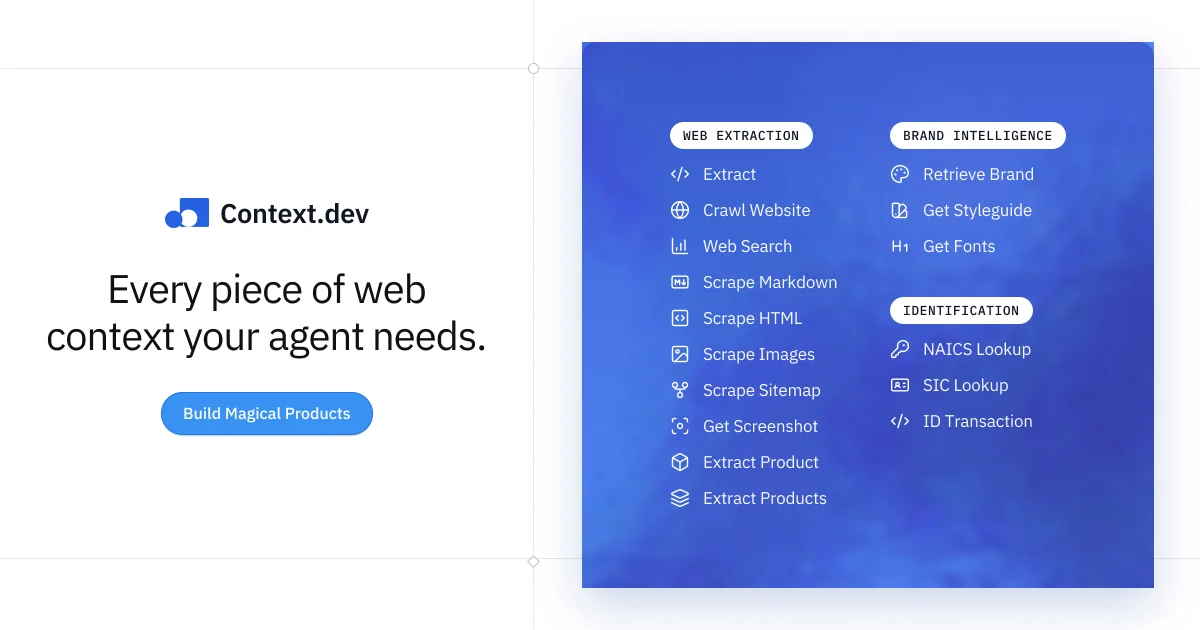
Context.dev is a web context API designed specifically for AI agents and LLM applications. Instead of cobbling together a headless browser, proxy rotation service, and HTML parser, you get one unified API that handles:
- Scraping any URL into clean Markdown or rendered HTML
- Crawling entire websites with configurable depth, page count, and URL patterns
- Structured extraction via caller-supplied JSON Schema — return exactly the data you need
- Brand intelligence — resolve a domain, email, name, or ticker and get back logos, colors, fonts, social links, NAICS/SIC codes, and transaction identification
- Website monitors — watch pages for changes and get alerts
- Web search — return ranked results and optionally scrape every result to Markdown in one request
The product description on the homepage reads:
“One API to scrape and crawl the web, extract structured data, retrieve brand intelligence, and monitor websites for changes.”
One API key covers all of these capabilities. Failed or blocked requests are not billed. JS rendering and anti-bot bypass are included without credit multipliers.
Setup Workflow
Step 1: Get an API Key
Sign up at context.dev/signup. The free tier gives you 500 credits (500 scraped pages) with no time limit. No credit card required.
Step 2: Install the SDK
Choose your language. The SDKs are available for Go (maintained), TypeScript/JavaScript, Python, Ruby, and PHP.
Go:
go get 'github.com/context-dot-dev/context-go-sdk@v2'
```bash

**Python:**

```bash
pip install context.dev
```bash

**TypeScript:**

```bash
npm install context.dev
```bash

### Step 3: Make Your First Request

Scraping a URL to Markdown takes a single call:

```python
import contextdev

client = contextdev.Client(
    api_key="your_api_key"  # or set CONTEXT_DEV_API_KEY env var
)

response = client.scrape(
    url="https://example.com",
    format="markdown"  # or "html"
)
print(response.content)  # clean Markdown
```bash

The same key also calls Brand Intelligence:

```python
brand = client.brand.retrieve(
    domain="stripe.com"
)
print(brand.logo_url)
print(brand.primary_color)
Step 4: Use the MCP Server
Context.dev ships an MCP server so you can connect it directly to AI coding assistants. The MCP server lets the model explore endpoints, make test requests, and read documentation inline. Install links are available for Cursor and VS Code from the docs context page.
Deeper Analysis
Pricing Model
Context.dev uses a credit system. One successfully scraped page costs one credit. There is no differentiation in credit cost for JavaScript rendering, anti-bot bypass, or premium proxies — all included. The free tier is 500 credits, one-time. The Build plan is $25/month for higher limits. Enterprise plans offer custom credit volumes.
Key pricing notes from the pricing page:
- Free tier: 500 credits, 50 brand lookups, 10K logo fetches, 2 concurrent monitors, 30 API calls/minute
- Build tier: starts at $25/month — exact limits on the pricing page
- Enterprise: 2M+ credits, custom limits, security and procurement support
Annual billing includes two months free. Early-stage startups can apply for up to 30% off for one year.
SDK Quality
The Go SDK is generated with Stainless and the package is at github.com/context-dot-dev/context-go-sdk/v2. The repository shows only 1 star on GitHub — the main product is the hosted API, not an open-source project. SDK source code quality is high, with proper error handling and typed responses.
HN Reception
The launch HN thread (119 points) received mostly positive reception. Comments praised it as “one of those rare APIs that immediately made a problem I had disappear” and noted it was previously known as Brand.dev. Concerns raised included comparison to Firecrawl, pricing relative to raw proxy costs, and whether rotating IPs are used for high-value data scraping.
Compliance and Trust
The service is SOC 2 Type I certified (trust.context.dev), with Type II in progress. The status page is at status.context.dev.
Practical Evaluation Checklist
- Free tier is sufficient for prototyping and small projects
- Markdown output is clean and RAG-ready without post-processing
- Brand intelligence covers logos, colors, socials, and industry codes
- One API key for scraping, crawling, extraction, and brand data
- MCP server available for Cursor and VS Code
- Failed/blocked requests are not billed
- SOC 2 Type I certified
Security Notes
- SOC 2 Type I certification in place (Type II in progress)
- No credit card required for the free tier
- API keys should be stored in environment variables, not hardcoded
- The service handles anti-bot bypass server-side, so your infrastructure IP is never exposed to target sites
FAQ
Q: What is the credit cost per request? A: One successfully scraped page costs one credit. Brand lookups cost 10 credits each. Failed or blocked requests are not billed.
Q: Does it handle JavaScript-rendered pages? A: Yes. JS rendering is included by default without any credit multiplier.
Q: What formats can it output? A: Markdown, rendered HTML, schema-validated JSON, screenshots, sitemaps, and images.
Q: How does it compare to Firecrawl? A: Both offer similar core capabilities (scrape to Markdown, crawl sites). Context.dev additionally bundles brand intelligence (logos, colors, transaction IDs, NAICS codes) under one API key, while Firecrawl focuses primarily on scraping and crawling. Pricing models differ — Context.dev uses a straightforward per-page credit system.
Q: Is there a self-hosted option? A: No. Context.dev is a hosted API only. There is no self-hosted deployment option.
Q: Does it support batch scraping? A: Yes. The API supports concurrent batch operations with configurable concurrency limits per plan.
Q: What SDKs are officially supported? A: Go (primary, Apache-2.0), Python, TypeScript/JavaScript, Ruby, and PHP. The Go SDK is generated with Stainless.
Conclusion
Context.dev solves the multi-vendor problem that plagues AI agent pipelines: combining a scraping service, proxy rotation, a headless browser, a brand data provider, and a change monitor. It unifies all of that into one API key and one credit system. The free tier is generous enough for real prototyping, the MCP server integration is a practical touch for developer workflows, and the SOC 2 certification addresses enterprise trust requirements.
If your agent needs to read websites, resolve brand data, or monitor pages for changes, Context.dev is worth evaluating. Start at context.dev with the free 500-page tier.
Related Posts
ai-setup
Recall – Persistent Memory for Claude Code via MCP Hooks
Recall gives Claude Code a permanent memory store that survives session restarts and context compaction. Four hooks capture and restore context automatically — with cloud SaaS or self-hosted options.
2/28/2026
dev-tools
Superset – Orchestrate 100+ Coding Agents in Parallel
Superset runs Claude Code, Codex, Cursor, and other AI coding agents simultaneously in parallel workspaces. Orchestrate agents, automated workflows, and code.
5/28/2026
dev-tools
Frigade – Build Product Onboarding That Actually Works
Frigade is a developer tool that makes it easy to build polished, interactive product onboarding flows without the usual headache.
5/28/2026