ChatWithCloud – AWS Cloud via Generative AI in Terminal
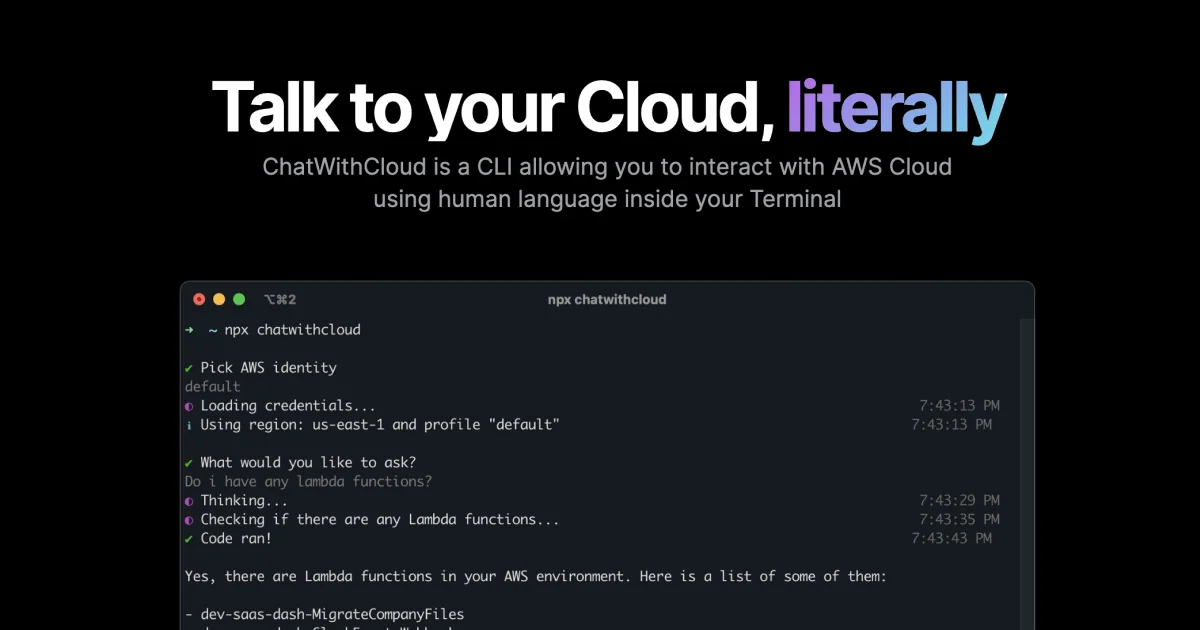
ChatWithCloud is a CLI tool that lets you query and manage AWS infrastructure using natural language. Powered by OpenAI, it creates and executes scripts against your account directly from the
TL;DR
TL;DR: ChatWithCloud is an npx-based CLI that lets you query and modify your AWS account using plain English — it interprets your intent, generates the appropriate AWS CLI scripts, and executes them locally without your credentials ever leaving your machine.
Source and Accuracy Notes
- Project page: chatwithcloud.ai
- npm package: npmjs.com/package/chatwithcloud ← verified accessible
- License: Proprietary (free tier: 15 runs, then paid plans)
- HN launch thread: news.ycombinator.com/item?id=44183166 (verified via HN Algolia)
What Is ChatWithCloud?
ChatWithCloud is a terminal-based interface for AWS cloud management. Instead of looking up IAM policy syntax, remembering which aws CLI subcommand to call, or writing Lambda functions to run one-off tasks, you describe what you want in plain English:
- “How much am I spending on EC2 this month?”
- “Find publicly accessible S3 buckets in my account”
- “Stop all running t2.micro instances”
- “Create a new IAM user with read-only access”
The tool interprets your intent, generates an AWS CLI script (or Python/boto3 equivalent), and executes it against your local AWS credentials. All processing happens locally — your credentials stay in ~/.aws/ and are never sent to ChatWithCloud’s servers. The only outbound call is to OpenAI for natural language interpretation.
Key Capabilities
Cost Analysis Query your AWS spend by service, region, or time period. ChatWithCloud breaks down costs and suggests optimization opportunities.
Security Analysis Scan for publicly accessible resources, analyze IAM policies, and identify over-permissioned roles — all by asking questions like “Are any of my S3 buckets public?”
Troubleshooting Ask about your infrastructure health in plain language. It can explain why a service is failing and suggest fixes.
Infrastructure Modification Create, delete, and update AWS resources. For read-only use cases, attach an IAM role with minimal permissions.
Setup Workflow
Prerequisites
- Node.js 18+ (for
npx) - AWS credentials configured in
~/.aws/credentialsor via environment variables - An OpenAI API key (optional for first 15 runs — the tool covers the cost)
Step 1: Run Without Installing
npx chatwithcloud
```bash

The first 15 runs are free. No OpenAI key required to get started.

### Step 2: Link Your OpenAI Key (optional)

For unlimited usage, get an OpenAI API key and set it as an environment variable:

```bash
export OPENAI_API_KEY="sk-..."
```bash

Or pass it inline:

```bash
OPENAI_API_KEY="sk-..." npx chatwithcloud
```bash

### Step 3: Connect AWS Credentials

Ensure your `~/.aws/credentials` file is configured:

```ini
[default]
aws_access_key_id = AKIA...
aws_secret_access_key = ...
region = us-east-1
For read-only operations, use an IAM role with ReadOnlyAccess or a custom policy scoped to the resources you want to inspect.
Deeper Analysis
How It Works
- You enter a natural language query (e.g., “What EC2 instances are running?”)
- ChatWithCloud sends the query to OpenAI’s API, along with a system prompt describing AWS service capabilities and your intent
- OpenAI returns the appropriate AWS CLI command(s) or boto3 script
- ChatWithCloud executes the script locally using your AWS credentials
- The output is returned to your terminal
Your AWS credentials never leave your local environment. Only the natural language query is sent to OpenAI, which processes it server-side.
Comparison with Amazon Q Developer
Amazon Q provides general AWS knowledge (best practices, syntax) but has no access to your specific account context. ChatWithCloud operates on your actual AWS account — it can tell you exactly which instances you have running, what your actual costs are, and modify your actual resources.
Security Considerations
- Credentials stay in
~/.aws/— no third-party storage - The OpenAI call only transmits your natural language query, not your AWS credentials or resource data
- For production use, apply least-privilege IAM policies
- For read-only analysis, use a read-only IAM role to prevent accidental modifications
Pricing
| Plan | Price | Includes |
|---|---|---|
| Free | 15 runs | No OpenAI key needed |
| Early Believer (Lifetime) | $37 one-time | Unlimited, bring your own OpenAI key |
| Managed Subscription | $19/month | Unlimited, fully managed (key included) |
Practical Evaluation Checklist
- First run:
npx chatwithcloudworks without any setup - Cost query returns accurate AWS billing data
- Security scan identifies publicly accessible resources
- Credential security: verify no AWS keys sent to OpenAI
- Read-only mode: restrict modifications with IAM policy
FAQ
Q: Does it work with AWS GovCloud or China regions? A: The tool uses standard AWS SDK calls, which work with GovCloud and China regions if your credentials have the appropriate permissions.
Q: Can I use it without an OpenAI API key? A: Yes — the first 15 runs are free and do not require your own OpenAI key.
Q: What happens if the AI generates a destructive command? A: The tool executes exactly what OpenAI returns. Always review the command before running it, or use an IAM role with limited permissions for automated use.
Q: Does it support multi-account AWS setups?
A: It uses your default AWS profile from ~/.aws/credentials. For multi-account setups, set the AWS_PROFILE environment variable to switch between profiles.
Conclusion
ChatWithCloud fills a practical gap for developers and DevOps engineers who know what they want to do in AWS but don’t want to memorize every aws CLI subcommand or write throwaway scripts. The natural language interface is genuinely useful for one-off operational tasks — cost lookups, security audits, and quick infrastructure checks. The local credential model is a strong security win over tools that require long-lived API keys on third-party servers.
For runany.dev readers: the free tier (15 runs, no key needed) is enough to evaluate whether it fits your workflow. If you manage AWS infrastructure regularly and prefer staying in the terminal, it’s worth a try.
Related Posts
ai-setup
Recall – Persistent Memory for Claude Code via MCP Hooks
Recall gives Claude Code a permanent memory store that survives session restarts and context compaction. Four hooks capture and restore context automatically — with cloud SaaS or self-hosted options.
2/28/2026
dev-tools
Automotive Skills Suite for AI Engineering
Evaluate Automotive Skills Suite for APQP, ASPICE, HARA, safety-plan, and DIA workflows with setup notes, governance risks, and SME review guidance.
5/28/2026
dev-tools
awesome-agentic-ai-zh Roadmap Guide
Explore awesome-agentic-ai-zh as a Chinese agentic AI learning roadmap, with setup notes, track selection, study workflow, and evaluation guidance.
5/28/2026