TL;DR
TL;DR: ChartDB Agent brings the AI-pair-programming model to database schema design — describe what you want in plain English, get a full ER diagram, export production-ready SQL.
Source and Accuracy Notes
- Official site: chartdb.io/ai
- GitHub (OSS): github.com/chartdb/chartdb (22.3k stars)
- No signup required to try the web app
What Is ChartDB Agent?
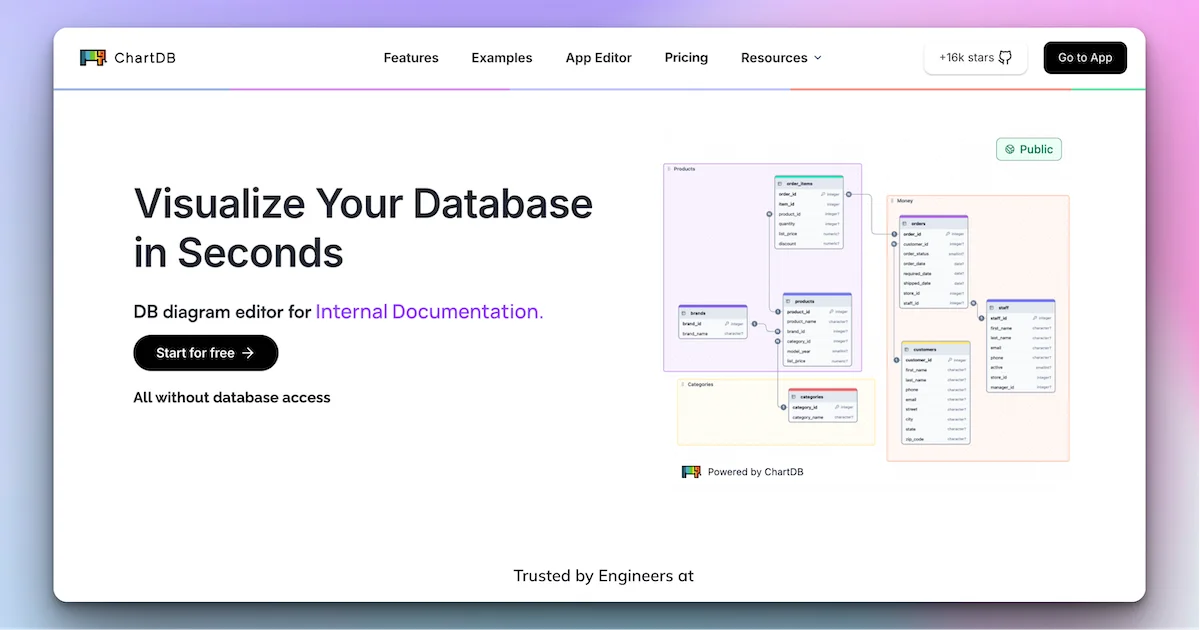
ChartDB launched in 2024 as an open-source ER diagram generator — feed it a SQL query, DBML, or database connection string, and it spits out a clean visualization of your schema. It’s useful for documenting existing databases, but designing new ones from scratch still meant writing SQL by hand.
ChartDB Agent flips this. Instead of reverse-engineering a live database, you start with a conversation. Describe the domain you’re building for — “a multi-tenant SaaS with users, subscriptions, and invoice tracking” — and the agentbrainstorms tables, columns, and foreign key relationships in real time. You see the ER diagram update as you iterate.
The workflow mirrors the “AI editor as pair programmer” model pioneered by Cursor. You propose; the AI suggests; you approve or refine. The output is a deterministic SQL script you can run against any Postgres, MySQL, MariaDB, SQLite, or MSSQL instance.
Setup Workflow
Step 1: Try the Web App (No Install)
# Open in browser — no account required
https://chartdb.io/ai
```bash

The web app opens with a blank canvas. Type a description of the schema you want, and the agent generates an initial diagram. You can edit it further by chatting — "add a `created_at` column to the `users` table" or "add a `projects` table with foreign keys to both `users` and `organizations`."

### Step 2: Connect a Real Database (Optional)

If you have an existing database you want to work with:

1. Sign up for a free ChartDB account
2. Connect your database via connection string or SSH tunnel
3. The agent reads your current schema and can suggest modifications

### Step 3: Export SQL

Once your diagram looks right, hit **Export SQL**. The output is a `CREATE TABLE` script with:

- Proper column types (VARCHAR, INT, TIMESTAMP, etc.)
- Foreign key constraints
- Indexes on frequently queried columns

```sql
-- Example output (simplified)
CREATE TABLE organizations (
  id SERIAL PRIMARY KEY,
  name VARCHAR(255) NOT NULL,
  plan VARCHAR(50) DEFAULT 'free',
  created_at TIMESTAMP DEFAULT NOW()
);

CREATE TABLE users (
  id SERIAL PRIMARY KEY,
  org_id INTEGER REFERENCES organizations(id),
  email VARCHAR(255) UNIQUE NOT NULL,
  created_at TIMESTAMP DEFAULT NOW()
);
Deeper Analysis
How It Works
ChartDB Agent uses a large language model to parse natural language into relational schema design. It has baked-in knowledge of normalization forms, indexing strategies, and common patterns (soft deletes, audit logs, multi-tenancy). When you describe a domain, it draws on this knowledge to propose a sensible starting point rather than just echoing your words back as column names.
Versus Hand-Written SQL
Writing schema from scratch in an editor works until you need to visualize relationships. Most SQL tools give you a query editor with auto-complete but no diagram. ChartDB Agent fills that gap — it’s the “preview” pane for your schema design.
The deterministic export is the key quality. The diagram is interactive, but the output is plain SQL — no proprietary format lock-in, no ChartDB-specific DSL to learn.
Versus Drawing Tools (Draw.io, Lucidchart)
Drawing tools require manual placement of every table and column. They’re great for one-off diagrams but painful when requirements change and you need to update 20 tables. ChartDB Agent regenerates the diagram from your revised description in seconds.
The OSS Version
ChartDB’s open-source version at github.com/chartdb/chartdb has 22.3k stars. The standalone OSS tool handles existing DB visualization but not the AI agent flow — that’s cloud-only (with a free tier).
Practical Evaluation Checklist
- Natural language to schema: Describe a domain, get tables and columns back in under 30 seconds
- ER diagram visualization: Drag-and-drop layout, zoom, pan; diagram updates live as you edit
- Multi-DB export: Postgres, MySQL, MariaDB, SQLite, MSSQL — pick your dialect when exporting
- Foreign key routing: Agent infers relationships from context (“each order belongs to a user”) and draws the correct FK lines
- No DB access needed: Design from scratch without a live connection — useful in early-stage architecture planning
- Open-source fallback: Standalone OSS for visualizing existing DBs without using the cloud agent
Security Notes
- Schema designs stay in your browser session until you export or save to your account
- Database connections use standard connection string security — never share connection strings in plain text
- ChartDB’s privacy policy governs cloud usage; the OSS version has no external network calls
FAQ
Q: Is ChartDB Agent free to use? A: Yes, the web app at chartdb.io/ai has a free tier with unlimited schema designs. Paid plans add database connections and team collaboration.
Q: Can I use this with an existing database I already have? A: Yes — sign up, connect your database via connection string or SSH tunnel, and the agent reads the current schema. You can then propose modifications and export updated SQL.
Q: What databases does it support for export? A: Postgres, MySQL, MariaDB, SQLite, and Microsoft SQL Server. Each export is dialect-specific SQL.
Q: How does this compare to the standalone OSS version? A: The OSS version at github.com/chartdb/chartdb visualizes existing databases from SQL/DBML/query input — no AI agent. ChartDB Agent (cloud-only) adds natural language schema generation and interactive diagram editing.
Q: Is my schema data sent to ChartDB’s servers? A: Schema designs are processed in ChartDB’s cloud when you use the agent. Review their privacy policy if you have strict data handling requirements.
Conclusion
ChartDB Agent brings the AI-pair-programming model to the earliest stage of application development: schema design. Instead of sketching boxes in a diagram tool or writing boilerplate CREATE TABLE statements, you describe your domain and get a complete, exportable ER diagram in seconds.
The free web tier is generous enough to be immediately useful for prototyping, architecture planning, and team alignment on data models. The open-source version handles existing DB visualization for teams that prefer self-hosted tooling.
If you’re building a new application and want to validate your schema thinking before writing migration scripts, ChartDB Agent is worth 10 minutes of your time.
URL: chartdb.io/ai
Related Posts
ai-setup
Recall – Persistent Memory for Claude Code via MCP Hooks
Recall gives Claude Code a permanent memory store that survives session restarts and context compaction. Four hooks capture and restore context automatically — with cloud SaaS or self-hosted options.
2/28/2026
dev-tools
Automotive Skills Suite for AI Engineering
Evaluate Automotive Skills Suite for APQP, ASPICE, HARA, safety-plan, and DIA workflows with setup notes, governance risks, and SME review guidance.
5/28/2026
dev-tools
awesome-agentic-ai-zh Roadmap Guide
Explore awesome-agentic-ai-zh as a Chinese agentic AI learning roadmap, with setup notes, track selection, study workflow, and evaluation guidance.
5/28/2026