ChartDB Agent – AI-Powered Database Schema Design
Turn any database into an interactive ER diagram with a single SQL query. ChartDB Agent adds AI-powered DDL migration and multi-dialect export to the open-source database diagramming tool.
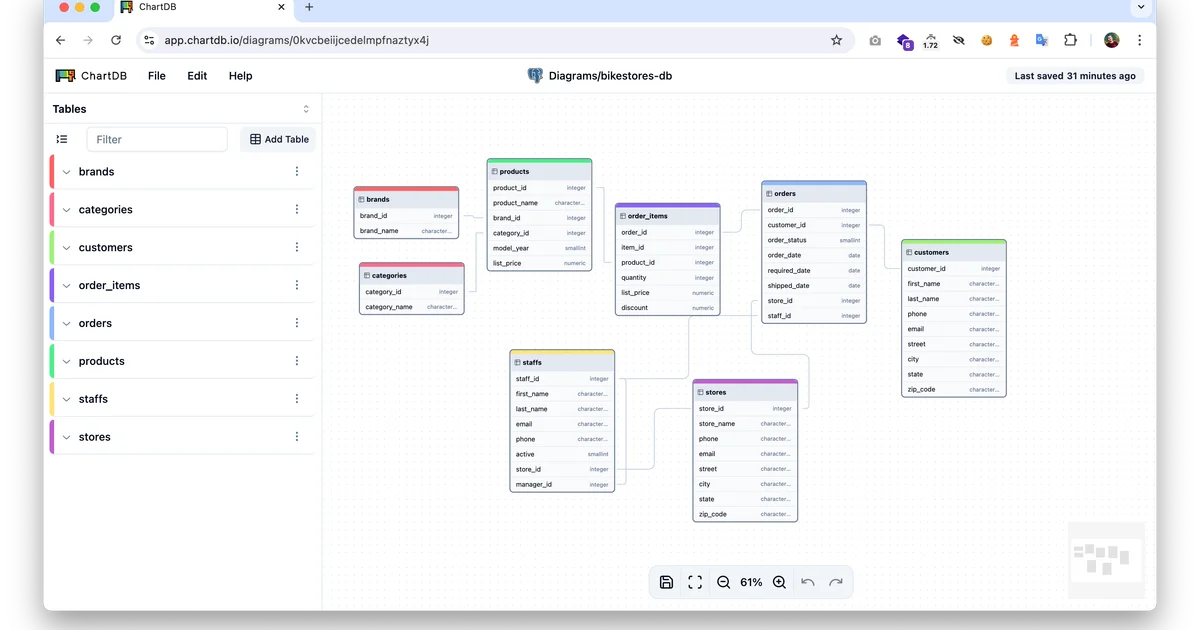
TL;DR
TL;DR: ChartDB Agent is a web-based database diagramming tool that reverse-engineers your schema from a single SQL query and lets you export it as AI-generated DDL for any database dialect.
What Is ChartDB Agent?
ChartDB Agent is an AI-augmented evolution of the open-source ChartDB project — a browser-based database schema visualizer that works without installing anything or handing over database passwords.
The core workflow is simple: connect your database, paste a “Smart Query” (a lightweight introspection query ChartDB provides), and get an instant entity-relationship diagram. The Agent layer adds an AI export function that converts your schema to DDL scripts in the dialect of your choice — MySQL to PostgreSQL, SQLite to MariaDB, and so on.
Key features (from the official README):
- Instant Schema Import — run one query to pull your full schema as JSON
- AI-Powered DDL Export — generate migration scripts in any supported dialect
- Interactive Diagram Editor — annotate and fine-tune your ER diagrams in-browser
- No account required — all features work without sign-up
- Privacy-first — optional analytics disable flag available
Supported databases: PostgreSQL, MySQL, SQL Server, MariaDB, SQLite, CockroachDB, and ClickHouse.
Setup Workflow
Option 1: Cloud (no install)
Visit app.chartdb.io and start immediately. Connect your database and run the Smart Query — no account needed.
Option 2: Self-hosted with Docker
docker run -e OPENAI_API_KEY=<YOUR_KEY> -p 8080:80 ghcr.io/chartdb/chartdb:latest
```bash

Then open `http://localhost:8080`.

### Option 3: Self-hosted from source

```bash
git clone https://github.com/chartdb/chartdb.git
cd chartdb
npm install
npm run dev
```bash

To enable AI features:

```bash
VITE_OPENAI_API_KEY=<YOUR_KEY> npm run build
Step 1: Connect and Import Schema
- Open ChartDB (cloud or self-hosted)
- Select your database type (PostgreSQL, MySQL, etc.)
- Run the provided Smart Query against your database — ChartDB never stores credentials, only the schema JSON
- Your schema renders as an interactive ER diagram
Step 2: Export with AI
- Click AI Export on any table or the full schema
- Choose your target dialect (e.g., “PostgreSQL”, “MySQL”, “SQLite”)
- ChartDB generates a DDL script ready to run in your target database
Deeper Analysis
What makes it different
Traditional database diagramming tools either require heavy desktop clients (DBVisualizer, TablePlus diagrams) or expensive commercial licenses (Navicat). ChartDB runs entirely in the browser with no plugin install and no password exposure — the introspection query is read-only by design.
The 22.5k GitHub stars on the base project reflect genuine developer traction. The Agent layer adds the missing piece for schema migration workflows: instead of manually translating DDL between dialects (a tedious and error-prone task), the AI export generates correct syntax for the target system.
Trade-offs
- Requires AI API key for the DDL export feature — the base diagram tool works without it
- Privacy: If you use the cloud version at
app.chartdb.io, your schema JSON passes through ChartDB’s servers. Self-hosting is available for sensitive environments - No live sync — ChartDB imports a snapshot. For evolving schemas, you re-run the Smart Query to refresh
Use cases
- Documentation — generate up-to-date ER diagrams for repos and wikis
- Cross-dialect migration — export a MySQL schema as PostgreSQL DDL for a migration project
- Team alignment — share schema visuals without requiring teammates to have database access
- Pre-mortem — visualize an unfamiliar database before making changes
Practical Evaluation Checklist
- Works in browser with no install
- Supports PostgreSQL, MySQL, SQL Server, SQLite, MariaDB, CockroachDB, ClickHouse
- Schema imports via read-only SQL query
- AI DDL export to multiple dialects
- Self-hostable via Docker
- MIT/AGPL licensed (self-hosted version)
- No account required for basic features
Security Notes
- ChartDB uses read-only schema introspection — it never writes to your database
- The Smart Query is designed to extract metadata only, not data
- For air-gapped or sensitive environments, self-host via Docker with
DISABLE_ANALYTICS=true - The cloud version at
app.chartdb.iouses Fathom Analytics (privacy-focused, no cookie consent required)
FAQ
Q: Does ChartDB store my database credentials? A: No. ChartDB never asks for your database password. You run the read-only Smart Query yourself in your own database client, and paste the resulting JSON into ChartDB.
Q: What is the license for self-hosted use? A: The project is AGPL-3.0. You can self-host it freely under those terms. The cloud version at app.chartdb.io is a hosted service with its own terms.
Q: Is an OpenAI API key required? A: Only if you want the AI DDL export feature. The basic schema visualization works without any API key.
Q: Can I export diagrams as images or vector files? A: ChartDB lets you export the diagram view. For vector export, use the browser’s built-in export or the self-hosted version with custom build tweaks.
Conclusion
ChartDB Agent fills a practical gap in the developer toolchain: converting a live database into a shareable, editable ER diagram without the overhead of desktop clients or credential sharing. The AI export feature makes cross-dialect migration significantly less painful by automating the DDL translation that developers otherwise do by hand. Self-hosting is straightforward via Docker, making it viable for teams with data sensitivity requirements.
Try it at app.chartdb.io or deploy your own via the one-line Docker command above.
Source and Accuracy Notes
- Project page: chartdb.io
- Source repository: github.com/chartdb/chartdb
- License: AGPL-3.0 (verified via
LICENSEfile in repository) - HN launch thread: news.ycombinator.com/item?id=45437594 (130 points, October 2025)
- Stars: 22,586 (GitHub API, July 2026)
Related Posts
ai-setup
Recall – Persistent Memory for Claude Code via MCP Hooks
Recall gives Claude Code a permanent memory store that survives session restarts and context compaction. Four hooks capture and restore context automatically — with cloud SaaS or self-hosted options.
2/28/2026
dev-tools
Automotive Skills Suite for AI Engineering
Evaluate Automotive Skills Suite for APQP, ASPICE, HARA, safety-plan, and DIA workflows with setup notes, governance risks, and SME review guidance.
5/28/2026
dev-tools
awesome-agentic-ai-zh Roadmap Guide
Explore awesome-agentic-ai-zh as a Chinese agentic AI learning roadmap, with setup notes, track selection, study workflow, and evaluation guidance.
5/28/2026