Cardboard - Agentic AI Video Editor in Your Browser
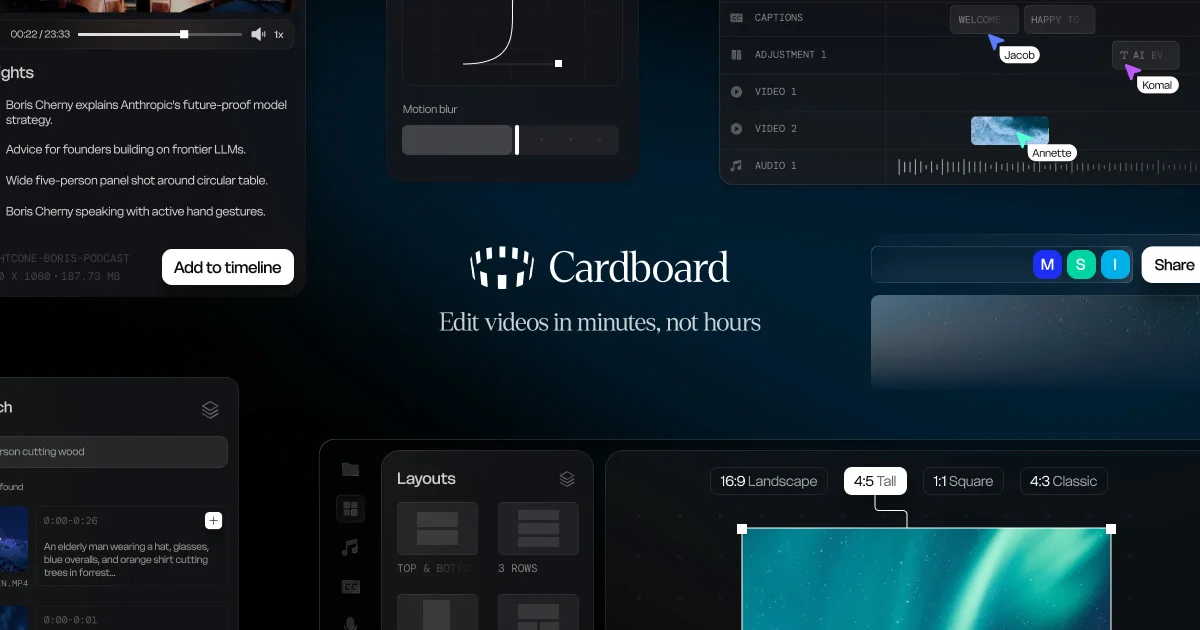
Cardboard is a browser-based AI video editor that cuts, captions, reframes and composes footage from a text prompt. From Y Combinator W26.
TL;DR
TL;DR: Cardboard is a browser-based agentic video editor that lets you cut, caption, reframe, and compose footage using plain text prompts — no install, no timeline wrestling.
Source and Accuracy Notes
- Project page: usecardboard.com — verified 2026-07-15
- YC Company page: ycombinator.com/companies/cardboard — verified 2026-07-15
- HN launch thread: news.ycombinator.com/item?id=47170174 — 132 points, verified 2026-07-15
- License: N/A (closed-source SaaS, no license file applicable)
What Is Cardboard?
Cardboard is an agentic video editor that runs entirely in your browser. Instead of learning Premiere Pro or DaVinci Resolve, you describe what you want in plain text and the AI handles the edit — cutting clips, adding captions, reframing for vertical/square/landscape formats, and composing multi-shot sequences.
From the Y Combinator company page:
“We are building Cardboard — it is an agentic video editor that lives in your browser. Ask for a first cut (‘make a 60s recap’ / ‘cut this into ads’). Search footage by meaning, not filenames. Then refine it yourself on a timeline.”
Cardboard was part of Y Combinator’s Winter 2026 batch (W26).
Key Features
Text-to-edit — Describe the cut you want and Cardboard executes it. Examples from the product page include “make a 60s recap” or “cut this into ads.”
Semantic footage search — Find the right clip by describing what’s in it (“find quotes, reactions, people, emotions, and scenes across hours of footage”) rather than scrubbing through timelines or guessing at filenames.
Automatic reformatting — Turn one video into vertical, square, and landscape versions simultaneously. Cardboard keeps the important action in frame across all formats.
AI-directed reframing — Snap at the line of scrimmage kicks off the play. Running back breaks through for a big gain. Cardboard tracks action automatically.
Real-time collaboration — Share a project, leave comments at exact timecodes, and work alongside your team in the same session. No exports, no version sprawl.
Setup Workflow
Step 1: Open the Web App
No install required. Navigate to usecardboard.com and sign up.
open https://www.usecardboard.com/Step 2: Upload Your Footage
Drag and drop video files into the browser window. Cardboard processes footage server-side and indexes it for semantic search.
Step 3: Make Your First Cut
Type a prompt describing the edit you want. For example:
- “Make a 60-second recap of our product launch event”
- “Cut this footage into three 15-second ads for social media”
- “Find all the moments where someone is laughing”
Cardboard generates the edit and presents it on a timeline for your review.
Step 4: Export or Share
When you’re happy with the cut, export in your desired format or share the project link with collaborators for inline feedback at specific timecodes.
How It Compares
Cardboard occupies a specific niche: agentic browser-based video editing focused on text-driven workflows. Here’s how it maps against adjacent tools:
| Tool | Browser-based | AI agent | Text-to-edit | Semantic search |
|---|---|---|---|---|
| Cardboard | ✅ | ✅ | ✅ | ✅ |
| CapCut | ✅ | Partial | ❌ | ❌ |
| Descript | ✅ | ❌ | ❌ | ❌ |
| Premiere Pro | ❌ | ❌ | ❌ | ❌ |
| Runway | ✅ | Partial | ❌ | ❌ |
The core differentiator is the combination of a fully browser-based workflow with genuine agentic behavior — the AI actively makes decisions about cuts and composition rather than just applying filters.
Practical Evaluation Checklist
If you’re evaluating Cardboard for your team, here is what to verify:
- Is your footage compatible? Check supported formats on the product page before uploading large files.
- Does the semantic search work on your use case? Try searching for a specific action or emotion in your footage — accuracy varies by clip quality.
- Is real-time collaboration fast enough? Test sharing a project with a teammate and leaving a timecode comment to verify latency.
- Export quality — Request an export in your target format and compare frame quality against the original.
- Pricing — Cardboard appears to be a commercial SaaS product. Check usecardboard.com/pricing for current tiers before committing a team.
Security Notes
- All video processing involves uploading footage to Cardboard’s servers. Review their data handling and retention policy before processing sensitive or proprietary content.
- Collaboration features share project access with invited teammates. Ensure your team understands the sharing permissions before adding external collaborators.
FAQ
Q: Do I need a powerful computer to run Cardboard? A: No — the editing engine runs on Cardboard’s servers, not your local machine. You need a modern browser (Chrome, Firefox, Safari, Edge) and a stable internet connection. Heavy lifting is offloaded to the cloud.
Q: Can I export to professional formats like ProRes or DNxHD? A: Check the export options on your plan. Consumer formats (MP4, WebM) are likely supported; professional intermediate codecs may require a higher tier.
Q: How does Cardboard handle footage with multiple people talking? A: From the product description, Cardboard can identify “quotes, reactions, people, emotions, and scenes.” For detailed speaker separation or transcription, a dedicated tool like Descript may complement it.
Q: Is this related to the Y Combinator W26 batch? A: Yes. Cardboard was part of Y Combinator’s Winter 2026 batch (W26). The HN launch thread received 132 points.
Conclusion
Cardboard targets a real gap in the video production workflow: the gap between having footage and having a finished edit. By putting an AI agent in the browser with text-driven editing commands and semantic search across your footage library, it removes the two biggest friction points in traditional video editing — the timeline learning curve and the filename-scouring hunt for the right clip.
If your team produces regular video content (marketing, product updates, event recaps) and the current workflow involves either manual editing sessions or exporting to a freelancer for every cut, Cardboard is worth evaluating. The browser-based model means zero install friction across your team.
Try it at usecardboard.com.
Related Posts
ai-setup
Recall – Persistent Memory for Claude Code via MCP Hooks
Recall gives Claude Code a permanent memory store that survives session restarts and context compaction. Four hooks capture and restore context automatically — with cloud SaaS or self-hosted options.
2/28/2026
ai-setup
Sentrial – Catch AI Agent Failures Before Your Users Do
YC W26-backed AI agent observability platform. Trace sessions, detect silent regressions, and A/B test prompts in production before failures reach users.
5/28/2026
ai-setup
IonRouter – Fast Low-Cost AI Inference API
IonRouter is a YC W26 inference API routing open-source and fine-tuned models via an OpenAI-compatible endpoint, built on a C++ runtime optimized for GH200.
5/28/2026