Bor – Open-Source Linux Desktop Policy Management
Open-source policy management for Linux desktops. Central server pushes Firefox, Chrome, and KDE policies to enrolled endpoints over encrypted gRPC in real time.
TL;DR
TL;DR: Bor is an open-source Linux desktop policy management system — a Go server pushes Firefox ESR, Chrome, and KDE Kiosk policies to enrolled endpoints over mTLS-encrypted gRPC in real time.
Source and Accuracy Notes
- Project page: getbor.dev
- Source repository: github.com/VuteTech/Bor
- License: LGPL v3.0 (verified via GitHub contents API)
- Latest release: v0.8.0 (2026-08-01)
- HN launch thread: news.ycombinator.com/item?id=49142569 (196 points, 2026-08-02)
What Is Bor?
Bor is an open-source policy management system for Linux desktops built by Vute Tech. A central Go + PatternFly web server distributes configuration policies to lightweight Go agent daemons running on enrolled Linux endpoints, applying them in real time over an encrypted gRPC stream.
Currently enforced policies:
- Firefox ESR — system-wide
policies.json(RPM/DEB and Flatpak) - Google Chrome / Chromium — managed JSON in
/etc/opt/chrome/and/etc/chromium/(including Flatpak) - KDE Plasma — KDE Kiosk (
kconfigfiles under/etc/xdg/, KCM module restrictions)
The server runs two HTTPS listeners: port 8443 for the admin REST API + enrollment gRPC, and port 8444 for the agent policy stream with mandatory mTLS. The architecture uses server-side streaming — agents receive policy changes the moment they are published, without polling.
Setup Workflow
Prerequisites
| Component | Requirement |
|---|---|
| Server host | Podman / Docker + podman-compose |
| Agent host | Linux x86_64 or arm64 |
| Build from source | Go 1.24+, Node.js 18+, Make |
Step 1: Deploy the Bor Server
Clone the repo and start the server with podman-compose:
git clone https://github.com/VuteTech/Bor.git
cd Bor
podman-compose -f podman-compose.yml up -d
```bash

The server starts with two HTTPS listeners:
- **8443** — Admin UI (REST) + enrollment gRPC
- **8444** — Agent policy stream (mTLS mandatory)

On first startup, Bor auto-generates an internal CA for mTLS. No external certificate infrastructure is required to get started.

### Step 2: Enroll a Linux Endpoint

Open the admin UI at `https://your-server:8443`, generate a one-time enrollment token, then install and start the agent on a Linux endpoint:

```bash
# Install the agent (deb/rpm/apk packages available via nfpm)
sudo apt install ./bor-agent.deb   # or sudo rpm -i ./bor-agent.rpm

# Enroll with the token from the UI
sudo bor-agent enroll https://your-server:8443 YOUR_TOKEN_HERE
The agent bootstraps its own mTLS certificate automatically — no manual certificate management is required.
Step 3: Assign Policies
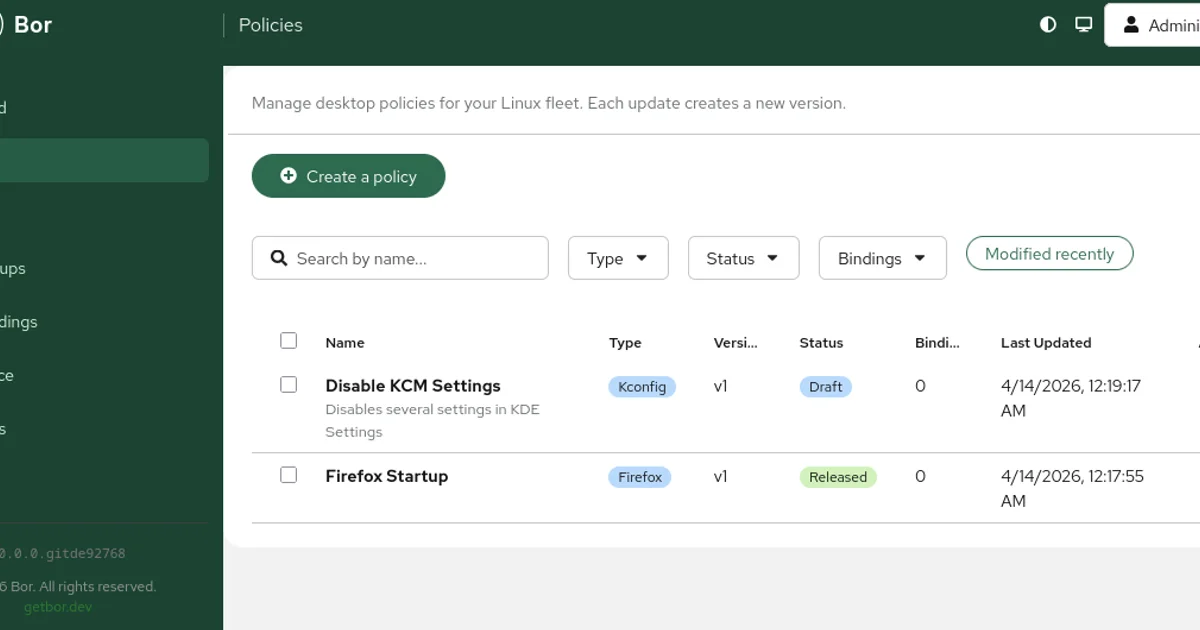
In the PatternFly dashboard, create a policy (e.g., lock down Firefox settings), create a node group, and bind endpoints to it. Policy changes are streamed to agents instantly.
Deeper Analysis
Architecture
The server stores policies, enrolled nodes, user bindings, and RBAC roles in PostgreSQL. The agent is a Go daemon running as root — it receives the policy stream, writes the managed configuration files, and reports compliance status back to the server.
The server-side streaming approach means no polling latency: the moment a policy is updated in the UI, all enrolled agents receive the delta immediately. A monotonic revision counter with ring buffer handles reconnections — agents that reconnect after a brief outage receive only the changes they missed.
Security Model
Every agent connection to port 8444 requires a valid mTLS client certificate. Bor generates its own internal CA on first run; certificates are renewed automatically every 90 days without operator action. The internal CA is FIPS 140-3 validated.
Optional hardening layers include:
- HSM support — CA private key can be stored in a hardware security module via PKCS#11
- LDAP/AD integration — enabled via environment variables for existing enterprise identity infrastructure
Tamper Protection
A file watcher on each endpoint detects modifications to managed files made outside of Bor. If a user or process changes a managed policies.json or Kiosk config, Bor restores the correct state automatically.
Comparison
| Bor | Falkon | Microsoft Intune | |
|---|---|---|---|
| Platform | Linux only | Cross-platform (SaaS) | Windows/macOS/Linux |
| License | LGPL v3 | Proprietary | Commercial |
| Self-hosted | Yes | No | No |
| Firefox ESR policies | Yes | Partial | No |
| Chrome/Chromium policies | Yes | Yes | Yes |
| KDE Kiosk | Yes | No | No |
| mTLS agent auth | Yes | Unknown | Certificate-based |
Practical Evaluation Checklist
- Deploy server with
podman-composeon a test host - Enroll one Ubuntu endpoint and verify Firefox ESR policy enforcement
- Enroll one Fedora endpoint and verify Chrome policy enforcement
- Enroll a KDE Plasma endpoint and verify Kiosk restrictions
- Test tamper protection by manually editing a managed file
- Verify certificate auto-renewal by checking agent logs after 90 days
- Test LDAP integration if your environment has an existing directory
Security Notes
- The agent runs as root on enrolled endpoints — ensure the agent-to-server channel is network-isolated from untrusted segments
- mTLS is mandatory on the policy stream port (8444); it is optional on the admin port (8443), but enabling it is strongly recommended for production deployments
- The internal CA is generated on first run and stored on the server host — protect it accordingly
- FIPS 140-3 validated crypto module is available for regulated environments
FAQ
Q: What Linux distributions does Bor support? A: Any Linux distro that can run the Go agent binary (x86_64 or arm64). The server runs in Docker/Podman on any host. Packages are available via nfpm for deb, rpm, and apk-based distributions.
Q: Can I self-host Bor without an internet connection? A: Yes. The server runs entirely on-premises. All policy distribution happens over the internal network via the encrypted gRPC channel.
Q: Does Bor support FIPS compliance? A: Yes. Bor uses a FIPS 140-3 validated cryptographic module for certificate generation and TLS.
Q: How does Bor differ from Falkon or Microsoft Intune? A: Bor is open-source, Linux-native, and self-hostable. It enforces Firefox ESR, Chrome, and KDE Kiosk policies in real time over mTLS-encrypted gRPC streaming. Intune does not support Firefox ESR policies and requires commercial licensing. Falkon is cross-platform SaaS with no self-hosted option.
Q: Can I integrate Bor with an existing LDAP or Active Directory? A: Yes, optional LDAP/AD integration is available via environment variables on the server.
Q: Does Bor support HSM-backed CA keys? A: Yes, PKCS#11 HSM integration is available as an optional feature for environments requiring hardware-stored CA keys.
Conclusion
Bor fills a specific gap in the Linux enterprise stack: real-time, cryptographically authenticated policy enforcement for Firefox ESR, Chrome, and KDE Plasma — without depending on a SaaS platform or proprietary tooling. If you are managing a fleet of Linux desktops and need open-source, self-hosted policy control, Bor is purpose-built for exactly that. Start with the podman-compose quick start at getbor.dev and have a policy enforced on a test endpoint within minutes.
Related Posts
ai-setup
Recall – Persistent Memory for Claude Code via MCP Hooks
Recall gives Claude Code a permanent memory store that survives session restarts and context compaction. Four hooks capture and restore context automatically — with cloud SaaS or self-hosted options.
2/28/2026
dev-tools
Automotive Skills Suite for AI Engineering
Evaluate Automotive Skills Suite for APQP, ASPICE, HARA, safety-plan, and DIA workflows with setup notes, governance risks, and SME review guidance.
5/28/2026
dev-tools
awesome-agentic-ai-zh Roadmap Guide
Explore awesome-agentic-ai-zh as a Chinese agentic AI learning roadmap, with setup notes, track selection, study workflow, and evaluation guidance.
5/28/2026