TL;DR
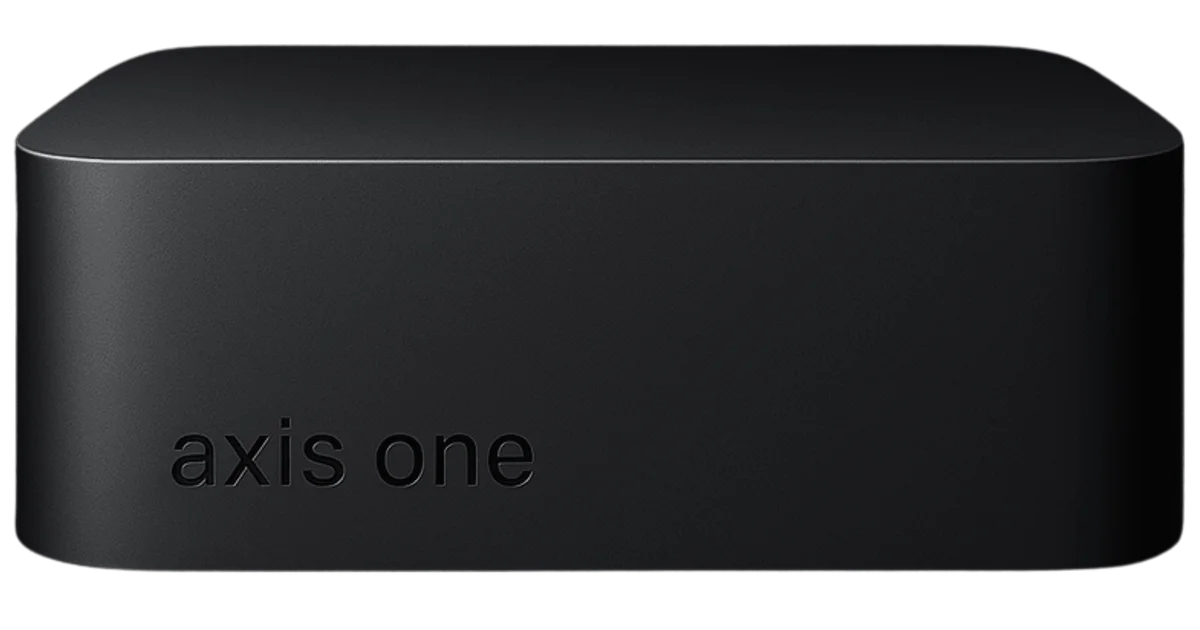
TL;DR: Axis One is a desk-size hardware inference console that runs local LLMs via llama.cpp and exposes an OpenAI-compatible API — no cloud, no latency, arrives tuned and boots silently.
Source and Accuracy Notes
- Project page: axis-one-psi.vercel.app
- Source repository: github.com/Axis-One/Axis-One
- License: MIT (verified via LICENSE file)
- HN launch thread: news.ycombinator.com/item?id=45977950
What Is Axis One?
Axis One is a hardware inference console aimed at developers, small offices, and homelabs who want private AI without the overhead of cloud GPU rental or DIY inference servers. The device runs on dedicated edge silicon (Jetson Orin) and is pre-tuned to run under-13B parameter models — Llama, Mistral, Qwen — at full speed with silent thermals.
The software layer is a FastAPI server backed by llama.cpp, exposing standard OpenAI-compatible endpoints (/v1/chat/completions, /v1/embeddings, /v1/models). Every OpenAI-compatible client — Cursor, Continue.dev, Open WebUI, or any custom script — points at the Axis One endpoint with no code changes.
The setup claim is “sixty seconds from unbox to boot”: plug in Ethernet and power, wait for the device to appear on the network, then point your client at its IP.
Setup Workflow
Step 1: Hardware and Network
Axis One ships as a self-contained unit. Connect it to your network via Ethernet and power it on. The device will broadcast its IP address on the local network — you access it via the admin dashboard at http://<device-ip>:8000/admin.
Step 2: Configure Models
The model registry lives in config.yaml on the device. Each entry specifies the GGUF file path, thread count, and token limit. The default config includes a placeholder local-llama entry:
default_model: local-llama
models:
  - id: local-llama
    path: /models/llama-7b.q4_0.gguf
    num_threads: 6
    max_tokens: 256
```bash

Axis One ships with Mistral, Qwen, and Llama support confirmed. Models download and update automatically once registered in the config.

### Step 3: Point Your Apps at the Local Endpoint

Axis One presents an OpenAI-compatible API. Set your client's base URL to the device address:

```yaml
http://<device-ip>:8000/v1
```bash

Test with the OpenAI Python client:

```python
import openai

openai.api_base = "http://localhost:8000/v1"
openai.api_key = "<your-api-key>"

response = openai.ChatCompletion.create(
    model="local-llama",
    messages=[{"role": "user", "content": "Hello!"}],
)
print(response)
```bash

Embeddings also work via the same endpoint:

```python
embedding_response = openai.Embedding.create(
    model="local-embedding",
    input="Describe the appliance in one sentence.",
)
print(embedding_response["data"][0]["embedding"][:8])
```bash

### Step 4: Admin Dashboard

The embedded admin dashboard at `/admin` lets you load and unload model runtimes, tail logs, and check OTA update status — all from a browser on the local network.

### OTA Updates

Axis One supports over-the-air updates via a signed manifest. The `config.yaml` entry looks like:

```yaml
ota:
  enabled: true
  current_version: 0.1.0
  manifest_url: https://updates.example.com/appliance/manifest.json
  download_dir: /data/updates
  signature_secret: change-me
When a new version is available, the admin dashboard surfaces it. Optional apply_command and rollback_command fields let you orchestrate container restarts as part of the update process.
Deeper Analysis
** llama.cpp as the runtime.** Backing Axis One with llama.cpp is a pragmatic choice: it is the most portable, CPU-optimized LLM inference engine available, runs on a wide variety of hardware, and has excellent GGUF model support. The tradeoff is that GPU inference is not the target — llama.cpp’s CPU path works best for quantised models under 13B.
** No GPU, no cloud — what is the actual use case?** The target user is someone who needs AIPrivacy for internal tooling, drafting, or Q&A, and who does not want that data touching third-party servers. The constraint of running under-13B models at full speed on CPU-only silicon is real — this is not a GPT-4 replacement. It is best suited for workflow automation, code completions, and summarisation tasks where local, private inference beats cloud cost and latency for repeated, high-volume calls.
** Promising signals:** The OTA signed-manifest update mechanism is well-designed for a physical appliance. The embedded admin dashboard and Prometheus metrics (/metrics) suggest a product intended for team environments, not just solo homelabbers. The OpenAI API compatibility is the right call — it maximises the number of tools that work out of the box.
** Things to watch:** Axis One is listed as pre-order / MVP as of mid-2026. The hardware spec (Jetson Orin core, under-13B target) places realistic ceilings on model capability. The software is open-source under MIT, so the core runtime is auditable, but the OTA mechanism requires the operator to trust the signature_secret they configure.
Practical Evaluation Checklist
- Hardware arrived undamaged, Ethernet and power connected
- Admin dashboard accessible at port 8000 within 60 seconds of boot
- GGUF model loaded and responding to chat completions via OpenAI client
- Embeddings endpoint functional
- API key authentication enforced (unauthenticated requests rejected)
- Prometheus metrics available at
/metrics - OTA update check surfaces current version correctly
- No data sent to external servers during inference (network inspection)
Security Notes
- API authentication is enforced via a static key supplied through the
AXIS_ONE_API_KEYenvironment variable - The admin dashboard requires a separate
AXIS_ONE_ADMIN_PASSWORD— also environment-only, never committed - No cloud sync, no outbound telemetry confirmed (network-level verification recommended)
- OTA updates use signed manifest verification; operators should configure a non-default
signature_secret
FAQ
Q: Does Axis One support GPU inference? A: Axis One is designed around dedicated edge silicon (Jetson Orin) running llama.cpp in CPU mode. It targets quantised GGUF models under 13B parameters. GPU inference via CUDA is not the primary design goal.
Q: What happens when there is no internet connection? A: Axis One is Ethernet-first and designed to operate fully offline. All inference, RAG, and function calling stay on the local network. OTA updates require internet access to reach the manifest URL.
Q: Can I use my own models instead of the pre-configured ones?
A: Yes. Add any GGUF-format model to the device, register it in config.yaml with the file path and thread count, then reload the runtime via the admin dashboard.
Q: How does Axis One compare to running llama.cpp directly on a spare machine? A: Axis One packages the hardware, firmware, OTA updates, admin dashboard, and Prometheus metrics into a purpose-built appliance. The software stack is the same (llama.cpp + FastAPI). The differentiation is in the turnkey form factor and zero-setup workflow.
Q: Is the source code open?
A: Yes. The Axis One software is published under the MIT license on GitHub at github.com/Axis-One/Axis-One.
Conclusion
Axis One occupies a specific niche: teams that want a self-contained, silent, low-power inference box with an OpenAI-compatible API surface — no GPU clusters, no cloud bills, no DIY assembly. The llama.cpp runtime is battle-tested, the OTA mechanism is sensibly designed, and the admin dashboard covers the operational basics. For homelabbers and small teams evaluating private AI, it is worth a closer look. Monitor the GitHub repository for hardware availability and software maturity signals as the MVP progresses toward production.
Related Posts
ai-setup
Recall – Persistent Memory for Claude Code via MCP Hooks
Recall gives Claude Code a permanent memory store that survives session restarts and context compaction. Four hooks capture and restore context automatically — with cloud SaaS or self-hosted options.
2/28/2026
dev-tools
AgentMesh – Define AI Agent Teams in YAML
Define multi-agent AI workflows in YAML and run them locally with one command. AgentMesh brings Docker Compose patterns to AI agent orchestration.
5/28/2026
ai-setup
Sentrial – Catch AI Agent Failures Before Your Users Do
YC W26-backed AI agent observability platform. Trace sessions, detect silent regressions, and A/B test prompts in production before failures reach users.
5/28/2026