APIMatic Context Plugins - Guardrails for Coding Assistants
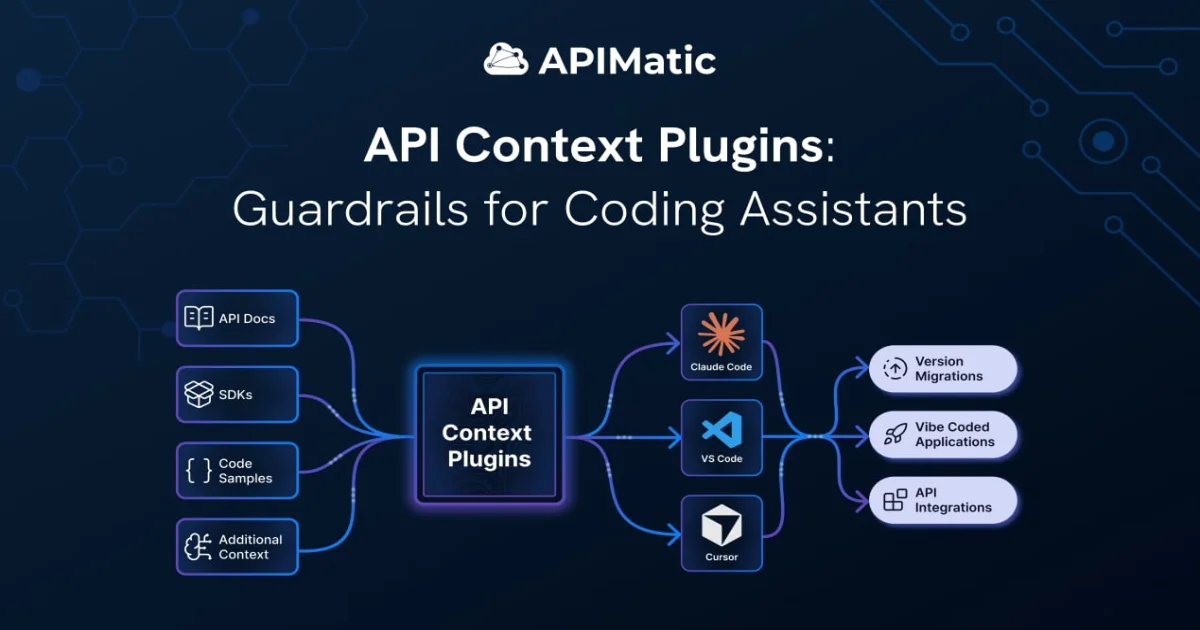
APIMatic Context Plugins ground Cursor, Claude Code, and VS Code in your real OpenAPI spec, cutting token usage 65% and prompt iterations 81% on PayPal.
TL;DR
TL;DR: APIMatic Context Plugins turn an OpenAPI spec into a version-aware MCP server that feeds Cursor, Claude Code, and VS Code the exact SDK, auth flow, and integration patterns they need. In a PayPal pilot, the plugin cut token usage by 65% and reduced prompt iterations by 81% compared to baseline Cursor.
Source and Accuracy Notes
- Product page: apimatic.io/product/context-plugins
- Launch blog post: apimatic.io/blog/context-plugins
- Show HN discussion: news.ycombinator.com/item?id=47530870
- Company: APIMatic (10+ years in API tooling, customers include PayPal and Verizon)
What Is APIMatic Context Plugins?
APIMatic Context Plugins are MCP servers generated directly from an OpenAPI spec. They package the canonical SDK, code samples, authentication flows, and integration workflows into a single MCP endpoint that any modern coding assistant can query.
The pitch is simple: stop letting AI coding tools guess how your API works from training data, and start feeding them a versioned, deterministic context that stays in sync with your spec.
APIMatic has been generating SDKs from OpenAPI definitions for over a decade. When the LLM-coding wave started producing broken PayPal and Twilio integrations, they had the right pieces already: the spec parser, the SDK generator, and the workflow metadata. MCP gave them the transport. Context Plugins are the assembled product.
Why This Matters
Ask Cursor to integrate PayPal’s Orders API and you get plausible-looking code that calls deprecated endpoints, imports an old SDK version, and uses the wrong auth header. The story is familiar: the AI pulls from outdated blog posts and GitHub scraping, not from PayPal’s current docs.
APIMatic measured this in a controlled benchmark on the PayPal API. Without a plugin, Cursor’s runs produced:
- 13% of runs pulling in a deprecated SDK
- 87% of runs using HTTP calls based on outdated documentation
With a Context Plugin installed, the assistant queries the MCP server for the right SDK version, the canonical auth flow, and the recommended integration pattern. The numbers from the PayPal pilot:
- 2x faster integration code generation
- 65% lower token usage
- 81% fewer prompt iterations
- Cleaner architecture and better maintainability in legacy migration scenarios
The bottleneck in AI-assisted API integration is no longer code generation. It is reliable, version-aware API context.
Repo-Specific Setup Workflow
Context Plugins ship as MCP servers. Once installed, they expose tools and prompts to the IDE’s coding assistant. Here is the flow from an API provider’s perspective.
Step 1: Upload your OpenAPI spec
# APIMatic accepts a hosted spec or a one-time upload
curl -X POST https://api.apimatic.io/v2/context-plugins \
  -H "Authorization: Bearer $APIMATIC_KEY" \
  -F "spec=@./openapi.yaml"
```bash

APIMatic parses the spec and validates it against its SDK generation pipeline. Bad specs surface as concrete errors here, not as broken AI output later.

### Step 2: Review the generated artifacts

APIMatic produces three artifacts from the same source of truth:

```text
1. SDK packages (one per supported language)
2. Code samples for common workflows
3. An MCP server exposing typed tools and prompts
```bash

The MCP server is what the coding assistant will install. It is generated alongside the SDKs, so it can never drift from the spec.

### Step 3: Install the plugin in your IDE

For Cursor, add the MCP server to your config:

```json
{
  "mcpServers": {
    "apimatic-context-plugin": {
      "command": "npx",
      "args": ["-y", "@apimatic/context-plugin", "serve", "--spec", "./openapi.yaml"]
    }
  }
}
```bash

For Claude Code, drop the same command into `.claude/mcp.json`. For VS Code with Copilot, register the server in the Copilot MCP settings. The plugin is one MCP endpoint regardless of the IDE.

### Step 4: Try a real integration prompt

Open your IDE and ask:

```text
Add a checkout flow that uses the Orders API to create an order,
capture payment, and handle webhooks.
Without a plugin, the assistant guesses at SDK choice, auth flow, and endpoint shape. With the plugin, it queries the MCP server for:
- The current Orders SDK class
- The canonical auth setup for OAuth 2.0 client credentials
- The recommended workflow: create order, capture, register webhook
The output is type-safe SDK code using the current SDK version, not a hand-rolled HTTP wrapper.
Step 5: Migrate legacy code with confidence
APIMatic ran the plugin against two real .NET applications in their case study:
- nopCommerce (mature ASP.NET Core e-commerce platform)
- eShop (Microsoft’s .NET microservices reference app)
In the eShop migration, the plugin-assisted run produced cleaner architecture and lower rework than the baseline. The same tool that helps greenfield work helps when you are moving a production codebase from a deprecated SDK to the current one.
Deeper Analysis
How the MCP server is structured
A Context Plugin is not a generic OpenAPI-to-text dump. It exposes:
- Typed tools for every API operation, with schemas derived from the spec
- Prompts for common workflows (auth setup, pagination, error handling, webhook verification)
- SDK metadata with current version, install command, and import path
- Integration patterns baked in from APIMatic’s decade of API tooling
When the coding assistant encounters an API integration question, it queries the plugin instead of guessing. The plugin returns code-ready, version-pinned guidance. The assistant’s job shifts from “remember how this API works” to “adapt this concrete example to my codebase.”
Why OpenAPI alone is not enough
OpenAPI describes the contract. It does not describe the recommended integration pattern, the SDK that wraps it, the auth quirks specific to this provider, or the version your team actually uses. A coding assistant fed only the spec still has to fill in all of that, and the gaps are where the wrong answers come from.
A Context Plugin keeps the spec as the source of truth, but bundles the implementation artifacts around it. The spec is the floor, not the ceiling.
Where Context Plugins fit in the AI tooling stack
The plugin sits between the spec and the IDE. It is not a replacement for your API portal, your SDK packages, or your docs. It is a context layer for AI assistants, generated and kept in sync by the same pipeline that already produces your SDKs.
For API providers, this turns the developer portal into a context engine. The same artifacts that serve human developers now also serve coding agents.
Practical Evaluation Checklist
Before installing a Context Plugin for your own API:
- Spec is OpenAPI 3.0 or 3.1 and validates against the APIMatic parser
- Auth section is fully specified (security schemes, scopes, token URLs)
- At least one SDK is generated and tested against the spec
- MCP server starts cleanly with the spec path as input
- Coding assistant can list the plugin’s tools and prompts on first query
- A representative integration prompt produces SDK-based output, not raw HTTP
- Token usage and iteration count are measured against a baseline run
Security Notes
Context Plugins are generated from your spec and ship as MCP servers. A few things to keep in mind:
- The plugin exposes metadata about your API (endpoints, schemas, auth flows) to the coding assistant. If your spec is confidential, run the plugin locally rather than from a hosted endpoint.
- Auth credentials are not embedded in the plugin. The assistant still needs to obtain tokens the way the spec describes; the plugin just tells it how.
- Treat the MCP server like any other build artifact from your spec pipeline: version it, sign it, and pin it in your IDE config so a stale plugin cannot be silently swapped in.
- APIMatic’s hosted tier means the spec and generated artifacts live on their infrastructure. If that is a concern, use the self-hosted pipeline (the same parser and generator, run on your own CI).
FAQ
Q: Is a Context Plugin the same as an OpenAPI-to-MCP tool I can build myself? A: Not quite. The MCP transport is the easy part. The hard part is the deterministic pipeline that keeps the plugin in sync with your SDK, code samples, and integration patterns. APIMatic has been running that pipeline for SDKs for ten years; the plugin is the same engine, exposed as MCP.
Q: Does this work with any coding assistant, or only the ones APIMatic supports? A: Anything that speaks MCP. Cursor, Claude Code, VS Code with Copilot, and any other MCP-compatible client can install the plugin. The plugin is a single MCP endpoint regardless of the IDE.
Q: How is this different from giving the assistant a link to the docs? A: Docs are designed for humans. The plugin is designed for an LLM: typed tools, machine-readable schemas, version-pinned SDK references, and recommended workflows. The assistant can query it, retrieve what it needs, and produce code in one step instead of reading prose and guessing.
Q: Does the plugin replace my API portal? A: No. The portal still serves human developers. The plugin serves the AI assistants those humans use. Both are generated from the same spec pipeline.
Q: What does the PayPal pilot actually measure? A: APIMatic ran a controlled benchmark on PayPal’s Orders API integration. The metrics were time to working code, total token usage, and number of prompt iterations needed. The 2x faster, 65% lower tokens, and 81% fewer iterations are all measured against a baseline Cursor run on the same task without the plugin.
Q: Can I try a Context Plugin without uploading my own spec? A: Yes. APIMatic has published Context Plugins for ten public APIs including PayPal, Twilio, Google Maps, and Spotify. The launch post links to a public showcase where you can install one and see the behavior without signing up.
Conclusion
Context Plugins are the most concrete answer to a problem every team using AI coding assistants has hit: the model is confident and wrong about API integrations. APIMatic’s decade of SDK generation, paired with the MCP transport, gives the assistant a version-aware context it can query instead of guess from.
If you maintain an API and your users are starting to integrate it with Cursor, Claude Code, or VS Code Copilot, a Context Plugin is worth a weekend of evaluation. The PayPal numbers are a useful anchor, but the real test is whether your integration code comes out type-safe, version-correct, and close to production-ready on the first pass.
Related Posts
ai-setup
Recall – Persistent Memory for Claude Code via MCP Hooks
Recall gives Claude Code a permanent memory store that survives session restarts and context compaction. Four hooks capture and restore context automatically — with cloud SaaS or self-hosted options.
2/28/2026
dev-tools
Automotive Skills Suite for AI Engineering
Evaluate Automotive Skills Suite for APQP, ASPICE, HARA, safety-plan, and DIA workflows with setup notes, governance risks, and SME review guidance.
5/28/2026
dev-tools
awesome-agentic-ai-zh Roadmap Guide
Explore awesome-agentic-ai-zh as a Chinese agentic AI learning roadmap, with setup notes, track selection, study workflow, and evaluation guidance.
5/28/2026