Adam CAD – AI-Powered CAD for Hardware Engineers
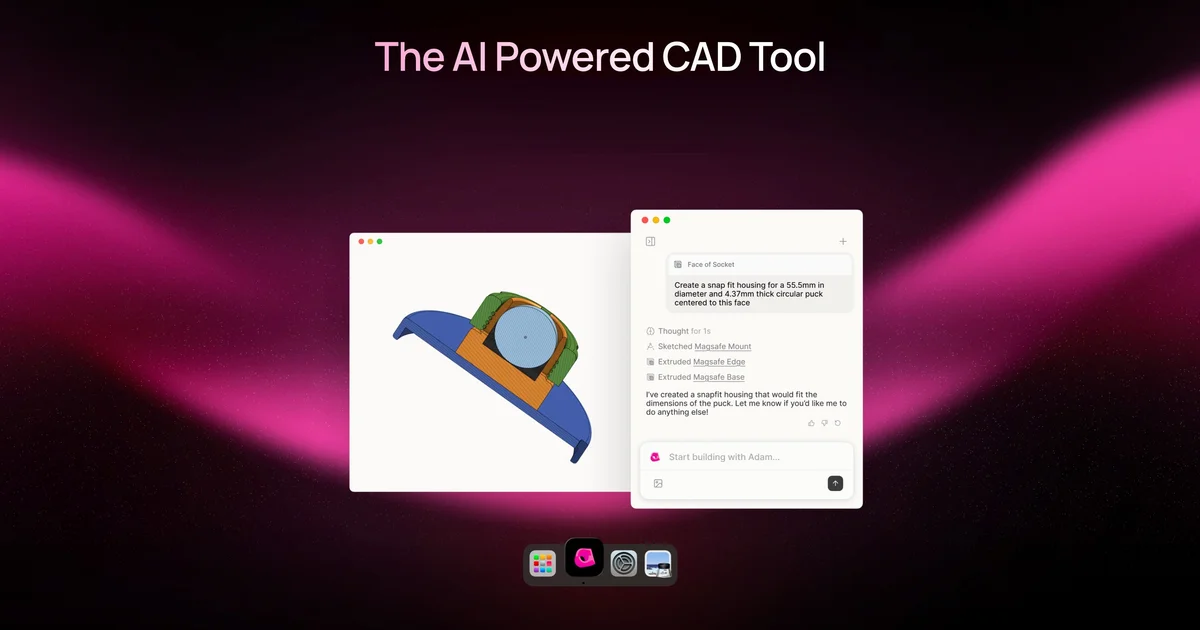
Adam is an AI CAD agent that helps mechanical engineers build hardware faster. Open source text-to-CAD web app with parametric controls and multi-format export.
TL;DR
TL;DR: Adam CAD is an AI-powered CAD agent that transforms natural language and images into 3D models, with extensions for Onshape and Fusion 360. The open source web app (CADAM) runs in your browser using WebAssembly.
Source and Accuracy Notes
- Project page: adam.new
- Source repository: github.com/Adam-CAD/CADAM
- License: GPL-3.0 (verified from GitHub search results)
- HN launch thread: news.ycombinator.com/item?id=44182206
What Is Adam CAD?
Adam is an AI CAD agent designed for mechanical engineers who want to accelerate hardware development. Unlike traditional CAD tools that require manual modeling, Adam lets you describe what you want in plain English or upload reference images, and it generates 3D models for you.
The project has two components:
- Adam (Commercial Product) — AI-powered extensions for Onshape and Fusion 360 that integrate directly into your existing CAD workflow
- CADAM (Open Source) — A browser-based text-to-CAD web application built with WebAssembly
Both tools target the same problem: reducing the repetitive clicks in CAD workflows by replacing them with natural language prompts.
Setup Workflow
Option 1: Use Adam Extensions (Commercial)
Adam provides browser extensions for popular CAD platforms:
For Onshape:
- Visit adam.new and click “Onshape Extension”
- Install the extension from your browser’s extension store
- Open Onshape in your browser
- Use the Adam sidebar to describe parts or select geometry for AI-assisted editing
For Fusion 360:
- Download the Fusion extension from adam.new
- Install via Fusion 360’s add-ins menu
- Access Adam features from within Fusion’s interface
Option 2: Self-Host CADAM (Open Source)
CADAM is the open source text-to-CAD web application. Here’s how to run it locally:
Prerequisites:
- Node.js 20.19.0+ or 22.12.0+
- npm 10+
- Supabase CLI
Installation steps:
# Clone the repository
git clone https://github.com/Adam-CAD/CADAM.git
cd CADAM

# Install dependencies
npm install

# Start Supabase
npx supabase start
npx supabase functions serve --no-verify-jwt

# Start the development server
npm run dev
```bash

**Environment setup:**

Copy `.env.local.template` to `.env.local` and configure:

```bash
VITE_SUPABASE_ANON_KEY="<Your Supabase Anon Key>"
VITE_SUPABASE_URL='http://127.0.0.1:54321'
ANTHROPIC_API_KEY="*** Anthropic API Key>
OPENROUTER_API_KEY="*** OpenRouter API Key>
OPENAI_API_KEY="*** OpenAI API Key>
GOOGLE_API_KEY="*** Google API Key>
FAL_KEY="<Your FAL API Key>"
SUPABASE_SERVICE_ROLE_KEY="<Your Service Role Key>"
CADAM supports multiple AI providers (Anthropic, OpenRouter, OpenAI, Google, FAL) for text-to-3D generation.
Deeper Analysis
Key Features
Adam (Commercial Extensions):
- Part Editing — Replace granular clicks with a single prompt. Instead of manually extruding, filleting, and chamfering, describe the change you want
- Selection Context — Select geometry in your CAD tool and use it as context for AI operations. The AI understands what you’ve selected and generates appropriate features
- Feature Tree Optimization — Find duplicate features and merge them to make your design tree more robust and maintainable
- Parametrization — Convert ad-hoc models by setting distinct variables which cascade throughout your design
CADAM (Open Source):
- Natural Language Input — Describe your 3D model in plain English
- Image References — Upload images to guide model generation
- Real-time Preview — See your model update instantly with Three.js
- Parameter Extraction — Automatically identifies adjustable dimensions
- Smart Updates — Efficient parameter changes without AI re-generation
- Multiple Export Formats — Export as STL, SCAD, or DXF files
- Library Support — Includes BOSL, BOSL2, and MCAD libraries
Backing and Traction
Adam raised a $4.1M seed round led by TQ Ventures. The project has strong endorsement from notable figures:
- Guillermo Rauch (Vercel CEO): “Adam is the v0 of CAD (c0?). A lot of incumbents will be decimated by startups ‘under-doing’ them with AI.”
- Eli Brown (Y Combinator | Guilded): “CAD software has accumulated decades of cruft, making it complex and unapproachable. @makewithadam is building modern, AI-native CAD software that’s simple and intuitive.”
- Dalton Caldwell (Y Combinator): Featured in testimonials
The open source CADAM repository has over 4,000 stars on GitHub, indicating strong community interest.
Technical Architecture
CADAM runs entirely in the browser using WebAssembly, which means:
- No server-side processing for basic operations
- Works offline after initial load
- Privacy-friendly (your models don’t leave your browser unless you explicitly use cloud AI features)
The commercial Adam extensions integrate with existing CAD platforms rather than replacing them, which is a smart go-to-market strategy. Engineers keep their existing workflows and tools while gaining AI assistance.
Practical Evaluation Checklist
For Mechanical Engineers:
- Do you spend significant time on repetitive CAD operations (extrusions, fillets, patterns)?
- Would natural language descriptions speed up your workflow?
- Do you use Onshape or Fusion 360 as your primary CAD tool?
- Are you comfortable with AI-generated geometry that may need manual refinement?
- Do you need parametric control over generated models?
For Hobbyists/Makers:
- Do you want to generate 3D models without learning complex CAD software?
- Are you comfortable with open source tools and self-hosting?
- Do you need STL export for 3D printing?
- Is browser-based operation important (no heavy desktop installs)?
For Teams:
- Do you need API access for pipeline integration? (Check if Adam exposes this)
- Is on-premise deployment required for IP protection?
- Do you need collaboration features beyond what Onshape/Fusion provide?
Security Notes
For CADAM (Self-Hosted):
- API keys for AI providers (Anthropic, OpenAI, etc.) are stored in
.env.local - Supabase handles authentication and data storage
- Review Supabase security configuration before exposing to production
- WebAssembly execution happens client-side, but AI API calls go to external services
For Adam Extensions:
- Extensions run in your browser and communicate with Adam’s servers
- Your CAD models may be sent to Adam’s servers for AI processing
- Review Adam’s privacy policy and data handling practices
- Consider IP implications if working on proprietary designs
General:
- Never commit
.env.localfiles with API keys to version control - Use
.gitignoreto exclude environment files - Rotate API keys periodically
- Monitor API usage to avoid unexpected costs
FAQ
Q: Is Adam CAD free to use?
A: CADAM (the open source web app) is free and GPL-3.0 licensed. The commercial Adam extensions for Onshape and Fusion 360 likely have pricing tiers, though specific pricing isn’t publicly listed on their site. Check adam.new for current pricing.
Q: Can I use Adam without internet access?
A: CADAM runs in your browser using WebAssembly, so basic operations work offline after initial load. However, AI-powered text-to-CAD generation requires API calls to external services (Anthropic, OpenAI, etc.), which need internet connectivity.
Q: What file formats does CADAM support?
A: CADAM exports to STL (for 3D printing), SCAD (OpenSCAD format), and DXF (for 2D drawings). The commercial Adam extensions work within Onshape and Fusion 360, so you get whatever export formats those platforms support.
Q: Does Adam work with other CAD tools besides Onshape and Fusion 360?
A: Currently, Adam only offers extensions for Onshape and Fusion 360. CADAM (the open source web app) is standalone and doesn’t integrate with other CAD tools. Check their roadmap or contact the team if you need support for other platforms.
Q: How accurate is the AI-generated geometry?
A: Based on HN comments, the AI generates reasonable geometry but may need manual refinement for production use. One user noted difficulty generating a “regular truncated tetrahedron,” suggesting complex geometries may require iteration. Think of it as a starting point, not a final manufacturing-ready model.
Q: Can I upload existing models and modify them with AI?
A: The HN comments show users asking about this feature, but it’s unclear if it’s currently supported. The commercial Adam extensions mention “Part Editing” which suggests some level of modification capability. Check the documentation or contact Adam for clarification.
Q: Is there an API for integrating Adam into automated workflows?
A: HN commenters asked about API access, but there’s no public documentation of a REST API. CADAM is a web application, not an API service. If you need programmatic access, you may need to contact the Adam team directly or contribute to the open source project.
Conclusion
Adam CAD represents a promising approach to AI-assisted mechanical design. The dual strategy of commercial extensions for existing CAD platforms plus an open source web app gives engineers multiple entry points.
For professionals already using Onshape or Fusion 360, the Adam extensions offer a low-friction way to experiment with AI-assisted design without changing workflows. For hobbyists, educators, or those wanting full control, CADAM provides a self-hosted alternative.
The $4.1M seed round and endorsements from Vercel and Y Combinator figures suggest the team has resources and credibility. The 4,000+ GitHub stars on CADAM indicate strong community interest in open source text-to-CAD.
Key considerations before adopting:
- AI-generated geometry may require manual refinement for production use
- Commercial pricing isn’t publicly listed (contact for demo)
- API access for automation isn’t documented
- IP considerations when sending proprietary designs to cloud AI services
If you’re a mechanical engineer tired of repetitive CAD operations, or a maker who wants to generate 3D models without learning complex software, Adam CAD is worth exploring. Start with the open source CADAM to understand the capabilities, then evaluate whether the commercial extensions fit your workflow.
Links:
- Website: adam.new
- CADAM (Open Source): github.com/Adam-CAD/CADAM
- Live Demo: adam.new/cadam
- HN Discussion: news.ycombinator.com/item?id=44182206
Related Posts
ai-setup
Recall – Persistent Memory for Claude Code via MCP Hooks
Recall gives Claude Code a permanent memory store that survives session restarts and context compaction. Four hooks capture and restore context automatically — with cloud SaaS or self-hosted options.
2/28/2026
dev-tools
Automotive Skills Suite for AI Engineering
Evaluate Automotive Skills Suite for APQP, ASPICE, HARA, safety-plan, and DIA workflows with setup notes, governance risks, and SME review guidance.
5/28/2026
dev-tools
awesome-agentic-ai-zh Roadmap Guide
Explore awesome-agentic-ai-zh as a Chinese agentic AI learning roadmap, with setup notes, track selection, study workflow, and evaluation guidance.
5/28/2026