TL;DR: ytch.tv rebuilds YouTube as cable television, with a fixed lineup of channels where each one plays a scheduled video, so every visitor watches the same thing at the same moment. You surf with a numeric keypad, an on-screen remote and a TV guide, and there is no pause button anywhere. The lineup has grown from 12 channels at launch to 40 today.
What it is
ytch.tv is a browser page that looks like a television set. Open it and you get a black screen with a green CH 01 label in the corner and a remote control floating on the right edge. There is a power switch, a guide button, volume, mute, channel up and down, a numeric keypad for typing a channel number, a settings gear and a fullscreen toggle.
The interesting part is what sits behind that interface. ytch.tv does not let you pick a video. Each of its 40 channels is a category (Science and Technology, Food, Chess, Public Domain Movies), and every channel runs on a timetable, so the video you land on is the one playing right now for everybody else on the site. Flip to another channel and the one you left keeps running in the background. Come back ten minutes later and you have missed whatever it moved on to.
The author, who posts on Hacker News as hadisafa, built it as a nostalgia project and told the launch thread that there is no backend behind it, just HTML, CSS and JavaScript, with YouTube’s own widget API handling playback. The schedule is not a live broadcast. It is a timetable the author wrote, and that is exactly why the site feels like cable: the lineup never changes while you watch.
Why it matters
Streaming solved the problem of finding something to watch and created a new one. You open YouTube to kill five minutes and end up twenty minutes into a recommendation rabbit hole with nothing to show for it. Every surface competes for the same clock, and the only decision you get to make is the first one.
ytch.tv takes that decision away. There is no search box, no feed, no recommendations. There are 40 channels, one of them is on, and that is the same bargain you made with cable, right down to the part where you miss the good stuff because it aired while you were watching something else.
The project also says something about attention. The site does not let you pause, and channels do not wait for you. That is a design choice rather than an oversight, and it runs directly against what every streaming app does. If you have ever wanted a video player that would not let you fall down a rabbit hole, this is that, with a remote control.
Getting it running
There is nothing to install. ytch.tv is a web page, and the whole interface is keyboard driven, which is the part that surprises most people.
Open https://ytch.tv/ and the first channel starts on its own. Press the power button on the remote to kill the set and bring it back. Everything else is a key:
| Key | Action |
|---|---|
ArrowUp and ArrowDown | Move one channel up or down |
0 through 9 | Type a channel number |
Enter | Jump to the channel number you typed |
+ or = | Volume up |
- or _ | Volume down |
m | Mute |
Space | Open or close the TV guide |
i | Open or close the settings panel |
f | Fullscreen |
Shift | Show or hide the remote |
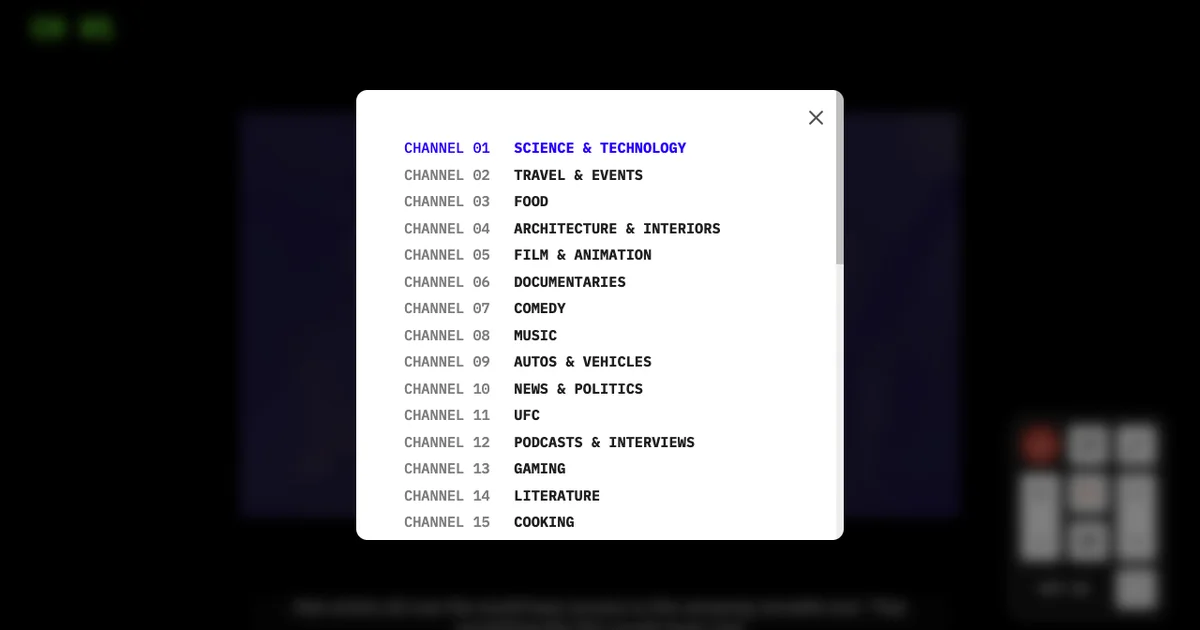
The guide is the piece worth spending time on. It lists channel numbers and names rather than individual titles, so a lookup tells you the genre before you commit to it. It does not tell you which video is on right now, which is a fair trade for something that behaves like a set-top box.
The current lineup, read straight off the live guide, looks like this:
[
  "Science & Technology",
  "Travel & Events",
  "Food",
  "Architecture & Interiors",
  "Film & Animation",
  "Documentaries",
  "Comedy",
  "Music",
  "Autos & Vehicles",
  "News & Politics",
  "UFC",
  "Podcasts & Interviews",
  "Gaming",
  "Literature",
  "Cooking",
  "Short Films",
  "Game Shows",
  "Cartoons",
  "Baseball",
  "Product Reviews",
  "Workshop",
  "Fashion",
  "Chess",
  "Video Essay",
  "Nature & Wildlife",
  "Soccer",
  "True Crime",
  "Classical Music",
  "Horror",
  "Economics & Finance",
  "Health & Fitness",
  "Movie Trailers",
  "Vlogs",
  "Camping & Outdoors",
  "History",
  "Programming",
  "Arts & Crafts",
  "Motorsports",
  "Public Domain Movies",
  "Mathematics"
]
The sync trick underneath is not complicated. Every visitor resolves the same video from the same schedule, so the server never has to tell anyone what is on:
// A sketch of the trick behind ytch.tv, where every viewer resolves the same
// video from the same schedule. The shipped player is minified and string
// obfuscated, so treat this as an illustration rather than the real source.

const SCHEDULE = {
  1: [['videoIdA', 0], ['videoIdB', 150]],   // minutes from midnight
  2: [['videoIdC', 30]],
  3: [['videoIdD', 0], ['videoIdE', 240]],
};

function nowPlaying(channel, minutesNow) {
  const slots = SCHEDULE[channel];
  const started = slots.filter(([, start]) => start <= minutesNow);
  return (started.length ? started[started.length - 1] : slots[0])[0];
}
Make your own channel
YTCH Studio is the creator side of the project, at https://ytch.tv/studio. The landing screen asks for a username and password and offers a sign up link for new accounts, with Terms of Service and Privacy Policy underneath. The page description sums up the pitch: create your own channels, add your favorite YouTubers, playlists, and more.
What that gives you is the ability to build a lineup the public player does not have, assembled from creators you actually want to watch and running on the same fixed schedule. A channel is always on, and you do not get to choose what.
I could not verify the rest of the Studio flow from the outside, because everything past that account screen sits behind a login. I also could not find published pricing on the pages I could reach, so read the terms before you commit anything.
What to watch for
The biggest surprise for most people is that there is no pause. You cannot stop a video, rewind it, or skip ahead, and switching channels does not stop the one you left. It just keeps playing somewhere you are not watching. The author said in the launch thread that more control options would come, and the settings panel today has three toggles: show channel name, show captions, and show title. No quality control, no playback speed.
The static transition between channels is the other thing people argue about. It is deliberate, it sells the cable feel, and a few people in the thread asked for it to be softened or dropped. One commenter pointed out that on a slow connection the white noise between channels stretched long enough to be genuinely unpleasant.
Three structural limits are worth stating plainly:
- The schedule belongs to the author and is written into the client, so a channel serving a week-old video behaves exactly like a channel serving something current.
- Playback runs through YouTube’s own player, so an embed that gets removed or blocked takes that channel down with it.
- There is no public source repository. Someone asked on Hacker News whether the code was open, and the shipped main.js is minified and string obfuscated rather than readable.
None of that makes the idea worse. A fixed timetable and a remote control are a small, coherent idea executed carefully, which is a rarer combination than it sounds.
Source and Accuracy Notes
- Project page: https://ytch.tv/ (ytch.xyz redirects here), verified via direct visit
- Studio page: https://ytch.tv/studio, verified via direct visit
- HN launch thread: https://news.ycombinator.com/item?id=41247023 (Show HN: If YouTube had actual channels, 2024-08-14, 2741 points, 514 comments)
- Channel lineup, keyboard shortcuts and interface details read from the live site and its main.js on 2026-10-30
- License: proprietary web service with no public repository; Terms of Service last updated March 23, 2026
- Support links on the site point to Buy Me a Coffee and Patreon
Related Posts
ai-setup
Prism – AI Video Workspace and API for Creators (YC X25)
Prism is a YC X25 AI video platform combining generation, editing, and an API for workflow automation. Generate assets, edit on a timeline, and integrate via.
5/28/2026
review
Mosaic – Agentic Video Editing With a Node-Based Canvas
Mosaic lets you build and run multimodal AI video editing agents on a node-based canvas. Upload raw footage, design a workflow, and let AI handle the heavy.
5/28/2026
review
Kita – VLM-Powered Credit Review Automation
Kita uses vision-language models to automate document-based credit review for lenders in emerging markets, parsing 50+ document types from PDFs to photos.
5/29/2026