Webstudio - Open Source Website Builder With No Vendor
Webstudio is an open source visual website builder that empowers developers and designers to build fast sites using modern web standards. AGPL-3.0 licensed, self-host or use the cloud.
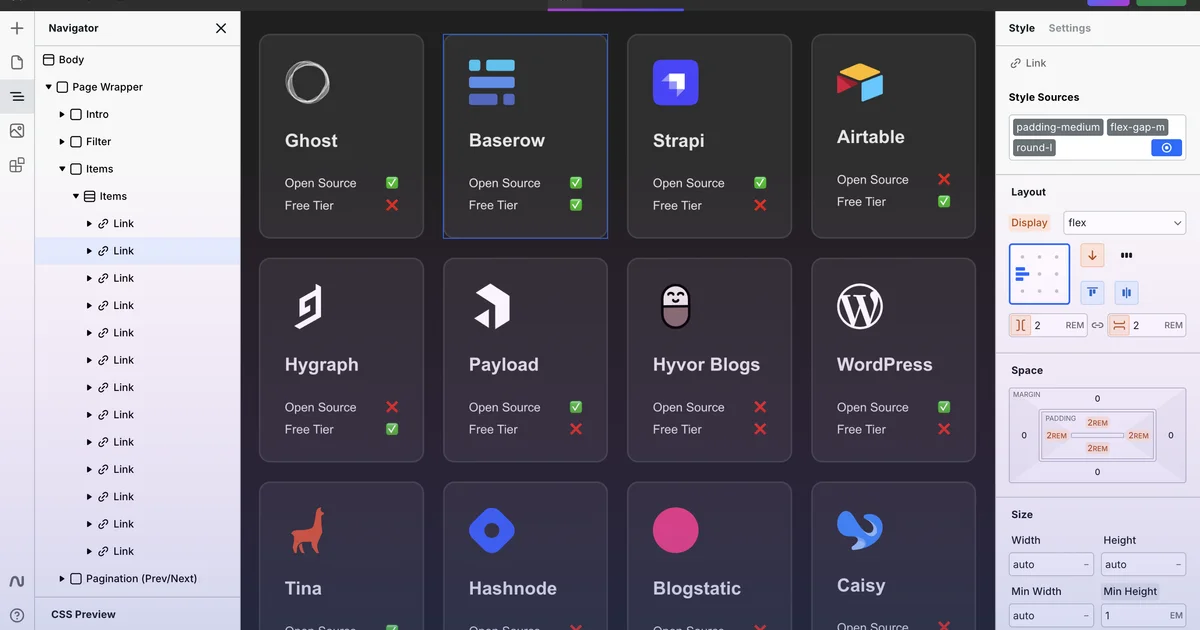
TL;DR
TL;DR: Webstudio is an open source visual website builder with AGPL-3.0 licensing. You get a drag-and-drop editor, modern web standards output, CMS integrations (Strapi, Supabase, etc.), and the choice of cloud hosting or fully self-hosted deployment — no vendor lock-in either way.
Source and Accuracy Notes
- Project page: webstudio.is — verified landing page, pricing, feature list
- Source repository: github.com/webstudio-is/webstudio — verified README, AGPL-3.0 license
- License: AGPL-3.0-or-later for Webstudio core (verified via README); proprietary EULA applies to the optional
sdk-components-animationpackage only - HN launch thread: news.ycombinator.com/item?id=35889188 — “Show HN: Webstudio Beta Prelaunch – open-source alternative to Webflow”
- Stats (as of mid-2026, from webstudio.is pricing page): 229.8K projects, 8.7K GitHub stars, 138.9K users
What Is Webstudio?
Webstudio is a visual website builder built for developers and designers who want ownership over their infrastructure and data. Unlike closed platforms, the core of Webstudio is fully open source under AGPL-3.0, meaning you can inspect, modify, and deploy your own instance.
From the README:
Webstudio is an Open Source Visual Development Platform for developers, designers, and cross-functional teams. You own the data, components, and infrastructure. You can use the hosted version or roll out your own.
The platform ships as two products:
- Webstudio Cloud — hosted by Webstudio, Inc. Free for hobby projects. Pro plan starts at $15/month (billed yearly) with custom domains, 100,000 page views/month, unlimited form submissions, staging publish, and CMS integrations.
- Webstudio Self-host — deploy on your own infrastructure. The core builder engine is the same; you only swap the hosting layer.
Key Features
- Visual drag-and-drop editor — real-time canvas with no iframe embedding required
- Modern web standards output — generates semantic HTML, CSS, and minimal JavaScript; no bloated framework runtime
- CMS integrations — out-of-the-box connectors for Strapi and Supabase, with a generic CMS interface for others
- Custom components — extend the component library with your own React components
- Publishing targets — cloud (Webstudio-hosted), self-hosted (Docker, Node.js), or export as static files
- Collaborative sharing — share projects with granular permissions on Pro and Team plans
The Proprietary Exception
The core builder (all functionality in the main repository) is AGPL-3.0. However, one optional package — sdk-components-animation — is proprietary and requires accepting a separate EULA. This is clearly disclosed in the README. The core editing experience is fully open source.
Setup Workflow
Option 1 — Webstudio Cloud (fastest)
- Go to apps.webstudio.is/dashboard
- Sign up for free — no credit card required for the Hobby tier
- Create a new project and start building immediately
Option 2 — Self-Host
The self-hosted option gives you full control over your deployment. The typical stack is:
# Clone the repository
git clone https://github.com/webstudio-is/webstudio.git
cd webstudio

# Follow the deployment guide in docs/
# docs.webstudio.is/contributing/contributing-for-developers
Webstudio publishes Docker images and provides deployment documentation for common platforms. The self-hosted builder communicates with your own data store, so you retain all project data.
Connecting a CMS
Webstudio supports connecting to external CMS backends. From the pricing page, the following are natively supported:
- Strapi — open source headless CMS
- Supabase — open source Firebase alternative
To connect a CMS in the visual editor, use the Content Mode panel (available on Pro and Team plans). This lets you bind dynamic content from your CMS to pages without writing glue code.
How It Compares to Webflow
The Show HN post explicitly calls Webstudio “an open-source alternative to Webflow.” The key differences:
| Webflow | Webstudio | |
|---|---|---|
| License | Proprietary SaaS | AGPL-3.0 (core) |
| Data ownership | Vendor-hosted only | Cloud OR self-hosted |
| CMS integrations | Native + custom | Strapi, Supabase + generic |
| Export | Closed format | Static HTML/CSS/JS export |
| Pricing | $14-$36/mo | Free (hobby) / $15/mo (Pro) |
Webflow projects are locked to the Webflow platform unless you export to code — and even then, the exported code is not designed to be re-imported. Webstudio’s self-hosted option means your project can live entirely outside the platform.
Practical Evaluation Checklist
- Can I build a multi-page site without writing code? Yes — visual editor with pages, components, and global styles.
- Can I self-host without the Webstudio cloud? Yes — the builder engine runs on your own infrastructure.
- Is the output semantic and fast? Webstudio generates clean HTML/CSS; the 229.8K-project user base and Cloudflare-hosted stats on the pricing page suggest it handles scale.
- Can I export my work? Yes — Webstudio supports exporting projects as static files.
- Is the license truly open? Core is AGPL-3.0. The
sdk-components-animationpackage is proprietary — this is disclosed but worth noting if you need animation components. - Are there CMS integrations? Yes — Strapi and Supabase natively; generic CMS interface for others.
Security Notes
- Self-hosted deployments keep all project data on your own infrastructure — no vendor lock-in for data either.
- The Webstudio Cloud is hosted on Cloudflare (visible from the pricing page infrastructure section), which handles DDoS protection and edge caching at the network layer.
- Two-factor authentication is available on Webstudio Cloud accounts (standard for SaaS platforms).
FAQ
Q: Is Webstudio really free? A: The Hobby tier on Webstudio Cloud is free with unlimited projects and pages, Wstd.io subdomain, and project export. Pro ($15/mo billed yearly) adds custom domains, 100,000 page views/month, staging publish, and CMS integrations.
Q: Can I migrate from Webflow to Webstudio? A: Webstudio has a copy-paste workflow for moving designs from Webflow. The HN launch thread and the webstudio.is/copy-paste page both document this. Note that complex Webflow interactions may need manual recreation.
Q: Does the proprietary sdk-components-animation package affect core websites?
A: No. It is an optional add-on. The core editor, all standard components, and the visual builder are fully AGPL-3.0. You only encounter the proprietary license if you explicitly install and use that specific package.
Q: Can I use Webstudio without an internet connection? A: The visual editor requires a browser and a running instance. For offline use, deploy the self-hosted version on local infrastructure. The editor itself is not a desktop app — it runs as a web service.
Q: Who maintains Webstudio? A: Webstudio, Inc. maintains the cloud offering and the open source repository. The GitHub shows active development — 17 issues closed and 49 merged PRs in the last 30 days as of mid-2026.
Conclusion
Webstudio fills a real gap between closed SaaS builders like Webflow and hand-coding from scratch. For developers who want a visual editor without giving up data ownership or paying escalating platform fees, it is one of the most credible open source options available today. The AGPL-3.0 core license is genuine — not a “source available” trap — and the self-hosted deployment path is a first-class citizen, not an afterthought.
If you are evaluating Webflow alternatives or looking for a visual builder that you can actually self-host, Webstudio is worth an afternoon to try.
Related Posts
dev-tools
AgentMesh – Define AI Agent Teams in YAML
Define multi-agent AI workflows in YAML and run them locally with one command. AgentMesh brings Docker Compose patterns to AI agent orchestration.
5/28/2026
ai-setup
IonRouter – Fast Low-Cost AI Inference API
IonRouter is a YC W26 inference API routing open-source and fine-tuned models via an OpenAI-compatible endpoint, built on a C++ runtime optimized for GH200.
5/28/2026
review
Mosaic – Agentic Video Editing With a Node-Based Canvas
Mosaic lets you build and run multimodal AI video editing agents on a node-based canvas. Upload raw footage, design a workflow, and let AI handle the heavy.
5/28/2026