Wealthfolio - Private Open-Source Portfolio Tracker
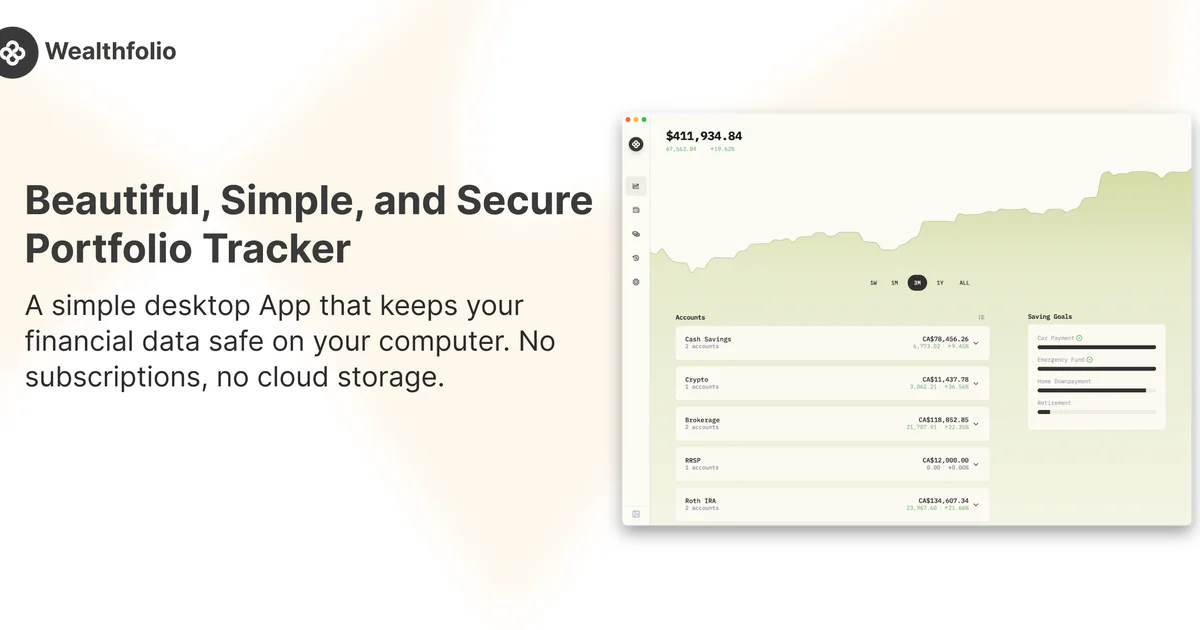
Wealthfolio is a free, open-source portfolio tracker that keeps your financial data on your device. Track investments, net worth, and performance across desktop, iOS, and self-hosted Docker.
TL;DR
TL;DR: Wealthfolio is an open-source, local-first investment tracker that runs on macOS, Windows, Linux, iOS, and Docker — your financial data never leaves your device unless you opt into optional broker sync.
Source and Accuracy Notes
- Project page: wealthfolio.app
- Source repository: github.com/wealthfolio/wealthfolio
- License: AGPL-3.0 (verified via GitHub API
license.spdx_id) - HN launch thread: news.ycombinator.com/item?id=46006016
What Is Wealthfolio?
Wealthfolio is a portfolio tracker built with Tauri (Rust backend + TypeScript frontend). The project describes itself as:
“The open-source, private portfolio tracker — investments, net worth, spending, and simulations. Local-first: your data lives on your device.”
The app launched on HN with 676 points and has accumulated over 7,600 GitHub stars. Version 2.0 added iOS and Docker support on top of the existing desktop apps.
Core Features
- Portfolio tracking across multiple accounts and asset types
- Performance analytics with true time-weighted and money-weighted returns, benchmark comparison, and historical analysis
- Activity management with CSV import for trades, dividends, and transfers
- Goal planning with allocation management
- Multi-currency support with exchange rate management
- Addon system — TypeScript SDK with hot reload, permission model, and secrets management
- Optional broker sync via Wealthfolio Connect (30+ institutions, read-only)
What “Local-First” Means Here
All portfolio data is stored in a local SQLite database (wealthfolio.db). No account creation, no cloud database, no telemetry required. The optional Wealthfolio Connect subscription adds encrypted multi-device sync and automated brokerage data feeds, but manual tracking and CSV import are free forever.
How to Run Wealthfolio
Desktop (macOS, Windows, Linux)
Download the installer from wealthfolio.app/download. The desktop app is a native Tauri binary — no runtime dependencies.
iOS
Available on the App Store.
Self-Hosted with Docker
Wealthfolio ships a web mode with a local Axum (Rust) REST API server and a Vite frontend.
# Clone and set up environment
git clone https://github.com/wealthfolio/wealthfolio.git
cd wealthfolio
cp .env.web.example .env.web

# Install dependencies (pnpm required)
pnpm install

# Start backend + frontend dev server
pnpm run dev:web
```bash

The Vite dev server runs at `http://localhost:1420` and proxies API calls to the Axum backend. For production Docker deployment, see the [self-hosting docs](https://wealthfolio.app/docs/guide/self-hosting/docker).

### Building from Source

Prerequisites: Node.js, pnpm, Rust, and Tauri CLI.

```bash
git clone https://github.com/wealthfolio/wealthfolio.git
cd wealthfolio
pnpm install
cp .env.example .env

# Development mode (Tauri desktop)
pnpm tauri dev

# Production build
pnpm tauri build
Deeper Analysis
Why Wealthfolio Stands Out
Most portfolio trackers fall into two camps: cloud-based SaaS (Personal Capital, Wealthfront) that require linking bank credentials to a remote server, or spreadsheets that require manual maintenance. Wealthfolio occupies a middle ground — it offers the polish of a SaaS product with the privacy guarantees of a local-first app.
The Tauri architecture is worth noting. Unlike Electron apps that bundle a full Chromium instance, Tauri uses the OS’s native webview. This means smaller binaries, lower memory usage, and a smaller attack surface. The Rust backend handles database operations and API calls, while the TypeScript frontend handles the UI.
The Addon System
Wealthfolio 2.0 introduced an addon architecture that lets developers extend the app without forking it. Addons are TypeScript packages with:
- A permission system (user must consent to each capability)
- Hot reload during development
- Access to accounts, holdings, activities, and market data
- Secrets management for API keys
- UI integration (custom pages, navigation items, components)
Official and community addons are maintained in the wealthfolio-addons repository.
Pricing Model
The core app is free and AGPL-3.0 licensed. Wealthfolio Connect is an optional paid subscription that covers the cost of brokerage data connections (the README states it “covers the real cost of the brokerage data connections”). Manual tracking, CSV import, and all core features remain free without any subscription.
Security Notes
- Local SQLite database — financial data never leaves your device by default
- No telemetry or analytics in the core app (the website uses Partytown to isolate third-party scripts)
- AGPL-3.0 license — source code is auditable; fork if you disagree with the project’s direction
- Optional broker sync is read-only — Wealthfolio Connect can pull data from brokerages but cannot execute trades
- Encrypted multi-device sync when using Wealthfolio Connect
Practical Evaluation Checklist
Before adopting Wealthfolio, verify:
- Your brokerage is in the 30+ supported institutions (if you want auto-sync)
- You are comfortable with AGPL-3.0 obligations if you plan to modify and redistribute
- The asset types you hold (stocks, ETFs, crypto, real estate) are supported
- CSV import covers your broker’s export format (check activity types docs)
- You have pnpm installed if building from source (the project uses pnpm, not npm)
FAQ
Q: Is Wealthfolio really free? A: Yes. The core desktop, iOS, and Docker apps are free forever. Manual tracking and CSV import have no paywall. Wealthfolio Connect is an optional paid add-on for automated broker sync and encrypted multi-device sync.
Q: Can I self-host Wealthfolio?
A: Yes. Wealthfolio supports a web mode with a Docker deployment. Clone the repo, copy .env.web.example to .env.web, run pnpm install and pnpm run dev:web. See the self-hosting documentation for production setup.
Q: What data format does Wealthfolio use?
A: All data is stored in a local SQLite database file (wealthfolio.db). You can back it up by copying the file. CSV import/export is supported for activities.
Q: Does Wealthfolio support cryptocurrency? A: The app tracks investments across multiple asset types. Check the activity types documentation for the full list of supported transaction types.
Q: How does Wealthfolio compare to Ghostfolio? A: Both are open-source portfolio trackers. Wealthfolio uses Tauri (Rust + native webview) while Ghostfolio uses NestJS + Angular. Wealthfolio offers an iOS app and an addon system; Ghostfolio has a more mature Docker-first deployment story. Both support multi-currency and local-first data storage.
Conclusion
Wealthfolio fills a real gap for developers and privacy-conscious investors who want a polished portfolio tracker without surrendering their financial data to a cloud service. The Tauri architecture keeps binaries small and fast, the local SQLite database means zero vendor lock-in, and the addon system opens the door for community-driven extensions.
If you self-host your tools and care about financial privacy, Wealthfolio is worth a look. Download it, import your CSV, and see if it fits your workflow — it takes under five minutes to get started.
Related Posts
dev-tools
Automotive Skills Suite for AI Engineering
Evaluate Automotive Skills Suite for APQP, ASPICE, HARA, safety-plan, and DIA workflows with setup notes, governance risks, and SME review guidance.
5/28/2026
dev-tools
awesome-agentic-ai-zh Roadmap Guide
Explore awesome-agentic-ai-zh as a Chinese agentic AI learning roadmap, with setup notes, track selection, study workflow, and evaluation guidance.
5/28/2026
dev-tools
Baguette iOS Simulator Automation Guide
Set up Baguette for iOS Simulator automation, web dashboards, device farms, gesture input, streaming, and camera testing with Xcode caveats.
5/28/2026