VaultSandbox: a self-hosted SMTP testing gateway
VaultSandbox is a self-hosted SMTP testing gateway that validates SPF, DKIM and DMARC, scores spam, and injects realistic failures.
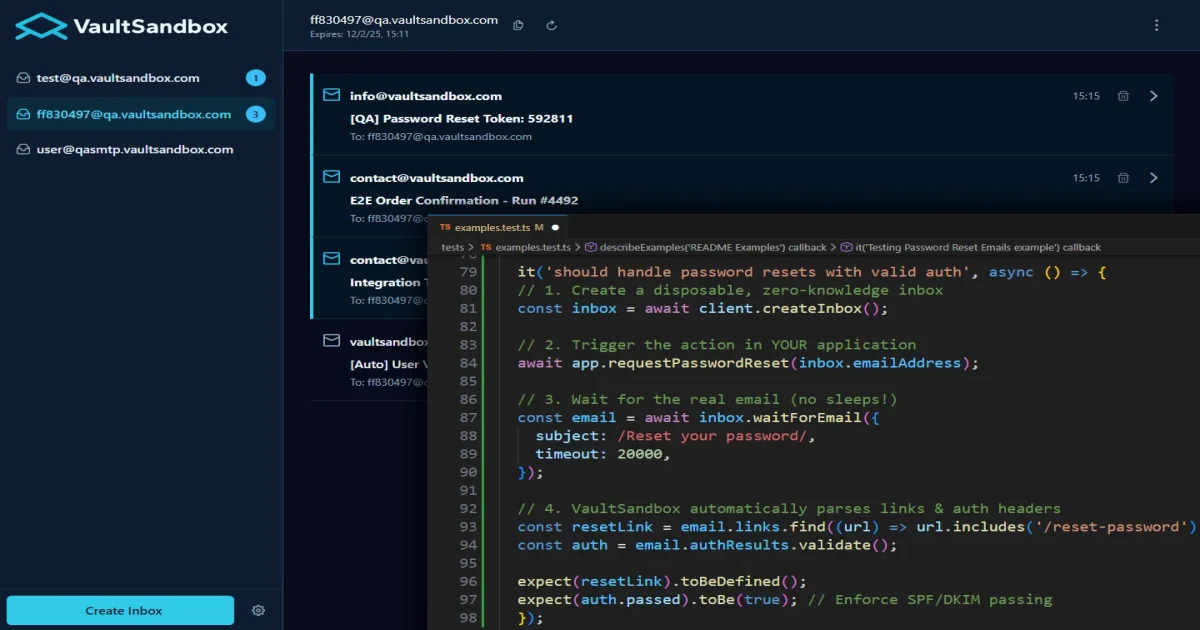
TL;DR: VaultSandbox runs a receive-only SMTP server that you host yourself, so an email test exercises real TLS, SPF, DKIM and DMARC instead of a mock that records a payload. It can also misbehave on purpose, injecting greylisting, dropped connections and latency. The gateway is Apache 2.0 licensed, and the official SDKs cover Node.js, Python, Go, Java and .NET.
What it is
VaultSandbox is an SMTP server for receiving test mail, and it behaves like a real one. It listens on port 25, negotiates TLS with Let’s Encrypt certificates, validates SPF, DKIM and DMARC on every message that arrives, checks reverse DNS, and scores message content against spam rules. Mail goes in and never comes back out. There is no outbound path and no open relay.
Underneath sits a NestJS backend with an Angular interface served from /app, a REST API, and an auto-generated API key you read out of a file on first boot. Everything ships as a single Docker image, vaultsandbox/gateway:latest.
What separates it from the usual mock mailer is the failure side. VaultSandbox can be told to behave badly on purpose, and that is the part worth reading the docs for.
Why it matters
A mock mailer answers exactly one question: did my code call the send function? Everything else stays invisible until production.
Real delivery asks more. Was TLS negotiated with a chain the client trusts. Does the SPF record cover the domain you actually send from. Does the DKIM signature still validate once the message is forwarded and the headers get rewritten. Would a receiving host greylist you for a few minutes before accepting. What does your error handling do when the connection drops halfway through a large body.
Most teams find out during a rollout, which is the worst possible time to learn that your DKIM selector was never published.
The self-hosted part matters for a different reason. A hosted test inbox means your password reset emails, with real account links in them, sit in someone else’s infrastructure. VaultSandbox keeps that traffic on a machine you control, and it runs entirely on localhost with no DNS and no TLS setup at all.
Getting it running
The quickest path is a local container on loopback, which needs no domain and no public ports.
# docker-compose.yml
services:
  vaultsandbox:
    image: vaultsandbox/gateway:latest
    ports:
      - '127.0.0.1:2525:25'
      - '127.0.0.1:8080:80'
    volumes:
      - vsb_data:/app/data

volumes:
  vsb_data:
Start it and point your mailer at port 2525. The web interface lands on port 8080.
Two other deployment modes exist for when you want a server other than your laptop to receive the mail. The VSX DNS mode encodes your public IP into a subdomain such as 1mzhr2y.vsx.email that resolves with MX records already set, so there is no DNS configuration to do, but ports 25, 80 and 443 have to be reachable from the internet. The custom domain mode uses a name you own and wants an A record plus an MX record, with Let’s Encrypt handling the certificates.
# VSX DNS mode: automatic domain and certificates
docker compose up -d
docker compose exec gateway cat /app/data/certificates/metadata.json
Once a gateway is running, the SDKs wait for mail over SSE instead of polling it, so a test blocks on the message rather than on a sleep.
import { VaultSandboxClient } from '@vaultsandbox/client';

const client = new VaultSandboxClient({
  url: process.env.VAULTSANDBOX_URL,
  apiKey: process.env.VAULTSANDBOX_API_KEY,
});

const inbox = await client.createInbox();
await sendPasswordReset(inbox.emailAddress);

const email = await inbox.waitForEmail({ timeout: 10000 });
const link = email.links.find((l) => l.includes('reset-password'));
expect(link).toBeDefined();

await inbox.delete();
One API across five languages
The client libraries share a shape, so moving a test suite between languages does not mean relearning the flow. Each one creates a throwaway inbox, waits for a message, reads the parsed body, and optionally deletes the inbox afterwards.
| Language | Install command | Registry |
|---|---|---|
| Node.js | npm install @vaultsandbox/client | npm |
| Python | pip install vaultsandbox | PyPI |
| Go | go get github.com/vaultsandbox/client-go | Go modules |
| Java | com.vaultsandbox:client | Maven Central |
| .NET | dotnet add package VaultSandbox.Client | NuGet |
The Python client takes the same shape as the Node one, with snake_case names and an async context manager.
import asyncio
from vaultsandbox import VaultSandboxClient

async def main():
    async with VaultSandboxClient(api_key="your-api-key") as client:
        inbox = await client.create_inbox()
        print(f"Send emails to: {inbox.email_address}")

        email = await inbox.wait_for_email()
        print(f"From: {email.from_address}")
        print(f"Subject: {email.subject}")

        await inbox.delete()

asyncio.run(main())
For CI there is also a vsb CLI written in Go. It watches inboxes over SSE and can block a pipeline until a message arrives.
# Fail the build if no verification email shows up within 30 seconds
vsb email wait --timeout 30s --subject "Password Reset"
Making it fail on purpose
This is the part that separates a real gateway from a fake one. Failures are configured per inbox, so the same server can behave correctly for one test and badly for the next.
- Latency injection, with jitter you control
- Greylisting simulated with a 451 temporary rejection
- Connections dropped partway through the session
- SMTP errors returned on demand, either a clean FIN or an abrupt RST
- Blackhole mode, where the server accepts a message and discards it silently
- Several of these combined, so retry and backoff logic gets exercised
Layering behaviours is the useful part. A retry loop that only ever sees a clean success is a retry loop you have not tested. Point it at a greylisting inbox that also drops the first connection and you will find out whether your backoff actually waits.
What to watch for
The project is still in public beta, with a GitHub discussions board open for feedback on the way to 1.0. Expect the API surface to move.
If you plan to use the VSX DNS or custom domain modes, check your network first. Many cloud providers and residential ISPs block outbound port 25 by default, and the VSX mode needs 25, 80 and 443 reachable from the public internet. The localhost mode sidesteps all of that and is the better starting point for local development.
Two details worth reading carefully on the project page. The server is receive-only, so it cannot help you test outbound delivery to a real provider. And the spam scoring is rule based rather than reputation based, which makes it a useful check on your templates but tells you little about how a mailbox provider will treat your sending domain.
Message retention defaults to seven days and is configurable. Per-inbox encryption using ML-KEM-768 is available where the server policy allows it, and the SDKs decrypt locally.
Source and Accuracy Notes
- Project page: https://vaultsandbox.com, verified by direct visit on 2026-11-05
- Source repository: vaultsandbox/gateway (Apache 2.0, 27 stars at time of writing), with SDKs in vaultsandbox/client-node, client-python, client-go, client-java, client-dotnet, plus the vsb-cli tool
- License: Apache 2.0, confirmed from the license metadata on each repository
- HN launch thread: https://news.ycombinator.com/item?id=46512203 (January 2026, 58 points), with a later post pointing at the GitHub repository
Related Posts
dev-tools
AgentMesh – Define AI Agent Teams in YAML
Define multi-agent AI workflows in YAML and run them locally with one command. AgentMesh brings Docker Compose patterns to AI agent orchestration.
5/28/2026
dev-tools
Cicada – FOSS CI/CD That Replaces YAML With a Real Language
Cicada replaces GitHub Actions and GitLab CI YAML configs with a custom functional DSL, letting you write pipelines using variables, functions, and shell.
5/29/2026
dev-tools
Stacktape – Deploy to AWS Without DevOps Knowledge
Stacktape is a DevOps-free cloud framework that cuts AWS deployment config by 98%. Supports serverless and containers, 20+ infra components built-in, and a.
5/29/2026