Skip – Build iOS and Android From One Swift Codebase
Skip is an open-source tool that compiles a Swift and SwiftUI codebase into native Jetpack Compose for Android, producing genuinely native apps on both platforms from one code base.
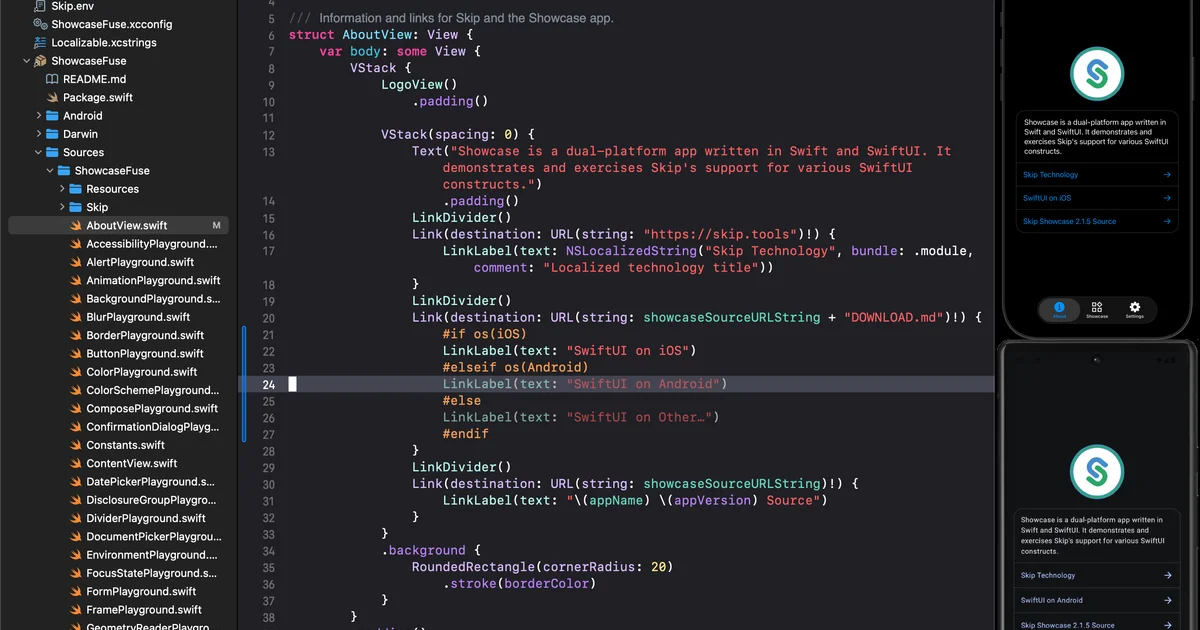
TL;DR
TL;DR: Skip is an open-source transpiler that converts a Swift and SwiftUI codebase into native Jetpack Compose for Android — you write once in Swift, ship native apps for both iOS and Android.
What Is Skip?
Skip is a free, open-source tool for building native iOS and Android apps from a single Swift codebase. You write your app in Swift and SwiftUI, and Skip produces real Jetpack Compose for Android. Both sides are genuinely native: SwiftUI on iOS, Jetpack Compose on Android. No web views, no custom runtime, no compromise on native performance.
The project describes itself as:
“One Swift Codebase. Two Native Platforms.”
Skip supports two development modes:
- Skip Stone — a full Swift-to-Android transpiler powered by a Kotlin code generator. Your Swift code runs on Android through generated Kotlin that mirrors the original Swift semantics.
- Skip Fuse — a runtime layer for Android that lets you run unmodified SwiftUI on Android, with a native SwiftUI implementation bridging to Jetpack Compose.
How Skip Works
At a high level, Skip takes your Swift source files and converts them to Kotlin/Jetpack Compose equivalents:
// Your SwiftUI code (runs on iOS natively)
import SwiftUI

struct ContentView: View {
    var body: some View {
        Text("Hello from Skip!")
            .padding()
    }
}
```bash

Skip transpiles this to Kotlin/Jetpack Compose for Android:

```kotlin
// Generated Kotlin (runs natively on Android)
@Composable
fun ContentView() {
    Text(
        text = "Hello from Skip!",
        modifier = Modifier.padding(padding = 16.dp)
    )
}
```bash

The generated Android code is real, readable Kotlin — not a custom runtime or virtual machine.

## Prerequisites and Setup

### Requirements

- **macOS** — required for iOS builds (Apple tooling)
- **Xcode** — for iOS development
- **Android Studio** — or any Android SDK installation
- **Homebrew** — for installing Skip

### Installation

Install Skip via Homebrew:

```bash
brew install skiptools/taps/skip
```bash

After installation, a `skip` command becomes available in your terminal.

### Initializing a New Project

```bash
skip new MyApp
cd MyApp
```bash

This scaffolds a project with a standard SwiftUI structure:

```text
MyApp/
├── Skip.toml         # Skip configuration
├── App/
│   ├── Sources/
│   │   ├── App/
│   │   │   └── MyApp.swift        # App entry point
│   │   └── ContentView.swift      # Main UI
│   └── Resources/
│       └── Assets.xcassets
├── iOS/
│   └── MyApp/                      # iOS Xcode project
└── android/
    └── app/src/main/kotlin/        # Generated Kotlin
```bash

### Building for iOS

```bash
skip build --platform ios
```bash

This invokes the standard Xcode build toolchain.

### Building for Android

```bash
skip build --platform android
```bash

This runs the Skip transpiler (Swift → Kotlin), then invokes Gradle to build the APK.

### Running on a Device or Emulator

```bash
skip run --platform ios    # Runs on iOS simulator or device
skip run --platform android  # Runs on Android emulator or device
```bash

### Running Both Platforms Concurrently

```bash
skip run                   # Builds and runs on both iOS and Android simultaneously
This starts both platform runtimes side-by-side, useful for live comparison.
Project Status and Community
Skip is actively maintained on GitHub:
- Repository: github.com/skiptools/skip
- Stars: 3,100+
- License: MPL-2.0
- Default branch: main
- Latest activity: June 2026
The project provides official channels for support and discussion:
Source and Accuracy Notes
- Project page: skip.dev
- Source repository: github.com/skiptools/skip
- License: MPL-2.0 (verified via GitHub API)
- HN launch thread: Show HN: Skip – Build native iOS and Android apps from a single Swift codebase
- Documentation: skip.dev/docs
FAQ
Q: Is Skip production-ready? A: Skip has been used to build real applications and powers its own documentation site. However, as a transpiler between two large platforms, some edge cases in SwiftUI semantics may require workarounds. Check the issue tracker for known limitations before committing to a large project.
Q: Does Skip require macOS? A: Yes. Building for iOS requires Apple tooling, which only runs on macOS. The Android side can be built on any platform, but the full workflow assumes macOS for simultaneous dual-platform development.
Q: How does Skip compare to Flutter or React Native? A: Unlike Flutter (which uses Dart and its own rendering engine) or React Native (which uses a JavaScript bridge), Skip produces genuinely native UI on both platforms — SwiftUI on iOS and Jetpack Compose on Android. There is no cross-platform runtime or web view.
Q: Can I use third-party Swift packages with Skip? A: It depends on the package. Pure Swift packages that don’t depend on platform-specific APIs can potentially work. Packages with iOS-only or Android-only native code will not transpile correctly.
Q: Is the generated Kotlin readable?
A: Yes — the generated Kotlin is human-readable and can be inspected in the android/ directory after transpilation.
Conclusion
Skip solves a specific problem: teams with iOS expertise who also need Android coverage, without maintaining two separate codebases or adopting a cross-platform runtime. The output on each platform is genuinely native — SwiftUI on iOS, Jetpack Compose on Android — with no web views or custom rendering layers in between.
If your team lives in Swift and needs to ship to both App Store and Play Store, Skip is worth evaluating. Start with brew install skiptools/taps/skip and skip new MyApp to feel it out.
For more, see the official getting started guide and browse the community forums.
Related Posts
dev-tools
Automotive Skills Suite for AI Engineering
Evaluate Automotive Skills Suite for APQP, ASPICE, HARA, safety-plan, and DIA workflows with setup notes, governance risks, and SME review guidance.
5/28/2026
dev-tools
awesome-agentic-ai-zh Roadmap Guide
Explore awesome-agentic-ai-zh as a Chinese agentic AI learning roadmap, with setup notes, track selection, study workflow, and evaluation guidance.
5/28/2026
dev-tools
Baguette iOS Simulator Automation Guide
Set up Baguette for iOS Simulator automation, web dashboards, device farms, gesture input, streaming, and camera testing with Xcode caveats.
5/28/2026