SelfDB Review: Self-Hosted Firebase Alternative
SelfDB is an open-source, self-hosted backend-as-a-service platform. Docker Compose stack with PostgreSQL 18, FastAPI, Deno serverless, realtime WebSockets, file storage, and admin dashboard.
TL;DR
TL;DR: SelfDB packages PostgreSQL 18, FastAPI, Deno serverless functions, and realtime WebSockets into a Docker Compose stack — a self-hosted alternative to Firebase and Supabase that you run on your own infrastructure.
Source and Accuracy Notes
- Project page: selfdb.io — verified live site, June 2026
- Source repository: github.com/Selfdb-io/SelfDB — verified README, June 2026
- License: MIT (SelfDB-mini, github.com/Selfdb-io/SelfDB-mini); source code available on GitHub under permissive license
- HN launch thread: news.ycombinator.com/item?id=45985395 — Show HN with 6 points
What Is SelfDB?
SelfDB is an open-source, self-hosted backend-as-a-service (BaaS) platform. It provides database management, file storage, realtime events, serverless functions, webhooks, and an admin dashboard — all orchestrated through Docker Compose on your own server.
The core goal is to give developers a Firebase/Supabase-like experience without vendor lock-in or per-seat pricing. The stack is built around PostgreSQL 18, with FastAPI as the API gateway, Deno 2.2 for serverless functions, and Phoenix (Elixir/OTP) for realtime WebSocket relay.
The project originated as a full open-source stack (MIT-licensed on GitHub), then expanded into a paid “Stable” edition with production hardening and priority support. The core Docker Compose setup described below works with the open-source release.
Platform Architecture
SelfDB consists of six containerized services:
Backend API (FastAPI) — Unified REST gateway exposing all platform features:
- JWT + refresh token authentication and user management
- Dynamic table operations with schema introspection
- SQL execution with parameterized query support
- Bucket and file management with multipart upload
- Serverless function deployment and execution
- Webhook management with delivery tracking
- WebSocket proxy for realtime connections at
/api/v1/realtime/ws - PG NOTIFY listener forwarding database events to Phoenix
Storage Service (FastAPI) — Internal S3-compatible blob storage:
- Multipart upload support
- HTTP range request handling for streaming media
- Direct filesystem persistence to Docker volumes
Deno Runtime (Deno 2.2.11) — Serverless function execution engine:
- TypeScript/JavaScript function execution
- Triggers: HTTP, scheduled (cron), database (LISTEN/NOTIFY), webhooks
- Direct PostgreSQL connection for LISTEN/NOTIFY (bypasses PgBouncer)
- Hot-reload on file changes
Phoenix Realtime (Elixir/OTP) — WebSocket relay service:
- Channel-based pub/sub messaging
- HTTP broadcast API for database events
- Accessed via Backend WebSocket proxy at
/api/v1/realtime/ws
PostgreSQL 18 + PgBouncer — Database layer:
- PostgreSQL 18 with performance optimizations
- PgBouncer connection pooling (session mode)
- Automatic schema initialization and migration system
- NOTIFY triggers for realtime events
Frontend Admin Console (React + Vite + Nginx) — Web-based control panel:
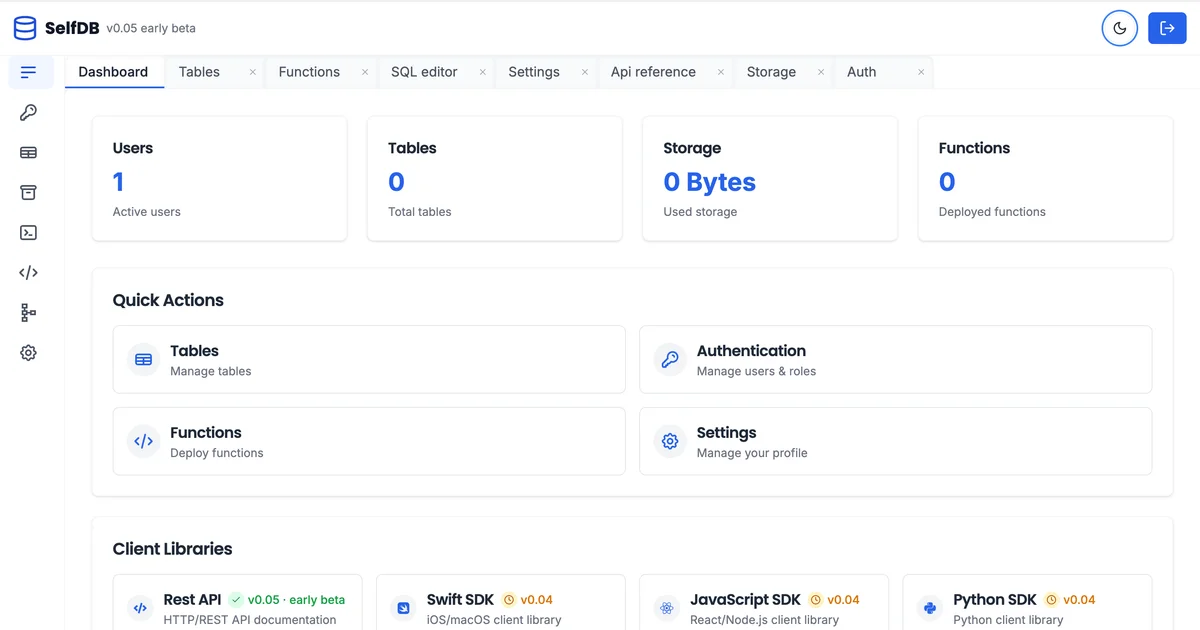
- Dashboard with system metrics and activity feed
- SQL editor with syntax highlighting
- Visual table designer
- File browser with drag-and-drop uploads
- Function editor with live deployment
Setup Workflow
Step 1: Prerequisites
- Docker and Docker Compose installed
- 4GB+ RAM recommended for the full stack
- Port availability: 8000 (API), 8001 (Storage), 4000 (Phoenix), 8090 (Deno), 5432 (PostgreSQL), 6432 (PgBouncer)
Step 2: Clone and Configure
git clone https://github.com/Selfdb-io/SelfDB.git
cd SelfDB
cp .env.example .env
# Edit .env with your domain, JWT secret, and database password
```bash

### Step 3: Launch with Docker Compose

```bash
docker-compose up -d
```bash

The stack starts all six services. The admin console becomes available at the configured domain or `http://localhost:8000`.

### Step 4: Connect Your Application

Authenticate and obtain a JWT token:

```bash
curl -X POST http://localhost:8000/api/v1/auth/signup \
  -H "Content-Type: application/json" \
  -d '{"email": "[email protected]", "password": "your-password"}'
```bash

Use the returned token for subsequent API requests:

```bash
curl http://localhost:8000/api/v1/tables \
  -H "Authorization: Bearer <your-token>"
```bash

## Key Features in Detail

### Serverless Functions with Deno

Functions are triggered by HTTP requests, cron schedules, or database events:

```typescript
// functions/hello.ts
export default {
  async onRequest(request: Request): Promise<Response> {
    return new Response(`Hello at ${new Date().toISOString()}`);
  },
  triggers: ["http", "cron:0 * * * *"]
}
```bash

Deploy via the admin console or the REST API. The Deno runtime hot-reloads on file changes during development.

### Realtime WebSocket Events

Subscribe to PostgreSQL NOTIFY events over WebSocket:

```javascript
const ws = new WebSocket("ws://localhost:8000/api/v1/realtime/ws");
ws.send(JSON.stringify({ channel: "table_changes" }));
ws.onmessage = (event) => {
  const data = JSON.parse(event.data);
  console.log("DB change:", data);
};
```bash

### File Storage Buckets

Create buckets and upload files via the API:

```bash
curl -X POST http://localhost:8000/api/v1/buckets \
  -H "Authorization: Bearer <token>" \
  -H "Content-Type: application/json" \
  -d '{"name": "user-avatars", "public": true}'
When to Choose SelfDB Over Firebase/Supabase
Choose SelfDB when:
- You need complete data ownership and no vendor lock-in
- You want to avoid Firebase per-seat or Supabase usage-based pricing at scale
- Your team has Docker and PostgreSQL operational experience
- You need full customization of auth flows, rate limits, or data residency
Stick with managed services when:
- You need managed infrastructure with zero DevOps overhead
- Your team lacks Docker/PostgreSQL operational knowledge
- You need instant global CDN and managed SSL
FAQ
Q: Is the GitHub version production-ready? A: The GitHub release is explicitly labeled “early beta.” The README notes expected sharp edges, manual setup, and breaking changes. The paid “Stable” edition is positioned as production-ready. For self-hosting on the open-source stack, treat it as you would any early beta — test thoroughly before production use.
Q: What license is the open-source version under? A: SelfDB-mini (github.com/Selfdb-io/SelfDB-mini) is MIT-licensed. The main SelfDB repository has “NOASSERTION” per GitHub’s license detection — verify the LICENSE file in the repo before production use.
Q: How does connection pooling work? A: PgBouncer runs in session mode on port 6432, sitting between the API services and PostgreSQL 18 on port 5432. The Deno runtime bypasses PgBouncer and connects directly to PostgreSQL for LISTEN/NOTIFY operations, which is required for realtime event delivery.
Q: Can I use SelfDB without the admin dashboard? A: Yes. All platform features are exposed via the REST API. The admin console is optional and wraps the same API endpoints.
Q: What authentication methods are supported? A: JWT-based authentication with refresh tokens. The README does not mention OAuth providers (Google, GitHub) in the open-source version — those may be limited to the Stable paid edition.
Conclusion
SelfDB is a genuine attempt to bring the Firebase/Supabase developer experience to self-hosted infrastructure. The architecture is solid — PostgreSQL 18, FastAPI, Deno serverless, and Phoenix realtime cover the same ground as managed BaaS platforms. The open-source release on GitHub gives you a working Docker Compose stack to evaluate before committing to any paid tier.
If you have been looking for a way to escape Firebase lock-in without building your own backend from scratch, SelfDB is worth a weekend eval. Star the repo at github.com/Selfdb-io/SelfDB and follow the Docker Compose setup above to get a feel for whether the stack fits your project.
Related Posts
dev-tools
AgentMesh – Define AI Agent Teams in YAML
Define multi-agent AI workflows in YAML and run them locally with one command. AgentMesh brings Docker Compose patterns to AI agent orchestration.
5/28/2026
dev-tools
Cicada – FOSS CI/CD That Replaces YAML With a Real Language
Cicada replaces GitHub Actions and GitLab CI YAML configs with a custom functional DSL, letting you write pipelines using variables, functions, and shell.
5/29/2026
dev-tools
Stacktape – Deploy to AWS Without DevOps Knowledge
Stacktape is a DevOps-free cloud framework that cuts AWS deployment config by 98%. Supports serverless and containers, 20+ infra components built-in, and a.
5/29/2026