Pikimov: a free motion design editor in your browser
Pikimov is a free browser-based motion design editor with After Effects style keyframes, JavaScript expressions and 3D compositing. No sign-up, no uploads.
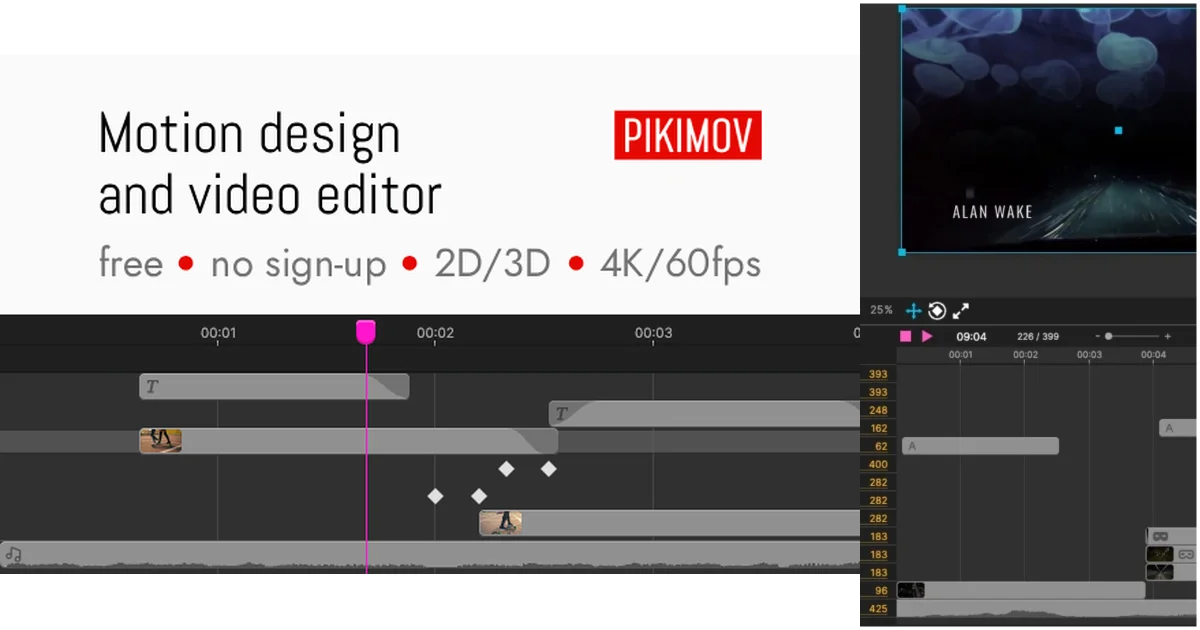
TL;DR: Pikimov puts a full timeline editor, a 2D compositing editor and a 3D compositing editor in a browser tab, and the whole app weighs around 7MB. Your files are processed on your own machine and never uploaded. The price is zero and there is no account, with a paid Patreon tier adding an offline desktop app.
What it is
Pikimov is a video and motion design editor that runs at pikimov.com in Chrome, Edge or Opera. It is the free alternative to After Effects that its author, Clement, wanted to exist. He built the first version after seeing what Photopea managed to do for Photoshop users, and the in-app changelog shows he has shipped a release every two or three weeks since version 5 landed in March 2026.
Three editors sit behind one tab. The classic editor is a familiar timeline, closer to CapCut than to After Effects, where you cut a clip and drag things around a playhead. The 2D compositing editor is the After Effects-style one, with layers, masks, blend modes and a graph editor for easing curves. The 3D editor adds a real 3D scene with camera and lighting.
Underneath it is Ember.js for the interface and three.js for rendering. The homepage says rendering compositions runs through three.js with multiple effects.
The whole application is around 7MB, which means it loads fast even on a mediocre connection, and the FAQ is explicit that no video streaming is involved at all. If you import a 4K file, it is read from your disk.
Why it matters
The usual free option for motion design is a trial of After Effects, which means a monthly fee and a watermark on anything you export. The other option is CapCut, which is free but leans heavily on AI generation and cloud features. Pikimov takes a third position: a local-first editor with no account, no paywall and no AI attached.
That last part is deliberate. The site states that your files stay on your computer, that they are not uploaded to a server, and that your projects are not used for AI model training. For a studio that handles unreleased footage, that is the point. The business page describes the same pitch for enterprises, offering private deployments on your own infrastructure.
There is also a workflow argument. Because Pikimov renders through three.js, a project is a browser-side composition you can script, and the expression system gives you the After Effects syntax to do it with.
Getting it running
There is nothing to install. Open the site, and you land in the editor. The app detects your browser and loads the right editor.
The quickest way to understand the interface is the built-in tutorial series, which is split into a classic editor track and a compositing editor track:
https://pikimov.com/tutorials/
├── Introduction to Pikimov
├── Classic editor
│   ├── Learn animation basics
│   └── Text styles and text effects
└── Compositing editor
    ├── Layers and compositions
    ├── Blend modes
    ├── Group parenting
    ├── Masking
    ├── 3D compositions
    ├── Motion tracking
    ├── Free shapes and rotoscoping
    ├── Graph editor
    └── Particles
Animating with JavaScript expressions
This is the part that separates Pikimov from a simple clip editor. Click the curly brace icon on a property and you can drive it with code, using the same expression syntax as After Effects. A rotating layer is one line:
time*10A timecode readout on a text layer takes a few more, pulling the current frame and formatting it as hours, minutes, seconds and frames:
f = timeToFrames(time);
fps = 1 / thisComp.frameDuration;
m = Math.floor(f / (fps * 60));
s = Math.floor((f / fps) % 60);
fr = Math.floor(f % fps);
(m < 10 ? "0" + m : m) + ":" +
(s < 10 ? "0" + s : s) + ":" +
(fr < 10 ? "0" + fr : fr);
Because the syntax matches After Effects, existing tutorials work as-is. The documentation lists the keywords and functions currently supported: time, outpoint, frameRate, thisComp, wiggle(), posterizeTime(), timeToFrames(), random(), linear() and ease().
The same compatibility applies to animation in general. Click the clock icon on any property and Pikimov creates a keyframe and an animation track. Right-click a keyframe to pick an easing preset, or open the graph editor to drag the curve by hand.
What you can throw at it
Effects come in four groups, color, blur, shape and text, and the documentation for version 5.4 lists around fifty of them. Effects stack on a single item and their own properties can be animated.
| Group | Examples |
|---|---|
| Color | bloom, chroma key, color balance, glitch, halftone, kaleidoscope, levels, luma key, teal orange, vignette |
| Blur | blur, motion blur, radial blur |
| Shape | bend, corner pin, crop edges, extrude, jelly shake, motion tile, shake, skew, turbulent displace, wave warp, wiggle |
| Text | text build, text explosion, text punch, text twist, text wave, text wobble, typewriter |
There is a background remover, automatic motion tracking, rotoscoping in both manual and automatic modes, and particle systems with presets.
File support covers the formats you would expect:
Images   .jpg .jpeg .png .webp .avif .tga .svg
Video    .mp4 .m4v .webm .mov (not all codecs)
Audio    .mp3 .wav .flac .m4a .ogg
Fonts    .ttf .woff
3D       .glb
What to watch for
Browser support is the hard limit, and the FAQ is refreshingly blunt about it. Pikimov does not run in Firefox and there is no Safari support, because the editor relies on features that only exist in Chromium-based browsers. Brave may work. The FAQ also notes that the project is not aimed at mobile, so iPads are out and Android tablets are a hack rather than a supported case.
Hardware matters more than the file size suggests. The author recommends at least 16GB of RAM and tests on a 2018 NUC and a 2023 MacBook Air. Work in full HD, 1920 by 1080, to keep things smooth, and treat 4K as a step up in cost. Rendering runs locally, so a slow machine means a slow export.
Pikimov is free to use but not open source. The FAQ says plainly that the plan is to stay free forever, following the Photopea model, and that supporting the author on Patreon is how the project stays funded.
Patreon supporters contributing $6 or more a month get an offline desktop app for Windows and macOS, with a Linux version possible if there is demand. The documentation describes the desktop app as having no expiry date and no hidden locks. The site is also careful to say that supporting the author keeps you on the updates, since the builds are published regularly. Enterprise customers can ask for a private, branded deployment with your own authentication and storage, which the author mentions working with TV broadcast and VFX clients in France.
The project shipped version 5.7 on 3 November 2026, adding a mirror effect, a flicker effect, a VHS glitch, subtitle generator improvements and links to royalty-free media libraries. The release cadence is fast enough that the feature list in any screenshot you find is likely out of date.
Source and Accuracy Notes
- Project page: https://pikimov.com - verified via direct visit on 9 November 2026
- Documentation: https://docs.pikimov.com/ - verified via direct visit, FAQ last updated 12 June 2026
- Business and private deployment: https://pikimov.com/business/ - verified via direct visit
- HN launch thread: https://news.ycombinator.com/item?id=40843867, posted 1 July 2024, 1150 points
- Source code: not open source, the FAQ confirms this directly
- Thumbnail: composite built from the official cover image at https://pikimov.com/pikimov-cover.png and the editor screenshot published by 80.lv at https://80.lv/articles/free-motion-design-video-editing-tool-that-works-in-browser/

Related Posts
dev-tools
Automotive Skills Suite for AI Engineering
Evaluate Automotive Skills Suite for APQP, ASPICE, HARA, safety-plan, and DIA workflows with setup notes, governance risks, and SME review guidance.
5/28/2026
dev-tools
awesome-agentic-ai-zh Roadmap Guide
Explore awesome-agentic-ai-zh as a Chinese agentic AI learning roadmap, with setup notes, track selection, study workflow, and evaluation guidance.
5/28/2026
dev-tools
Baguette iOS Simulator Automation Guide
Set up Baguette for iOS Simulator automation, web dashboards, device farms, gesture input, streaming, and camera testing with Xcode caveats.
5/28/2026