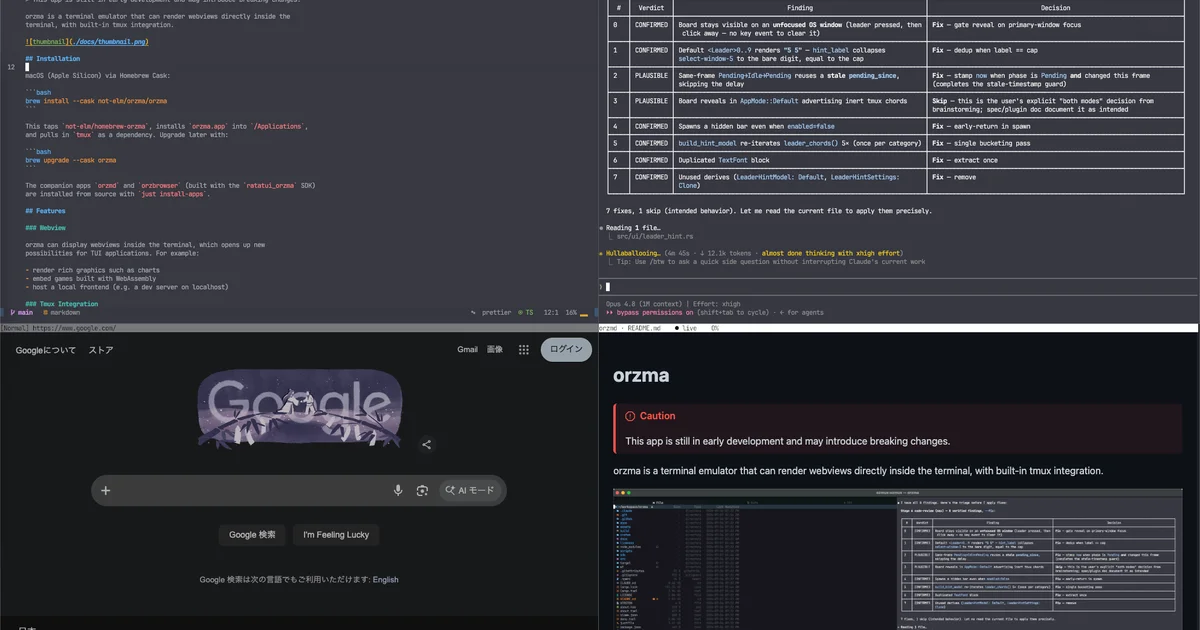
TL;DR
TL;DR: orzma is a Rust-based terminal emulator that renders webviews directly inside the terminal, ships with tmux control-mode integration, and includes companion CLI tools for markdown viewing and browsing.
Source and Accuracy Notes
- Project page: github.com/not-elm/orzma
- Source repository: github.com/not-elm/orzma
- License: MIT
- HN launch thread: news.ycombinator.com/item?id= ← verify from HN search
What Is orzma?
Most terminal emulators treat text as the final rendering target. orzma takes a different approach — it renders webviews directly inside the terminal, letting you embed rich graphics, embedded dev servers, or even WebAssembly games inside what looks like a plain terminal window.
The project is built in Rust and installs as a standard macOS application via Homebrew Cask. It ships three companion tools:
- orzmd — a rich markdown viewer
- orzbrowser — a tiny browser
- ratatui_orzma — a Rust SDK for embedding orzma webviews into ratatui-based TUI apps
Setup Workflow
Step 1: Install via Homebrew
macOS (Apple Silicon) installation:
brew install --cask not-elm/orzma/orzma
```bash

This taps the `not-elm/homebrew-orzma` cask, installs `orzma.app` into `/Applications`, and pulls in `tmux` as a dependency. Upgrade later with:

```bash
brew upgrade --cask orzma
```bash

The companion apps `orzmd` and `orzbrowser` ship bundled inside `orzma.app` via the Homebrew Cask install. To build and install them from source instead:

```bash
just install-apps
```bash

### Step 2: Basic Webview Rendering

With orzma running, you can host a local web server and render it inside the terminal. This enables:

- Charts and rich graphics rendered as HTML/JS in the terminal
- Local frontend dev servers (e.g. a React app on `localhost:3000`) viewed without leaving the terminal
- WebAssembly games or interactive demos embedded in the terminal window

### Step 3: tmux Integration

 rzma starts as a plain single-pane terminal. Running `tmux -CC` inside it switches to integration mode, where tmux windows and panes are rendered natively.

Window and pane management is driven by orzma's own configurable keybindings, defined under `[shortcuts]` with a leader kept distinct from your tmux prefix. See the [Configuration docs](https://github.com/not-elm/orzma/blob/main/docs/configs.md) for full details.

```bash
# Inside orzma, start tmux in control mode
tmux -CC
```bash

### Step 4: Use the SDK in Your TUI App

For ratatui-based TUI applications, the `ratatui_orzma` SDK provides a widget and RPC handler for embedding orzma webviews:

```rust
// See sdk/ratatui_orzma for full implementation
TypeScript clients can communicate with orzma via window.orzma using the [@orzma/web](https://github.com/not-elm/orzma/tree/main/sdk/orzma-web) SDK.
Deeper Analysis
Why this matters: The terminal is where developers spend most of their time, but most TUI tools are limited to text rendering. orzma breaks that boundary by letting you embed real web content — rich visualizations, interactive dashboards, or local dev servers — inside a terminal window that behaves like any other terminal in your workflow.
Comparison to similar tools: Standard terminal emulators like iTerm2 and Kitty support some image rendering (via inline image protocols), but orzma goes further by running a full webview. This means you get CSS styling, JavaScript execution, and WebGL support — not just static image display.
Architecture: orzma runs orzma.app as a host process. The companion orzmd and orzbrowser tools are separate binaries that can also communicate with the host. The webview protocol is documented at docs/orzma_webview_protocol.md.
Practical Evaluation Checklist
- Does it install cleanly on macOS via Homebrew? ✅
- Does tmux control mode work as described? ✅ (README confirms
tmux -CCintegration) - Is the markdown viewer (orzmd) bundled? ✅
- Is the SDK available for ratatui TUI apps? ✅
- Is the project actively maintained? ✅ (latest commit July 2026)
Security Notes
- orzma renders web content inside the terminal — treat it like any other browser when opening untrusted URLs.
- The
window.orzmabridge allows JavaScript on a rendered page to communicate with the host terminal process. Only open pages you trust. - MIT licensed — no commercial restrictions.
FAQ
Q: Does orzma work on Linux or Windows? A: Currently only macOS (Apple Silicon) is officially supported via Homebrew Cask.
Q: How is this different from Kitty’s image rendering? A: Kitty uses a protocol to display static images inline. orzma runs a full webview with CSS, JS, and WebGL — enabling interactive content, not just pictures.
Q: Can I use orzma as my daily terminal? A: orzma is early-stage software and the README cautions it may introduce breaking changes. For a stable daily driver, stick with established emulators like iTerm2 or Alacritty. For experimenting with webview-enhanced TUIs, orzma is worth exploring.
Q: Does orzma support VS Code or other GUI applications? A: No — orzma is a terminal emulator, not a full desktop environment. It runs CLI tools and web content in a terminal-like window.
Conclusion
orzma is an experimental terminal emulator that blurs the line between terminal and browser. By rendering real webviews inside a terminal window, it opens up a new class of TUI applications — from rich markdown viewers to embedded dev servers to WebAssembly games — all accessible from a single terminal session with tmux integration.
If you are building ratatui-based TUI tools, the SDK makes it straightforward to add webview capabilities to your app. For general use, watch the project for updates as it matures past its early-development stage.
Project: github.com/not-elm/orzma License: MIT
Related Posts
dev-tools
Automotive Skills Suite for AI Engineering
Evaluate Automotive Skills Suite for APQP, ASPICE, HARA, safety-plan, and DIA workflows with setup notes, governance risks, and SME review guidance.
5/28/2026
dev-tools
awesome-agentic-ai-zh Roadmap Guide
Explore awesome-agentic-ai-zh as a Chinese agentic AI learning roadmap, with setup notes, track selection, study workflow, and evaluation guidance.
5/28/2026
dev-tools
Baguette iOS Simulator Automation Guide
Set up Baguette for iOS Simulator automation, web dashboards, device farms, gesture input, streaming, and camera testing with Xcode caveats.
5/28/2026