Open Terminal — open-source Bloomberg for retail investors
Open Terminal is an open-source financial research tool that gives individual investors SEC filings, stock charts, AI analysis, and SQL exploration in a Bloomberg-style web interface.
TL;DR
TL;DR: Open Terminal is a self-hosted, open-source financial research platform that gives retail investors SEC filings, live stock charts, AI-powered analysis, and SQL query access — all in a Bloomberg-style web UI, for free.
Source and Accuracy Notes
- Project page: tesseractanalytics.ai
- Live demo: terminal.tesseractanalytics.ai
- Source repository: github.com/alexanderdolotov/open-terminal
- License: MIT (verified via GitHub API)
- HN launch thread: news.ycombinator.com/item?id=48400544
What Is Open Terminal?
Open Terminal is a self-hosted web application that brings professional-grade financial research tools to individual investors who cannot afford a Bloomberg terminal subscription. It aggregates three data streams into a single browser-based interface:
- SEC EDGAR filings — revenues, net income, assets, and dozens of GAAP concepts, aggregated monthly going back years
- Stock prices — live via Polygon.io, or monthly averages from a built-in parquet archive when no API key is provided
- News with sentiment — historical articles from Polygon with LLM-scored sentiment scores and reasoning
The data is pre-processed into columnar parquet files and served through DuckDB in-memory, so most queries return in milliseconds. The project was shared on Hacker News in August 2026.
Setup Workflow
Prerequisites
- Python 3.10 or higher
- Polygon.io API key (optional — app works without it)
- OpenRouter API key (required for the AI tab)
Step 1: Clone and Install
git clone https://github.com/alexanderdolotov/open-terminal
cd open-terminal
pip install -r requirements.txt
```bash

### Step 2: Configure

Create a `config.yaml` in the working directory:

```yaml
app:
  name: Open Terminal

server:
  host: 0.0.0.0
  port: 3000

api_keys:
  polygon: YOUR_POLYGON_KEY      # optional
  openrouter: YOUR_OPENROUTER_KEY  # required for AI tab
```bash

Without a Polygon key, the app falls back to monthly average prices from its built-in parquet archive. Without an OpenRouter key, the AI tab is disabled.

### Step 3: Run

```bash
python app.py
```bash

The app serves at `http://localhost:3000` by default. For production:

```bash
gunicorn --workers 2 --threads 2 --timeout 120 --bind 0.0.0.0:3000 app:app
```bash

## The Six Tabs

### Financials

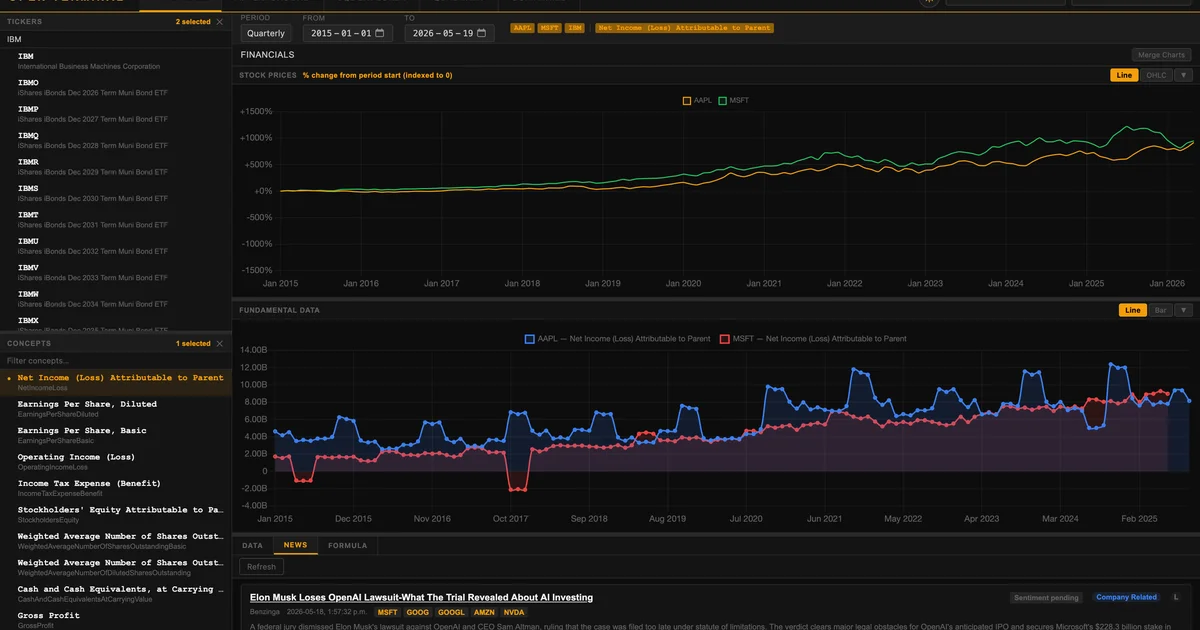
Select one or more tickers from the sidebar, choose financial concepts (Revenue, Net Income, etc.), and the chart renders immediately. The top panel shows a price chart — live from Polygon when a key is present, or monthly averages from the parquet archive otherwise. The bottom panel plots any combination of SEC financial concepts.

**Formulas tab** lets you build custom metrics using Python-style arithmetic. For example:

```bash
NetIncomeLoss / Revenues
```bash

Name it "Profit Margin", add it to your selection, and it plots alongside standard concepts. Formulas persist via localStorage.

**Data tab** shows raw numbers behind the chart with direct links to the original SEC filing for each data point.

**News tab** displays recent articles for selected tickers, each with an LLM-scored sentiment (range -10 to +10) and a hover-able reasoning explanation.

### Companies

A screener covering 4,000+ public companies. Filter by financial criteria, view aggregate fundamentals, and add tickers to the main Financials view.

### Quadrant

A scatter plot tool for multi-factor stock screening — plot any two financial concepts against each other to find outliers and correlations.

### AI Playground

Chat interface powered by OpenRouter. Ask questions about selected tickers and get answers grounded in the loaded SEC and price data. Also supports AI-assisted chart generation.

### SQL Explorer

Direct DuckDB SQL query access to the loaded parquet data. Write arbitrary SQL queries against the financial dataset and export results.

## Deeper Analysis

### Data Architecture

The backend is a Flask app backed by DuckDB for in-memory SQL over parquet files:

```bash
Browser (Vanilla JS + Chart.js + Lightweight Charts)
        │
        │  REST / JSON
        ▼
Flask app (app.py)
        │
        ├── DuckDB (in-memory)  ←── financial_data parquet  (SEC + prices)
        ├── DuckDB (per-request) ←── polygon_news.parquet   (news + sentiment)
        ├── Polygon.io API       ←── live prices, live news
        └── OpenRouter API       ←── AI chart generation, chat
```bash

A threading lock (`_duckdb_lock`) serializes all queries against the main financial table to keep DuckDB thread-safe. News queries use independent connections to avoid contention.

### ETL Pipeline

A separate pipeline (run via `run_etl.sh`) pulls SEC data, Polygon news, and market cap. News sentiment is scored locally via Ollama (default: `qwen3:8b`) or any OpenRouter model:

```bash
# Daily news sentiment
./run_etl.sh --classes A

# Weekly SEC financials
./run_etl.sh --classes B
Optional CAPTCHA Gate
Set gate.enabled: true in config.yaml to require a math CAPTCHA on first visit — useful if you want to expose the terminal publicly.
Practical Evaluation Checklist
- Installs cleanly on Python 3.10+ with
pip install -r requirements.txt - Starts with
python app.pyand serves on port 3000 - Loads parquet data into DuckDB without errors
- Financials tab renders price + fundamentals charts
- Formulas work:
NetIncomeLoss / Revenuesplots as Profit Margin - SQL Explorer executes arbitrary queries against parquet data
- Without Polygon key: falls back to monthly avg parquet prices
- Without OpenRouter key: AI Playground returns an appropriate error
-
gunicornproduction deployment starts with correct worker count
Security Notes
- No authentication by default — the app is designed for local or private network use
- If exposing publicly, enable
gate.enabled: truefor basic bot protection - API keys stored in
config.yaml— do not commit this file to version control - ETL pipeline runs locally — no data leaves your server unless you configure outbound API calls
- DuckDB queries are sandboxed to the loaded parquet datasets
FAQ
Q: Does this replace Bloomberg? A: Not fully. Bloomberg terminals offer real-time market data across all asset classes, proprietary news, and messaging. Open Terminal covers US equities via SEC filings and Polygon — useful for fundamental analysis, but limited to that scope.
Q: Do I need a Polygon.io account? A: No. The app ships with a built-in parquet archive of monthly average stock prices. You only need Polygon if you want live daily prices and current news.
Q: Can I run this on a VPS?
A: Yes. The server binds to 0.0.0.0:3000 and runs on any machine with Python 3.10+. For public access, enable gate.enabled: true in config and consider putting it behind a reverse proxy with TLS.
Q: What models does the AI Playground use?
A: Any model available via OpenRouter. The default ETL pipeline uses Ollama with qwen3:8b for local news sentiment scoring, but OpenRouter powers the interactive chat tab.
Conclusion
Open Terminal fills a real gap: retail investors who want to do fundamental financial research — cross-referencing SEC filings, building custom financial formulas, running SQL queries against real market data — without paying for a Bloomberg or FactSet subscription. The architecture is straightforward (Flask + DuckDB + parquet), self-contained, and runs entirely on your own hardware. The five-tab interface (Financials, Companies, Quadrant, AI Playground, SQL Explorer) covers the full workflow from discovery to deep-dive analysis. If you are serious about US equity research and want full data ownership, this is worth running on a home server or VPS.
Related Posts
dev-tools
AgentMesh – Define AI Agent Teams in YAML
Define multi-agent AI workflows in YAML and run them locally with one command. AgentMesh brings Docker Compose patterns to AI agent orchestration.
5/28/2026
ai-setup
IonRouter – Fast Low-Cost AI Inference API
IonRouter is a YC W26 inference API routing open-source and fine-tuned models via an OpenAI-compatible endpoint, built on a C++ runtime optimized for GH200.
5/28/2026
review
Mosaic – Agentic Video Editing With a Node-Based Canvas
Mosaic lets you build and run multimodal AI video editing agents on a node-based canvas. Upload raw footage, design a workflow, and let AI handle the heavy.
5/28/2026