Octarine - Fast Native Markdown Notes App With BYOK AI
Octarine is a sub-30MB native markdown notes app with on-device RAG, BYOK AI, and Git sync. Buy once ($79 Pro) instead of a subscription. Mac, Windows, Linux.
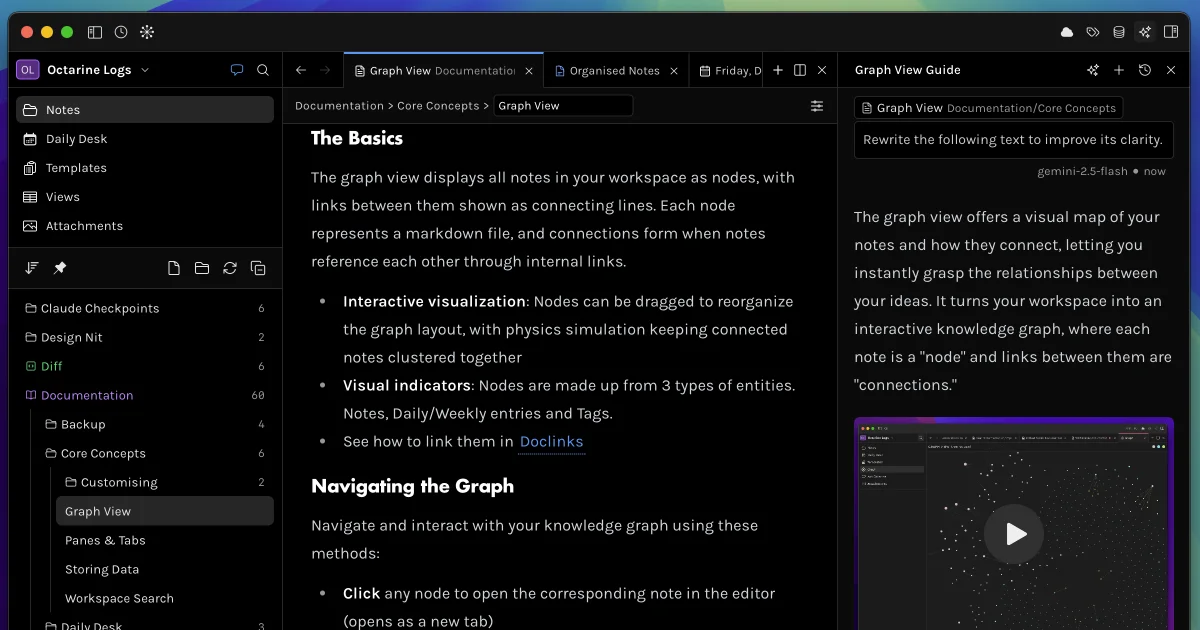
TL;DR
TL;DR: Octarine is a sub-30MB native markdown notes app for Mac, Windows, and Linux with on-device RAG, BYOK AI (OpenAI, Anthropic, Ollama, LM Studio), and built-in Git sync — all under a one-time $79 Pro license instead of a subscription.
Source and Accuracy Notes
This post is based on:
- The official Show HN thread: news.ycombinator.com/item?id=45061399
- The product homepage: octarine.app
- The full documentation set: docs.octarine.app and the AI-friendly mirror at
https://docs.octarine.app/llms.txt - Pricing details: octarine.app/pricing
- Comparison page: octarine.app/compare
Octarine is built and shipped by Rajat, an independent developer in India. The 0.44.1 release on June 5, 2026 added editor embeds for links and images. Pricing, features, and version numbers are accurate as of June 2026.
What Is Octarine?
Octarine is a markdown-first note-taking app that opens in under a second, stores every note as a plain .md file on your disk, and bakes the things PKM users usually bolt on (search, graph view, Git sync, AI chat) directly into the UI. The product’s tagline is “Take back control of your writing.”
The app is built with Tauri (a Rust-backed native shell) and uses TipTap for the WYSIWYG editor. Three things differentiate it from Obsidian, Notion, and Bear:
- Native, not Electron. The binary is under 30 MB. It launches fast and stays under 100 MB of RAM even with large workspaces (the docs claim tested behavior with 100k+ word documents).
- Batteries-included, no plugin bazaar. Core features are not gated behind a community plugin ecosystem. There is no plugin API. If you want a graph view, daily notes, Mermaid diagrams, Git sync, or AI chat, they ship in the box.
- One-time license, not a subscription. The Pro tier is a flat $79 buy-once, use-forever license that covers three devices. There are no AI credits or monthly fees — you bring your own API key (or run a local model with Ollama or LM Studio) and pay the model provider directly.
The Free tier gets the editor, daily notes, search, and graph view forever. The Pro tier adds AI features, focus mode, custom themes, note types, advanced export formats (PDF, HTML, DOCX), and team-style workspace customization.
Why Octarine?
If you’ve bounced between Obsidian, Notion, Bear, and Apple Notes, the pain points are predictable:
- Obsidian is a 200 MB Electron app and plugin sprawl becomes its own chore.
- Notion locks your data in a cloud database behind a monthly bill.
- Bear has a beautiful editor but its sync is iCloud-only and AI features are gated behind a subscription.
- Apple Notes is fine for grocery lists and not much else.
Octarine’s author calls out the tradeoffs on the compare page directly:
- Speed over features. The app stays fast by not trying to please everyone.
- Simplicity over flexibility. No plugin API because the author wants the app to work well without requiring assembly.
- One-time purchase over subscription. No recurring costs to cover, no sync servers to run, no notes to monetize.
For technical writers, indie hackers, and developers who live in Markdown anyway, that positioning lands.
Prerequisites
- macOS (Apple Silicon or Intel), Windows 10/11, or a Linux distribution
- For AI features: a Pro license ($79) plus an API key from OpenAI, Anthropic, Gemini, or Perplexity — OR a local model server (Ollama or LM Studio) running on
localhost - For Git sync: Git installed locally, plus an SSH key configured against GitHub or GitLab
- For RAG features: roughly 90 MB of disk space for the on-device embedding model
Step 1: Install Octarine
Download the right binary for your platform from the releases page.
# macOS (Apple Silicon)
curl -L -o octarine.dmg https://octarine.app/releases/octarine-latest-arm64.dmg
open octarine.dmg
# Drag Octarine to /Applications, then eject
```bash

For Linux AppImage (which supports auto-updates):

```bash
chmod +x Octarine_<version>_amd64.AppImage
./Octarine_<version>_amd64.AppImage
```bash

For RPM, DEB, TAR, or Arch packages, you can install with the standard tooling for your distro, but auto-updates will not work — you'll need to grab new releases manually.

## Step 2: Pick a Workspace and Activate Your Pro License

The first launch prompts you to create a workspace. A workspace is just a folder on disk that Octarine watches — every note inside becomes a `.md` file you can open in any other editor. The default location is `~/Documents/Octarine/`, but you can point it at an existing iCloud, Dropbox, Syncthing, or Git folder.

If you bought a license, go to **Octarine → Manage Licenses** and paste the key. The license activates on up to three devices simultaneously, and you can deactivate any device from the same panel to free up a slot.

```bash
# A typical workspace tree after a few weeks of use
~/Documents/Octarine/
├── daily/
│   ├── 2026-06-07.md
│   └── 2026-06-08.md
├── projects/
│   ├── runany-cron.mdx
│   └── hermes-agent-tasks.md
├── inbox/
│   └── 2026-06-05-capture.md
└── .octarine/
    └── settings.json
```bash

## Step 3: Connect an AI Provider

Open **Settings → AI Assistant → AI Providers**. You can connect as many as you want and switch between them per prompt. Cloud options include OpenAI, Anthropic, Google Gemini, Perplexity, Mistral, Groq, OpenRouter, and a few others. Local options include Ollama and LM Studio.

For OpenAI:

```bash
# 1. Get an API key from https://platform.openai.com/api-keys
# 2. In Octarine: Settings -> AI Assistant -> AI Providers -> OpenAI
# 3. Paste the key, click Save
# 4. The provider card shows a checkmark when the key validates
```bash

For Ollama (fully local, free, no data leaves the machine):

```bash
# 1. Install Ollama
curl -fsSL https://ollama.com/install.sh | sh

# 2. Pull a model
ollama pull llama3.2

# 3. Start the server (runs on http://localhost:11434)
ollama serve

# 4. In Octarine: Settings -> AI Assistant -> AI Providers -> Ollama
#    Server URL: http://localhost:11434 -> Save
```bash

The Ollama API only listens on `localhost` by default, so it is not exposed to the public internet.

## Step 4: Use Ask Octarine for RAG Over Your Notes

Ask Octarine is the chat-with-your-notes feature. The first time you open it, Octarine downloads a 90 MB embedding model to your machine and indexes your workspace into a local vector store. Indexing runs entirely on-device — no chunks are sent to any server until you actually ask a question.

Open Ask Octarine with `Cmd/Ctrl + O`, or click the sidebar button. Use `@` to scope a query to a specific note, folder, or date range:

```text
@projects/runany-cron what did I write about thumb extraction in June?
@daily/2026-06-0* summarize last week's meetings
```bash

Each response shows the notes it referenced, the model used, and a timestamp. You can copy answers as Markdown (for pasting back into another Octarine note) or as plain text. The chat history is grouped by relative dates (Today, Yesterday, 1w ago) and each thread can be saved as a note with one click — your queries become blockquotes, with each AI response separated by a line divider.

> **Only when you send a query are your message and the relevant chunks sent to your AI provider.** To keep everything fully local, point Octarine at an Ollama or LM Studio model.

## Step 5: Turn On Git Sync for Backups

Git Sync is built in — no Obsidian-style Git plugin to install. Go to **Settings → Git Sync**, paste the SSH URL of an empty GitHub or GitLab repository, and click **Finish Setup**.

```bash
# Quick pre-flight check
git -v  # should print git version
ssh -T [email protected]  # should authenticate without password

# If GitHub auth is silent, your SSH key isn't loaded
ssh-add --apple-use-keychain ~/.ssh/id_ed25519
Octarine handles the first commit, sets a default 10-minute sync interval, and gives you a cloud icon in the top-right breadcrumb area that turns yellow if anything fails. If a conflict ever happens, the conflict resolution setting (Use Remote vs Keep Local) handles it automatically without any interactive git rebase.
Deeper Analysis
The Architecture Choice (Tauri + TipTap)
Most modern PKM apps are Electron shells wrapping a React front-end. Electron ships a full Chromium runtime, which is why Obsidian is 200 MB and Notion is 350 MB. Octarine’s choice of Tauri (Rust shell, system webview) is the main reason the binary stays under 30 MB and launch is sub-second.
TipTap is a ProseMirror-based editor that handles the WYSIWYG-to-Markdown mapping. When you bold text, TipTap renders rich text in the editor, but the file on disk stays .md with **bold** syntax. The round-tripping is one of the things Obsidian users complain about, and it has been a perennial engineering challenge. Octarine’s docs are quiet about the exact implementation, but the result holds up in practice.
BYOK vs Built-In AI Credits
The “bring your own key” pattern is the right call for a privacy-focused PKM. Notion and Bear charge a monthly fee for AI features that you could get for $0.001 per request from OpenAI directly. The downside is the API key onboarding — you have to know how to find your OpenAI dashboard. Octarine mitigates that with a one-pane provider list that shows a checkmark when keys validate.
For users who never want to think about API keys, Ollama with a small model like llama3.2 (about 2 GB on disk) is the answer. It runs on a MacBook Air and is fast enough for RAG-style queries over a few thousand notes.
One-Time License Economics
The $79 Pro price is a deliberate signal. Most indie software that wants to grow chooses $9/month — same revenue in 9 months, but with churn risk and the constant pressure to add features that justify a subscription. Octarine’s author, Rajat, explicitly says the app is “bootstrapped, no venture capital, no growth-at-all-costs roadmap.” The Pro tier is a buy-it-once, get-everything model, including all future updates.
That model has obvious sustainability questions — the Pro price has to be high enough to fund continued development across Mac, Windows, Linux, and the upcoming iOS app. Whether it works is a multi-year experiment. For buyers, the upside is no surprise price hikes and no monthly fee to keep features you already paid for.
Practical Evaluation Checklist
- Sub-30 MB install and sub-second launch on your machine
- Notes stored as plain
.mdfiles you can open in any text editor - Free tier covers the core editing, search, and graph view forever
- Pro tier is $79 once, covers 3 devices, includes all future updates
- No telemetry or analytics (per the about page)
- AI features work fully offline with Ollama or LM Studio
- Git sync handles conflicts automatically (no manual rebase)
- Daily Desk auto-migrates unfinished tasks to the next day
- Cross-platform: macOS, Windows, Linux desktop, iOS in TestFlight
Security Notes
- API key storage: AI provider keys are stored locally in the app’s settings directory (
~/Library/Application Support/Octarine/on macOS). The data is not synced to any cloud by default. - Embedding model: The 90 MB RAG model is downloaded once and lives on disk. It does not phone home.
- Ollama and LM Studio: Both bind to
localhostby default. Verify withlsof -iTCP:11434 -sTCP:LISTENon macOS to confirm no public exposure. - Git sync: Auth uses your existing SSH key. The sync interval default is 10 minutes — drop it lower for more aggressive backups, raise it for less git churn.
- Windows installer: The .msi is not notarized yet. The author flags a Windows SmartScreen warning (“unrecognized app”) and asks you to click “Run anyway.” Read the SmartScreen prompt carefully to make sure the publisher matches.
- Local LLM data: When you use Ask Octarine with a local model (Ollama or LM Studio), your message and the retrieved chunks stay on your machine. The RAG retrieval step is fully on-device; only the final prompt leaves for the model endpoint.
FAQ
Q: How is Octarine different from Obsidian? A: Obsidian is a 200 MB Electron app with a huge plugin ecosystem. Octarine is a 30 MB Tauri app with no plugin API and the features most people want baked in. If you love configuring 30 community plugins, Obsidian wins. If you want notes to just work without the maintenance, Octarine is the simpler path. The author’s compare page walks through the tradeoffs in detail.
Q: Can I use Octarine completely offline?
A: Yes, for the core editor, search, and graph view. AI features work offline if you point Octarine at an Ollama or LM Studio server on localhost. The first time you open Ask Octarine, a 90 MB embedding model downloads from the Octarine server; after that, no network requests are needed for RAG over your notes.
Q: Does Octarine support real-time collaboration? A: No. Real-time collaboration is explicitly out of scope — the author calls it out on the compare page as a feature Notion has and Octarine is not trying to match. If you need multi-user editing, Notion or a CRDT-based tool is the right choice.
Q: What happens to my notes if I stop paying for the Pro license?
A: Nothing. The Pro license is a one-time payment, not a subscription. If you stop using the Pro features, your notes, daily desk, graph view, and search all keep working on the Free tier. The notes themselves are plain .md files, so they survive even an uninstall — you can read them in any text editor.
Q: Can I import my Obsidian vault? A: Yes. Octarine has a dedicated import guide for moving from Obsidian. Markdown files, frontmatter, tags, and most internal links map cleanly. Community plugins and their data (Dataview queries, custom CSS snippets) do not transfer.
Q: Does the iOS app exist yet? A: It is in TestFlight as of June 2026. The current iOS feature set covers the editor, wikilinks, tags, attachments, search, templates, Daily Desk, and the inbox. AI features are not in the iOS build yet.
Conclusion
Octarine is a focused bet: a small, fast, native Markdown app with the things most PKM users actually use — search, graph view, daily notes, Git sync, AI chat — baked in instead of bolted on. The one-time $79 Pro license and the BYOK AI model put it philosophically closer to buying a piece of software than subscribing to a platform.
The main reasons to try it: you want a sub-second-launch native app, you want your notes to be plain .md files you can open in any editor, and you want AI features that you control the keys to. The main reasons to skip it: you depend on a specific Obsidian community plugin, you need real-time collaboration, or you want a mobile-first app today (iOS is still in TestFlight).
Try the free tier first at octarine.app. The Pro upgrade unlocks the AI features and theme customizer when you decide you want them.
Related Posts
dev-tools
Automotive Skills Suite for AI Engineering
Evaluate Automotive Skills Suite for APQP, ASPICE, HARA, safety-plan, and DIA workflows with setup notes, governance risks, and SME review guidance.
5/28/2026
dev-tools
awesome-agentic-ai-zh Roadmap Guide
Explore awesome-agentic-ai-zh as a Chinese agentic AI learning roadmap, with setup notes, track selection, study workflow, and evaluation guidance.
5/28/2026
dev-tools
Baguette iOS Simulator Automation Guide
Set up Baguette for iOS Simulator automation, web dashboards, device farms, gesture input, streaming, and camera testing with Xcode caveats.
5/28/2026