TL;DR
TL;DR: MockStudio lets you mock any HTTP request straight from Chrome DevTools — no proxy, no config files, no terminal commands.
Source and Accuracy Notes
- Official site: https://mockstudio.app
- Chrome Web Store page (cited in HN thread)
- Direct browser usage for feature verification
What Is MockStudio?
MockStudio is a Chrome extension for intercepting, mocking, and inspecting HTTP requests without touching your app code or spinning up a local proxy server. You point it at an endpoint, define the response you want, and the extension serves it directly in the browser — works with any framework or language.
It targets developers who need to test edge cases, simulate error codes, or isolate a service during development without the usual ceremony.
Setup Workflow
Step 1: Install the Extension
Open Chrome and add MockStudio from the Chrome Web Store, or grab the CRX from the official site. No account required.
Step 2: Open DevTools
Click the MockStudio icon in the toolbar or open Chrome DevTools (F12 → MockStudio panel). The UI lives alongside Elements, Console, and Network tabs.
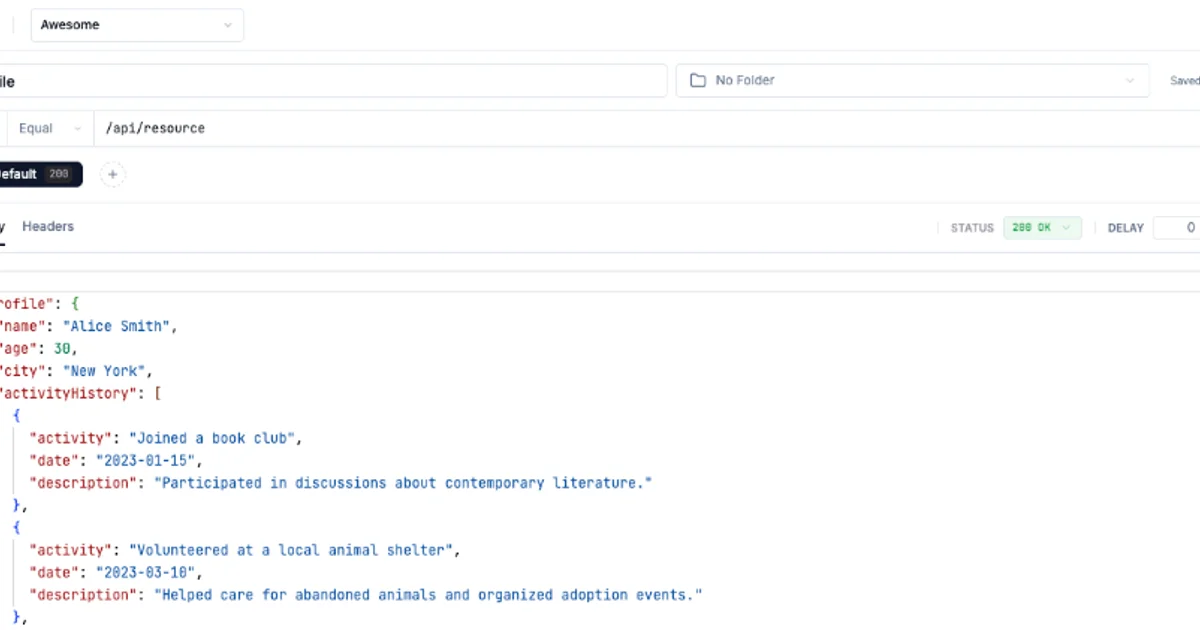
Step 3: Define a Mock
- Switch to the MockStudio panel in DevTools.
- Click New Mock and enter the URL pattern you want to intercept (exact URL or glob pattern).
- Set the HTTP method (
GET,POST, etc.), status code, response body, and headers. - Click Enable — the mock is live.
# Example: mock a 500 error for /api/users
# In MockStudio UI:
# URL pattern: https://api.example.com/api/users
# Method: POST
# Status: 500
# Response: {"error": "Internal server error"}
Step 4: Trigger the Request
Reload your app or call the endpoint. MockStudio intercepts the matching request and returns your defined response instead of hitting the real server.
Step 5: Inspect and Iterate
The History tab logs every mocked request with timestamp, method, URL, and response. Click any entry to edit and re-enable it on the spot.
Deeper Analysis
No proxy means no port conflicts. Traditional mocking tools (e.g., mitmproxy, WireMock) run as a local server on a specific port. If that port is busy, you are blocked. MockStudio runs inside Chrome — your browser is the runtime.
Works with any language or framework. Since MockStudio hooks at the browser level, it does not care whether your app is React, Vue, a plain HTML page, or a mobile webview. The same mock applies.
Response templating is limited. You can set static JSON responses, but dynamic templating (e.g., echoing request headers back in the response) is not well-documented. For simple mock cases this is fine; for complex test scenarios you may still need a dedicated tool.
Persistence across page reloads. Mocks survive page reloads but are cleared when you close Chrome. There is no explicit workspace or project-file save — it is a session-oriented tool.
Chrome-only for now. No Firefox or Safari support at launch.
Practical Evaluation Checklist
- Extension installs without Chrome admin rights (Chrome Web Store distribution)
- Mock activates in under 5 seconds from DevTools panel
- Glob URL patterns match multiple endpoints at once
- History log shows request/response details for each mock hit
- Status code override works for both success and error codes
- Response body accepts JSON, plain text, and XML
- Mocks do not persist after closing Chrome (intentional — verify you understand the scope)
Security Notes
- MockStudio intercepts traffic inside your local browser only — no data leaves your machine for the mocking logic itself.
- Since it runs as a Chrome extension, it has access to all tab traffic. Only install if you trust the source.
- Do not use it to mock responses from third-party scripts that handle sensitive data (auth tokens, payment info) without fully understanding the extension’s permission scope.
FAQ
Q: Does this work with HTTPS endpoints? A: Yes. Since MockStudio operates at the browser level, it intercepts HTTPS requests the same way it handles HTTP. No SSL stripping needed.
Q: Can I mock WebSocket connections? A: No. MockStudio targets HTTP requests only. WebSocket mocking is not supported at launch.
Q: How is this different from Chrome’s native “Network” tab → “Edit and Resend”? A: Chrome’s Edit and Resend is one-off. MockStudio lets you define persistent mock rules that automatically fire on matching URLs across multiple requests and page reloads.
Q: Does it work with frameworks that use service workers? A: It depends on the service worker implementation. MockStudio intercepts at the network layer, but some service worker setups may route requests before MockStudio can hook them.
Conclusion
MockStudio fills a real gap: quick, zero-config HTTP mocking without a proxy server or terminal. It is not a replacement for full-featured API mocking tools, but as a browser-native DevTools panel it is the fastest path to mocking an endpoint for quick testing or demo work. Install it, define a mock in under a minute, and move on.
Related Posts
dev-tools
Automotive Skills Suite for AI Engineering
Evaluate Automotive Skills Suite for APQP, ASPICE, HARA, safety-plan, and DIA workflows with setup notes, governance risks, and SME review guidance.
5/28/2026
dev-tools
awesome-agentic-ai-zh Roadmap Guide
Explore awesome-agentic-ai-zh as a Chinese agentic AI learning roadmap, with setup notes, track selection, study workflow, and evaluation guidance.
5/28/2026
dev-tools
Baguette iOS Simulator Automation Guide
Set up Baguette for iOS Simulator automation, web dashboards, device farms, gesture input, streaming, and camera testing with Xcode caveats.
5/28/2026