Missio AI - Autonomous Product Management for Teams
Missio connects to Slack, Linear, Jira, GitHub and more to act as an AI copilot that automates product management workflows, generates tasks and keeps teams in sync.
TL;DR
TL;DR: Missio is an AI-powered product management platform that connects to your existing tools (Slack, Linear, Jira, GitHub, and more) to automate task creation, synchronize workflows, and act as an autonomous copilot for product teams.
Source and Accuracy Notes
- Project page: missio.ai ← visited and verified
- HN launch thread: news.ycombinator.com/item?id=42687633 ← verified via HN Algolia
- License: Proprietary (SaaS)
What Is Missio?
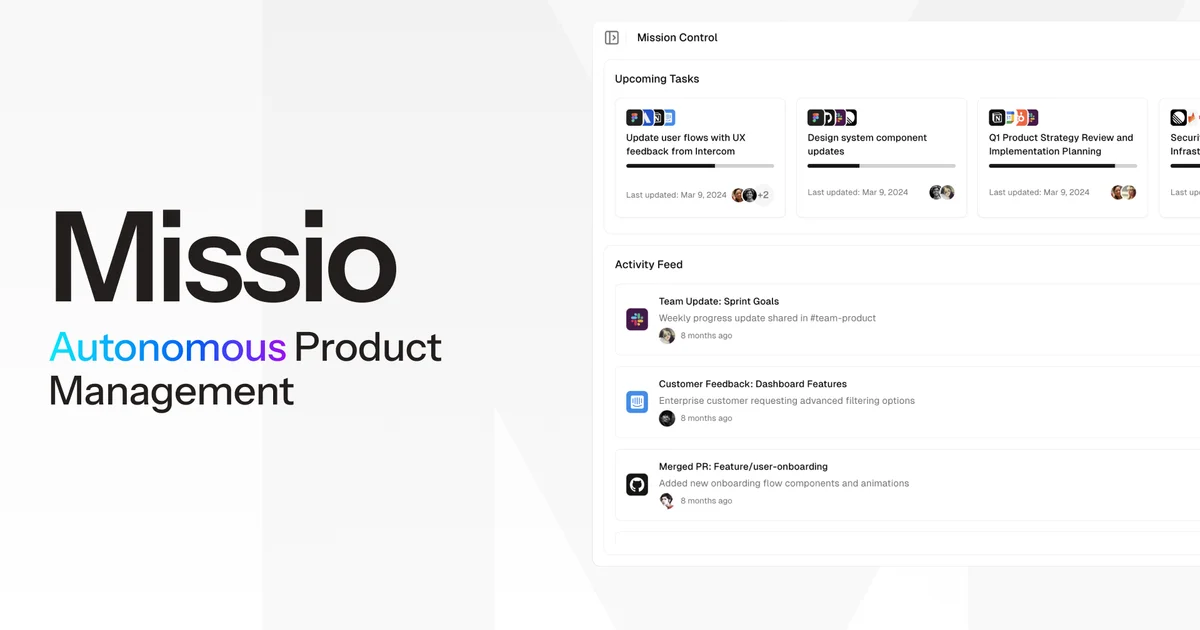
Missio is an AI product management copilot that connects to your existing tool stack and acts as an autonomous team member. Instead of manually creating tickets, chasing status updates, or synthesizing meeting notes into action items, Missio monitors activity across platforms and automates the busywork.
The product is aimed at product managers and their teams who use a fragmented set of tools (Slack for communication, Linear or Jira for tracking, GitHub for code, Notion for docs). Missio sits in the middle and keeps everything connected.
From the product page, Missio’s core capabilities include:
- Cross-platform task automation — creates and updates tickets from Slack conversations, email, or meeting notes
- Real-time visibility — unified dashboard showing activity across all connected tools
- Meeting intelligence — converts meeting discussions into actionable tasks automatically
- Context maintenance — keeps track of cross-tool dependencies and ensures nothing slips through the cracks
Setup and Integration
Missio is a hosted SaaS product. Getting started involves:
- Signing up at app.missio.ai (free tier available)
- Connecting your existing tools through OAuth-based integrations
- Configuring workflow rules and notification preferences
- Missio begins monitoring and automating from there
Supported integrations include:
- Communication: Slack, Teams, Gmail
- Project management: Linear, Jira, Notion, Asana
- Code: GitHub, GitLab
- Support: Intercom, Zendesk
- Calendar: Google Calendar, Outlook
No self-hosted option is available — Missio runs entirely in the cloud and requires ongoing connectivity to your connected tools via their APIs.
Practical Evaluation Checklist
Getting started:
- Free tier available for small teams
- OAuth integrations make initial setup straightforward
- No self-hosted deployment option
Day-to-day use:
- Task automation works across the connected tool stack
- Dashboard provides a unified view of team activity
- Meeting intelligence reduces manual note-to-task conversion
- Cross-tool dependency tracking is included
Limitations:
- Fully cloud-based with no on-prem option — not suitable for teams with strict data residency requirements
- Requires continuous API access to connected tools (if a tool changes its API, integration may break)
- Automation quality depends on how well-structured your existing workflows are
Security Notes
Missio requires read and write access to a significant number of third-party tools. The security model is:
- OAuth-based authentication — Missio does not store credentials for connected tools
- Data is processed in Missio’s cloud infrastructure
- The product targets teams that are comfortable with SaaS tools handling their workflow data
If you are in a regulated industry (finance, healthcare, defense), evaluate Missio’s data handling policies before enabling integrations with production systems.
FAQ
Q: Does Missio work for small teams? A: Yes. Missio is designed for teams of all sizes. For small teams, the automation reduces administrative overhead proportionally more, since there are fewer people to manually coordinate.
Q: Can Missio be self-hosted? A: No. Missio is a cloud-only SaaS product. There is no on-premises or air-gapped deployment option.
Q: What happens if Missio’s API integration with one of my tools breaks? A: Automated tasks and sync would pause until the integration is restored. Manual fallback to your native tool is always available.
Q: Does Missio support custom workflow rules? A: Yes, you can configure automation rules to determine how tasks are created, routed, and updated based on activity in your connected tools.
Conclusion
Missio targets a real pain point: product teams that have stitched together Slack, Linear, Jira, GitHub, and Notion but still spend significant time on manual coordination. The AI copilot approach — where the tool actively monitors and acts rather than just passively storing data — is a meaningful step beyond simple integrations.
The main consideration is the fully cloud-hosted model. For teams already comfortable with SaaS tools, Missio offers a way to reduce the coordination tax without adding yet another standalone tool to the stack.
If you want an autonomous product management copilot that ties your existing tools together, missio.ai is worth evaluating.
Related Posts
dev-tools
Dulus Terminal Agent Setup Guide
Set up Dulus as a terminal AI agent with native and Docker paths, installer profiles, WebChat ports, repo safety checks, and shell-access risks.
5/28/2026
dev-tools
OpenSquilla Agent Gateway Setup Guide
Set up OpenSquilla with uv, onboarding, OpenRouter env keys, gateway runtime, Git LFS model files, and migration paths from other agents.
5/28/2026
dev-tools
RMUX Terminal Multiplexer Guide
Set up RMUX for detachable agent terminals, tmux-like sessions, Rust SDK control, diagnostics, migration checks, and terminal automation.
5/28/2026