Micasa: home maintenance and vendor quotes in a terminal
Micasa is a keyboard-driven terminal UI for home maintenance, projects, appliances, and vendor quotes, all stored in one local SQLite file.
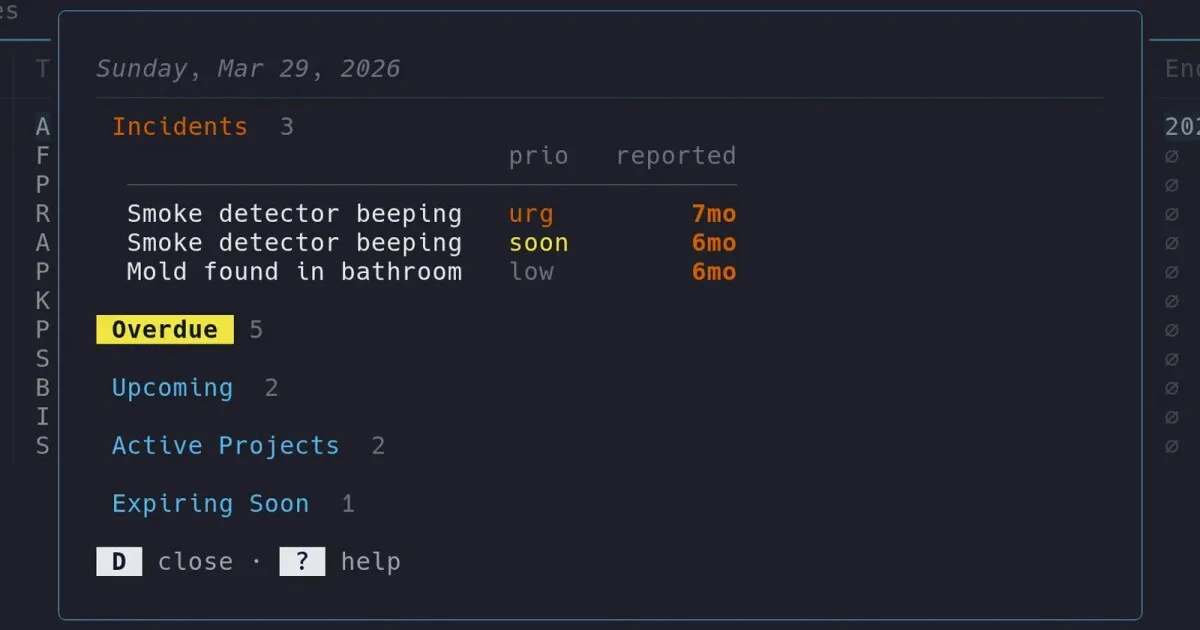
TL;DR: Micasa keeps maintenance schedules, renovation projects, appliance warranties, and vendor quotes in a single SQLite file on your own machine, with no account and no cloud service. It is a modal terminal UI written in Go, so you can sort any column, drill from a project into its quotes, and ask a local model questions about the data without opening a spreadsheet.
What Micasa is
Almost every household has the same filing problem. Somewhere there is a photo of a furnace filter receipt, a notebook of contractor phone numbers, a warranty PDF that may or may not have been filed, and a mental note that the dishwasher should be descaled. Collecting the data is not the hard part. Keeping it in a shape where a question like “is the dishwasher still under warranty” has an answer is.
Micasa is a terminal UI for that household record. It is a single static Go binary built on Charmbracelet for the interface, GORM for the data layer, and SQLite for storage. There is no server component, no account, and no subscription. The whole database lives in one file.
The interesting part is that it is not a notes app. It is a relational model of a house: projects link to quotes, quotes link to vendors, maintenance items link to appliances, and every maintenance item carries a service log recording who did the work and what it cost. Foreign keys are navigable inside the interface, so pressing enter on a vendor name inside a service log takes you to that vendor’s record.
Why it matters
The design bet is that a household record is a database problem rather than a document problem. Spreadsheets fall apart as soon as you want to know what you spent on plumbing across a whole year. Notes apps fall apart because a note about one plumber’s quote has no connection to the other two quotes that plumber gave you.
Micasa treats maintenance as recurring instead of as a task you have to remember. Each maintenance item holds a last service date and an interval, and the next due date is computed from those two values. Overdue items and expiring warranties surface on the dashboard, and micasa status reports them for cron jobs and shell prompts.
It also takes the no-cloud promise seriously. There is an optional sync component, but it is separate from the core tool, and the local database is always the source of truth.
Getting it running
The binary has no runtime dependencies. Homebrew is the shortest path, and the formula pulls in nothing of its own.
brew install micasa

micasa demo     # sample data in an in-memory database
micasa          # start empty, creates the schema on first run
If you write Go, installing from source works too. The project requires Go 1.27.3 or newer.
go install github.com/micasa-dev/micasa/cmd/micasa@latestPre-built binaries are published for Linux, macOS, and Windows on both amd64 and arm64, and every release ships a checksums.txt file. There is also a Nix flake (nix run github:micasa-dev/micasa) and a container image on GitHub Container Registry. The container needs -it because the interface is a TUI.
docker run -it --rm ghcr.io/micasa-dev/micasa:latest demoThe database path follows platform conventions and can be overridden with the MICASA_DB_PATH environment variable or a positional argument.
| Platform | Default path |
|---|---|
| Linux | ~/.local/share/micasa/micasa.db |
| macOS | ~/Library/Application Support/micasa/micasa.db |
| Windows | %LOCALAPPDATA%\micasa\micasa.db |
Driving the interface
Navigation is modal and Vim flavored. nav mode browses, edit mode changes things, and i switches between them.
| Key | Action |
|---|---|
j / k | Move down and up a row |
h / l | Move left and right a column |
/ | Fuzzy jump to a column |
c / C | Hide the current column, or show all hidden columns |
s | Cycle sort on the current column |
n / N | Pin a cell value, then activate the filter |
enter | Drill into a detail view or follow a foreign key |
i | Enter edit mode |
tab | Toggle the house profile |
D | Toggle the dashboard |
@ | Open LLM chat |
ctrl+q | Quit |
Pinning a cell value is worth trying first. Select a vendor name in a quotes table and press n, and every row that does not match dims. Press N and the non-matching rows are hidden entirely instead. Comparing a year of contractor bills becomes a two-keystroke operation.
There is also ctrl+o, which swaps every money value for its order of magnitude, so $1,250 renders as a single pictograph. It is an easter egg, and it works inside LLM answers too.
The command line underneath
The TUI is the main surface, but every subcommand has a scriptable form, which is what makes the tool usable from a cron job or a status line.
micasa status                    # items needing attention, exit code 2 if any
micasa status --days 14 --json
micasa show projects --json
micasa query "SELECT name, cost FROM quotes" --json
micasa backup ~/backups/micasa-$(date +%F).db
micasa query accepts only SELECT and WITH statements, caps results at 200 rows, and times out after 10 seconds. micasa status exits with code 2 when something needs attention, which makes it a one-line addition to a shell prompt or a scheduled check.
There is an MCP server too. micasa mcp speaks the Model Context Protocol over stdio and exposes your household data to clients such as Claude Desktop and Claude Code.
Asking a local model about your house
Press @ for a chat overlay. The model translates your question into SQL, runs it against your database, and summarizes the result, all against a local OpenAI-compatible endpoint.
# install Ollama (macOS/Linux)
curl -fsSL https://ollama.com/install.sh | sh
ollama pull qwen3
ollama serve
Micasa connects to http://localhost:11434/v1 by default. The prompt handed to the model includes your schema, the table relationships, and the actual distinct values stored in key columns, so asking for “plumbing stuff” or “planned projects” tends to work even though those strings never appear in your data.
Two details make this usable rather than a toy. Press ctrl+s to show the generated SQL above each answer, which is the fastest way to catch a query that went sideways. And the chat input accepts /model to switch models, downloading the model automatically if it is not present locally.
Getting documents in
Attachments such as manuals, invoices, and photos live inside the same SQLite file as BLOBs, capped at 50 MB per file, so a single micasa backup captures everything. Saving a document kicks off a three-layer extraction pipeline, and each layer degrades gracefully when its tooling is missing.
- Text extraction runs at save time, pulling selectable text from PDFs with
pdftotextand reading plain text files directly. Images skip this layer. - OCR takes over when text extraction returns little, using
tesseractplus one ofpdfimages,pdftohtml, orpdftoppmto obtain page images. The overlay shows which tool actually ran and how many images it produced. - LLM extraction runs when a model is configured. The extracted text goes to a local model under a JSON Schema constraint that produces structured create and update operations, and those operations are validated against a strict allowlist before anything is written.
What to watch for
This is explicitly a personal tool for one house. The author says so plainly: it is not a smart home controller, not a home automation platform, and not a property management product.
The LLM chat is the weak part, and the documentation is upfront about it. Small models in the 7B to 14B range frequently write SQL that does not match the schema or join tables wrongly. Larger models do noticeably better, and a 32B-class model is where the difference becomes real. Hallucinated numbers show up in aggregation queries often enough that anything financial deserves a check against the actual table. That is what ctrl+s exists for.
The sync side is where the cryptography lives, and it is worth understanding before you enable it. Household data is encrypted with NaCl secretbox before it leaves the device, so a relay stores ciphertext it cannot read. A self-hosted relay is a PostgreSQL container plus the relay binary, with row-level security policies forcing tenant isolation at the database level. Conflict resolution is last writer wins on the creation timestamp, and micasa pro conflicts lists the operations that lost.
Source and Accuracy Notes
- Project page: https://micasa.dev (verified via direct visit)
- Source repository: micasa-dev/micasa
- License: Apache-2.0 (verified from the repository LICENSE file and the Homebrew formula)
- Latest release: v2.8.2, published 2026-10-25
- Repository stats at time of writing: 1,283 stars, 56 forks, 56 open issues
- Built with Charmbracelet, GORM, and SQLite, in pure Go with no CGO
- HN launch thread: https://news.ycombinator.com/item?id=47075124 (657 points, 218 comments, 19 February 2026)
Related Posts
dev-tools
Bumblebee Go Package Inventory Guide
Review Bumblebee for Go package inventory workflows, including setup, dependency validation, CI adoption, supply-chain use, and report checks.
5/28/2026
dev-tools
AgentMesh – Define AI Agent Teams in YAML
Define multi-agent AI workflows in YAML and run them locally with one command. AgentMesh brings Docker Compose patterns to AI agent orchestration.
5/28/2026
dev-tools
Cicada – FOSS CI/CD That Replaces YAML With a Real Language
Cicada replaces GitHub Actions and GitLab CI YAML configs with a custom functional DSL, letting you write pipelines using variables, functions, and shell.
5/29/2026