MCPJam - Open Source MCP Server Testing Platform
Debug, test, and evaluate any MCP server locally with MCPJam — an open source inspector with OAuth tracing, LLM chat, and native GitHub Actions CI/CD.
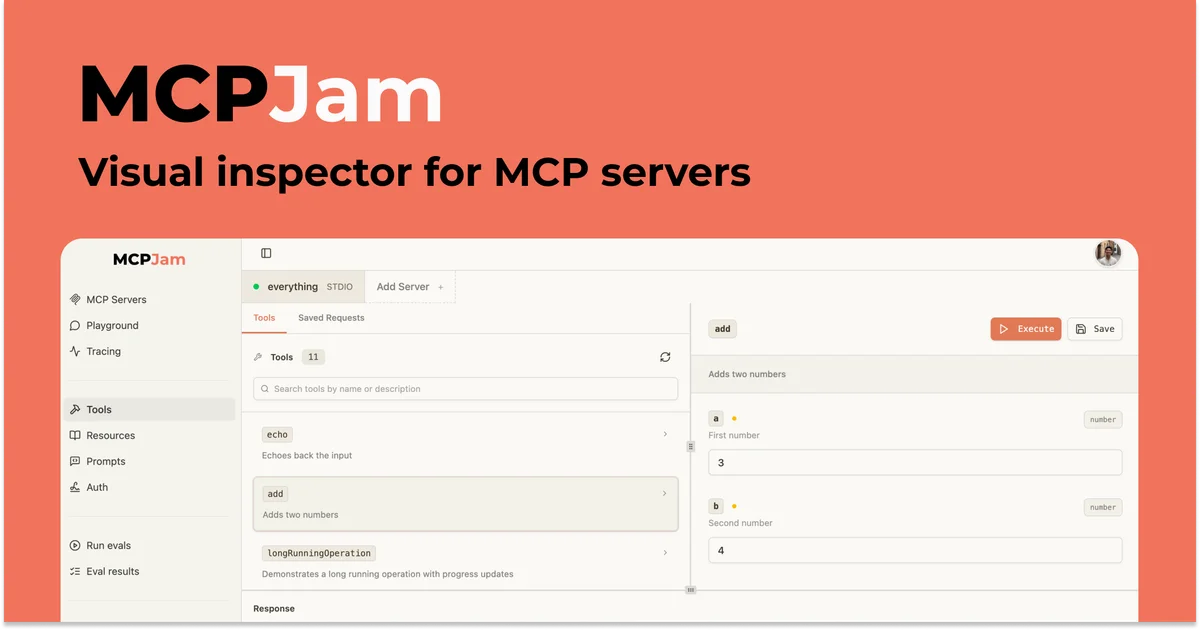
TL;DR
TL;DR: MCPJam is a free, open source platform for testing and debugging MCP servers — with an interactive inspector, OAuth flow tracing, LLM-powered chat sandbox, and GitHub Actions CI/CD integration. Runs locally in one command or as a desktop app.
Source and Accuracy Notes
- Project page: mcpjam.com
- Source repository: github.com/MCPJam/inspector
- License: Apache 2.0 (verified via README.md)
- HN launch thread: news.ycombinator.com/item?id=45521084
What Is MCPJam?
MCPJam is the development platform for MCP servers, MCP apps, and ChatGPT apps — built by the team behind the Model Context Protocol. It fills the gap between writing an MCP server and knowing whether it actually works across clients.
The core problem it solves: MCP servers are hard to debug. You need to inspect JSON-RPC traces, check OAuth handshakes, verify tool schemas, and run behavioral evals — often across multiple LLM providers. MCPJam brings all of that into one local tool with a web UI, a CLI, and a programmable SDK.
Key capabilities from the README:
- Debug: Inspect every JSON-RPC message and OAuth exchange across host configurations with full traces.
- Chat: Talk to any LLM against your server with full trace visibility into tool calls and context.
- Inspect: Explore your server’s tools, resources, and prompts in one place.
- Evaluate: Run evals across multiple LLMs and track accuracy over time to catch regressions.
- CLI: Probe servers, run doctor checks, exercise OAuth flows, and list tools straight from the terminal.
- SDK: Programmatically drive inspections and assert on tool and resource shapes from your own tests.
- CI/CD: Wire the CLI and SDK into GitHub Actions to run e2e tests, evals, and spec conformance on every PR.
Running MCPJam
Three ways to run it:
Hosted web app
Open app.mcpjam.com — no install needed. Always on the latest version. Share server links with teammates the same way you’d share a Google Doc.
Note: The hosted app only accepts HTTPS MCP server URLs. For local HTTP or STDIO servers, use the Desktop or Terminal versions.
Desktop app
Download the installer for your OS. No Node.js required. Supports HTTP/S and local STDIO servers.
# macOS
# Download from: https://github.com/MCPJam/inspector/releases/latest/download/MCPJam.Inspector.dmg

# Windows
# Download from: https://github.com/MCPJam/inspector/releases/latest/download/MCPJam-Inspector-Setup.exe
```bash

### Terminal (npx)

Requires Node.js 20 or higher. Supports HTTP/S and local STDIO servers.

```bash
npx @mcpjam/inspector@latest
```bash

After it starts, open the printed localhost URL in your browser.

## How It Works — Inspector Walkthrough

Once the inspector is running and your MCP server is connected (via SSE at `http://localhost:8000/mcp` or via STDIO), the inspector shows:

**Tools tab** — A deterministic list of every tool your server exposes, including parameter schemas. Click any tool to invoke it with custom arguments and see the raw JSON-RPC request and response.

**Chat tab** — An LLM playground that simulates how a real client (ChatGPT, Claude) would interact with your server. You can switch between LLM providers and see exactly which tools were called, in what order, and with what context.

**Traces tab** — Every JSON-RPC message, grouped by session. Useful for replaying exactly what happened during a failing conversation.

**OAuth debugger** — For servers that use OAuth, the debugger traces the full handshake and shows exactly which step failed (token exchange, redirect, scope mismatch).

## CI/CD Integration

MCPJam has first-class GitHub Actions support. You can gate every PR on model behavior using the CLI or SDK.

### CLI in GitHub Actions

```yaml
- name: Run MCPJam evals
  run: npx @mcpjam/inspector@latest eval --server ./path/to/server
```bash

### SDK in a test file

```typescript
import { createInspector } from '@mcpjam/inspector';

const inspector = await createInspector({
  server: 'http://localhost:8000/mcp',
});

const result = await inspector.evaluate({
  name: 'order_refund_flow',
  prompts: ['A user wants a full refund on order #1234'],
  assertions: [
    { type: 'tool_called', name: 'create_refund' },
    { type: 'tool_called_count', name: 'create_refund', count: 1 },
    { type: 'no_destructive_tools' },
  ],
});
MCPJam ships with built-in eval suites: mcpjam/evals for behavior coverage, mcpjam/security for prompt injection checks, and mcpjam/conformance for MCP spec compliance (e.g. MCP 2025-11-25).
Security Notes
The OAuth debugger is particularly useful for catching misconfigured server-side OAuth flows. MCPJam traces the full exchange locally without sending tokens to external services — useful for auditing auth behavior without leaking credentials in logs.
The mcpjam/security eval suite checks for common tool call patterns that may indicate over-permissioned tools (e.g. tools that delete data without confirmation prompts).
FAQ
Q: How is this different from the official MCP SDK inspector? A: The official MCP SDK ships basic tools for inspecting server capabilities. MCPJam adds OAuth flow tracing, cross-client testing (simulating how ChatGPT, Claude, and other hosts behave differently), LLM-powered chat sandbox with full trace visibility, behavioral evals, and native GitHub Actions CI/CD integration.
Q: Is it free? A: Yes. MCPJam is open source under the Apache 2.0 license. The hosted web app is also free to use.
Q: Does it work with any MCP server? A: MCPJam follows the Model Context Protocol specification. Any server that implements the standard MCP protocol (tools, resources, prompts, and the 2025-11-25 spec) should work. STDIO, SSE, and Streamable HTTP transports are supported.
Q: Can I use this for production monitoring? A: MCPJam is primarily a development-time and CI tool. For production monitoring of MCP servers, you would typically instrument your server with custom logging and connect those logs to your observability stack.
Q: What are the desktop app requirements? A: The desktop app requires macOS or Windows. It has no local Node.js requirement — the runtime is bundled. Supports both HTTP/S and local STDIO servers.
Q: Can teams use MCPJam collaboratively? A: The hosted web app at app.mcpjam.com lets you share MCP server links with teammates directly, similar to sharing a Google Doc URL. The desktop and terminal versions are per-developer local tools.
Conclusion
MCPJam closes the loop between writing an MCP server and shipping it with confidence. Its combination of interactive debugging, OAuth tracing, behavioral evals, and CI/CD integration makes it the most complete open source MCP testing platform available.
If you’re building MCP servers, MCP apps, or ChatGPT apps, MCPJam is worth adding to your development workflow. The hosted app requires zero setup, and the CLI version runs in seconds via npx.
Get started at mcpjam.com or github.com/MCPJam/inspector.
Related Posts
dev-tools
Automotive Skills Suite for AI Engineering
Evaluate Automotive Skills Suite for APQP, ASPICE, HARA, safety-plan, and DIA workflows with setup notes, governance risks, and SME review guidance.
5/28/2026
dev-tools
awesome-agentic-ai-zh Roadmap Guide
Explore awesome-agentic-ai-zh as a Chinese agentic AI learning roadmap, with setup notes, track selection, study workflow, and evaluation guidance.
5/28/2026
dev-tools
Baguette iOS Simulator Automation Guide
Set up Baguette for iOS Simulator automation, web dashboards, device farms, gesture input, streaming, and camera testing with Xcode caveats.
5/28/2026