MCPJam Inspector – MCP Server Testing and Debugging
MCPJam Inspector tests MCP servers across Claude, ChatGPT, Cursor and more. Catch breakages before your users do. 2079 GitHub stars.
TL;DR
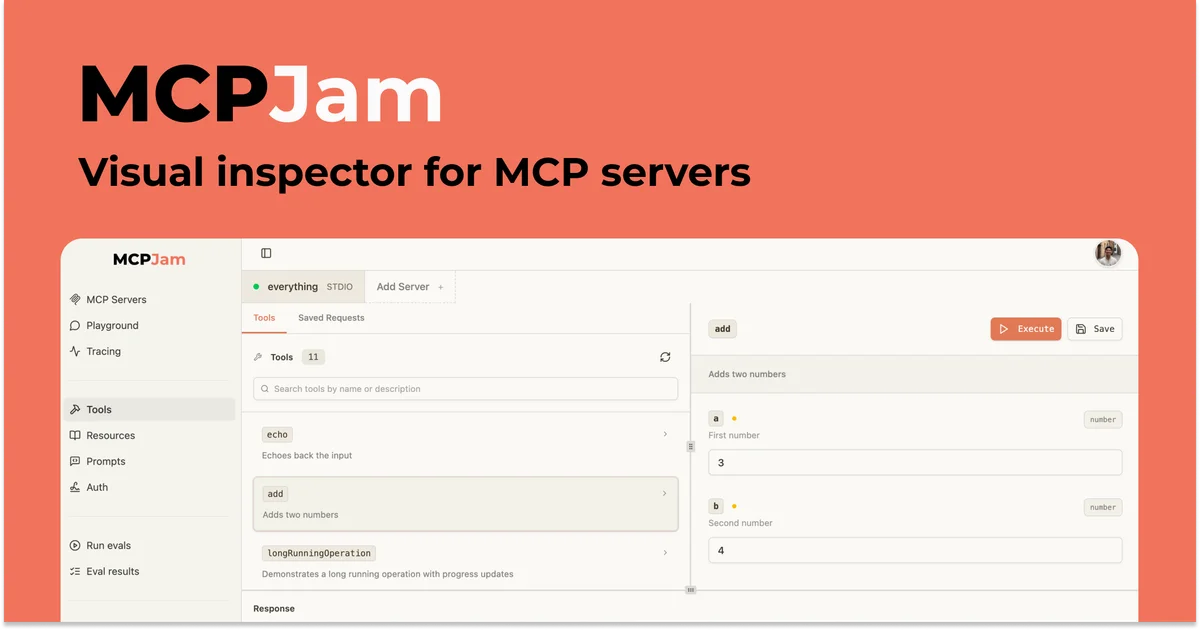
TL;DR: MCPJam Inspector is a free web-based platform for testing, debugging, and evaluating MCP servers across every major AI client — no ngrok or paid subscriptions needed.
Source and Accuracy Notes
- Project page: mcpjam.com
- Source repository: github.com/MCPJam/inspector (2,079 stars, Apache 2.0 license, verified via GitHub API)
- License: Apache 2.0 (verified via README badge)
- HN launch thread: news.ycombinator.com/item?id=46815786
What Is MCPJam?
MCPJam Inspector is a development platform purpose-built for testing MCP servers, MCP apps, and ChatGPT apps. If you maintain an MCP server or are integrating one into your product, this tool lets you inspect every JSON-RPC message, debug OAuth flows, and run evaluation suites across multiple AI clients — all from a hosted web UI or a terminal.
The core value: catch regressions before your users do, without needing ngrok, a ChatGPT subscription, or a Claude account just to test.
Setup Workflow
Step 1: Try the hosted version
The fastest path is no install at all. Open app.mcpjam.com, connect your MCP server, and start probing it immediately.
Step 2: CLI quick start
If you prefer terminal-based workflows, install the CLI with one command:
npx @mcpjam/inspector@latest
```bash

From there you can list tools, inspect prompts, run OAuth diagnostics, and exercise your server directly from the command line.

### Step 3: Wire into CI/CD

The CLI and SDK both integrate with GitHub Actions or any pipeline. Every pull request can run end-to-end tests, OAuth checks, and spec-conformance validation automatically.

```bash
# Example: run evals in CI
npx @mcpjam/inspector@latest eval --server your-mcp-server --threshold 0.9
```bash

Exit code 1 fires when any client drops below your threshold, blocking the merge until you fix the regression.

## Deeper Analysis

### What it actually tests

MCPJam runs three distinct validation tracks against your server:

1. **Reliability** — does the server respond correctly across clients?
2. **Security / OAuth** — does the OAuth handshake complete without errors?
3. **Protocol compliance** — does the server conform to the MCP spec?

On every run you get a per-client pass rate: Claude, ChatGPT, Microsoft Copilot, Gemini, and Cursor all tested independently.

### Multi-client debugging

One of MCPJam's strongest features is cross-client visibility. A tool that works perfectly for Claude might silently fail for ChatGPT due to subtle output schema differences. MCPJam surfaces exactly which client fails, on which tool, and why — something you cannot easily replicate without maintaining five separate accounts.

### CI/CD integration

The SDK lets you snapshot server capabilities programmatically and assert on tool shapes from your own test suite:

```javascript
import { Inspector } from '@mcpjam/inspector';

const inspector = new Inspector({ server: 'stdio', command: 'npx', args: ['-y', '@modelcontextprotocol/server-everything'] });
await inspector.connect();
const tools = await inspector.listTools();
console.log(`Server exposes ${tools.length} tools`);
Practical Evaluation Checklist
- Can connect via STDIO or HTTP transport
- OAuth and EMA debugger for auth flow inspection
- Cross-client testing across Claude, ChatGPT, Copilot, Gemini, Cursor
- CLI for local terminal workflows
- SDK for programmatic testing in your own test suite
- GitHub Actions integration for CI gates
- Free hosted version at app.mcpjam.com
Security Notes
- MCPJam runs your server locally in the web app sandbox — tool calls are executed against your live server, not a mock
- OAuth debugging features inspect actual OAuth handshakes; avoid testing against servers that hold production credentials
- The CI/CD integration runs your server in GitHub Actions runners; follow standard runner security practices
FAQ
Q: Do I need a paid subscription to use MCPJam?
A: No. The hosted version at app.mcpjam.com is free, and the CLI (npx @mcpjam/inspector@latest) is also free.
Q: Which MCP clients are supported? A: As of the current version: Claude, ChatGPT, Microsoft Copilot, Gemini, and Cursor.
Q: Can I test HTTP-based MCP servers? A: Yes. MCPJam supports both STDIO and HTTP transport modes.
Q: Does it work with any MCP server? A: Any server implementing the Model Context Protocol should work. If you hit a compatibility issue, the MCPJam Discord (linked from the GitHub repo) is active.
Q: Is there an on-premises option for enterprise use? A: The website mentions an enterprise plan for security reviews. Visit mcpjam.com for details.
Conclusion
MCPJam Inspector fills a real gap in the MCP ecosystem: reliable, multi-client testing without the setup overhead. Whether you are shipping an MCP server to the public or integrating one internally, running eval gates on every PR is a practice that pays off quickly. The free tier is genuinely useful — worth bookmarking if you work with MCP at all.
Related Posts
dev-tools
Automotive Skills Suite for AI Engineering
Evaluate Automotive Skills Suite for APQP, ASPICE, HARA, safety-plan, and DIA workflows with setup notes, governance risks, and SME review guidance.
5/28/2026
dev-tools
awesome-agentic-ai-zh Roadmap Guide
Explore awesome-agentic-ai-zh as a Chinese agentic AI learning roadmap, with setup notes, track selection, study workflow, and evaluation guidance.
5/28/2026
dev-tools
Baguette iOS Simulator Automation Guide
Set up Baguette for iOS Simulator automation, web dashboards, device farms, gesture input, streaming, and camera testing with Xcode caveats.
5/28/2026