LimanDoc - Visual Knowledge Organization Tool
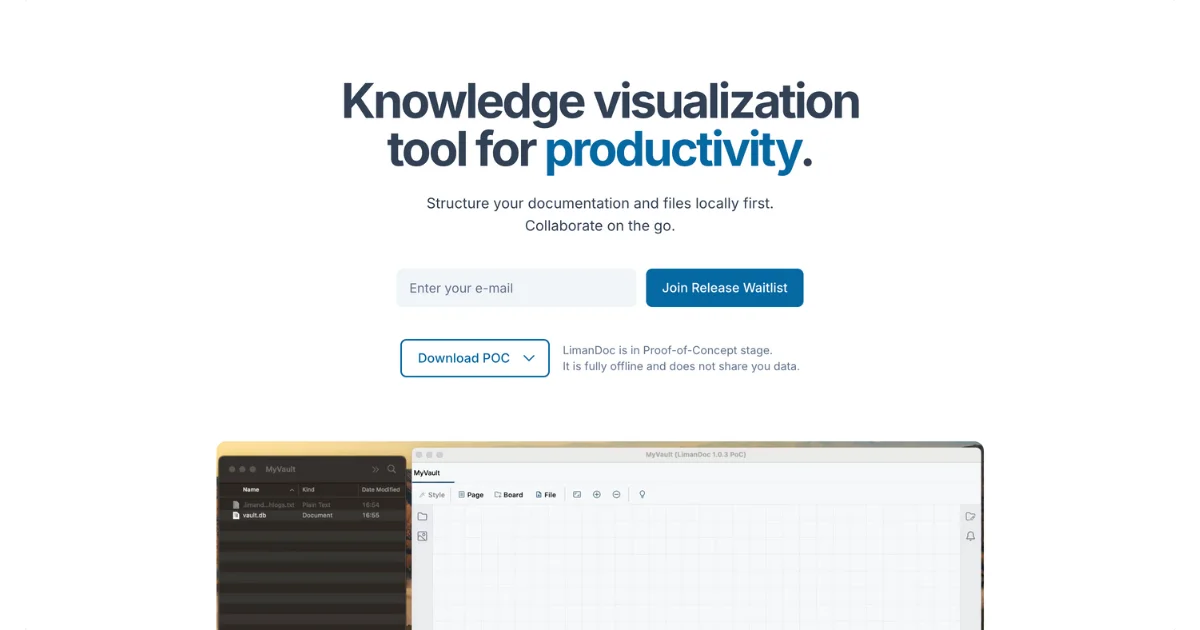
Offline-first desktop app for organizing files and documentation on infinite zoomable canvases. Supports markdown, PDFs, images with local file storage.
TL;DR
TL;DR: LimanDoc is an offline-first desktop app that organizes documentation and files on infinite zoomable canvases, supporting markdown, PDFs, and images with local file storage.
Source and Accuracy Notes
- Project page: limandoc.com
- Source repository: github.com/NuruNabiyev/LimanDocDiscussion (discussions)
- License: Proprietary (not open source, per FAQ)
- HN launch thread: news.ycombinator.com/item?id=41847293 (45 points)
What Is LimanDoc?
LimanDoc is a knowledge visualization tool that replaces traditional folder hierarchies with infinite zoomable canvases. Instead of nesting files in folders, you place them on a visual canvas where you can see relationships at a glance.
The app stores all data in local files rather than a database, syncing immediately with any file changes made outside the app. This means your data stays portable and you’re never locked into a proprietary format.
Core Features
Infinite Canvas with Inner Canvases
The main innovation is nested canvases - you can zoom into any element to reveal another canvas inside it. This mirrors how knowledge actually works: topics contain subtopics, documents reference other documents, and ideas branch in multiple directions.
Multi-Format File Support
Files stored in a vault appear directly on the canvas:
- PDFs render inline for quick reference
- Images display at full resolution
- Markdown files render with full formatting
- Text files show content immediately
- Icons for visual organization
Local-First Architecture
LimanDoc follows an offline-first philosophy:
- No central servers handle your files
- All data stored locally in your filesystem
- Peer-to-peer sync only (no cloud dependency)
- Works completely offline
- Changes sync immediately, even from external editors
Markdown Support
Create rich documents with:
- Lists and todos
- Tables
- Embedded images
- Full markdown syntax
Platform Support
LimanDoc runs as a JVM desktop application on:
- macOS (tested, fully functional)
- Linux (supported)
- Windows (supported)
- Mobile (coming soon)
Pricing Model
LimanDoc offers three tiers:
Free (Always)
- Unlimited projects, boards, and files
- Analytics (crash reports and anonymized usage stats)
- Standard support priority
Lifetime Ownership (€34)
- Automatic backups
- Option to disable analytics
- Priority support and early feature drops
- Price increases as features are added
Corporate License
- Sync on premise or cloud
- Collaboration mode (coming soon)
- Additional security measures
- 24/7 support
- Contact for pricing
Current Status
LimanDoc is in Alpha stage. The offline functionality is fully working and tested on macOS. The team is actively developing:
- P2P sync for local collaboration
- Community and personal templates
- Mobile apps for iOS and Android
- Linux and Windows stability improvements
Who Is It For?
LimanDoc targets visual thinkers who struggle with traditional hierarchical file systems. If you’ve ever felt constrained by folder structures in tools like Confluence, Evernote, or Google Workspace, LimanDoc offers a different approach.
It’s particularly useful for:
- Researchers organizing papers and notes
- Developers managing documentation and code snippets
- Writers structuring complex narratives
- Students building knowledge graphs
- Teams needing visual project overviews
Practical Evaluation Checklist
Before adopting LimanDoc, consider:
- ✅ Your workflow benefits from visual spatial organization
- ✅ You work primarily offline or need local file control
- ✅ You use macOS, Linux, or Windows desktop
- ✅ You’re comfortable with alpha-stage software
- ✅ You value data portability over cloud sync
- ❌ You need real-time collaboration (not yet available)
- ❌ You require mobile access (coming soon)
- ❌ You need production-ready stability
Security Notes
LimanDoc’s local-first architecture has security implications:
Advantages:
- Your files never leave your machine unless you explicitly sync
- No third-party servers store your data
- Full control over backups and encryption
Considerations:
- You’re responsible for your own backups (unless you pay for Lifetime Ownership)
- P2P sync (when available) requires trust in connected devices
- Alpha software may have undiscovered vulnerabilities
FAQ
Q: Is LimanDoc open source?
A: No. The founder plans to earn revenue from the software, so it remains proprietary. You can submit bugs and feature requests via GitHub discussions.
Q: Can I use LimanDoc for free?
A: Yes. The free tier includes unlimited projects, boards, and files with no feature restrictions. The paid tiers add convenience features like automatic backups and priority support.
Q: How does LimanDoc differ from Obsidian or Notion?
A: Obsidian uses markdown files in folders (hierarchical). Notion uses a database model with cloud sync. LimanDoc uses a visual canvas model with local file storage - you see all your content spatially rather than in nested folders or database views.
Q: Will my data be portable if I stop using LimanDoc?
A: Yes. Since LimanDoc stores data in standard files (markdown, PDFs, images) rather than a proprietary database, you can access everything with any file manager or compatible app.
Q: Is the €34 lifetime price a one-time payment?
A: Yes, but the price increases for new customers as more features are added. Early adopters lock in the current price permanently.
Conclusion
LimanDoc offers a fresh approach to knowledge organization by treating information as a visual landscape rather than a file tree. The offline-first, local-storage model appeals to privacy-conscious users and those who want full control over their data.
While still in alpha, the core canvas concept is compelling for visual thinkers. The free tier is generous, and the lifetime ownership option provides good value for early adopters willing to tolerate some rough edges.
If you’ve ever wanted to organize your notes and files the way your brain actually works - as interconnected ideas rather than nested folders - LimanDoc is worth trying.
Related Posts
dev-tools
Automotive Skills Suite for AI Engineering
Evaluate Automotive Skills Suite for APQP, ASPICE, HARA, safety-plan, and DIA workflows with setup notes, governance risks, and SME review guidance.
5/28/2026
dev-tools
awesome-agentic-ai-zh Roadmap Guide
Explore awesome-agentic-ai-zh as a Chinese agentic AI learning roadmap, with setup notes, track selection, study workflow, and evaluation guidance.
5/28/2026
dev-tools
Baguette iOS Simulator Automation Guide
Set up Baguette for iOS Simulator automation, web dashboards, device farms, gesture input, streaming, and camera testing with Xcode caveats.
5/28/2026