Libredesk - Self-Hosted Customer Support Desk
Set up Libredesk, an open-source omnichannel customer support desk with live chat, email, and automation in a single binary on your VPS.
TL;DR
TL;DR: Libredesk is an open-source, single-binary customer support desk that replaces Intercom or Zendesk. Deploy it on any VPS with Docker or a standalone binary.
Source and Accuracy Notes
- Project page: libredesk.io
- Source repository: github.com/abhinavxd/libredesk
- License: AGPL-3.0 ← verified via GitHub API
- HN launch thread: news.ycombinator.com/item?id=43158166
What Is Libredesk?
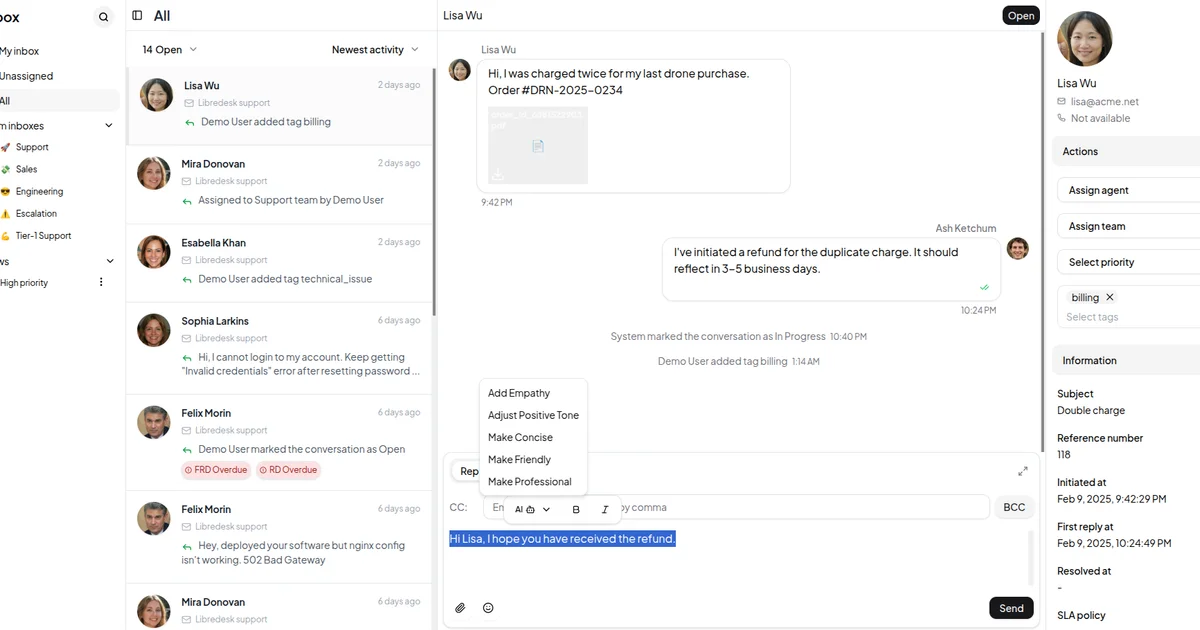
Libredesk is an open-source, self-hosted omnichannel customer support desk. It replaces tools like Intercom or Zendesk with a single Go binary that runs on your own server.
From the official README:
Modern, open source, self-hosted omnichannel customer support desk. Live chat, email, and more in a single binary.
Key features verified from source:
- Omnichannel inbox — live chat, email, and more in one unified interface
- Live chat widget — embed on your website for real-time conversations
- Granular permissions — custom roles for teams and individual agents
- Automations — auto-tag, assign, and route conversations based on custom conditions
- CSAT surveys — automated customer satisfaction measurement
- Macros — saved message templates for one-click responses
- AI-assist — rewrite responses with AI to make them more friendly or professional
- SLA management — set and track response time targets
- Command bar — CTRL+K shortcut for quick actions on conversations
- Webhooks — real-time HTTP notifications for external integrations
The backend is written in Go, frontend is Vue.js 3 with Shadcn UI. It stores data in PostgreSQL.
Prerequisites
- A VPS with Ubuntu or similar Linux distro
- Docker installed, or ability to run a single binary
- PostgreSQL database (included via Docker, or set up separately for binary install)
- Domain/subdomain pointed to your server (optional, for production)
Setup Workflow
Step 1: Deploy with Docker
The quickest path is Docker Compose. Download the compose file and sample config:
curl -LO https://github.com/abhinavxd/libredesk/raw/main/docker-compose.yml
curl -LO https://github.com/abhinavxd/libredesk/raw/main/config.sample.toml
cp config.sample.toml config.toml
```bash

Edit `config.toml` with your database credentials and domain settings. Then start the services:

```bash
docker compose up -d
```bash

### Step 2: Set the System User Password

After the containers are running, set the initial admin password:

```bash
docker exec -it libredesk_app ./libredesk --set-system-user-password
```bash

Go to `http://YOUR_SERVER_IP:9000` and log in with username `System` and the password you just set.

### Step 3: Configure the Live Chat Widget

Once logged in, go to **Settings → Widget** to get the embed code. Add it to your website header:

```html
<script src="https://your-libredesk-domain.com/widget.js"></script>
Step 4: Connect Email Channels
Under Settings → Channels, add your support email addresses (support@, billing@, sales@) via IMAP/SMTP. Libredesk will pull emails into the unified inbox.
Step 5: Set Up Automations
Go to Automations to create rules. Example: auto-assign conversations from high-value customers to a specific team, or auto-tag based on subject keywords.
Deeper Analysis
Libredesk vs Intercom/Zendesk
The core value proposition is ownership. Libredesk runs on infrastructure you control — no per-seat pricing, no data leaving your servers, no vendor lock-in.
Compared to other open-source alternatives like Chatwoot or Plane, Libredesk differentiates by being a single binary with no separate backend services to maintain beyond PostgreSQL.
Data storage
All conversation data, agent activity logs, and customer information stays on your PostgreSQL instance. Back it up with standard Postgres tools (pg_dump, barman, etc.).
AI-assist
The built-in AI rewrite feature sends message content to an external AI provider (you configure the API key in settings). It is opt-in and does not require a specific provider — any OpenAI-compatible API works.
Practical Evaluation Checklist
- Runs on a $6/month VPS with 2GB RAM
- First login in under 5 minutes after Docker starts
- Live chat widget loads on a test site without CORS issues
- Email channel connects via standard IMAP/SMTP (no proprietary connector needed)
- Webhook fires on message events (test with a local
ngroktunnel) - Automations apply rules without manual intervention
Security Notes
- All agent actions are logged in the Activity Logs for auditing
- Webhooks use standard HTTP with optional secret signing
- Database credentials live in
config.toml, not in environment variables exposed to the container - PostgreSQL connection can be TLS-secured for production
FAQ
Q: Does Libredesk have a built-in knowledge base? A: Not yet. The current roadmap includes a knowledge base feature. For now, you can link to external docs in automated responses.
Q: Can I migrate from Intercom? A: There is no built-in migration tool. You would need to export Intercom data and write a custom import script. Check the GitHub Discussions for community migration approaches.
Q: How does the AI-assist feature work? A: It requires an OpenAI-compatible API key in settings. Message content is sent to that provider for rewrite suggestions. No data is stored or processed by Libredesk beyond the API call.
Q: Is there a hosted/cloud version? A: No. Libredesk is fully self-hosted only. There is a live demo you can try before deploying.
Conclusion
Libredesk is a practical self-hosted replacement for commercial customer support tools. The single-binary deployment, combined with live chat, email, and automation features, covers what most indie projects need. The AGPL license means you have the freedom to run, modify, and host it yourself.
If you are paying per-seat for Intercom or Zendesk, Libredesk is worth a weekend evaluation on a test VPS.
Related Posts
dev-tools
AgentMesh – Define AI Agent Teams in YAML
Define multi-agent AI workflows in YAML and run them locally with one command. AgentMesh brings Docker Compose patterns to AI agent orchestration.
5/28/2026
ai-setup
IonRouter – Fast Low-Cost AI Inference API
IonRouter is a YC W26 inference API routing open-source and fine-tuned models via an OpenAI-compatible endpoint, built on a C++ runtime optimized for GH200.
5/28/2026
dev-tools
Cicada – FOSS CI/CD That Replaces YAML With a Real Language
Cicada replaces GitHub Actions and GitLab CI YAML configs with a custom functional DSL, letting you write pipelines using variables, functions, and shell.
5/29/2026