TL;DR
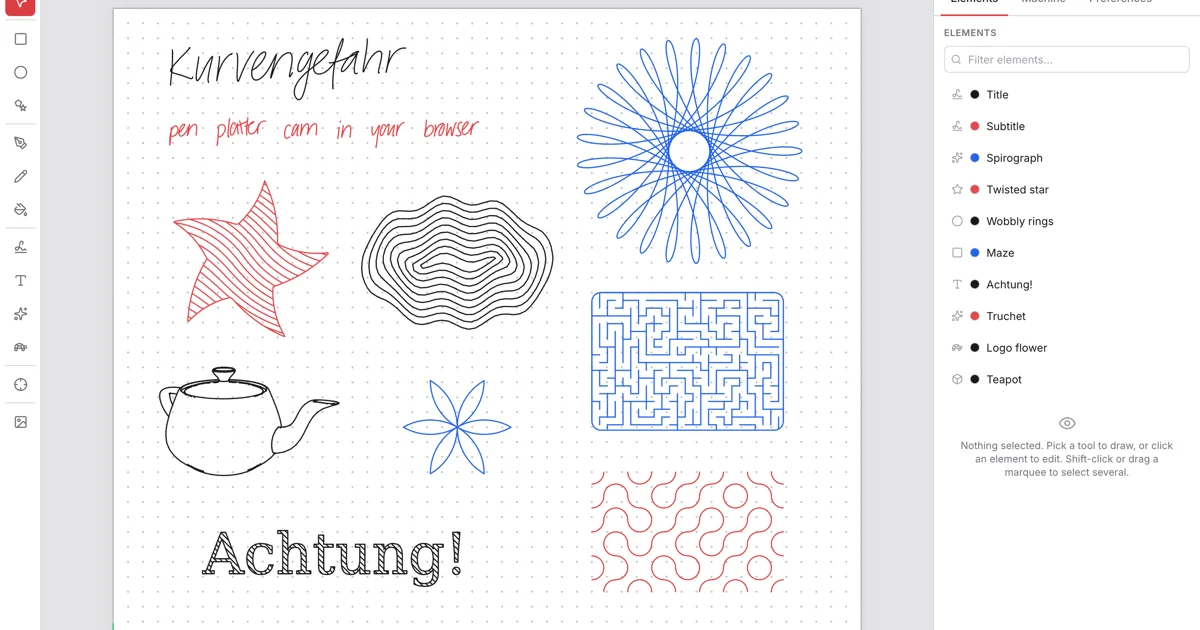
TL;DR: Kurvengefahr is a free, browser-based pen plotter CAM tool that turns handwriting, SVG, photos, and generative patterns into G-code or live USB plotting — no install required.
Source and Accuracy Notes
- Project page: kurvengefahr.org
- Source repository: github.com/tibordp/kurvengefahr
- License: GNU GPL v2.0 (verified via LICENSE file in repo)
- HN launch thread: news.ycombinator.com/item?id=48881352
What Is Kurvengefahr?
Kurvengefahr is a browser-based CAM tool for pen plotters. It covers the full workflow from importing or creating artwork to generating the exact toolpath for plotting — everything runs client-side, nothing is uploaded to a server.
The project grew out of a need: the author built a pen plotter attachment for a Prusa MK4 but had no good way to turn artwork into G-code. What started as a small browser app expanded into a full CAD/CAM editor with features rarely found outside of desktop CAD software.
Key capabilities directly from the README:
- Handwriting synthesis — a Graves RNN writes your text as real handwriting, not a font
- Logo interpreter — turtle graphics with procedures, recursion, and seeded randomness
- Shape editing — Béziers, booleans, welds, flood-fill hatching, and more
- Generative patterns — spirographs, L-systems, Truchet tiles, Voronoi, flow fields
- SVG and DXF import — files become native, editable paths at real-world size
- Raster tracing — restyle photos as outlines, hatching, TSP tours, or spirals
- STL wireframes — import 3D models and render as plottable feature-edge wireframes
- Plot it — download G-code, or plot live over Web Serial (AxiDraw EBB, GRBL 1.1)
- Share via encrypted link — document encrypted in-browser, key rides in the URL
Setup Workflow
Kurvengefahr runs entirely in the browser at kurvengefahr.org. It is also a installable PWA that works offline.
For self-hosting or local development:
git clone https://github.com/tibordp/kurvengefahr.git
cd kurvengefahr
npm install
npm run dev   # builds the wasm crate, then starts Vite
Requires the Rust wasm32-unknown-unknown target and wasm-pack. Rebuild the Rust/WASM core after changes with npm run build:wasm.
Plotter Integration
The README documents machine profiles for three broad categories:
- G-code machines — Prusa printers with a pen attachment (or any G-code CNC), via PrusaLink + Bridge extension or direct G-code download
- AxiDraw-style EBB plotters — connected over Web Serial (USB), with pause/resume and a moving playhead
- GRBL 1.1 plotters — Z-axis or servo pen, optional homing, over Web Serial
To plot live, open the app in Chromium-based browser, connect your plotter over USB, and use the live plot panel.
Technical Architecture
From the README:
The app is client-only React, but all the geometry — the handwriting model, font and text layout, shape and path math, polygon booleans, SVG and DXF parsing, occlusion, image tracing, generative patterns, the Logo interpreter, clipping, and path optimization — is Rust compiled to WebAssembly (the
kg_corecrate).
The handwriting model, image tracing, and Logo programs run in Web Workers so the UI stays responsive.
Practical Evaluation Checklist
- Works in browser, no install: ✅
- PWA with offline support: ✅
- Handwriting synthesis (Graves RNN): ✅
- Logo interpreter with turtle graphics: ✅
- SVG/DXF import: ✅
- Raster photo tracing: ✅
- STL wireframe export: ✅
- G-code export: ✅
- Live USB plotting (Web Serial): ✅
- Open source (GPL v2): ✅
- Self-hostable: ✅
Security Notes
The sharing feature encrypts documents in-browser before upload. The encryption key is encoded in the shared URL fragment and never sent to the server. If you self-host the share service, the same encryption model applies.
Everything else — editing, plotting, G-code generation — runs locally in your browser with no network requests.
FAQ
Q: Does it work with my AxiDraw? A: Yes. AxiDraw-style machines using the EBB board are supported over Web Serial. The author specifically requested feedback from AxiDraw users since testing was done with a hardware mock on STM32.
Q: Can I run it offline? A: Yes. Install the PWA and it works without an internet connection.
Q: What formats can I import? A: SVG, DXF, and STL. Raster images (PNG, JPG) can be traced using several algorithms (outlines, hatching, TSP spirals, flow fields).
Q: Is the source code available? A: Yes, licensed under GNU GPL v2.0.
Conclusion
Kurvengefahr is a surprisingly complete browser-based CAD/CAM tool purpose-built for pen plotters. The combination of handwriting synthesis, a real Logo interpreter, generative patterns, and direct plotter integration over USB makes it stand out from simple G-code generators. Everything runs client-side, no data leaves your machine unless you explicitly share a document.
If you own a pen plotter — or have been eyeing the Prusa pen attachment for your MK4 — it is worth trying at kurvengefahr.org.
Related Posts
dev-tools
Automotive Skills Suite for AI Engineering
Evaluate Automotive Skills Suite for APQP, ASPICE, HARA, safety-plan, and DIA workflows with setup notes, governance risks, and SME review guidance.
5/28/2026
dev-tools
awesome-agentic-ai-zh Roadmap Guide
Explore awesome-agentic-ai-zh as a Chinese agentic AI learning roadmap, with setup notes, track selection, study workflow, and evaluation guidance.
5/28/2026
dev-tools
Baguette iOS Simulator Automation Guide
Set up Baguette for iOS Simulator automation, web dashboards, device farms, gesture input, streaming, and camera testing with Xcode caveats.
5/28/2026