TL;DR: Keet builds a whole course on whatever topic you name, with short explainer videos, a roadmap of sequenced lessons, and games that test you at the end of each one. Videos are rendered by Manim and Remotion, and the shape of the content is picked by where your topic sits on Biglan’s hard-soft and pure-applied axes. It is an iPhone app from a YC S24 startup, free to download, with two courses included before you start buying credits.
What it is
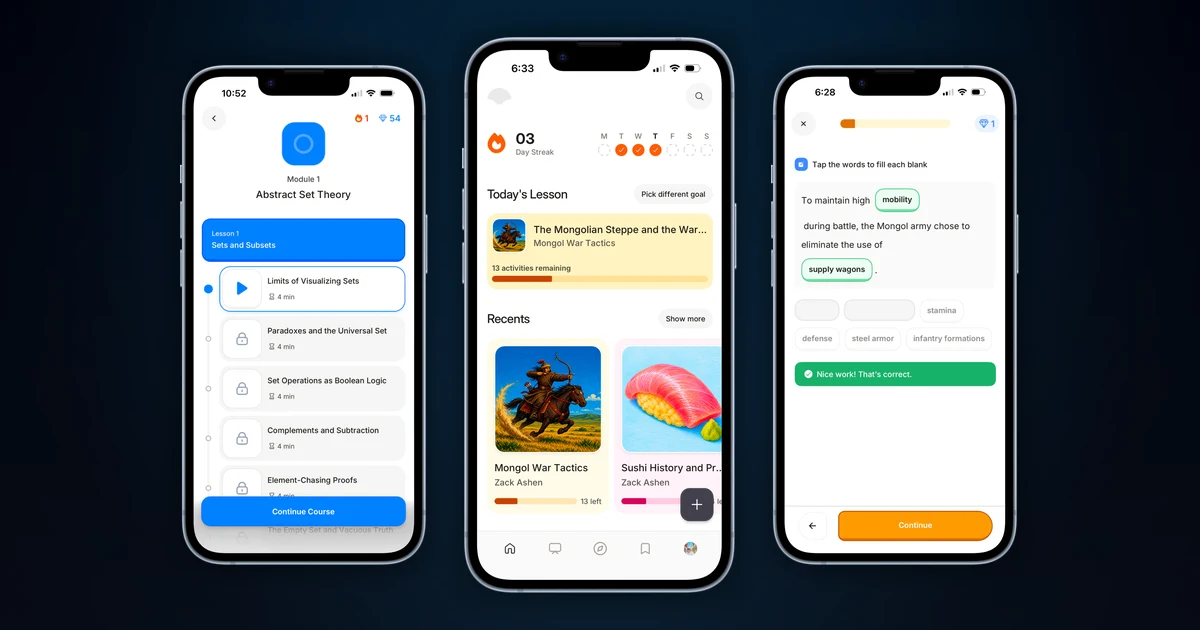
Keet is an iPhone app from Zack and Tommy, the two co-founders who launched it on Hacker News in August 2026 as a YC S24 company. You type in a topic and the app returns a course: a roadmap of modules, lessons of about four minutes each, and a set of games attached to every lesson.
The founders met in a linear algebra class in college and took classes together for four years. Zack Ashen tells the story as a complaint about learning without curriculum. He wanted to understand coffee brewing and ended up with YouTube videos, ChatGPT conversations and books scattered across the room, never getting past the fact that every source assumed prerequisites he did not have, or none at all.
Keet is the fix for that specific frustration. Give it a topic and it finds a sensible starting point, then sequences the lessons so each one builds on the last. The team’s own use cases are worth reading, because they are about narrowness rather than breadth. A subject you already enjoy passively, a small corner of a field you know well, or a term you saw mentioned somewhere and want to chase down.
How the course is built
When you create a course, Keet asks how hard it should be, how much depth it should go into, and a few optional questions about what you want out of it. You also set the narration style.
After that the topic gets filed into one of Biglan’s four quadrants, and the quadrant changes the instructions the generation runs under.
| Quadrant | Example topics | Content the team named |
|---|---|---|
| Hard and pure | mathematics, theoretical physics | worked problems, proofs, real world cases |
| Hard and applied | engineering, applied sciences | not specified |
| Soft and pure | history, literature, philosophy | primary source narratives, contrasting perspectives |
| Soft and applied | policy, management, education | not specified |
The App Store description says the same thing in plain language: a quantum physics course is full of worked problems and proofs, while a History of NYC course leans on primary source narratives and contrasting perspectives.
The videos come out of two open source renderers, and the paths on Keet’s own CDN make it obvious which one handled which clip:
# Manim clips carry a math-visualisation renderer id
https://cdn.trykeet.com/courses/<course-id>/modules/<module-id>/lessons/<lesson-id>/chunks/<chunk-slug>/<render-id>_manim/video.mp4

# Remotion clips carry a process-animation renderer id
https://cdn.trykeet.com/courses/<course-id>/modules/<module-id>/lessons/<lesson-id>/chunks/<chunk-slug>/<render-id>_remotion/video.mp4
Manim handles the clips that need maths drawn on screen. Remotion animates processes and lays primary source material over the top, in the style the founders cite as inspiration along with Vox and 3Blue1Brown. The team tried a website first, then a text-only mobile app, and says the text version was boring and made complex ideas less clear, which is what pushed them toward video.
Getting it running
Keet ships as an iOS app and I could not find an Android version. The download button on the site points straight at the App Store.
# The App Store build, free download, version 1.0.8 as of Oct 28 2026
open "https://apps.apple.com/us/app/keet-learn-anything/id6751751665"

# The public beta that shipped with the HN launch
open "https://testflight.apple.com/join/wkWW2enA"
The TestFlight link came with the launch post along with the code KEETHN on the waitlist screen, which granted three free course generations at the time. The shipping app needs iOS 17 or newer and weighs about 103 MB.
Pricing has moved since launch. The launch post described a monthly subscription handing out credits to generate courses, a model the founders compared to Suno. The current site FAQ says a new account gets two free courses and after that you buy credits to generate more.
| Stage | What you get |
|---|---|
| New account on the shipping app | Two free courses, then paid credits |
| Beta at launch, August 2026 | Three free course generations with code KEETHN |
| Paid | Monthly subscription with a credit allowance, priced like Suno |
The games
Every lesson ends in activity rather than a video you watch and forget. The app ships five activity types:
- Multiple Choice
- Swipe
- Order, where you sequence a chain of events or steps
- Connections, a grid-based linking exercise
- Custom, which the team describes as the interesting one
The custom activities are the pitch. A genetics course can hand you a Watson-Crick DNA model to interact with instead of a multiple choice question about base pairs. That is the hardest thing Keet does and also the thing the founders flag as still being worked on. Their own note is that generating quizzes is easy, while generating interactions that actually drive the concept home is much harder.
The rest of the app follows the retention model you would expect from a Duolingo-style product. There is a daily streak counter, a Today’s Lesson card with a progress bar and a count of activities remaining, a Recents row of your own courses with per-course progress, a bookmark tab, and a thread view for seeing what friends are generating and how far along they are. The App Store listing also mentions progress tracking inside each course.
What to watch for
Start with the price model, because it decides how often you will use it. The app is a free download and the first two courses are free, but every course after that costs credits, and credits come with a subscription whose price the site does not publish. If your plan is to work through a list of twelve topics, you are buying a subscription.
Second, generation is slow, and the founders describe it as a deliberate trade. They sacrificed generation time for higher quality courses, on the reasoning that a person is going to spend weeks inside the result. Budget for the wait rather than assuming a course is ready in a minute.
Third, the personalization is shallower than the marketing implies. Today Keet adapts mostly around your topic and goal. Adapting to your background, pace and weak spots needs a global prerequisite map the team has not built yet. A course built for a computer science major and one built for someone with no STEM background are meant to look different, and right now they mostly do not.
Fourth, the content is AI-generated and the Terms are clear that Keet is a general learning tool. It does not provide accredited instruction, certification or professional advice, and it is not a substitute for a qualified professional on medical, legal, financial, mental health or safety questions. The Terms also require you to be at least 16, and were last updated July 14, 2026.
The app is young enough that the numbers are thin: a 5.0 average from 10 ratings, and a release note for version 1.0.8 that says only “Improved videos”. Keet is worth a try on a free topic you actually care about, which is what the founders ask for. Generate something narrow and specific, because that is where the courses have come out best.
Source and Accuracy Notes
- Product page: https://www.trykeet.com/ — verified via direct visit
- App Store listing: https://apps.apple.com/us/app/keet-learn-anything/id6751751665 — version 1.0.8, updated October 28, 2026
- Terms of Service: https://www.trykeet.com/terms — last updated July 14, 2026
- HN launch thread: https://news.ycombinator.com/item?id=49259309 (48 points, 48 comments, August 11, 2026)
- TestFlight beta: https://testflight.apple.com/join/wkWW2enA
Related Posts
dev-tools
Dulus Terminal Agent Setup Guide
Set up Dulus as a terminal AI agent with native and Docker paths, installer profiles, WebChat ports, repo safety checks, and shell-access risks.
5/28/2026
dev-tools
OpenSquilla Agent Gateway Setup Guide
Set up OpenSquilla with uv, onboarding, OpenRouter env keys, gateway runtime, Git LFS model files, and migration paths from other agents.
5/28/2026
dev-tools
RMUX Terminal Multiplexer Guide
Set up RMUX for detachable agent terminals, tmux-like sessions, Rust SDK control, diagnostics, migration checks, and terminal automation.
5/28/2026