Hodor – macOS Prompt Launcher for AI Tools
A free, open-source macOS utility that saves your AI prompts and launches them anywhere with a hotkey or keyword — 701KB native app, no Electron.
TL;DR
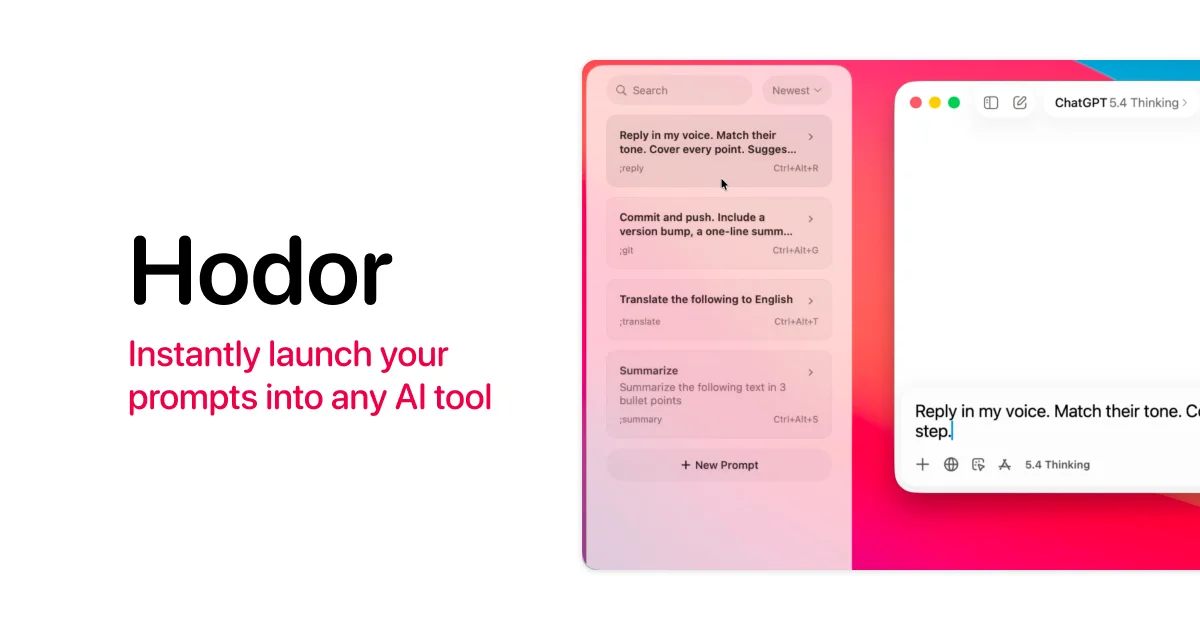
TL;DR: Hodor is a free, open-source macOS utility that stores your frequently-used AI prompts and pastes them into any app with a keyboard shortcut or a typed keyword — 701KB native SwiftUI binary, no Electron, no network calls.
Source and Accuracy Notes
- Project page: hodor.design — verified via direct visit
- Source repository: github.com/woody-design/hodor — verified via
curlof README.md - License: GPL v3 — verified via LICENSE file
- HN launch thread: news.ycombinator.com/item?id=48296678 — Show HN
What Is Hodor?
If you use ChatGPT, Claude, or any AI tool regularly, you probably have a handful of prompts you retype constantly — code review templates, debugging scaffolds, meeting summaries. Hodor eliminates that friction.
It is a native macOS app (SwiftUI + SwiftData, no WebView, no Electron) that stores your prompts locally and surfaces them in three ways:
- Screen edge — Slide your cursor to the screen edge to open a prompt sidebar. Click a prompt to paste it.
- Keyboard shortcut — Assign a letter A–Z to any prompt. Press
Ctrl+Opt+Rthen that letter to paste instantly. - Keyword — Set a text trigger like
;kit. Type it anywhere and Hodor replaces it with your full prompt in place.
All three methods paste the prompt into the currently focused text field, or onto the clipboard if nothing is focused. Zero network requests — the developer explicitly calls out that searching the source for URLSession returns nothing.
Setup Workflow
Step 1: Download and Install
Download the latest .dmg from the project page:
open https://hodor.design
# Click "Download for macOS" to get Hodor-1.3.2.dmg
# Open the DMG and drag Hodor into Applications
```bash

Hodor is Apple-notarized, so macOS will run it without complaints.

### Step 2: Grant Accessibility Permission

On first launch, Hodor requests macOS Accessibility permission. This is required to simulate `Cmd+V` paste events — the same mechanism used by Raycast, Alfred, and other macOS productivity tools.

```bash
# macOS will prompt: System Settings → Privacy & Security → Accessibility
# Add Hodor to the list and enable it
The README is explicit: Hodor does not record keystrokes, read screen content, or access other apps’ data. The entire source is on GitHub and the binary is small enough (701KB) to audit manually.
Step 3: Save Your First Prompt
- Press
Ctrl+Opt+Spaceto open the sidebar. - Click the + button.
- Enter your prompt text and optionally assign a shortcut letter or keyword.
- Click Save.
Step 4: Use It
- Sidebar: Slide to screen edge → click a prompt.
- Shortcut: Press
Ctrl+Opt+R, then the assigned letter. - Keyword: Type your keyword trigger anywhere and press
SpaceorReturn.
Deeper Analysis
Size and footprint. At 701KB, Hodor is roughly 1/1000th the size of a typical Electron app. It launches instantly and uses negligible RAM. The binary is small enough to decompile and audit in an afternoon — a meaningful property for a tool that handles potentially sensitive prompt data.
Privacy model. The README makes a strong privacy claim: zero network requests, no analytics, no telemetry, no update checks. For a tool that handles personal prompts, this is the right default. The absence of a network stack also means it cannot phone home even if compromised.
Accessibility API. The paste mechanism is standard macOS Accessibility — CGEventPost with kCGHIDEventTap. This is the same low-level API Raycast, Alfred, and Keyboard Maestro use. It requires the Accessibility permission but does not require Admin privileges.
Keywords vs. shortcuts. The keyword approach is clever: you type ;review in any text field and your saved prompt replaces it in place. This keeps you in context without switching apps. The shortcut approach (Ctrl+Opt+R + letter) is faster for power users who memorize their bindings.
Dual-display support. Settings allow pinning the sidebar to a specific display or following the focused screen — a thoughtful touch for multi-monitor setups.
Practical Evaluation Checklist
- Native macOS binary (SwiftUI, no Electron)
- Binary size: 701KB — auditable
- No network calls — verified by README (search for
URLSessionreturns nothing) - Apple notarized
- Three trigger methods: screen edge, shortcut, keyword
- Dual-display support
- Free and open source (GPL v3)
- macOS Accessibility API for pasting (same as Raycast/Alfred)
Security Notes
Hodor’s threat model is straightforward: a local app that types text on your behalf. The security boundary is macOS Accessibility, which grants apps the ability to simulate input. This permission is also held by your browser, IDE, and terminal emulator.
What Hodor can do: simulate Cmd+V paste events into focused text fields.
What Hodor cannot do: read your screen, intercept keystrokes outside its keyword trigger, or send data anywhere (no network stack).
For sensitive environments, the full source is on GitHub and the binary is small enough to build from source and compare hashes.
FAQ
Q: Does Hodor work with every macOS app? A: It works with any app that accepts text input via the standard macOS text field API. Most apps do. Some protected fields (password managers, secure notes) may not be accessible to the Accessibility API.
Q: Does it work with ChatGPT, Claude, and other web-based AI tools? A: Yes — as long as the browser tab is focused and a text field is active, Hodor can paste into web-based tools the same way it pastes into native apps.
Q: How is this different from Raycast or Alfred? A: Raycast and Alfred are general-purpose launchers with plugin ecosystems. Hodor is a single-purpose tool focused only on prompt launching. It is smaller, simpler, and specifically designed for AI-heavy users who want one thing: instant prompt paste without switching context.
Q: Is my data sent anywhere? A: No. Hodor has no network code. Your prompts are stored in SwiftData on-device and never leave your Mac.
Conclusion
Hodor solves a narrow but real problem for anyone who uses AI tools daily. If you find yourself copying the same prompts from a notes app over and over, this eliminates that friction. At 701KB, with zero network calls and fully auditable source, it is the kind of tool you can install without hesitation.
Download it at hodor.design or check the GitHub releases page for the latest version.
Related Posts
ai-setup
IonRouter – Fast Low-Cost AI Inference API
IonRouter is a YC W26 inference API routing open-source and fine-tuned models via an OpenAI-compatible endpoint, built on a C++ runtime optimized for GH200.
5/28/2026
ai-setup
Prism – AI Video Workspace and API for Creators (YC X25)
Prism is a YC X25 AI video platform combining generation, editing, and an API for workflow automation. Generate assets, edit on a timeline, and integrate via.
5/28/2026
review
Mosaic – Agentic Video Editing With a Node-Based Canvas
Mosaic lets you build and run multimodal AI video editing agents on a node-based canvas. Upload raw footage, design a workflow, and let AI handle the heavy.
5/28/2026