Hexclave - Open-Source User Infrastructure Platform
Hexclave is an open-source, self-hostable user infrastructure platform that bundles auth, teams, payments, emails, analytics, and API keys into one modular stack.
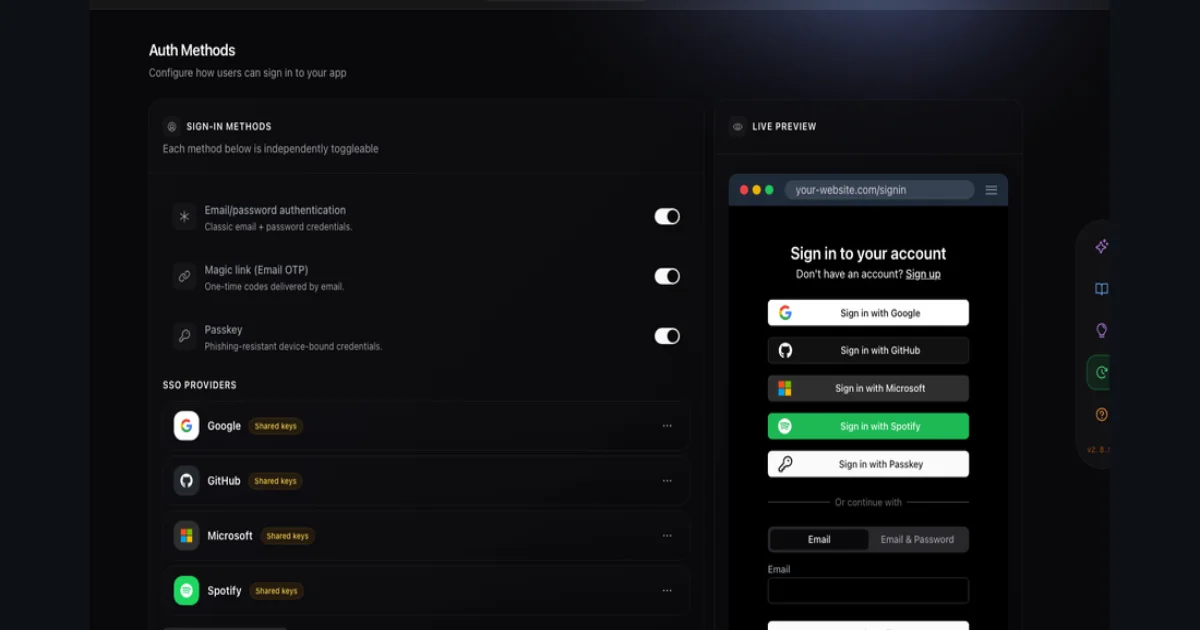
TL;DR
TL;DR: Hexclave is an open-source, self-hostable user-infrastructure platform that bundles authentication, teams, RBAC, payments, emails, analytics, API keys, data vault, webhooks, and a launch checklist into one modular stack with a single Next.js SDK, replacing the Auth0-plus-Stripe-plus-PostHog-plus-Resend sprawl with one self-hostable product formerly known as Stack Auth.
Source and Accuracy Notes
- Official site: hexclave.com
- Repository: github.com/hexclave/hexclave (6,800+ stars, 519 forks, 80 contributors)
- Original HN launch: Show HN: Stack, an open-source Clerk/Firebase Auth alternative (144 points, 70 comments, Apr 2024)
- Rebrand note: the project was originally launched as Stack Auth in 2024 (YC S24) and rebranded to Hexclave in 2025-2026 as the scope expanded from auth-only to a full user-infrastructure platform
- License: dual-licensed MIT and AGPLv3
- Pricing verified from the live dashboard at app.hexclave.com (free hosted tier available, self-hosting is free)
What Is Hexclave?
Hexclave calls itself “the user infrastructure platform.” The product ships as a catalog of apps you switch on as your product needs them, all backed by the same user model: authentication, fraud protection, teams, RBAC, API keys, payments, emails, a data vault for secrets, signed webhooks, a launch checklist, Vercel integration, analytics, and session replays.
The pitch is direct. Every SaaS app ends up wiring together the same handful of services:
Auth:         Clerk / Auth0 / Supabase Auth / Firebase Auth
Teams:        custom or Rollout
Payments:     Stripe + a webhook handler
Emails:       Resend / Postmark + a template editor
Analytics:    PostHog / Mixpanel + a session-replay tool
API keys:     custom or Unkey
Secret store: custom or AWS Secrets Manager
Webhooks:     custom or Svix
```bash

Each of those is its own dashboard, its own API key, its own billing line, and its own self-hosting story. Hexclave folds them into one self-hostable service with one SDK, one admin dashboard, and one usage line. The README puts it as a single line: `Read skill.hexclave.com and help me setup hexclave in this project` — that's the entire setup flow for a coding agent.

The product is the evolution of Stack Auth, which launched on Show HN in April 2024 as an open-source Clerk/Firebase Auth alternative. The rebrand to Hexclave tracks the scope expansion: the team kept building beyond auth, and the product name had to follow the surface area.

## What Hexclave Actually Handles

The README breaks the catalog into discrete apps, each with its own dashboard surface and SDK module. The full list, current as of June 2026:

| App | What it does |
|---|---|
| Authentication | Passkeys, OAuth (14 providers), email/password, magic links, 2FA, CLI auth |
| Fraud protection | Bot detection and abuse signals during signup |
| Teams | Workspaces, invites, roles, workspace switcher |
| RBAC | Permission management with audit-friendly roles |
| API keys | First-class API-key issuance, rotation, and revocation |
| Payments | Subscriptions, one-time charges, usage metering, team billing |
| Emails | Transactional + marketing sends with template editor and open/click tracking |
| Data vault | Encrypted secret storage your server reads with two lines |
| Webhooks | Signed, tamper-proof outgoing webhooks with retries and backoff |
| Launch checklist | Pre-prod domain, callback, and secret-rotation checks |
| Analytics | Live active users, session replays, plain-English dashboards |
| Vercel | Native Vercel integration for deploy hooks and env management |

Not all of these are enabled by default. Apps are turned on in the dashboard, and the SDK tree-shakes the ones you don't use.

## Setup Workflow

### Step 1: Pick a host path

There are two paths, and you can switch between them.

```bash
# Hosted path — sign up at the managed dashboard
open https://app.hexclave.com

# Self-host path — clone the repo and run the platform locally
git clone -b stable https://github.com/hexclave/hexclave.git
cd hexclave
docker compose up
# Access at http://localhost/
```bash

The default credentials are documented in the repo; the first thing to do is create a new admin user and disable the default. The hosted tier is free for small projects; the self-hosted tier is free forever under the MIT/AGPLv3 dual license.

### Step 2: Install the SDK

Hexclave ships framework-specific SDKs that are versioned together. Pick the one that matches your stack.

```bash
# Next.js (App Router)
npm install @hexclave/next

# React (Vite, Remix, custom)
npm install @hexclave/react

# Plain TypeScript / JavaScript (Node, Bun, Deno)
npm install @hexclave/js

# TanStack Start
npm install @hexclave/tanstack-start
```bash

The SDK is also published as a Python package and a Go SDK for backend services that need to verify users server-side.

### Step 3: Wire up the provider and client

Next.js App Router setup looks like this:

```tsx
// hexclave/client.tsx
import { HexclaveProvider } from "@hexclave/next";

export function Providers({ children }: { children: React.ReactNode }) {
  return (
    <HexclaveProvider
      publishableClientKey={process.env.NEXT_PUBLIC_HEXCLAVE_PUBLISHABLE_KEY!}
    >
      {children}
    </HexclaveProvider>
  );
}

// app/layout.tsx
import { Providers } from "./hexclave/client";

export default function RootLayout({ children }: { children: React.ReactNode }) {
  return (
    <html>
      <body>
        <Providers>{children}</Providers>
      </body>
    </html>
  );
}
```bash

The server-side app lives in a separate file with the secret key:

```tsx
// hexclave/server.tsx
import { HexclaveServerApp } from "@hexclave/next";

export const hexclave = new HexclaveServerApp({
  secretServerKey: process.env.HEXCLAVE_SECRET_SERVER_KEY!,
});
```bash

### Step 4: Drop in the auth components

The components auto-adapt to your design system. If you use shadcn, MUI, or Radix, the components inherit your theme without a config file.

```tsx
import { SignIn, SignUp, UserButton, AccountSettings } from "@hexclave/next";

export default function AuthPage() {
  return <SignIn />;
}
For programmatic checks, the SDK returns a Result<T, E> type instead of throwing — { status: "ok", data: T } | { status: "error", error: E }. Always handle the error branch.
Step 5: Turn on the apps you need
Back in the dashboard, the apps you want are toggle-on:
- Toggle on Payments, set the Stripe connector, and the SDK exposes a
usePayments()hook - Toggle on Emails, paste your sending domain, and templates show up in the editor
- Toggle on Webhooks, register an endpoint, and Hexclave signs and retries for you
- Toggle on Analytics, and a one-flag call adds live users and session replays
Each app that gets enabled becomes a module the SDK can import. The whole point of the catalog model is that you only pay attention to the apps you actually use.
Deeper Analysis
Why the catalog model matters
Most “all-in-one” platforms in this space try to be one opinionated product. Hexclave’s choice is to ship a catalog of small apps on a shared user model. The trade-off is intentional:
- The user model is the only shared state. Teams, RBAC, payments, and emails all reference the same
UserandTeamrows, so a team’s billing plan and the user’s role stay consistent across apps without a sync layer. - Each app is opt-in. You can run Hexclave for auth-only on day one, turn on payments in month three, and add session replays in month six. There is no “full platform” tax for the apps you don’t use.
- The SDK is modular. Importing
@hexclave/next/authpulls in just the auth surface; importing@hexclave/next/paymentsadds the payments surface. The README is explicit that the SDK tree-shakes the rest.
The practical upshot: a team that today uses Clerk + Stripe + PostHog + Resend can replace all four with one self-hostable Hexclave deployment and one SDK, and keep the same UX patterns users already expect (sign-in pages, billing portals, email templates, dashboards).
What changed in the rebrand
Stack Auth launched in April 2024 as a Clerk/Auth0 alternative — the README title was literally “Stack, the open-source user management service” and the dashboard was centered on sign-in, sign-up, account settings, and an admin panel. By 2026, the same product has grown to cover the full user infrastructure stack.
The current README’s positioning image makes the scope explicit. Vercel handles hosting and compute. Convex adds a database. Supabase adds storage. Cloudflare adds object storage and edge. Hexclave spans the same axis for everything user-facing: auth, RBAC, payments, emails, analytics.
That reframe matters because the buy decision changes. Stack Auth was competing with Clerk. Hexclave is competing with the Clerk + Stripe + PostHog + Resend combination, which is what most production SaaS apps actually run.
Practical Evaluation Checklist
Before you commit, run Hexclave through these checks:
- Sign up on the hosted tier and drop the
<SignIn />component into a test route - Verify the component inherits your design system (shadcn, MUI, or Radix)
- Enable at least two apps from the catalog and confirm the SDK surfaces them
- Test the hosted-to-self-host migration path on a staging project
- Read the dual-license terms (MIT for SDK, AGPLv3 for self-hosted server)
- Verify that your auth provider set is supported (14 OAuth providers + passkeys + 2FA)
- If you depend on session replays, verify the data residency options
- Run the launch-checklist app against a production deploy and confirm the checks run
Security Notes
- License split: The SDK is MIT; the self-hosted server is AGPLv3. If you self-host, your server’s source becomes AGPL-encumbered. Hosted users are unaffected.
- Secret storage: Server-side secret keys live in
HEXCLAVE_SECRET_SERVER_KEY. The client-side publishable key is safe to ship in the browser bundle. - Data vault: Encrypted with your server’s secret; Hexclave never sees plaintext. Two-line read/write API.
- Webhooks: Signed and tamper-proof; you verify in five lines. The data-vault pattern is the recommended way to store per-user third-party credentials.
- Token storage: OAuth tokens for connected providers (Google, GitHub, Microsoft, etc.) are managed by Hexclave; rotate the secret key on any suspected leak.
- Compliance: The hosted tier runs on the Stackframe Inc. infrastructure (the same company that built Stack Auth). Self-hosting puts you in charge of the security boundary.
The reasonable default is: use the hosted tier for prototyping and small production, and self-host when you have a security team that can own the AGPLv3 source.
FAQ
**Q: How is Hexclave different from Clerk? A: Clerk is auth-only and hosted-only with a per-MAU pricing model that gets expensive at scale. Hexclave is auth-plus-payments-plus-emails-plus-analytics in one product, with a self-host path that removes the per-MAU tax entirely. The SDK surface is similar (sign-in components, hooks, server APIs), so the migration cost is mostly the import paths.
**Q: Is Hexclave still called Stack Auth?
A: No. The project launched as Stack Auth in April 2024 and rebranded to Hexclave in 2025-2026. The domain, GitHub repo, and SDK packages all carry the new name (hexclave.com, hexclave/hexclave, @hexclave/next). The skill site at skill.hexclave.com notes explicitly: “Hexclave was formerly known as Stack Auth. You may still see reference to it as Stack Auth in some places.”
**Q: Do I need to self-host, or is the hosted tier enough? A: The hosted tier is a real product, not a demo. Free for small projects, paid tiers as you scale. Self-hosting is the choice when you need data residency, want to remove per-MAU pricing, or need to customize the auth flow beyond what the dashboard exposes. Many teams start hosted and move to self-host when their MAU count makes the math work.
**Q: Which frameworks does the SDK support? A: Next.js (App Router and Pages), React (Vite, Remix, custom), TanStack Start, and plain TypeScript/JavaScript (Node, Bun, Deno). Server-side SDKs are also available in Python and Go for backend services that need to verify users.
**Q: How does Hexclave handle session state?
A: Sessions are JWTs issued by the Hexclave server, with refresh handled by the SDK. The useUser() hook suspends until the session is resolved, so you need a Suspense boundary in your component tree. For server-side verification, hexclave.getUser() returns a fully-typed user object.
**Q: Can I use Hexclave alongside an existing auth provider? A: Not really. Hexclave owns the user model, and the apps in the catalog (payments, emails, RBAC) all reference Hexclave’s user IDs. If you need to migrate from an existing provider, the official migration guide covers the common cases (Clerk, Auth0, Supabase Auth, Firebase Auth).
**Q: What about the AGPLv3 license — does that affect my SaaS? A: Only if you self-host. AGPLv3 is a copyleft license that requires you to publish the source of your self-hosted server. If you use the hosted tier, your code is not AGPL-encumbered. The SDK under MIT is fine for any use.
**Q: Does Hexclave have an AI agent integration?
A: Yes. The skill site at skill.hexclave.com is an LLM-optimized documentation site designed to be fetched by coding agents. You can point an agent at it with the prompt Read skill.hexclave.com and help me setup hexclave in this project and the agent gets the full setup flow. There’s also a hexclave-mcp server for agents that support the Model Context Protocol.
Conclusion
Hexclave is the most ambitious open-source play in the user-infrastructure space. Where Clerk owns auth and the rest of the stack is someone else’s problem, Hexclave ships the full user-facing surface — auth, teams, payments, emails, analytics, webhooks, data vault, launch checklist, API keys, session replays — as one self-hostable product with one Next.js SDK.
The rebrand from Stack Auth is a signal. The original product was a Clerk alternative; the current product is a Clerk-plus-Stripe-plus-PostHog-plus-Resend alternative. The scope expansion tracks the team’s belief that the user-infrastructure layer is a single coherent problem, not a bag of separate services to wire together.
For a team running Next.js with Clerk + Stripe + Resend + PostHog, Hexclave is worth a weekend. Sign up on the hosted tier, drop in the <SignIn /> component, enable the payments app, and see whether the catalog model fits your stack. The hosted free tier is enough to evaluate, the SDK is MIT, and the migration guides cover the common starting points.
Related Posts
ai-setup
Recall – Persistent Memory for Claude Code via MCP Hooks
Recall gives Claude Code a permanent memory store that survives session restarts and context compaction. Four hooks capture and restore context automatically — with cloud SaaS or self-hosted options.
2/28/2026
dev-tools
Automotive Skills Suite for AI Engineering
Evaluate Automotive Skills Suite for APQP, ASPICE, HARA, safety-plan, and DIA workflows with setup notes, governance risks, and SME review guidance.
5/28/2026
dev-tools
awesome-agentic-ai-zh Roadmap Guide
Explore awesome-agentic-ai-zh as a Chinese agentic AI learning roadmap, with setup notes, track selection, study workflow, and evaluation guidance.
5/28/2026