Grocy: a self-hosted ERP for your kitchen and household
Grocy is a free, MIT-licensed, self-hosted app that tracks groceries, meal plans, chores and household inventory, so you know what you have and what expires.
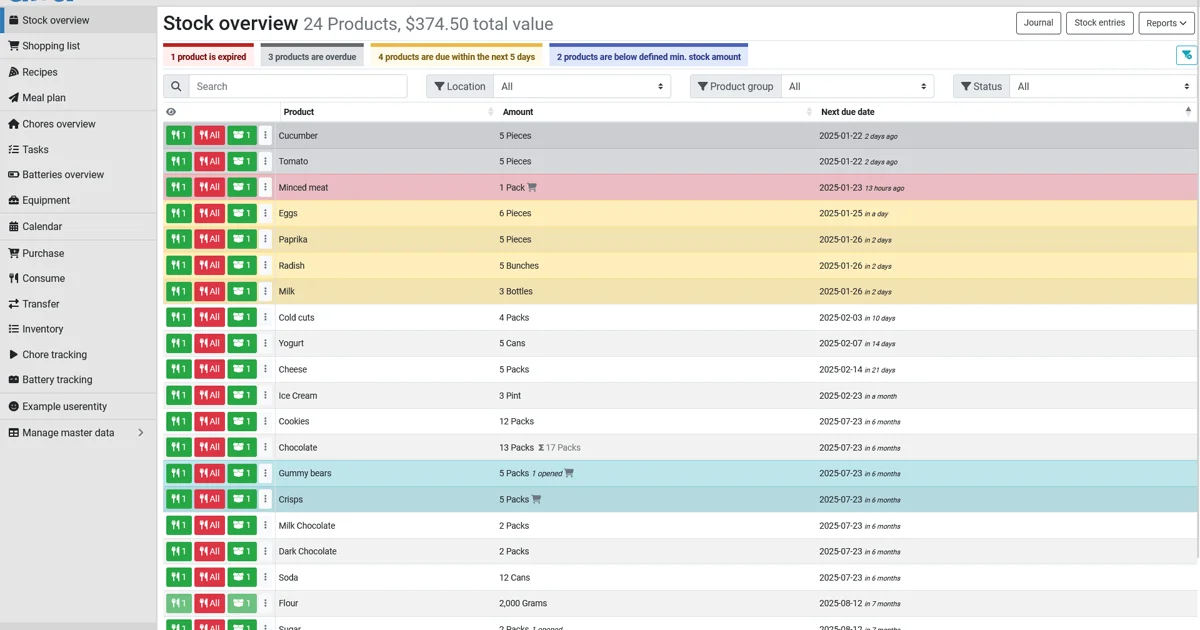
TL;DR: Grocy turns your household into a small inventory system you run yourself. It knows how many rolls of paper towels you have, when the milk expires, what you planned to cook on Thursday, and which chores are overdue, and it turns all of that into a shopping list you can take to the store. It is free, MIT licensed, and the whole thing is a single PHP app with a SQLite file, so it runs on a cheap box or a spare Raspberry Pi without a database server. The catch is that it starts empty and earns its usefulness only once you type in your actual products.
What it is
Grocy describes itself as “ERP beyond your fridge”, which is an odd phrase until you see the interface. The stock overview screen is a spreadsheet with a shopping cart attached: every product has a quantity, a location, a best-before date, and a minimum stock level. When something runs low or expires, the screen turns into a to-do list.
Around that core sit a set of modules that each handle one part of running a home. Shopping lists, recipes with ingredient quantities, a weekly meal plan, a chore tracker with a journal of when each task was last done, an equipment inventory, a battery tracker for rechargeable cells, a product log for purchases with prices, and a calendar view. You can attach photos to products and recipes, define your own custom fields and objects, and print labels.
The unusual thing is how much attention goes to the input problem. Grocery data is entered on a phone in a supermarket, one-handed, while holding a basket. Grocy answers that with a barcode scanning flow: scan with the camera, the product is matched against the database, and the quantity gets incremented. There is a browser-based scanner using the device camera, a dedicated Android app, a native app for Apple devices, and a separate barcode lookup helper for products not in your database yet. The “one hand, 3 seconds” line on the project site is not marketing fluff, it is the design target.
Everything runs on a single server with a SQLite database by default. There is also a REST API for every object in the system, documented with a Swagger interface at the /api path of your instance.
Why it matters
Household data is the kind of data you would rather not hand to somebody else’s server. A shopping list tells you what you buy and therefore something about your income, your diet, and your household. Grocy keeps that on hardware you control, which is a quieter but more common reason to self-host than, say, wanting to run a particular database engine.
The other reason is that the whole thing works offline. Once the data is in SQLite, nothing about checking your pantry requires an internet connection. That matters more than it sounds, because the most useful moment to look up “how much flour do I have” is in a shop with one bar of signal.
There is a broader point about what self-hosted software is for. Grocy is not trying to be a consumer app. It has an unusual interface density, a developer who openly calls it a hobby project, and a wiki of community add-ons. What it does is let one person build a small system that fits their actual household, in a way a packaged consumer app never would.
Getting it running
Docker is the path with the least friction. The LinuxServer image is the maintained one:
docker run -d \
  --name=grocy \
  -e PUID=1000 \
  -e PGID=1000 \
  -e TZ=Etc/UTC \
  -p 9283:80 \
  -v /path/to/grocy/config:/config \
  --restart unless-stopped \
  lscr.io/linuxserver/grocy:latest
The /config volume is the part that matters. It holds the SQLite database and your configuration, so that is the directory you back up and the one you must not lose. The container serves on port 9283. Log in with user admin and password admin, then change the password from the user menu in the top right before you do anything else, because a fresh Grocy install accepts those defaults on any instance reachable from the internet.
If you would rather run the PHP application directly, it is not much harder. Unpack the latest release, copy config-dist.php to data/config.php, point the web server root at the public directory, and make sure data is writable:
unzip https://releases.grocy.info/latest -d /opt/grocy
cd /opt/grocy
cp config-dist.php data/config.php
chown -R www-data:www-data data
Requirements are PHP 8.5 with SQLite 3.40 or newer, plus the fileinfo, pdo_sqlite, gd, ctype, intl, zlib and mbstring extensions. With nginx you also need try_files $uri /index.php$is_args$query_string; in the location block, or you can turn off URL rewriting with the DISABLE_URL_REWRITING option.
Settings can be overridden without editing the config file. Any setting can be set as an environment variable with the GROCY_ prefix, and a text file of the same name in data/settingoverrides takes priority over the environment variable:
docker run -d \
  --name=grocy \
  -e GROCY_BASE_URL=https://grocy.example.com \
  -e GROCY_CURRENCY=EUR \
  -p 9283:80 \
  -v /path/to/grocy/config:/config \
  --restart unless-stopped \
  lscr.io/linuxserver/grocy:latest
There is a public demo at demo.grocy.info if you want to click through before installing anything.
What the modules actually do
The modules overlap more than you would expect at first, and the trick is that they all read from the same product list.
| Module | What it tracks | Connects to |
|---|---|---|
| Stock | Quantities, locations, best-before dates, min stock levels | Drives the shopping list |
| Shopping list | What to buy, where it goes once bought | Receives low-stock and expiring items |
| Recipes | Ingredients, quantities, unit conversion | Feeds the meal plan |
| Meal plan | Which meals on which days | Generates the shopping list |
| Chores | Tasks, schedules, a journal of completions | Notifies the user |
| Equipment | Household devices, their manuals and warranty | Independent |
| Batteries | Rechargeable cells, charge state, usage history | Independent |
| Purchase | Price and quantity history per product | Feeds price tracking |
| Consume / Transfer | Removes or moves stock between locations | Keeps stock counts honest |
The meal plan is the part people get stuck on. You pick recipes for a week, Grocy works out the combined ingredient quantities, and that becomes your shopping list, with the items you already have subtracted. Change one recipe and the list updates. This is where the app earns the “ERP” label, and it is also the part that takes the longest to set up because you have to enter recipes first.
The consume and transfer actions are the unglamorous features that keep the numbers honest. Consuming an item decrements stock and can decrement its best-before date, which is how the expiry warnings stay accurate. Transferring moves quantity between locations, such as moving six bottles from the pantry to the fridge.
What to watch for
Grocy has no accounts system beyond its own user table, and the default admin/admin credentials are the first thing to change. There is no built-in two-factor authentication, so if you expose the instance, put it behind a reverse proxy with TLS and some form of access control. Access tokens for the API are issued per user and are the other thing to treat carefully, since the API can read and write every object in the system.
Entry speed is the real ceiling on usefulness. The barcode flow makes it tolerable, but a product that is not in the database, or that has no barcode at all, still means typing. A household with a large pantry and no barcodes on bulk items will feel this. The project has add-ons and community integrations, including a Home Assistant addon, but the core does not do image recognition of products.
The project states plainly that it is a hobby project by a single developer. It has been maintained since 2017 and the current release is 4.7.1, published on 2026-09-04, with the last code push on 2026-09-16. It is stable and MIT licensed, but expect one-developer pace rather than a team.
One more detail worth knowing: Grocy does not handle currency conversion. The CURRENCY setting only formats money values, so if your household buys in more than one currency, you track the rate yourself or keep products in a single currency.
Source and Accuracy Notes
- Project page: https://grocy.info/ — verified via direct visit, current version 4.7.1 shown on the page
- Source repository: https://github.com/grocy/grocy — 9,625 stars, 140 open issues, PHP with Blade templates, MIT license, last pushed 2026-09-16
- License: MIT, copyright 2017-2026 Bernd Bestel — verified from the LICENSE.md file in the repository
- Docker image:
lscr.io/linuxserver/grocy:latest— install command and parameters verified from the linuxserver/docker-grocy README - API: 74 documented endpoints in
grocy.openapi.json(OpenAPI 3.1.0), with a Swagger UI served at/api - Version and release date:
version.jsonin the repository, 4.7.1 released 2026-09-04 - HN launch thread: https://news.ycombinator.com/item?id=22646358 — “Grocy: web-based, self-hosted grocery and household management”, 652 points and 49 comments, 2020-03-21
- Thumbnail source: https://grocy.info/img/screenshot.png — the project’s own stock overview screenshot, cropped to 1200x630

Related Posts
dev-tools
AgentMesh – Define AI Agent Teams in YAML
Define multi-agent AI workflows in YAML and run them locally with one command. AgentMesh brings Docker Compose patterns to AI agent orchestration.
5/28/2026
dev-tools
Cicada – FOSS CI/CD That Replaces YAML With a Real Language
Cicada replaces GitHub Actions and GitLab CI YAML configs with a custom functional DSL, letting you write pipelines using variables, functions, and shell.
5/29/2026
dev-tools
Stacktape – Deploy to AWS Without DevOps Knowledge
Stacktape is a DevOps-free cloud framework that cuts AWS deployment config by 98%. Supports serverless and containers, 20+ infra components built-in, and a.
5/29/2026