Edka: Kubernetes on Hetzner Without the Glue Code
Edka turns a Hetzner account into a managed-grade Kubernetes platform. Production-ready k3s clusters in 2 minutes, one-click add-ons, HA Postgres, and rolling deployments.
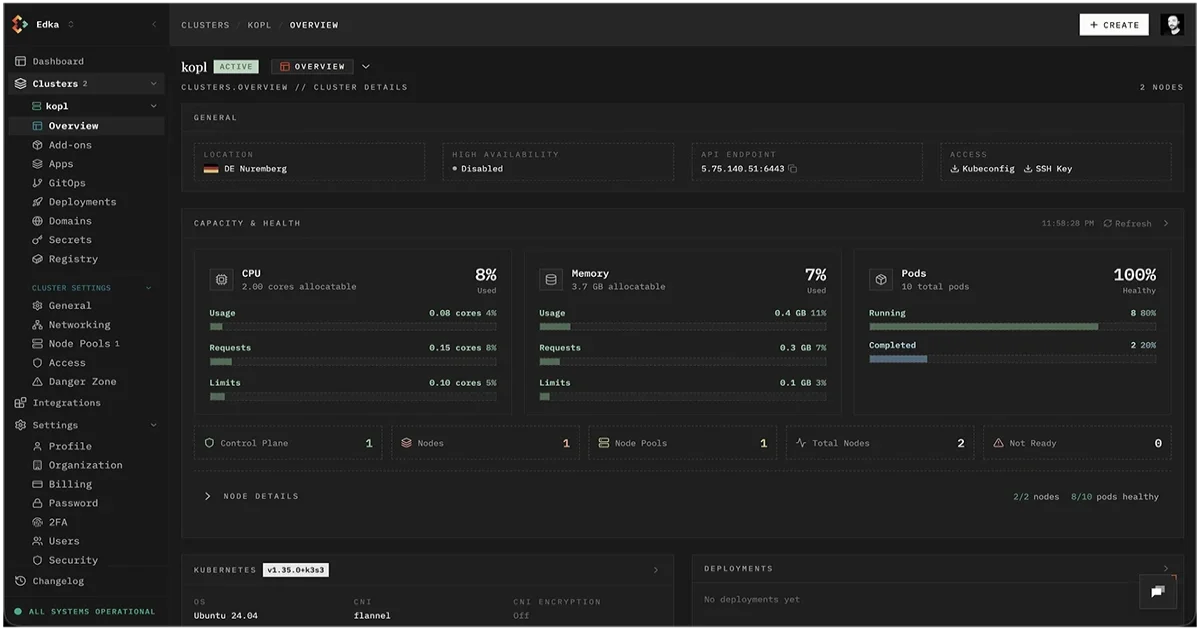
TL;DR
TL;DR: Edka is a Kubernetes management layer purpose-built for Hetzner Cloud. It provisions k3s clusters in roughly two minutes, wires up cert-manager, metrics-server, and CloudNativePG, and ships HA Postgres with point-in-time recovery behind a single UI. If you have wanted the developer experience of EKS or GKE at Hetzner prices, Edka is the missing piece.
Source and Accuracy Notes
- Product site: edka.io
- Demo: edka.io/apps/ and edka.io/deployments/
- Show HN thread: news.ycombinator.com (437 points, 130 comments, August 2025)
- Founder: Camil, ten-plus years in Kubernetes, ex-kube-aws contributor
Edka is in beta as of mid-2026, so pricing and a few features are still settling. The information below reflects what the team describes on the product site and in the HN launch thread.
What Is Edka?
Edka is a hosted control plane for Kubernetes clusters running on Hetzner Cloud. It does not invent a new orchestrator. Instead, it sits on top of the k3s distribution and packages the glue work that is normally left to the operator:
- Cluster bootstrap (control plane + node pools, networking, DNS, SSH keys)
- Add-on lifecycle (cert-manager, metrics-server, CloudNativePG, and similar operators)
- Application deployment (Postgres, Redis, and a small library of preconfigured stacks)
- GitOps-style rollouts (image push, semver rollouts, instant rollbacks, autoscaling)
The product is built by a single founder who has been running Kubernetes for more than a decade, including a stint on kube-aws before AWS launched EKS. The pitch is straightforward: Hetzner is the best-priced provider, but configuring clusters for real workloads still takes time. Edka removes that tax.
Why Hetzner Specifically?
Hetzner Cloud is the economics of a German datacenter at indie-developer prices: dedicated vCPUs, fast NVMe, generous bandwidth, and predictable monthly billing. For small teams, Hetzner can be 3-5x cheaper than a comparable EKS or GKE setup once you add in data transfer and control plane fees.
The catch is that the managed Kubernetes story is thinner. There is no first-party Hetzner Kubernetes service of the same caliber as EKS, so most teams fall back to one of two paths:
- Hand-roll a cluster with
hetzner-k3sorcluster-api-hetzner. This is fast to start and slow to maintain. - Pay the AWS/GCP premium for a managed control plane. This is fast to maintain and slow on the bill.
Edka is option three: managed control plane, Hetzner hardware. You keep the Hetzner pricing without giving up the developer experience of a hosted control plane.
The Layered Architecture
Edka exposes four layers in the UI, mirroring the way Kubernetes work is usually scoped:
Layer 1: Cluster Provisioning
A new cluster is a k3s control plane plus one or more node pools, all on Hetzner. You pick a region (Nuremberg, Falkenstein, Helsinki are the typical three), the instance type for control plane and workers, and a node count. Edka handles the hcloud API calls, sets up the k3s server and agents, configures the CNI, and hands you a kubeconfig.
The HN launch claims a production-ready cluster in about two minutes. That number is realistic for k3s on Hetzner once the API calls are scripted; the win is that the scripting is the product, not a project you have to maintain.
Layer 2: Add-Ons
This is the part that normally takes a weekend. Edka ships preconfigured integrations for the boring things every cluster eventually needs:
- cert-manager with the Hetzner DNS webhook preconfigured
- metrics-server so HPA works out of the box
- CloudNativePG operator (the Postgres story, see below)
- Hetzner CSI driver for persistent volumes
- A handful of others that the founder has battle-tested
Each one is “one-click” because the values are tuned for Hetzner. You are not getting a generic Helm install. You are getting the install the founder would write by hand for his own cluster.
Layer 3: Applications
This is where Edka starts to look less like a cluster manager and more like a small PaaS. Each supported app is a thin UI over a battle-tested operator:
- PostgreSQL (via CloudNativePG): HA setup, PITR backups, restore to any point in time, ready-to-use connection strings. The whole thing runs as a few form fields.
- Redis and a couple of caches: same shape, point-and-click
- A small library of other things (object storage, message queues) that follow the same pattern
The HN launch highlights the Postgres story specifically. Point-in-time recovery, in particular, is the feature that costs the most engineering time to build by hand, and Edka delivers it as a checkbox.
Layer 4: Deployments
Connect a CI pipeline (or push manually), and Edka rolls out new container images with semver rules, autoscaling, persistent volume claims, secret and env imports, and a public-exposure toggle. Rollbacks are one click. This is the layer that replaces the typical “ArgoCD + Helm + a bunch of YAML” stack for a single application.
Repo-Specific Setup Workflow
Edka is a hosted service, so the setup is account-based rather than repo-based. The expected path for a new user is:
Step 1: Create the Account and Connect Hetzner
Sign up at edka.io and connect a Hetzner Cloud API token. Edka needs the token to call the hcloud API on your behalf. You retain ownership of the underlying servers; Edka orchestrates them but does not pretend to be Hetzner.
Step 2: Create Your First Cluster
Pick a region, choose a control plane size (a small shared instance is enough to start), and add a worker node pool. The cluster page in the UI shows a progress view while the API calls fire. By the time the page is done loading, you have a kubeconfig you can kubectl against.
Step 3: Install the Add-Ons You Need
Click the add-ons tab and turn on cert-manager, metrics-server, and the Postgres operator. Each one shows a status indicator. There is no Helm to learn, no values files to copy.
Step 4: Deploy a Database
In the Apps section, click Postgres, fill in the database name, user, and storage size, and submit. Edka provisions an HA Postgres cluster with PITR and gives you a connection string. You can later pick a timestamp and restore to it from the same UI.
Step 5: Push Your First Image
In the Deployments section, point Edka at a container registry (Docker Hub, GHCR, or a private one) and a semver pattern. Each push triggers a rollout. The UI shows the history and lets you roll back to any previous version.
Tech Stack
The team lists the following on the launch thread:
- TypeScript across the board
- React + Tailwind CSS for the UI
- PostgreSQL and Redis for the control plane
- BullMQ for background jobs
- Vault plus AWS KMS for encrypting sensitive data at rest
This is a sensible stack for a control plane. The interesting choice is Vault plus AWS KMS, which is a sign the team is taking secrets hygiene seriously from day one. Hetzner API tokens and Postgres credentials both pass through that pipeline.
Deeper Analysis
Where Edka Wins
The strongest argument for Edka is unit economics on small clusters. A two-node Hetzner setup (one control plane, one worker) with a managed control plane via Edka is meaningfully cheaper than the cheapest comparable EKS or GKE setup once you add in the data transfer and control plane fees. For a team running one or two production services, that delta is the entire decision.
The second strongest argument is time-to-cluster. The combination of Hetzner plus k3s plus Edka removes the weekend you would normally spend on bootstrap. The “2 minutes” claim is plausible because the underlying k3s setup is fast on Hetzner; Edka’s value is the templating and the API-driven UI on top.
Where Edka Loses
A few sharp edges worth knowing:
- It is a single-vendor product in beta. If the company disappears, you inherit a Hetzner cluster that you still need to know how to run. That is not as bad as a closed-source orchestrator (the cluster is just k3s), but it is not nothing.
- Hetzner regions are limited (Germany, Finland, and a couple of others as of mid-2026). If your users are in Asia or South America, the latency story is not great.
- The application layer is small. You can deploy Postgres, Redis, and a handful of other things with one click. If you want Kafka, ClickHouse, or a particular observability stack, you are back to writing your own manifests.
- No multi-cloud. The whole point of Edka is Hetzner. If you want a multi-cloud story, this is not the tool.
Compared to EKS, GKE, and AKS
Managed Kubernetes services on the hyperscalers come with first-party integrations for the rest of the cloud (IAM, load balancers, persistent disks, secret stores). Edka does not pretend to compete on integration breadth. It competes on price and on the developer experience for the Hetzner path specifically. If you are already on AWS or GCP, Edka is the wrong tool. If you are on Hetzner by choice or by budget, Edka is the right shape.
Compared to hand-rolled k3s
The most direct alternative is to script a k3s cluster with hetzner-k3s and manage it yourself. The trade is straightforward: you save the Edka subscription fee and you own all the operational work. For a hobby project or a single service, that is a reasonable trade. For a small business running three or four production services, the subscription fee is cheap compared to the on-call time you would otherwise spend.
Practical Evaluation Checklist
If you are considering Edka for a real workload, here is the short list of things to verify during a trial:
- Does your application fit the supported add-ons? If you need an operator Edka does not ship, you can still install it manually, but the win is smaller.
- Are Hetzner regions acceptable for your latency budget? Run a traceroute from your main user population.
- Does the deployment model (semver-based image push) match your CI? If you ship by tag already, the fit is good. If you ship by commit SHA, you will be retrofitting the workflow.
- What is the disaster recovery story? Postgres PITR is built in. For object storage and other state, you will need your own backup plan.
- What is the exit plan? You can always
kubectlagainst the cluster directly. Make sure the add-ons are installed in a way that survives a separation from Edka (standard Helm releases, not custom operators).
Security Notes
The most important security property of Edka is the data plane stays in your Hetzner account. Edka orchestrates the cluster but the nodes, the volumes, and the Hetzner firewalls are yours. If you revoke Edka’s Hetzner token, the cluster keeps running.
Sensitive data is encrypted at rest in the Edka control plane using Vault plus AWS KMS. The HN launch thread does not specify the encryption model in detail, so if you are in a regulated environment, ask the team directly about key custody and rotation.
The deploy model is image-push, which means your CI needs a registry credential that Edka can read. Treat that credential the same way you would treat a deploy key: scoped, rotatable, and audited.
FAQ
Q: Does Edka replace EKS, GKE, or AKS? A: Only if you are also willing to leave AWS or GCP. Edka is Hetzner-specific by design. On the hyperscalers, the managed Kubernetes services have integration advantages that Edka cannot match.
Q: Can I run a cluster if Edka goes down?
A: Yes. The underlying cluster is a standard k3s on Hetzner. You can kubectl against it directly, and the add-ons are installed with normal Kubernetes manifests. The piece you lose is the UI and the Postgres app.
Q: Is the Postgres PITR feature equivalent to a managed database? A: Functionally yes, within the limits of a single Postgres cluster. For most small-business workloads, the Edka-managed Postgres is a credible alternative to a managed service. For very high write throughput or strict compliance regimes, a dedicated managed Postgres is still the safer choice.
Q: How is pricing structured? A: Pricing was not finalized at the beta stage described in the HN launch. The model is a control plane subscription separate from your Hetzner infrastructure bill, which keeps the Hetzner hardware costs fully transparent.
Q: Does Edka support Windows nodes? A: No, and that is unlikely to change. k3s is Linux-only, and Edka is built on k3s.
Q: Can I bring my own CNI, ingress, or service mesh? A: The default is flannel for CNI, but you can install alternatives. The product is opinionated about defaults to keep the “2-minute cluster” promise, and less opinionated once you need to customize.
Conclusion
Edka is a focused tool that solves a real problem: Hetzner is the most cost-effective cloud for small Kubernetes deployments, but the operational tax of running k3s by hand is real. Edka takes that tax off your plate with a managed control plane that exposes the cluster, the add-ons, and a small set of applications behind a clean UI. If you are already running on Hetzner or evaluating a move there, Edka is worth a serious look.
The beta status is the only reason to hesitate. The product works, the founder is shipping, and the architecture is sensible. Pin the underlying Hetzner account and the add-on manifests so you can keep running the cluster even if the company changes direction, and you have a low-risk way to test the model.
Related Posts
ai-setup
Recall – Persistent Memory for Claude Code via MCP Hooks
Recall gives Claude Code a permanent memory store that survives session restarts and context compaction. Four hooks capture and restore context automatically — with cloud SaaS or self-hosted options.
2/28/2026
dev-tools
Automotive Skills Suite for AI Engineering
Evaluate Automotive Skills Suite for APQP, ASPICE, HARA, safety-plan, and DIA workflows with setup notes, governance risks, and SME review guidance.
5/28/2026
dev-tools
awesome-agentic-ai-zh Roadmap Guide
Explore awesome-agentic-ai-zh as a Chinese agentic AI learning roadmap, with setup notes, track selection, study workflow, and evaluation guidance.
5/28/2026