drawDB - Free Database Diagram Editor and SQL Generator
Open-source browser-based ERD editor with 37K+ stars. Design schemas, export SQL for PostgreSQL, MySQL, SQLite, and more. No account required.
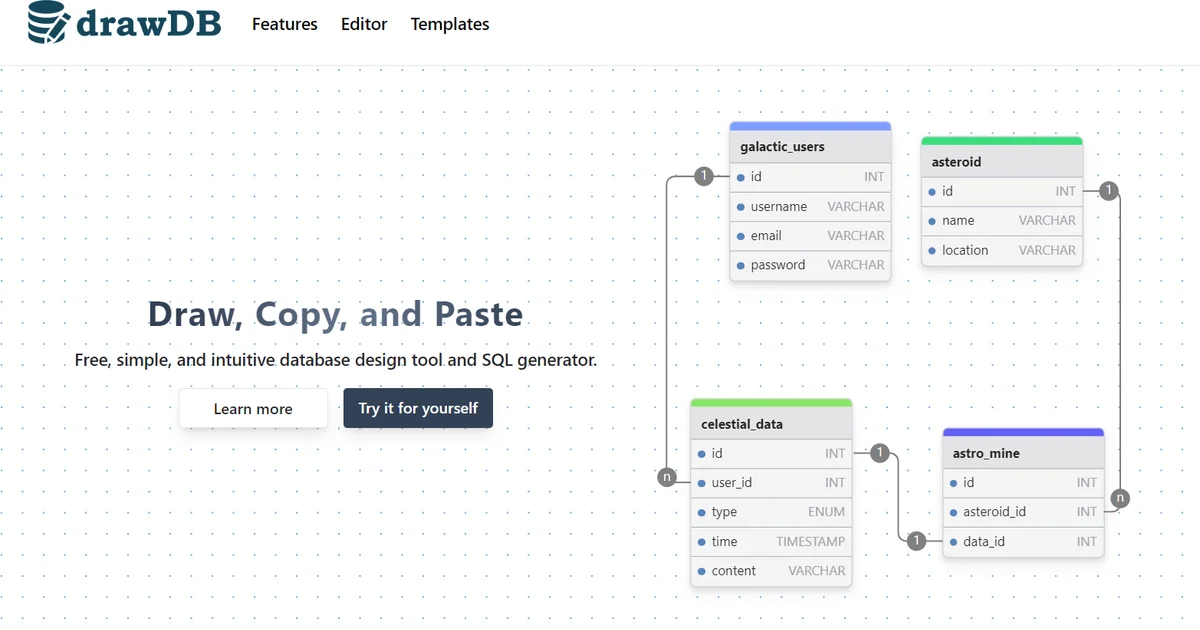
TL;DR
TL;DR: drawDB is a free, open-source online database diagram editor that lets you design entity-relationship diagrams and export SQL scripts for PostgreSQL, MySQL, SQLite, MariaDB, Oracle, and SQL Server directly in your browser, with no account required.
Source and Accuracy Notes
- Project page: drawdb.app
- Source repository: github.com/drawdb-io/drawdb
- License: AGPL-3.0 (verified via GitHub API
license.spdx_id) - HN launch thread: news.ycombinator.com/item?id=43627758
What Is drawDB?
drawDB is a browser-based database entity-relationship diagram (ERD) editor and SQL generator. It lets you visually design database schemas, define tables with columns, data types, and relationships, then export the result as ready-to-run SQL scripts.
The project has gained significant traction with over 37,000 stars on GitHub, reflecting strong demand for a simple, free tool that handles schema visualization without requiring sign-ups or installations.
Key Features
Based on the project repository and official site:
- Multi-dialect SQL export: Generate scripts for PostgreSQL, MySQL, SQLite, MariaDB, Oracle Database, and SQL Server
- No account required: Everything runs client-side in your browser using IndexedDB for local storage
- Import existing SQL: Parse existing SQL scripts to generate diagrams from existing schemas
- Migration generation: Create migration scripts when you modify your schema
- Customizable editor: Adjust themes, layouts, and editor preferences
- Export options: Save diagrams as images (PNG/SVG), JSON, or PDF
- Drag-and-drop interface: Build diagrams visually with drag-and-drop table placement
- Open-source: Fully open-source under AGPL-3.0 license
Setup and Usage
Option 1: Use the hosted version (recommended)
Visit drawdb.app and start building immediately. No installation or account creation needed.
Option 2: Self-host with Docker
For teams that want to host drawDB internally:
docker build -t drawdb .
docker run -p 3000:80 drawdb
```bash

Then access it at `http://localhost:3000`.

### Option 3: Local development

```bash
git clone https://github.com/drawdb-io/drawdb
cd drawdb
npm install
npm run dev
The development server starts and you can access the editor locally.
Optional: Enable sharing
drawDB includes an optional server component for sharing diagrams via links. To enable it:
- Clone and set up the drawdb-server repository
- Configure environment variables according to the
.env.samplefile - This is only needed if you want to share diagrams with others via URLs
Tech Stack
drawDB is built with modern web technologies:
- React for the UI framework
- Monaco Editor for SQL editing (same editor that powers VS Code)
- Dexie (IndexedDB wrapper) for client-side persistence
- node-sql-parser and oracle-sql-parser for SQL parsing
- Framer Motion for animations
- Tailwind CSS for styling
- Semi UI component library
Practical Evaluation Checklist
Before adopting drawDB for your workflow, consider:
- Dialect coverage: Confirm it supports your target database (PostgreSQL, MySQL, SQLite, MariaDB, Oracle, SQL Server)
- Schema complexity: Test with a representative schema to ensure the visual layout handles your table count and relationship density
- Export fidelity: Verify the generated SQL matches your team’s conventions (naming, constraints, indexes)
- Collaboration needs: The hosted version stores data locally in your browser. For team collaboration, you need the optional server component or a shared workflow (export/import JSON)
- Self-hosting requirements: If you need internal hosting, the Docker setup is straightforward but the sharing server is a separate deployment
Security Notes
- Client-side storage: Diagrams are stored in your browser’s IndexedDB by default. Clearing browser data will delete unsaved work.
- No authentication: The hosted version has no accounts, so there is no server-side user data to protect.
- Self-hosted sharing server: If you deploy the optional sharing server, review its
.env.samplefor required configuration and secure it appropriately (it handles form submissions and gist sharing). - AGPL-3.0 license: If you modify and deploy drawDB internally, the AGPL requires you to make your modifications available to users who interact with it over the network. Review license obligations before forking for commercial use.
FAQ
Q: Is drawDB completely free? A: Yes, drawDB is free and open-source under the AGPL-3.0 license. There are no paid tiers or premium features.
Q: Do I need to create an account? A: No. The hosted version at drawdb.app works entirely without an account. Your diagrams are stored locally in your browser.
Q: Can I import my existing database schema?
A: Yes. drawDB can parse SQL scripts and generate diagrams from them. Use the import feature to load your existing CREATE TABLE statements.
Q: What databases does it support? A: drawDB exports SQL for PostgreSQL, MySQL, SQLite, MariaDB, Oracle Database, and SQL Server.
Q: Can I use it offline? A: The web app uses IndexedDB for local storage, so your diagrams persist between sessions. However, you need an initial internet connection to load the app. For true offline use, self-host it locally.
Q: How does it compare to dbdiagram.io? A: drawDB is fully open-source and free, while dbdiagram.io has paid tiers. drawDB runs entirely client-side with no account required. dbdiagram.io offers a DBML text-based syntax that some teams prefer for version control.
Conclusion
drawDB fills a clear gap for developers who need quick, visual database schema design without the overhead of desktop tools or account creation. With 37K+ GitHub stars and support for six major SQL dialects, it has become a go-to choice for rapid ERD creation.
The combination of browser-based access, no-signup usage, and open-source self-hosting options makes it suitable for both individual developers and teams. If you regularly design database schemas or need to visualize existing ones, drawDB is worth bookmarking.
Related Posts
dev-tools
Automotive Skills Suite for AI Engineering
Evaluate Automotive Skills Suite for APQP, ASPICE, HARA, safety-plan, and DIA workflows with setup notes, governance risks, and SME review guidance.
5/28/2026
dev-tools
awesome-agentic-ai-zh Roadmap Guide
Explore awesome-agentic-ai-zh as a Chinese agentic AI learning roadmap, with setup notes, track selection, study workflow, and evaluation guidance.
5/28/2026
dev-tools
Baguette iOS Simulator Automation Guide
Set up Baguette for iOS Simulator automation, web dashboards, device farms, gesture input, streaming, and camera testing with Xcode caveats.
5/28/2026