DoubleMemory – Local-First Read-It-Later for macOS and iOS
DoubleMemory captures via double Cmd+C, stores locally with iCloud sync, and auto-tags with Apple Intelligence — no extensions, no account required.
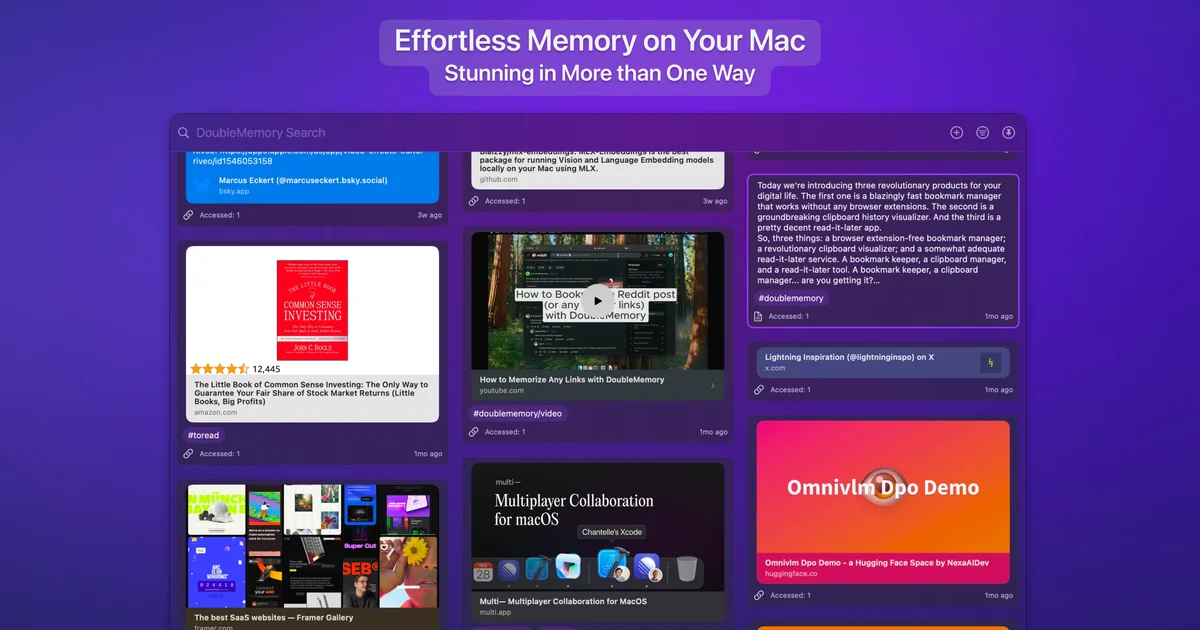
TL;DR
TL;DR: DoubleMemory is a local-first read-it-later app for macOS and iOS that captures links and text via double Cmd+C — no browser extension, no account, no server-side storage. It syncs through your personal iCloud and uses on-device Apple Intelligence for auto-tagging.
Source and Accuracy Notes
- Project page: doublememory.com — visited and verified
- HN launch thread: news.ycombinator.com/item?id=44075451 — 162 points, author
randomor - License: Proprietary free app (core features free; Pro plan $9.99/year)
What Is DoubleMemory?
DoubleMemory is a macOS and iOS app that sits in your menu bar or dock and automatically captures anything you double-tap Cmd+C. Instead of flooding your clipboard history with every copy, it silently saves links and text after detecting a second rapid copy — then renders them as Pinterest-style cards you can search, tag, and browse offline.
The pitch from the HN launch: “I wanted to see if I could automatically save all double cmd+c without needing extensions, and avoid flooding the clipboard history like regular clipboard managers do.”
The product evolved over six months into a read-it-later + bookmarking organizer + clipboard manager + card-based note-taking app — all local-first, all private.
Setup Workflow
Step 1: Download and Launch
Download DoubleMemory from the Mac App Store or directly from doublememory.com. The app launches into your menu bar (macOS) or as a homescreen app (iOS). No sign-up, no email, no account creation screen.
Step 2: Grant Clipboard Monitoring Permission
On first launch, macOS will prompt you to grant clipboard monitoring access. This allows DoubleMemory to detect when you double-tap Cmd+C — it does not read your clipboard continuously, only the second tap within a short window. The privacy policy states explicitly that captured content stays on-device and is never sent to DoubleMemory’s servers.
Step 3: Start Capturing
From any app, just double-tap Cmd+C. DoubleMemory saves the link or text as a card. You can also:
- Use the Share extension from any macOS or iOS app
- Drag and drop content onto the Dock icon or menu bar icon
- Import your existing Safari Reading List and Bookmarks via the built-in importer tool
Step 4: Sync with iCloud
Open DoubleMemory settings and sign in with your Apple ID to enable iCloud sync. Your cards travel between your Mac and iOS devices automatically. The sync uses Apple’s end-to-end encryption — DoubleMemory as a company never sees your data.
Key Features
Automatic Capture via Double Cmd+C
The core mechanic: most clipboard managers record every single copy. DoubleMemory only captures on a double-tap, which better matches how people actually save links instinctively.
On-Device Apple Intelligence Auto-Tagging
Screenshots are automatically OCR’d and tagged using Apple’s on-device AI. Tags like #screenshot, #design, #inspiration are generated without any cloud processing.
Local-First Architecture
All saved content lives on your Mac or iPhone. iCloud sync makes it available across devices, but the primary store is always local — meaning DoubleMemory works fully offline.
Reader Mode and Beautiful Preview Cards
Saved links render as uniform preview cards. Toggle Reader Mode for distraction-free text. Cards are laid out on a Pinterest-style mood board rather than a plain list.
Import from Pocket, Readwise, Omnivore, MyMind
The importer page at doublememory.com/posts/import provides browser-based tools to migrate from most major read-it-later services.
Privacy by Design
From the site: “DoubleMemory does not store your saved content on its own servers. Your data stays on your Mac/iPhone/iCloud.” The app is “default alive” — it works without internet and without the company’s servers.
Comparison: DoubleMemory vs Alternatives
| Dimension | Pocket / Instapaper | DoubleMemory |
|---|---|---|
| Capture method | Browser extension | Double Cmd+C system-level |
| Data storage | Server-side | On-device + iCloud |
| Auto-tagging | Cloud-based (if at all) | On-device Apple Intelligence |
| Works offline | Limited | Full functionality |
| Account required | Yes | No (Apple ID for sync only) |
| macOS / iOS | Web + apps | Native apps |
| Import from competitors | Limited | Built-in browser importer |
Pricing
Core features are completely free. Capturing content will always remain free.
A Pro plan ($9.99/year to start, then $17.99/year) removes the “Subscribe” prompt and unlocks unlimited Saved Searches. Free users are limited to 3 saved searches.
A Kindred Spirit lifetime plan is planned at $59.99 (one-time).
FAQ
Q: How is this different from a clipboard manager? A: Regular clipboard managers log every single copy — DoubleMemory only captures a double-tap, which is a more intentional signal that you want to save something. It also presents saves as browsable cards rather than a chronological clipboard log.
Q: Is my data really private? A: According to the product’s own privacy documentation, captured content is stored locally on your device and synced through your personal iCloud account. DoubleMemory as a company states they do not store your saved content on their servers.
Q: Does it work without internet? A: Yes. Core capture, search, and organization work completely offline. iCloud sync requires internet to propagate changes between devices.
Q: Is there a Windows or Android version? A: Currently macOS and iOS only. The team has stated they want to capture a small portion of the Apple market before expanding.
Conclusion
DoubleMemory solves a specific but relatable problem: you want to save a link, so you instinctively double-tap Cmd+C, and then you lose it to the clipboard history scroll. It sidesteps the extension-and-account model that dominates read-it-later apps by making capture work system-wide — no browser, no plugin, no sign-up required.
For developers and knowledge workers who live in keyboard shortcuts and want their saved content to outlive any VC-funded startup, the local-first + iCloud sync model is worth evaluating. The free tier covers most use cases.
Download at doublememory.com.
Related Posts
dev-tools
Automotive Skills Suite for AI Engineering
Evaluate Automotive Skills Suite for APQP, ASPICE, HARA, safety-plan, and DIA workflows with setup notes, governance risks, and SME review guidance.
5/28/2026
dev-tools
awesome-agentic-ai-zh Roadmap Guide
Explore awesome-agentic-ai-zh as a Chinese agentic AI learning roadmap, with setup notes, track selection, study workflow, and evaluation guidance.
5/28/2026
dev-tools
Baguette iOS Simulator Automation Guide
Set up Baguette for iOS Simulator automation, web dashboards, device farms, gesture input, streaming, and camera testing with Xcode caveats.
5/28/2026