DoubleMemory – Local-First Read-It-Later for macOS
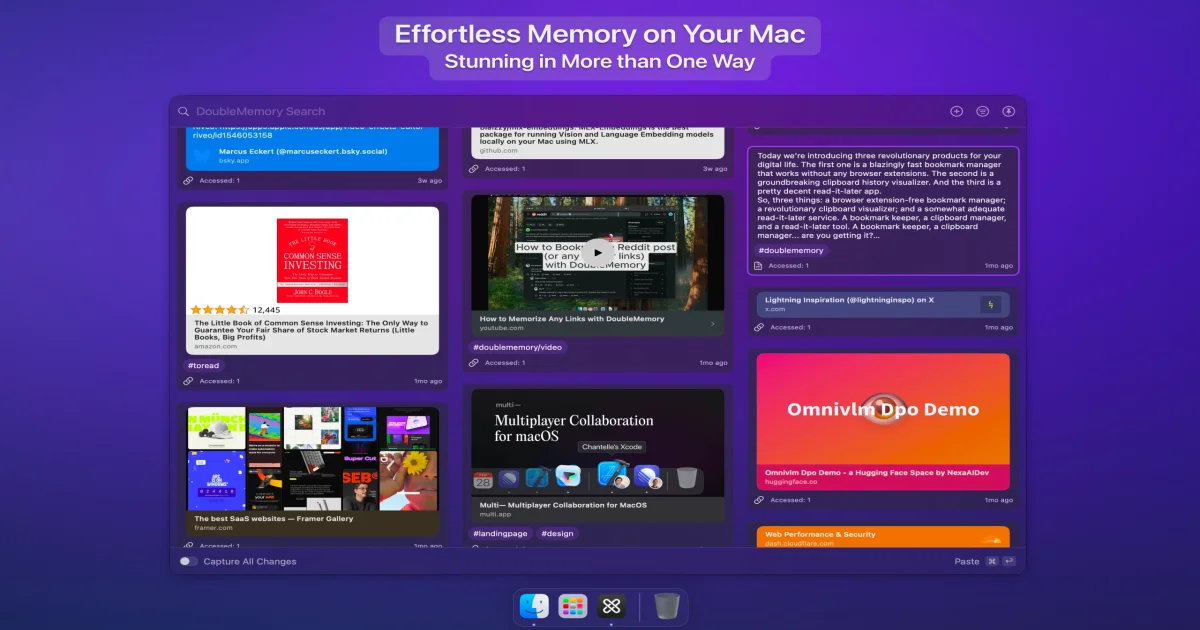
DoubleMemory is a local-first read-it-later app for macOS and iOS that captures via double cmd+c, renders preview cards in a Pinterest-like mood board, and requires no browser extensions.
TL;DR
TL;DR: DoubleMemory is a local-first read-it-later and bookmarking app for macOS and iOS that captures links via double cmd+c, renders everything as preview cards in a Pinterest-like mood board, and runs entirely on iCloud with no browser extensions required.
Source and Accuracy Notes
This post is based on the Show HN launch post (162 points) and the official DoubleMemory website. The app is available on the Mac App Store.
What Is DoubleMemory?
DoubleMemory started as an experiment to automatically save content when the user instinctively double-presses cmd+c. Over six months of development, it evolved into a cohesive combination of four tools: a read-it-later app, a bookmarking organizer, a clipboard manager, and a card-based note-taking app.
The app is built exclusively for the Apple ecosystem — macOS, iPhone, and iPad — and leverages iCloud for sync instead of running any backend servers. Everything is free with no limits at launch.
How DoubleMemory Works
Capture Methods
DoubleMemory offers multiple ways to save content without requiring browser extensions:
- Double cmd+c — The signature capture method. Instinctively copy twice to save.
- Drag and drop — Drop links or text onto the app icon or menu bar icon.
- Right-click Services menu — Use the macOS Services context menu.
- Share sheet — Standard iOS/macOS share extension.
- Menu bar shortcut — Launch the app from the menu bar with a keyboard shortcut.
Preview Card Architecture
Instead of rendering a plain list of article titles like traditional read-it-later apps, DoubleMemory renders every saved item as a rich preview card. Apple’s system generates these preview cards for thousands of link types, and the app caches them locally. The result is a translucent, Pinterest-like mood board of your saved content.
Local-First Architecture
The app’s architecture is intentionally local-first:
- No servers — Sync happens through iCloud, eliminating server costs.
- No browser extensions — Capture works at the system level via clipboard and share sheet.
- Apple-native previews — Uses macOS/iOS built-in link preview generation instead of custom Open Graph parsers.
The founder estimates this approach costs roughly $10/year (domain registration) compared to the $1M+/year typical of cloud-hosted read-it-later services.
Setup Workflow
Step 1: Install from the Mac App Store
# Search for "DoubleMemory" in the Mac App Store
# Or use the direct link:
# https://apps.apple.com/us/app/doublememory/id6737529034
```bash

### Step 2: Configure Capture Preferences

Open DoubleMemory from the menu bar. The app works immediately with default settings — double cmd+c captures whatever is in your clipboard. You can also enable drag-and-drop capture by keeping the app icon visible in your Dock or menu bar.

### Step 3: Import Existing Bookmarks

DoubleMemory includes importers for popular read-it-later services:

```bash
# Visit the tools page to download importers:
# https://doublememory.com/posts/tools
# Supported: Pocket, Omnivore, ReadWise
Step 4: Navigate with Keyboard Shortcuts
The app supports full keyboard navigation. Use arrow keys to browse cards, and standard macOS shortcuts for search and organization. The iOS companion app supports thumb-swipe navigation between articles.
Deeper Analysis
Why Local-First Matters for Read-It-Later
The read-it-later space has seen significant consolidation and shutdowns. Pocket announced its closure, Instapaper returned to indie ownership, and services like Omnivore and UpNext have shut down over the years. All of these were cloud-hosted services where user data lived on company servers.
DoubleMemory’s local-first approach addresses this fragility. Since content is stored locally and synced via iCloud, users retain access to their saved articles regardless of the company’s business status. The app’s $10/year operating cost (domain registration only) also makes it economically sustainable without requiring venture funding or subscription revenue.
The Double Cmd+C Interaction Model
The double cmd+c capture mechanism is DoubleMemory’s most distinctive feature. It exploits a natural user behavior — when people want to save something, they often copy it instinctively. By detecting two rapid copy operations, the app captures content without interrupting workflow or requiring a browser extension.
This approach has a tradeoff: Apple has been progressively restricting clipboard access for privacy reasons. DoubleMemory mitigates this by offering alternative capture methods (drag-and-drop, Services menu, Share sheet) as fallbacks.
Preview Cards vs. Title Lists
Most read-it-later apps display saved items as a list of titles and URLs. DoubleMemory renders everything as visual preview cards in a grid layout. This design choice has practical benefits:
- Visual recognition — Users recognize saved content by its thumbnail rather than reading titles.
- Context preservation — Preview cards retain the visual context of the original page.
- Browseability — The mood board layout encourages serendipitous rediscovery of saved content.
The tradeoff is that preview cards require more storage space than plain text entries. DoubleMemory handles this by caching previews locally and relying on Apple’s built-in preview generation rather than maintaining custom parsers.
Practical Evaluation Checklist
- Capture speed — Double cmd+c should feel instantaneous. Test with a few links.
- Preview quality — Check that saved links generate accurate preview cards.
- iCloud sync — Verify content syncs between Mac and iOS devices.
- Keyboard navigation — Test arrow key browsing and search shortcuts.
- Import workflow — If migrating from Pocket/Omnivore, test the importer tools.
- Storage usage — Monitor local storage if saving thousands of articles.
Security Notes
DoubleMemory’s local-first architecture has inherent security advantages:
- No server-side data — Your saved content never passes through company servers.
- iCloud encryption — Sync uses Apple’s encrypted iCloud infrastructure.
- No account required — The app works with your Apple ID only, no separate registration.
The clipboard-based capture method does require clipboard access permission on macOS. Apple’s privacy restrictions mean the app can only read clipboard content when the user explicitly copies — it cannot monitor clipboard contents passively.
FAQ
Q: Is DoubleMemory free? A: Yes, everything in the app is free with no limits at launch. The founder plans to add paid features focused on content retrieval and consumption workflows in the future.
Q: Does it work on Windows or Android? A: No. DoubleMemory is Apple-ecosystem only (macOS, iPhone, iPad). The local-first architecture leverages iCloud sync and Apple-native preview generation, which are not available on other platforms.
Q: What happens if Apple restricts clipboard access further? A: DoubleMemory already supports alternative capture methods: drag-and-drop, right-click Services menu, Share sheet, and menu bar shortcut. These do not require clipboard monitoring and will continue to work regardless of Apple’s clipboard policy changes.
Q: Can I import from Pocket or other read-it-later apps? A: Yes. DoubleMemory provides importers for Pocket, Omnivore, and ReadWise. Visit https://doublememory.com/posts/tools to download them.
Q: How does local-first sync work? A: Content is stored locally on each device and synced via iCloud. There are no company servers involved. If iCloud is disabled, the app still works — content just stays on the local device.
Conclusion
DoubleMemory offers a compelling alternative to cloud-hosted read-it-later services. Its local-first architecture, double cmd+c capture, and preview card interface differentiate it from traditional bookmark managers. The Apple-ecosystem limitation is a tradeoff, but for Mac and iOS users, it provides a fast, private, and visually rich way to save and rediscover content.
With the read-it-later market experiencing consolidation and shutdowns, a local-first approach that costs $10/year to operate is a sustainable model worth watching.
Related Posts
dev-tools
Automotive Skills Suite for AI Engineering
Evaluate Automotive Skills Suite for APQP, ASPICE, HARA, safety-plan, and DIA workflows with setup notes, governance risks, and SME review guidance.
5/28/2026
dev-tools
awesome-agentic-ai-zh Roadmap Guide
Explore awesome-agentic-ai-zh as a Chinese agentic AI learning roadmap, with setup notes, track selection, study workflow, and evaluation guidance.
5/28/2026
dev-tools
Baguette iOS Simulator Automation Guide
Set up Baguette for iOS Simulator automation, web dashboards, device farms, gesture input, streaming, and camera testing with Xcode caveats.
5/28/2026