What Is Devv? AI Coding Agent for Indie Builders
Devv is an AI coding agent for indie builders that helps ship full-stack products fast with private projects, integrations, and workflow support for solo teams.
TL;DR
TL;DR: Devv is a full-stack AI coding agent with 700k+ developers using it to ship AI-powered products from a single prompt. It started in 2024 as a vertical search engine for developer docs and code, and has since pivoted into an agent that builds and ships complete web apps, APIs, and integrations.
Source and Accuracy Notes
- Official site: devv.ai
- HN launch: Show HN: I made a better Perplexity for developers (185 points, May 2024)
- Current product: devv.ai — the AI Coding Agent landing page
- Manifest description (still legacy): “The next generation AI search engine for developers”
- No public GitHub repo for the product itself
What Is Devv?
Devv is an AI coding agent designed for indie builders and small teams who want to ship full-stack AI products without standing up a separate frontend, backend, and integration layer for every idea. You describe what you want to build, the agent scaffolds the project, sets up the database and routes, and runs the app in a private workspace you can iterate on.
The product was originally a developer-focused search engine. The 2024 Show HN pitch positioned it as “a better Perplexity for developers,” with a vertical search index that mixed official documentation, real code from public repositories, and web results. The premise was that for technical questions — “How do I serialize a Django queryset to JSON?” — nothing beats the actual Django source code and the canonical docs, ranked higher than blog posts and Stack Overflow snippets.
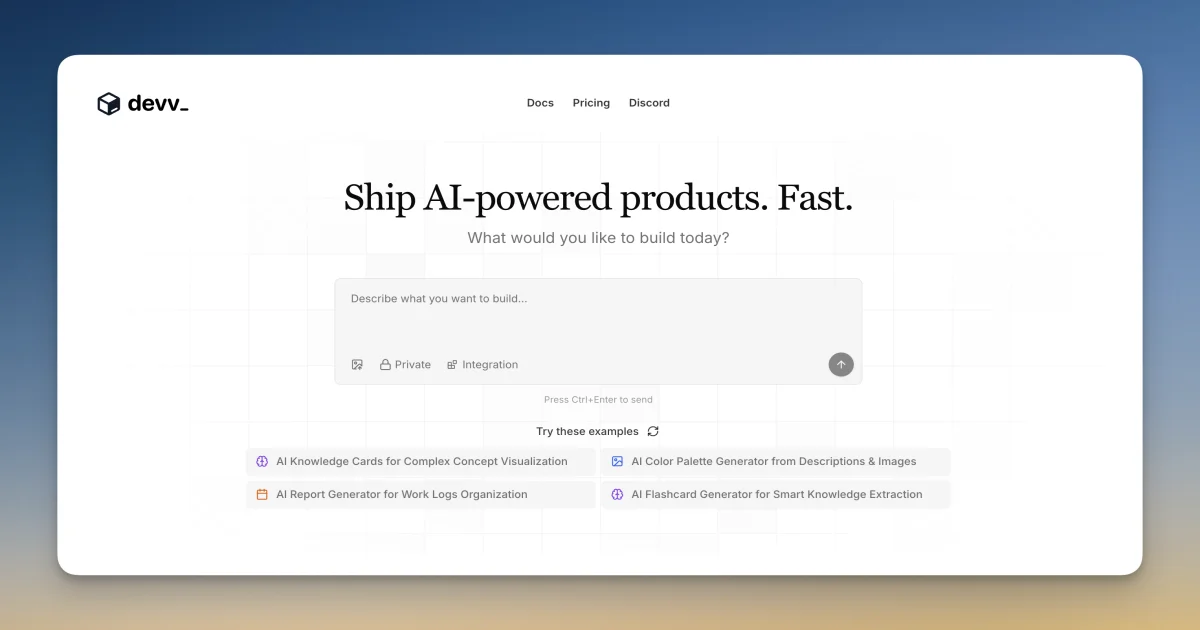
That search engine is still live at devv.ai (the manifest.json still says “The next generation AI search engine for developers”), but the front door has been replaced. Today’s Devv is an AI coding agent that builds full-stack web applications end to end. The site leads with “Ship AI-powered products. Fast.” and showcases prompts like “AI Knowledge Card for Complex Concept Visualization” and “AI Report Generator for Work Logs Organization” as example projects you can fork.
Setup Workflow
Devv is browser-based — there is no local install. You sign in, choose whether the project is Private or an Integration, and start describing what you want to build.
Step 1: Sign in and pick a workspace
Go to devv.ai and sign in with Google or email. You land in the prompt box with the example projects already laid out for one-click remixing.
# No CLI install required. Browser-first.
open "https://devv.ai"
```bash

The four built-in example projects are:

- **AI Knowledge Card for Complex Concept Visualization** — generates spaced-repetition cards with diagrams
- **AI Color Palette Generator from Descriptions & Images** — palette extraction from natural language or uploaded images
- **AI Report Generator for Work Logs Organization** — turns freeform daily notes into structured reports
- **AI Flashcard Generator for Smart Knowledge Extraction** — extracts Q&A pairs from long-form text

Click any of these to fork the example and see the full project structure, prompts, and code the agent generated.

### Step 2: Describe your app

In the prompt box, write a plain-English description of what you want to build. The agent treats the input as a product spec, not a single command. The longer and more specific the description, the closer the first iteration is to what you actually want.

```text
Build me a Trello-style kanban board where each card is a podcast episode.
The user can drag cards between columns, click a card to see episode
notes, and there's an "AI Summary" button on each card that calls an LLM
to generate a 3-bullet summary of the show notes.
Once you press Enter (Ctrl+Enter is the explicit shortcut), the agent starts scaffolding. The sidebar shows real-time progress: selecting the project type, generating routes, creating the database schema, and finally previewing the running app.
Step 3: Iterate in the live preview
When the scaffold finishes, you get a working app in a private workspace. The preview is interactive — click around, hit the AI Summary button, watch the data flow. If something is off, you describe the change in the same prompt box and the agent diffs the project, applies edits, and refreshes the preview.
There is no separate “edit” mode and “preview” mode. The whole loop is: type a change, see it run.
Step 4: Mark as Integration
For apps that need to talk to external services (Stripe, Resend, OpenAI, Supabase, etc.), toggle the project type from Private to Integration. This unlocks credential storage and the integrations panel where you can paste API keys and the agent will wire them into the right environment variables.
The Private/Integration toggle is right under the prompt box on the home screen. Private projects run in an isolated sandbox with no external network access. Integration projects can reach the third-party APIs you configure.
Step 5: Ship or export
Devv runs the app for you at a devv.ai-hosted URL out of the box. For production shipping you can either keep it on the Devv domain or export the generated code to your own GitHub repo and deploy from there. Pricing is at devv.ai/en/pricing — a free tier exists for low-traffic experiments.
Deeper Analysis
The search-engine-to-agent pivot is interesting
Devv’s evolution is a useful case study in how developer-tooling startups find product-market fit. The original pitch — a vertical search engine mixing docs, code, and web results — was technically well-argued (the Show HN post laid out exactly why general search engines fail for technical queries: their indexes are dominated by SEO-optimized blog posts, not canonical sources). The 185-pt reception showed real interest in the premise.
But the team evidently concluded that “AI answers for technical questions” was a feature, not a product. Users want the code written, not just the answer found. So the product absorbed the search index as an internal capability — the agent uses a curated code-and-docs corpus to ground its generations — and rebuilt the front end around generation rather than retrieval.
This is the same arc that GitHub Copilot’s inline completions took when they rolled into Copilot Chat, then Copilot Workspace, then Copilot Agent. Each layer absorbed the one below. Devv skipped the chat step entirely and went straight from “search engine” to “agent that ships the app.”
What the index gets you
Most AI coding agents are trained on the open web. They know what’s in the top-ranked Medium posts and Stack Overflow answers. They do not know what’s in the latest version of the library you’re using unless that version is well-indexed in their training data, which it usually isn’t for fast-moving JS/TS frameworks.
Devv’s pitch is that the agent is grounded in a vertical index that prefers canonical sources: official documentation, the library’s own repository, and real code in the wild. For questions like “How do I use the new use() hook in React 19?” the agent is more likely to cite the actual React docs and pull snippets from React’s own examples, rather than a 2022 blog post that explains the legacy patterns.
This is a real differentiator when the library is less than a year old, or when you’re using a niche framework. It’s less differentiated when you’re on a popular stack where every major model already has solid training data.
Where the agent is weaker
A few honest limitations worth flagging before you commit a project to it:
- No local development. Everything runs in Devv’s sandbox. You can export code, but the iteration loop is browser-first. If your workflow depends on local CLI tools (linters, formatters, custom scripts), expect friction.
- The integration panel is closed. You can paste API keys, but you cannot run your own background workers, schedule cron jobs, or talk to internal services on your private network. The Integration toggle opens outbound HTTPS to third-party APIs, not arbitrary network access.
- Public roadmap is thin. Pricing details, model choices, and deployment options are not deeply documented. Expect to learn the limits by trial.
Practical Evaluation Checklist
When deciding whether Devv fits your workflow, run through this:
- Speed-to-first-app — Can you describe a small app and have it running in under 5 minutes? Test with one of the four example projects first.
- Iteration latency — When you request a change, how long until the preview reflects it? Sub-minute is the target.
- Code quality on export — If you plan to export and self-host, is the generated code readable? Or is it the typical AI-generated spaghetti that needs a full rewrite?
- Integration scope — List the third-party APIs you need. Check that the integration panel supports them before committing.
- Pricing ceiling — What’s the free tier’s limit, and where do you get pushed into a paid plan? Cross-check with devv.ai/en/pricing.
- Data privacy — Private projects are isolated, but read the terms. If you’re building something with real customer data, the export-and-self-host path is safer than running production on the hosted tier.
Security Notes
A few things to know before you put anything real into Devv:
- Private projects are isolated. The Private/Integration toggle is the security boundary. Private projects cannot make outbound network calls; Integration projects can. Keep the default on Private until you actively need an external API.
- API keys are stored server-side. When you paste a key into the Integration panel, it lives in Devv’s credential store, not in your project source. This is good practice — keys never end up in the exported code unless you explicitly add them.
- No local-first option. Everything runs in Devv’s cloud. If you need air-gapped development (regulated industries, sensitive IP), this is not the right tool — export the code and self-host on your own infrastructure.
- Read the manifest. The site manifest.json still says “AI search engine for developers” — the product is in active pivot. Pricing, terms, and security model may shift without much notice.
FAQ
Q: Is Devv free? A: There is a free tier for low-traffic projects. For higher usage, multi-user workspaces, and longer-running apps, paid plans apply. Check devv.ai/en/pricing for the current numbers.
Q: Can I export the code Devv generates? A: Yes. You can push the generated project to your own GitHub repo and deploy from there. The intent is that Devv is a fast way to prototype, not a lock-in platform.
Q: What models does the agent use? A: The product does not publish a default model list. The agent behaves like a Claude-class or GPT-4-class model for code generation. Specific model selection per project is not exposed in the UI as of this writing.
Q: Does Devv have a public API? A: Not in the traditional sense. The product is browser-based; programmatic access is not a first-class feature.
Q: How is this different from Replit Agent, Bolt.new, or v0? A: Replit Agent runs in Replit’s IDE and ties into Replit’s deployment platform. Bolt.new runs in StackBlitz’s WebContainers and is best for client-side apps. v0 from Vercel focuses on UI components. Devv’s positioning is closer to Bolt — full-stack apps from a prompt — with the added pitch that the agent is grounded in a vertical code-and-docs index rather than general web data.
Q: Does the original search engine still work? A: The legacy search interface is still served at the same domain. The product is in active pivot, so expect the search surface to evolve.
Q: Can multiple people collaborate on the same project? A: Multi-user editing is part of the paid plans. Free-tier projects are single-author.
Q: What happens to my project if I stop paying? A: The free tier remains available; paid features fall back to free-tier limits. Your data is not deleted automatically, but check the terms for the dormancy window before you assume indefinite retention.
Conclusion
Devv is one of the more interesting cases in the current wave of “prompt-to-app” tools. The team’s earlier work on a vertical search index for developer content shows in the agent’s grounding — it leans on canonical docs and source code rather than the open web, which matters when you’re building on top of libraries that are newer than the training cutoff.
The product is mid-pivot, so pricing, security boundaries, and feature scope are all subject to change. The honest evaluation is: prototype here, but plan to export. Devv is fast at getting to a working first version of an app. The export-to-own-repo path is the safer production story until the platform settles.
If you ship a lot of small AI-powered web apps and value the time between idea and running preview, Devv is worth a 30-minute trial with one of the example projects. If you need a long-lived, lockable-down production environment for serious workloads, prototype in Devv and then move the generated code to your own infrastructure.
Related Posts
ai-setup
Recall – Persistent Memory for Claude Code via MCP Hooks
Recall gives Claude Code a permanent memory store that survives session restarts and context compaction. Four hooks capture and restore context automatically — with cloud SaaS or self-hosted options.
2/28/2026
dev-tools
Automotive Skills Suite for AI Engineering
Evaluate Automotive Skills Suite for APQP, ASPICE, HARA, safety-plan, and DIA workflows with setup notes, governance risks, and SME review guidance.
5/28/2026
dev-tools
awesome-agentic-ai-zh Roadmap Guide
Explore awesome-agentic-ai-zh as a Chinese agentic AI learning roadmap, with setup notes, track selection, study workflow, and evaluation guidance.
5/28/2026