Databasus - Self-Hosted Database Backups With PITR
Open-source self-hosted database backup tool for PostgreSQL, MySQL, MariaDB, and MongoDB with point-in-time recovery, restore verification, and GFS retention.
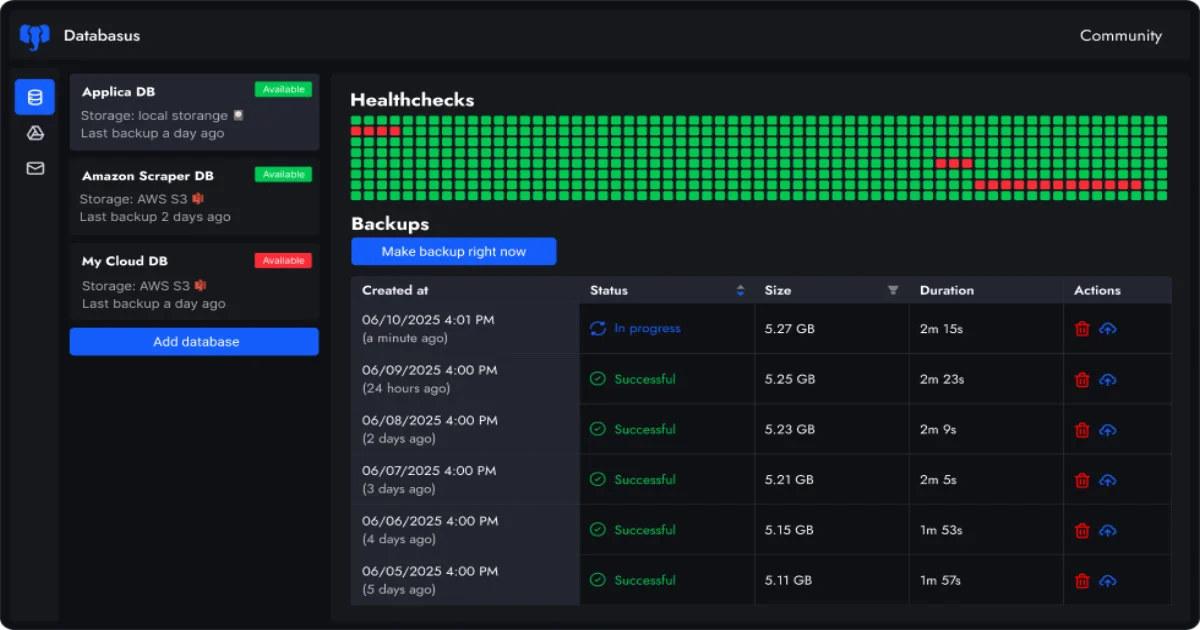
TL;DR
TL;DR: Databasus is a self-hosted, Apache 2.0 backup tool for PostgreSQL, MySQL, MariaDB, and MongoDB that combines logical, physical, and incremental (WAL) backups with built-in restore verification, AES-256-GCM encryption, GFS retention, and Helm-based Kubernetes deployment.
Source and Accuracy Notes
- Official site: databasus.com
- GitHub: github.com/databasus/databasus (7,041 stars, 381 forks, Go)
- HN launch: Show HN: Databasus - Dec 2025 and Show HN: Databasus v3.16.0 - Feb 2026
- Docker pulls: ~240k combined (Postgresus and Databasus images)
The project was originally named Postgresus and was renamed to Databasus in 2025 when MySQL, MariaDB, and MongoDB support was added. It now surpasses WAL-G and pgBackRest as the most-starred backup repository on GitHub.
What Is Databasus?
Databasus is a backup platform aimed at developers, DevOps engineers, and DBAs who want scheduled, verifiable backups of relational and document databases without paying for a managed service or operating WAL-G by hand. The single Docker image ships a web UI, scheduler, retention engine, and notifier router — what would otherwise be a small stack of shell scripts and cron jobs is bundled into a deployable binary.
The current version (3.x) supports:
- PostgreSQL 12 through 18 (including 18)
- MySQL 5.7, 8, and 9
- MariaDB 10, 11, and 12
- MongoDB 4.2+ through 8
Three backup modes are exposed per database:
- Logical — engine-native dump (e.g.
pg_dump,mysqldump,mongodump) compressed and streamed straight to storage with no intermediate files on the Databasus host. - Physical — file-level copy of the database cluster, faster for large datasets.
- Incremental — physical base backup plus continuous WAL archive. This is what enables point-in-time recovery (PITR): restore to any second between two backups.
Why Databasus?
Most teams running self-hosted Postgres eventually collide with the same problem: backups are running, the cron job says “OK”, and yet when the day comes to restore, the dump is corrupt or partial. The industry joke is that backups are not real until you have restored from them. Databasus attacks this directly with a feature they call restore verification.
Restore verification
Instead of just checksum-verifying a file, Databasus spins up a fresh database container, runs the actual restore, and counts rows in every table. The report is shipped to whatever notifier channel is configured. The trigger is configurable: after every backup, on a schedule, or both.
This is the only honest way to know a backup is usable, and it is rare to see it in a self-hosted tool. WAL-G and pgBackRest can do it, but you wire the validation yourself. Databasus does it for you.
No vendor lock-in (even though it is open source)
A surprising amount of “open-core” backup tooling encrypts dumps in a proprietary format and stores the key in the tool’s own database. If the server dies and you only have the S3 bucket, you cannot restore. Databasus ships backup files alongside a *.dump.metadata sidecar that contains the AES-256-GCM metadata needed to decrypt the file with pg_dump, mysqlbackup, or mongodump directly. The project’s stance is documented: “We avoid ‘vendor lock-in’ even to open source tool!” Recovery without Databasus is a first-class flow, not an afterthought.
Accepted into Claude and Codex for Open Source
In March 2026, the project was independently accepted into both Anthropic’s Claude for Open Source and OpenAI’s Codex for Open Source. The README is unusually explicit about how AI is used in the development process: as a verification, search, and review assistant only — no “vibe code” PRs, no AI-written features without tests. The acceptance is partly a signal that the project is treated as critical infrastructure by both companies.
Setup Workflow
Step 1: Install with the automated script (Linux)
sudo apt-get install -y curl && \
sudo curl -sSL https://raw.githubusercontent.com/databasus/databasus/refs/heads/main/install-databasus.sh \
| sudo bash
```bash

The script installs Docker and Docker Compose if missing, sets up Databasus, and configures autostart on reboot.

### Step 2: Run with a single Docker command

If you already have Docker running, this is the minimum viable setup:

```bash
docker run -d \
  --name databasus \
  -p 4005:4005 \
  -v ./databasus-data:/databasus-data \
  --restart unless-stopped \
  databasus/databasus:latest
```bash

The data volume persists all internal state — workspaces, schedules, encryption keys. Mount it on a real disk in production.

### Step 3: Add the first database

Open `http://localhost:4005`, sign in with the default admin, and click **New Database**. The setup wizard asks for:

- Connection string (or hostname, port, database, user, password)
- Backup mode: logical, physical, or incremental (PITR)
- Schedule: hourly, daily, weekly, monthly, or cron
- Storage destination
- Retention policy
- Notification channel (optional)

### Step 4: Configure storage

Storage destinations are pluggable. Each database can target a different backend:

- Local filesystem
- AWS S3
- Cloudflare R2
- Google Drive
- Azure Blob
- Dropbox
- SFTP
- NAS (any mount exposed to the container)
- rclone (translates to ~40 cloud providers)

Backups are encrypted client-side before upload, so S3 and R2 buckets can be shared or public without leaking data.

### Step 5: Pick a retention policy

Three retention strategies are available:

```text
Time period:    keep backups for the last N days/months/years
Count:          keep only the most recent N backups
GFS:            keep N hourly, N daily, N weekly, N monthly, N yearly independently
```bash

The GFS policy is the new (v3.16.0) addition. Default GFS configuration:

- 24 hourly backups
- 7 daily backups
- 4 weekly backups
- 12 monthly backups
- 3 yearly backups

This is the retention shape enterprise compliance teams usually want: 24 hours of granular recovery, a week of daily points, a month of weekly points, a year of monthly points, three years of annual snapshots — all from a single config block.

### Step 6: Deploy on Kubernetes with Helm

For production clusters, the official Helm chart is published as an OCI artifact:

```bash
helm install databasus oci://ghcr.io/databasus/charts/databasus \
  -n databasus --create-namespace
```bash

For external access with TLS:

```bash
helm install databasus oci://ghcr.io/databasus/charts/databasus \
  -n databasus --create-namespace \
  --set ingress.enabled=true \
  --set ingress.hosts[0].host=backup.example.com
```bash

NodePort, LoadBalancer, and Gateway API (`HTTPRoute`) modes are all supported.

### Step 7: Verify a restore manually

The automated restore verification already runs on a schedule, but you can also trigger one manually through the UI to test a specific backup before deleting it. The report lists every table with its row count after the restore — diff this against a known-good snapshot if you want belt-and-braces confirmation.

## Deeper Analysis

### Security model

The team has documented their security pipeline in unusual detail. The relevant guarantees:

- **AES-256-GCM at rest** for all backup files
- **Read-only DB user by default** — backups cannot modify production data even if the Databasus host is compromised
- **CodeQL + gitleaks + semgrep + CodeRabbit** on every PR
- **Dependabot** watches for CVEs with a cooldown on new versions (a defense against compromised-package supply-chain incidents)
- **Trivy** scans every Docker image, plus a separate Dockerfile lint pass
- **GitHub Actions pinned to full commit SHAs**, not floating tags (2025 saw real attacks on `@v4` and `@main`)
- **Restore tests run in CI** — every PR runs a full backup-then-restore cycle against real database containers, not just unit tests

For a self-hosted tool, this is more thorough than most managed services.

### Why GFS matters

GFS (Grandfather-Father-Son) is what serious backup policies look like. Hourly backups catch recent mistakes. Daily backups cover most user-error scenarios. Weekly backups survive multi-day incidents. Monthly backups satisfy quarterly compliance reviews. Yearly backups cover rare but important legal/audit requirements.

Without GFS, you have a single retention knob: "keep 30 days". That overwrites your only copy of a backup from 45 days ago — sometimes the only one that matters in a slow-moving incident. GFS keeps the right granularity at each timescale. The default values (24/7/4/12/3) are conservative and match common enterprise templates.

### Connection modes: agent vs. remote

Two topologies are supported:

- **Remote** (default) — Databasus connects over the network to the database using a read-only credential. No agent on the DB host. Works with cloud-managed databases (RDS, Cloud SQL, Supabase) and on-prem.
- **Agent** — a lightweight Go binary runs alongside the database and streams the backup directly to Databasus. The database itself is never exposed to the network. Useful when the DB is on a private subnet with no public access.

The agent topology is a good fit for paranoid setups: the backup flow is outbound-only from the database, so opening an inbound port on the DB is not required.

### Cloud and self-hosted are the same build

The project explicitly states that Databasus Cloud runs the exact same code as the self-hosted version. There are no feature gates. If you start on the cloud and want to self-host later, you can — and if you self-host, the cloud is available as a managed option if you stop wanting to run the operations side yourself. This is meaningfully different from the open-core pattern where the cloud has features the OSS does not.

## Practical Evaluation Checklist

When comparing Databasus to alternatives (WAL-G, pgBackRest, managed services), walk through this list:

- Does it support your database engine and version?
- Does it support incremental backups with PITR if you need it?
- Does it perform real restore verification, not just checksum checks?
- Can you decrypt backups without the tool itself (i.e. no vendor lock-in)?
- Does it encrypt backups before they leave the host?
- Does it run as a single container or single binary?
- Can it deploy via Helm for Kubernetes?
- Does it integrate with your existing notification stack (Slack, Discord, Telegram, email, webhooks)?
- Does it support GFS retention out of the box?
- Is the codebase open source under a permissive license (Apache 2.0)?

Databasus answers yes to every item on this list.

## Security Notes

- The default admin password should be rotated immediately. The reset command is:

```bash
docker exec -it databasus ./main --new-password="YourNewSecurePassword123" --email="admin"- Back up the encryption key file (
secret.key). Without it, encrypted dumps cannot be decrypted even with the metadata sidecar. Recovery-without-Databasus requires only the key and the metadata file. - Mount the
./databasus-datavolume on a separate disk in production so a host failure does not corrupt backups and state together. - For agent-mode deployments, the agent does not need elevated DB privileges — a read-only user is sufficient.
- All GitHub Actions in the upstream repo are pinned to commit SHAs, so a supply-chain attack on
@maincannot inject malicious code into your fork’s CI without explicit SHA bumps.
FAQ
Q: What is the difference between Databasus and the older Postgresus? A: Postgresus was the original name when only PostgreSQL was supported. In 2025, MySQL, MariaDB, and MongoDB were added and the project was renamed Databasus. Existing Postgresus users were migrated and Docker images redirect accordingly.
Q: Does Databasus support point-in-time recovery (PITR)? A: Yes. For PostgreSQL, the incremental backup mode combines a physical base backup with continuous WAL segment archiving. You can restore to any second between two backups. MySQL and MariaDB use binlog archiving, and MongoDB uses oplog tailing for the same effect.
Q: Can I restore backups if my Databasus server dies?
A: Yes, by design. Encrypted backups are stored with a *.dump.metadata sidecar that contains the encryption parameters. To restore without Databasus, you only need the secret.key file and standard database tools (pg_dump, mysqlbackup, mongodump). The full guide is at databasus.com/how-to-recover-without-databasus.
Q: How does Databasus compare to WAL-G or pgBackRest? A: Both are excellent CLI-first tools with strong PostgreSQL focus. Databasus is positioned differently: a web UI, multi-database support, built-in restore verification, and a turnkey Docker/Helm deploy. If you want a hands-on tool you script yourself, WAL-G and pgBackRest remain best-in-class. If you want a deploy-and-forget web UI that also restores, Databasus is the answer.
Q: Is there a free tier or is everything paid? A: The self-hosted version is fully featured, Apache 2.0 licensed, and free. There is no “open core” tier where features are held back for the cloud. Databasus Cloud is a paid managed hosting option that runs the same code. Databasus Labs (DBA-as-a-service) is a separate paid offering that funds development.
Q: Does the AI feature in the README mean Databasus is AI-written? A: No. The README is explicit: AI is used as a verification, search, and documentation assistant only. “Vibe code” PRs are rejected by default. Every PR is reviewed by a human line-by-line before merge. The Claude and Codex for Open Source acceptance is partly based on the project’s engineering discipline, not the reverse.
Conclusion
Databasus is a serious self-hosted backup platform that has crossed the line from “side project” to “production-ready” — its star count, Docker pulls, and the dual acceptance into Claude and Codex for Open Source are evidence. The combination of multi-engine support, real restore verification, no-lock-in encrypted backups, GFS retention, and Helm deployment is rare for a single tool in the self-hosted space.
If you are running PostgreSQL, MySQL, MariaDB, or MongoDB and want a deployable backup platform you can trust under audit, Databasus is a strong candidate. Try the single docker run command first, wire a real production database into the UI, and watch the restore verification report come through to Slack. The feature that makes it stand out is not on the marketing page — it is the fact that the project will not let backups exist on disk in a state where they cannot be restored.
Related Posts
dev-tools
AgentMesh – Define AI Agent Teams in YAML
Define multi-agent AI workflows in YAML and run them locally with one command. AgentMesh brings Docker Compose patterns to AI agent orchestration.
5/28/2026
dev-tools
Cicada – FOSS CI/CD That Replaces YAML With a Real Language
Cicada replaces GitHub Actions and GitLab CI YAML configs with a custom functional DSL, letting you write pipelines using variables, functions, and shell.
5/29/2026
dev-tools
Stacktape – Deploy to AWS Without DevOps Knowledge
Stacktape is a DevOps-free cloud framework that cuts AWS deployment config by 98%. Supports serverless and containers, 20+ infra components built-in, and a.
5/29/2026