Databasus – Self-Hosted PostgreSQL Backup Tool
Open-source PostgreSQL backup tool with point-in-time recovery, restore verification, and support for MySQL, MariaDB, and MongoDB.
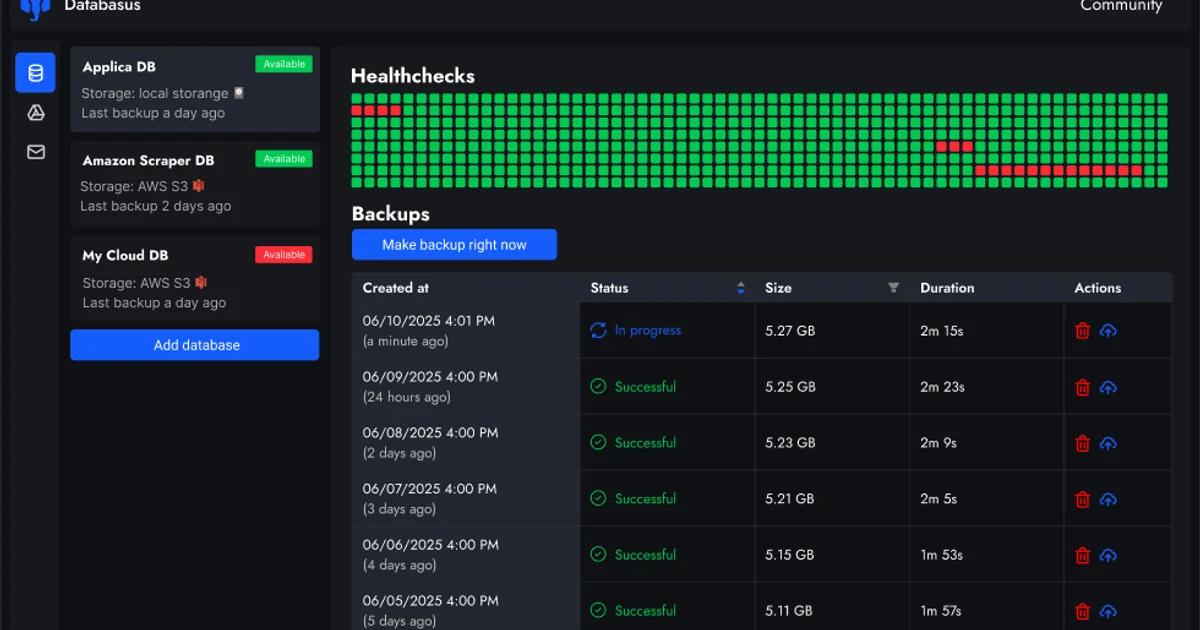
TL;DR
TL;DR: Databasus is an Apache 2.0-licensed, self-hosted backup tool for PostgreSQL with physical and logical backup support, point-in-time recovery, restore verification, and multi-database support including MySQL, MariaDB, and MongoDB.
Source and Accuracy Notes
- Project page: databasus.com
- Source repository: github.com/databasus/databasus
- License: Apache 2.0 (verified via
LICENSEfile on GitHub) - HN launch thread: news.ycombinator.com/item?id=46410656
What Is Databasus?
Databasus is a free, open-source, self-hosted backup tool for PostgreSQL, MySQL, MariaDB, and MongoDB. It runs as a Docker container on your own infrastructure, keeping all backup data under your control.
The project launched on Hacker News in 2025 and has grown to over 7,800 GitHub stars. It is published under the Apache 2.0 license and is actively maintained.
Key differentiators from other backup tools:
- Restore verification: Databasus performs a real restore after each backup, spinning up a temporary database container to confirm the backup is usable — not just intact on disk.
- Physical backups for PostgreSQL: Uses PostgreSQL’s native incremental backup mechanism, keeping incremental backups small and fast.
- WAL streaming: Continuously captures the write-ahead log, enabling point-in-time recovery down to the second.
- Multi-database: Supports PostgreSQL 14–18 (physical and logical), MySQL 5.7–9 (logical), MariaDB 10–12 (logical), and MongoDB 4.2+ (logical).
- Multi-storage: S3, Cloudflare R2, Google Drive, NAS, Dropbox, SFTP, and more.
- AES-256-GCM encryption: Backup files are encrypted at rest; secrets are never exposed in logs.
- Workspaces and RBAC: Teams can manage access with viewer, member, admin, and owner roles.
Setup Workflow
Step 1: Quick Docker Run
The fastest way to get started:
docker run -d \
  --name databasus \
  -p 4005:4005 \
  -v ./databasus-data:/databasus-data \
  --restart unless-stopped \
  databasus/databasus:latest
```bash

Access the dashboard at `http://localhost:4005`.

### Step 2: Docker Compose Setup

For production use, use Docker Compose:

```yaml
services:
  databasus:
    container_name: databasus
    image: databasus/databasus:latest
    ports:
      - "4005:4005"
    volumes:
      - ./databasus-data:/databasus-data
    restart: unless-stopped
    healthcheck:
      test: ["CMD", "databasus", "healthcheck"]
      interval: 30s
      timeout: 5s
      retries: 3
      start_period: 60s
```bash

Start with:

```bash
docker compose up -d
```bash

### Step 3: Kubernetes with Helm

For Kubernetes deployments, install from the OCI registry:

```bash
helm install databasus oci://ghcr.io/databasus/charts/databasus \
  -n databasus --create-namespace \
  --set service.type=LoadBalancer
```bash

For domain-based access with Ingress:

```bash
helm install databasus oci://ghcr.io/databasus/charts/databasus \
  -n databasus --create-namespace \
  --set ingress.enabled=true \
  --set ingress.hosts[0].host=backup.example.com
Step 4: Configure Your First Backup
- Navigate to
http://localhost:4005 - Click “New Database” and select your database type (PostgreSQL, MySQL, MongoDB, or MariaDB)
- Enter connection credentials and test the connection
- Choose a backup schedule: hourly, daily, weekly, monthly, or cron
- Select a storage destination (local, S3, R2, Google Drive, etc.)
- Configure retention policy (time-based, count-based, or GFS)
- Optionally enable restore verification and notifications
- Save — Databasus validates settings and begins the schedule
Supported Databases
| Database | Versions | Physical Backup | Logical Backup |
|---|---|---|---|
| PostgreSQL | 14, 15, 16, 17, 18 | Yes | Yes |
| MySQL | 5.7, 8.0, 8.4, 9 | No | Yes |
| MariaDB | 10, 11, 12 | No | Yes |
| MongoDB | 4.2+, 5, 6, 7, 8 | No | Yes |
Retention Policies
Databasus supports three retention strategies:
- Time period: Keep backups for a fixed duration (e.g., 7 days, 3 months, 1 year)
- Count: Keep a fixed number of the most recent backups (e.g., last 30)
- GFS (Grandfather-Father-Son): Layered retention with independent hourly, daily, weekly, monthly, and yearly cycles
You can also set per-backup and total storage size caps to control costs.
Security Features
- AES-256-GCM encryption for backup files at rest
- Zero-trust storage: Encrypted backups are safe to store on shared infrastructure like public S3 buckets
- Read-only backup user: Databasus uses a read-only database user by default and never stores credentials that can modify data
- Secrets never appear in logs or error messages
Notification Channels
Receive backup reports via:
- Telegram
- Slack
- Discord
- Microsoft Teams
- Mattermost
- Webhooks
You can configure failure-only alerts or full reports.
Practical Evaluation Checklist
- Docker container starts and dashboard is accessible on port 4005
- Successfully connects to a PostgreSQL database
- First backup completes and is stored in the configured destination
- Restore verification runs after backup and reports table row counts
- Scheduled backup fires at the expected time
- Notification arrives on configured channel on backup completion
- Retention policy correctly prunes old backups
- Encrypted backup files are not readable without the encryption key
FAQ
Q: Does Databasus support point-in-time recovery? A: Yes. For PostgreSQL, enabling WAL streaming captures the continuous write-ahead log, allowing you to restore to any point in time within the WAL retention window.
Q: How does restore verification work? A: After each backup, Databasus spins up a temporary database container, restores the backup into it, and checks the restored data size against the backup. It reports table row counts and sends the result via your configured notification channel.
Q: Can I use Databasus to back up to Cloudflare R2? A: Yes. R2 is supported as a storage destination, alongside S3, Google Drive, Dropbox, NAS, SFTP, and more.
Q: Is there a managed / SaaS version of Databasus? A: No. Databasus is purely self-hosted. You run it on your own infrastructure. There is no cloud-hosted offering.
Q: What happens if my backup storage fills up? A: You can configure per-backup and total storage size caps. When a limit is reached, Databasus respects the retention policy to prune old backups before creating new ones.
Conclusion
Databasus fills a real gap for teams running PostgreSQL in self-hosted environments: the gap between a raw pg_dump cron job and an expensive enterprise backup suite. Restore verification alone is worth the setup — it eliminates the class of failure where a backup appears to succeed but is actually corrupt.
With support for four database engines, multiple storage backends, encryption, RBAC, and a polished UI, it is a credible open-source alternative to tools like Barman, pgBackRest, or commercial products for teams that want full control of their backup infrastructure.
Set it up with Docker in under five minutes, or use the Helm chart for Kubernetes. The GitHub repo has over 7,800 stars and active releases.
Source and Accuracy Notes
- Project page: databasus.com
- Source repository: github.com/databasus/databasus
- License: Apache 2.0 (verified via GitHub
LICENSEfile) - HN launch thread: news.ycombinator.com/item?id=46410656
Related Posts
dev-tools
AgentMesh – Define AI Agent Teams in YAML
Define multi-agent AI workflows in YAML and run them locally with one command. AgentMesh brings Docker Compose patterns to AI agent orchestration.
5/28/2026
dev-tools
Cicada – FOSS CI/CD That Replaces YAML With a Real Language
Cicada replaces GitHub Actions and GitLab CI YAML configs with a custom functional DSL, letting you write pipelines using variables, functions, and shell.
5/29/2026
dev-tools
Stacktape – Deploy to AWS Without DevOps Knowledge
Stacktape is a DevOps-free cloud framework that cuts AWS deployment config by 98%. Supports serverless and containers, 20+ infra components built-in, and a.
5/29/2026