Databasus - Self-Hosted DB Backup with Point-In-Time
Self-hosted backup tool for PostgreSQL, MySQL, MariaDB, and MongoDB with physical and logical backups, S3/R2 storage, and restore verification.
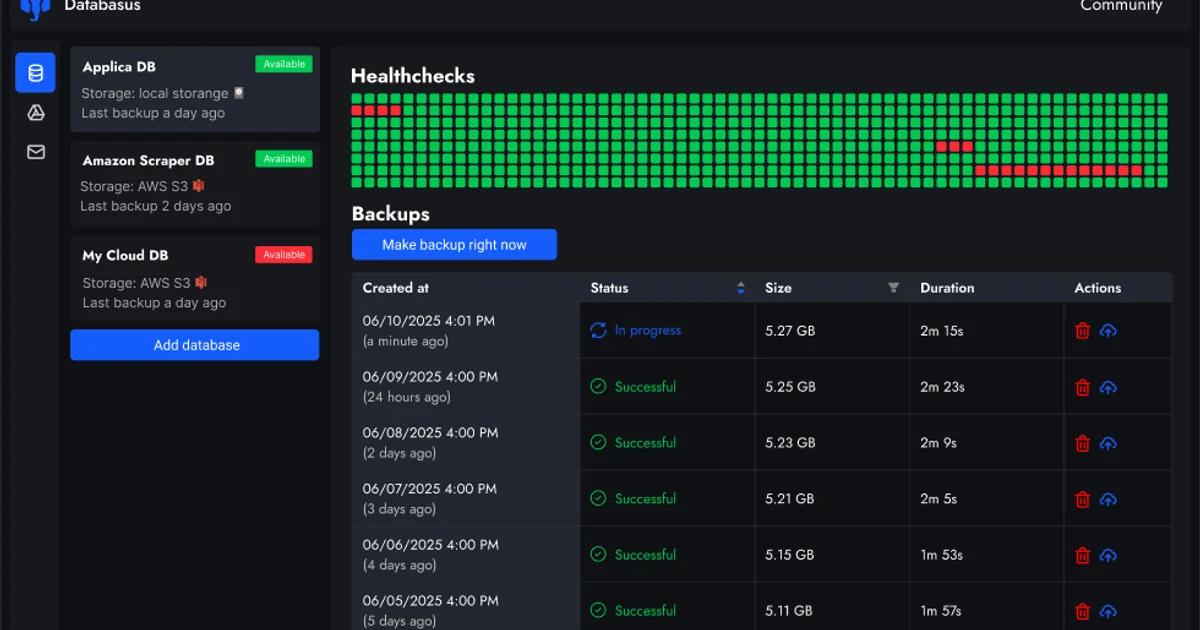
TL;DR
TL;DR: Databasus is an open-source, self-hosted backup tool that supports PostgreSQL (physical + logical), MySQL, MariaDB, and MongoDB — with Point-In-Time Recovery, S3/R2 storage destinations, encryption, and restore verification.
Source and Accuracy Notes
- Project page: databasus.com ← visited and verified
- Source repository: github.com/databasus/databasus ← README read in full
- License: Apache 2.0 (verified via README badge and LICENSE file)
- HN launch thread: news.ycombinator.com/item?id=46410656
What Is Databasus?
Databasus is a free, open-source, self-hosted tool to back up PostgreSQL, MySQL, MariaDB, and MongoDB. It runs on Linux, macOS, and Windows as a Docker container, with a web UI for managing backups, restores, and retention policies.
The tool targets DevOps teams and database administrators who want Point-In-Time Recovery (PITR) capability without enterprise licensing costs. Its key differentiator is restore verification — Databasus spins up a temporary database container after each backup, runs a real restore, and confirms the row count matches before reporting success.
From the README:
Databasus is a free, open source and self-hosted tool to backup PostgreSQL. Make backups with different storages (S3, Google Drive, FTP, etc.) and notifications about progress (Slack, Discord, Telegram, etc.). With a focus on Point-in-Time Recovery at low RPO/RTO
Supported Databases
| Database | Version | Physical Backup | Logical Backup |
|---|---|---|---|
| PostgreSQL | 14, 15, 16, 17, 18 | ✅ | ✅ |
| MySQL | 5.7, 8 | ❌ | ✅ |
| MariaDB | 10, 11, 12 | ❌ | ✅ |
| MongoDB | 4.2+, 5, 6, 7, 8 | ❌ | ✅ |
Physical backups (file-level copies using PostgreSQL’s native incremental mechanism) are available for PostgreSQL only. All other databases use logical (dump-based) backups.
Setup Workflow
Step 1: Pull the Docker Image
docker pull databasus/databasus
```bash

### Step 2: Start the Container

```bash
docker run -d \
  --name databasus \
  -p 3000:3000 \
  -v databasus_data:/data \
  databasus/databasus
Open http://localhost:3000 to access the web UI.
Step 3: Connect a Database
In the Databasus UI, add a new database connection:
- Workspaces → create or select a workspace
- Databases → Add database
- Choose the database type (PostgreSQL, MySQL, MariaDB, MongoDB)
- Fill in connection details (host, port, credentials)
- Test the connection → Save
Step 4: Configure Backup Storage
Databasus supports multiple storage destinations:
- Local — server filesystem
- S3 / Cloudflare R2 — S3-compatible object storage
- Google Drive — cloud file storage
- Dropbox — cloud file storage
- SFTP — remote server via SSH
- Rclone — any Rclone-supported backend
To add S3/R2 storage:
- Storages → Add storage
- Select S3 as the type
- Enter endpoint, bucket name, access key, and secret key
- Test the connection → Save
Step 5: Set Up a Backup Schedule
- Select your database in the UI
- Backups → New backup
- Choose backup type:
- Physical (PostgreSQL only) — Full or Incremental
- Logical — Full dump
- Set schedule: hourly, daily, weekly, monthly, or cron expression
- Choose storage destination
- Set retention policy (time period, count, or GFS)
- Enable restore verification if desired
- Save and run
Key Features
Point-In-Time Recovery (PITR)
For PostgreSQL, Databasus continuously streams Write-Ahead Log (WAL) segments in addition to periodic full/incremental backups. This enables PITR — you can restore to any point in time within the WAL retention window, minimizing data loss after a disaster.
Restore Verification
After each backup (or on a configurable schedule), Databasus:
- Spins up a temporary container with the target database engine
- Restores the backup into it
- Counts rows in each table
- Reports the restoration result
This catches silent corruption that checksums miss. Failure notifications go to any configured channel (Telegram, Slack, Discord, email).
Encryption
Backups are encrypted with AES-256-GCM before leaving the server. The encryption key is stored in the Databasus configuration and is never sent to third parties. Even if an S3 bucket is compromised, backup archives are unusable without the key.
Retention Policies
Three retention modes:
- Time period — keep backups for N days/months/years
- Count — keep the last N backups
- GFS (Grandfather-Father-Son) — layered retention with independent schedules for hourly, daily, weekly, monthly, and yearly snapshots
Self-Hosted Security Notes
- Databasus uses a read-only database user for backups by default
- Secrets are stored locally and never logged, even on error
- Runs entirely on your infrastructure — no data leaves your network unless you configure external storage
- Audit logs track all user actions within the application
FAQ
Q: Does Databasus support incremental physical backups? A: Yes, for PostgreSQL. Physical incremental backups store only what changed since the last full backup, keeping backup sizes small and fast after the initial full snapshot.
Q: Can I use it with Cloudflare R2 instead of S3?
A: Yes. R2 is S3-compatible. Enter https://<account_id>.r2.cloudflarestorage.com as the endpoint and use your R2 access key and secret key.
Q: Does it require a database user with write permissions? A: No. Databasus uses a read-only user for the backup operation itself. Write permissions are only needed for the temporary restore verification container.
Q: How does PITR work for PostgreSQL?
A: Databasus streams WAL segments continuously from the PostgreSQL server. Combined with a full backup, this lets you replay the WAL to any point in time. PostgreSQL must have wal_level = replica or logical and max_wal_senders configured.
Q: Is there a CLI mode? A: The primary interface is the web UI. For automation, schedules handle CLI-free operation. Advanced users can interact via the REST API (enabled in the container config).
Conclusion
Databasus fills a gap between basic pg_dump scripts and full enterprise backup suites. It is self-hosted, open-source under Apache 2.0, and handles the full backup lifecycle: scheduling, compression, encryption, multi-destination storage, retention management, and automated restore testing. If you run PostgreSQL in production on a VPS or home lab and do not have a verified backup tested in the last month, Databasus is worth 10 minutes of setup.
Install: databasus.com/installation
Related Posts
dev-tools
AgentMesh – Define AI Agent Teams in YAML
Define multi-agent AI workflows in YAML and run them locally with one command. AgentMesh brings Docker Compose patterns to AI agent orchestration.
5/28/2026
dev-tools
Cicada – FOSS CI/CD That Replaces YAML With a Real Language
Cicada replaces GitHub Actions and GitLab CI YAML configs with a custom functional DSL, letting you write pipelines using variables, functions, and shell.
5/29/2026
dev-tools
Stacktape – Deploy to AWS Without DevOps Knowledge
Stacktape is a DevOps-free cloud framework that cuts AWS deployment config by 98%. Supports serverless and containers, 20+ infra components built-in, and a.
5/29/2026