Chroma Cloud – Serverless Vector Search for AI Agents
Chroma Cloud brings fully-managed, serverless vector search to production AI apps. Built on Apache 2.0 Chroma Distributed in Rust, it powers agents at Apple.
TL;DR
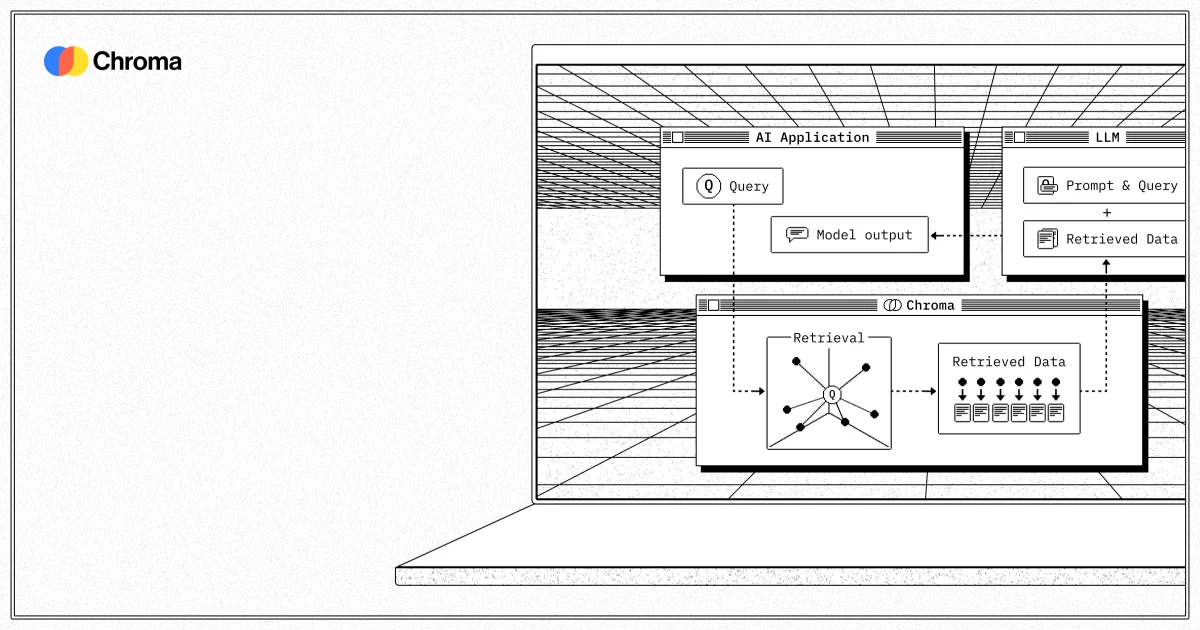
TL;DR: Chroma Cloud is a fully-managed, serverless vector database built on the open-source Chroma project (21k+ GitHub stars), designed to bring reliable retrieval-augmented generation to production AI agents without infrastructure overhead.
Source and Accuracy Notes
- Product: trychroma.com/cloud
- Open-source project: github.com/chroma-core/chroma (21k+ stars)
- HN Show HN: Chroma Cloud – serverless search database for AI (93 points)
- Note: The open-source Chroma project has been covered on HN extensively since its 2023 launch. Chroma Cloud is the new managed cloud offering.
What Is Chroma Cloud?
Vector databases are the backbone of retrieval-augmented generation (RAG). They store embeddings — numerical representations of text, code, images, and other data — and enable fast similarity searches across massive corpora. For AI agents that need to ground their responses in real, up-to-date information, vector search is not optional; it is the mechanism that separates a hallucinating model from one that cites sources.
Chroma is the open-source vector database that made embeddings accessible to solo developers and startups. Launched in February 2023, it quickly accumulated over 21,000 GitHub stars and 5 million monthly downloads, with adoption at Apple, Amazon, Salesforce, and Microsoft. The core library is designed to “just work” — you install it, point it at your documents, and query. Chroma Cloud is the managed service tier that handles the production-hardened infrastructure so you do not have to.
Under the hood, Chroma Cloud is backed by Chroma Distributed, an Apache 2.0 licensed serverless database written in Rust. Rust was chosen for memory safety and performance at scale. Object storage underneath provides extreme scalability and reliability without the operational burden of managing nodes, replicas, or failover configurations.
The managed offering is designed for AI teams building agents, RAG pipelines, and knowledge retrieval systems that need to scale from prototype to production without rewriting queries or re-architecting data pipelines.
Why Vector Search Matters for AI Agents
Large language models are trained on public data up to a cutoff date. They do not know your internal codebase, your product documentation, or the specific third-party SDK version your system runs. Without retrieval, an agent will either guess (hallucinate) or require you to paste context into every prompt — which does not scale.
The pattern that plays out in practice: you paste URLs and code snippets into a prompt, the agent confidently uses an outdated API or the wrong framework version, and you spend more time verifying and correcting than if you had just written the code yourself.
Feeding models precise, up-to-date context becomes the bottleneck once generation quality is good enough. Vector search solves this by letting you index your actual data — codebases, docs, PDFs, internal wikis — and retrieve the most relevant chunks at query time. The model gets grounded context without you manually curating prompts.
Core Features
Serverless Architecture
Chroma Cloud manages all underlying infrastructure. There are no servers to provision, no replica sets to configure, and no capacity planning for traffic spikes. Query volume fluctuates as agents handle bursty user workloads — serverless means you pay for what you use without over-provisioning for peak.
Open-Source Foundation
Chroma Distributed, the engine behind Chroma Cloud, is Apache 2.0 licensed. You are not locked into a proprietary storage format. If you later decide to self-host or migrate to a different managed provider, the underlying data remains portable.
LangChain and LlamaIndex Integration
Chroma was built alongside the early RAG stack. Both LangChain and LlamaIndex have first-class Chroma integrations. Switching from a local Chroma instance to Chroma Cloud typically requires changing a connection string and an API key — not rewriting your retrieval logic.
Managed Metadata Filtering
Beyond semantic similarity search, Chroma Cloud supports metadata filtering. You can scope queries to a specific document set, date range, or any custom attribute without post-filtering in application code. This is critical for multi-tenant applications where data isolation matters.
Setup Workflow
Getting started with Chroma Cloud takes under five minutes if you already have a RAG pipeline using Chroma.
Step 1: Create a Chroma Cloud Account
Sign up at trychroma.com/cloud. The free tier includes sufficient queries for development and small production workloads.
Step 2: Get Your API Key
After login, you receive an API key and a connection endpoint. The connection endpoint follows the standard Chroma client URL format — you replace localhost:8000 with your cloud endpoint.
Step 3: Update Your Chroma Client
For Python clients using the chromadb package, the connection change is minimal:
import chromadb

# Local development
# client = chromadb.Client()

# Chroma Cloud
client = chromadb.ChromaClient(
    api_key="your-api-key",
    cloud_region="us-east-1"
)

collection = client.get_collection("knowledge_base")
results = collection.query(
    query_texts=["your search query"],
    n_results=5
)
```bash

### Step 4: Connect to LangChain (Optional)

LangChain's `Chroma` vector store class accepts the same connection parameters:

```python
from langchain_community.vectorstores import Chroma
from langchain_openai import OpenAIEmbeddings

vectorstore = Chroma(
    client=client,
    collection_name="knowledge_base",
    embedding_function=OpenAIEmbeddings()
)
Performance and Scalability
Chroma Distributed uses object storage as its backend, which removes the disk IO bottleneck that limits many embedded vector databases. Object storage also means data durability is handled by the cloud provider, not by replica configuration you manage.
For enterprise users already running Chroma at scale, the managed service removes the operational burden of monitoring, alerting, and scaling a distributed system. The same query interface works regardless of whether you are running on a single laptop or querying a billion-vector collection in the cloud.
Practical Evaluation Checklist
If you are evaluating Chroma Cloud for an AI agent project, here is a practical checklist:
- Existing Chroma usage? If you already use the open-source library, migration is a connection string swap
- Multi-tenant requirements? Metadata filtering is built-in; you do not need separate collections per tenant
- Embeddings provider? Chroma Cloud works with OpenAI, Cohere, HuggingFace, and any embeddings API that follows standard formats
- Data isolation needs? Confirm with Chroma Cloud documentation on tenant isolation guarantees for your compliance requirements
- Self-hosting preference? Chroma Distributed is open-source; you can run it yourself on any cloud provider with object storage
Security Notes
Chroma Cloud handles the infrastructure security layer — data at rest encryption, transport security, and access controls are managed by the service. However, you remain responsible for your embeddings pipeline: what data you index, whether it contains PII, and how long you retain it. Treat your Chroma Cloud API key like a database password — rotate it periodically and use environment variables rather than hardcoding.
For applications handling sensitive data, review Chroma Cloud’s data processing agreement and confirm which regions your data is stored in, particularly if you have data residency requirements.
FAQ
Q: Is Chroma Cloud the same as the open-source Chroma project?
A: Chroma Cloud is the managed service offering built on top of Chroma Distributed, a separate Apache 2.0 licensed storage engine written in Rust. The original open-source Chroma library remains open-source. Chroma Cloud uses a different storage backend optimized for cloud-scale workloads.
Q: How does Chroma Cloud compare to Pinecone or Weaviate?
A: Chroma targets developers who want a lightweight path from prototype to production. Pinecone is a purpose-built cloud vector database with more mature enterprise features. Chroma’s advantage is its tight integration with the Python RAG stack (LangChain, LlamaIndex) and its open-source foundation. For teams already using open-source Chroma, the migration path to Chroma Cloud is minimal.
Q: Can I self-host Chroma Distributed?
A: Yes. Chroma Distributed is Apache 2.0 licensed and can be deployed on any cloud provider with object storage. This gives you the flexibility to start on Chroma Cloud and migrate to self-hosting if cost or compliance requirements change.
Q: What embeddings models does Chroma Cloud support?
A: Any embeddings model that produces fixed-dimension vectors works. The integration is via API, so OpenAI’s text-embedding-3 series, Cohere, HuggingFace sentence transformers, and custom models are all compatible.
Conclusion
Chroma Cloud targets a specific pain point: teams that love the open-source Chroma experience but do not want to manage production infrastructure. The serverless model removes operational complexity, while the Apache 2.0 licensed storage engine keeps you from getting locked into a proprietary stack.
For AI agents that need grounded, up-to-date context — whether that is your internal codebase, product documentation, or a knowledge base that changes frequently — Chroma Cloud provides the retrieval layer without the ops burden. If you are already running Chroma locally, the upgrade path is worth evaluating.
Related Posts
ai-setup
Recall – Persistent Memory for Claude Code via MCP Hooks
Recall gives Claude Code a permanent memory store that survives session restarts and context compaction. Four hooks capture and restore context automatically — with cloud SaaS or self-hosted options.
2/28/2026
dev-tools
Automotive Skills Suite for AI Engineering
Evaluate Automotive Skills Suite for APQP, ASPICE, HARA, safety-plan, and DIA workflows with setup notes, governance risks, and SME review guidance.
5/28/2026
dev-tools
awesome-agentic-ai-zh Roadmap Guide
Explore awesome-agentic-ai-zh as a Chinese agentic AI learning roadmap, with setup notes, track selection, study workflow, and evaluation guidance.
5/28/2026