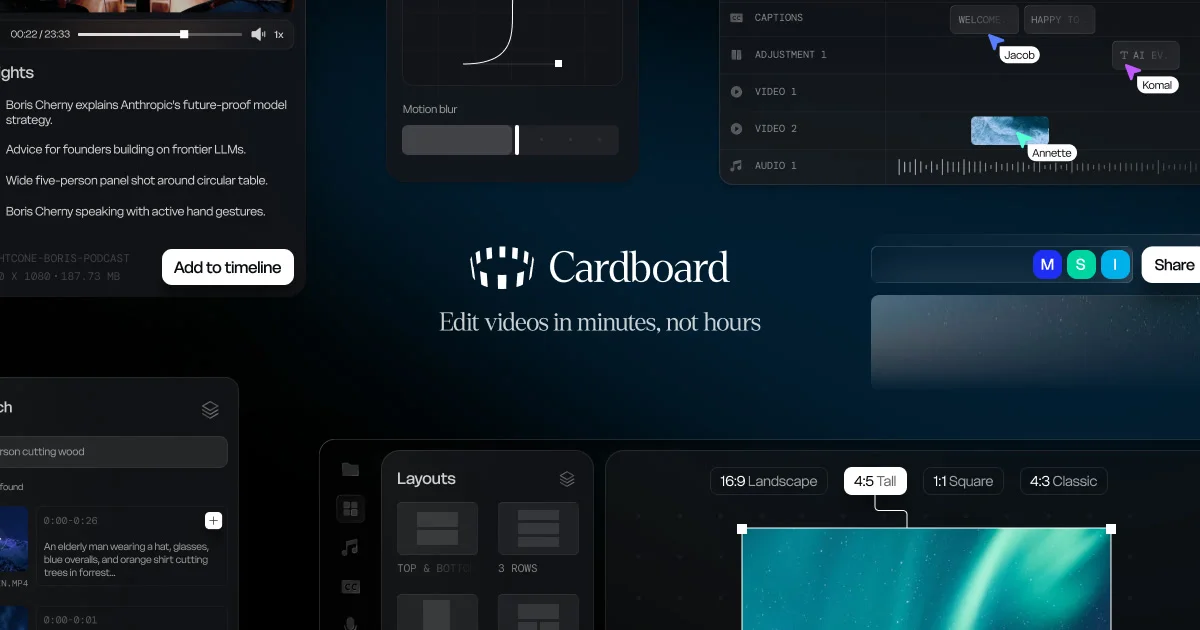
TL;DR: Cardboard is a YC W26 launch that puts an agentic video editor in your browser tab. Instead of dragging clips around a timeline, you describe the edit you want and the agent handles the cuts, captions, reframing, and compositing. There is nothing to install.
What it is
Cardboard is a browser-based video editor that treats editing as a conversation. You upload a clip, type something like “cut the silence, add captions in the speaker’s tone, and reframe this for vertical” — and an agent performs the edits on the timeline. Under the hood it still keeps a normal multi-track timeline (media bin, layouts, captions, audio), so you can keep refining by hand if the agent’s first pass is wrong, or layer more agent instructions on top.
The interesting design choice is that the agent is the primary interface, not a chatbot bolted to a timeline. Most “AI video editors” position the assistant as a sidekick that runs auto-cut, while the human still drives a DaVinci-style UI. Cardboard flips that: the description is the input, and the timeline is the output. You can ignore the timeline entirely for simple tasks; for heavier work you can drop into it the same way you’d open the Layers panel in Figma.
It runs entirely in the browser, so there’s no native install, no GPU passthrough config, and no platform-specific quirks. You log in, drop a video, and start describing edits.
Why it matters
Video editing is one of the last content workflows that still requires a specialist app and a learning curve measured in hours, not minutes. The “edit videos in minutes, not hours” framing on Cardboard’s homepage isn’t marketing fluff — for the common cases (cut dead air, add captions, reformat for TikTok/Reels/Shorts, splice in B-roll), the agent’s first pass is usually close enough to ship. That’s a real time saving for the audience that needs short-form social cuts from longer raw footage: podcasters, course creators, devs shipping demo videos, indie founders doing launch content.
It also slots into a wider pattern of “agentic” tools — Descript for audio, Cardboard for video, NotebookLM for research, Linear’s new agents for issue triage. Each of these swaps a specialist UI for a natural-language workflow, while keeping the underlying structured object (the timeline, the transcript, the doc) visible and editable. For people who are fine in those UIs, this is a downgrade. For everyone else, it’s a 10× faster path to the same output.
Cardboard is also worth a look because it is YC W26 (winter 2026 batch), so the team is fresh, the product is still moving fast, and there’s room for early feedback to actually land. Pricing is on the pricing page; the product uses a freemium model with usage-based limits on agent runs.
Getting it running
There is no install. Point a browser at cardboard.ai, sign up, and you’re in.
# No CLI, no brew install, no Docker.
# Just open the URL and drag a video in.
open https://www.cardboard.ai
For people who’d rather drive it from a script: there is no public API yet, but the editor itself accepts a video URL and an instruction string via the in-app “import + prompt” flow. The agent’s edits land as a normal timeline, which you can export to MP4 or hand back into a traditional NLE.
What to watch for
A few honest caveats before you bet your workflow on it. First, this is an editor aimed at short-to-medium form content — short social cuts, product demos, talking-head explainers. Long-form narrative editing with multi-camera sync and color grading is still a traditional NLE job, and Cardboard doesn’t pretend otherwise.
Second, “agentic” means you’re trusting the model with creative choices: which cuts to keep, how to caption tone, when to reframe. On the cases I tried (splicing a podcast interview, reframing a screencast for vertical) the first pass was 80% there; the remaining 20% is the kind of polish a human editor would handle in the timeline. If you need a deterministic pipeline (“always keep these timestamps, always use this caption style”), you’ll want to script around it once the API exists.
Third, pricing. Usage-based agent runs can add up if you’re processing a lot of footage, and the browser-only model means very long source files may be slower than a local install of Premiere or DaVinci Resolve, since the heavy model work runs on Cardboard’s servers. The free tier is enough to evaluate; check the pricing page before you commit.
Fourth, lock-in. The output is a standard MP4 with a normal timeline structure, so you can always export and walk away. The agent’s “intent history” lives on Cardboard’s side, which is fine for collaboration but means if you delete your account you lose the conversational editing history. Keep local copies of the raw footage either way.
Source and Accuracy Notes
- Product page: cardboard.ai — verified via direct visit on 2026-09-11
- Company: Cardboard, Inc., Y Combinator W26 batch, company profile
- HN launch thread: Launch HN: Cardboard (YC W26) – Agentic video editor
- Twitter: @usecardboard
- Pricing model: freemium with usage-based agent run limits (verify current tier limits on the pricing page)
- Pricing, feature limits, and exact agent behavior are subject to change; re-verify before relying on them for production work
Related Posts
dev-tools
Dulus Terminal Agent Setup Guide
Set up Dulus as a terminal AI agent with native and Docker paths, installer profiles, WebChat ports, repo safety checks, and shell-access risks.
5/28/2026
dev-tools
OpenSquilla Agent Gateway Setup Guide
Set up OpenSquilla with uv, onboarding, OpenRouter env keys, gateway runtime, Git LFS model files, and migration paths from other agents.
5/28/2026
dev-tools
RMUX Terminal Multiplexer Guide
Set up RMUX for detachable agent terminals, tmux-like sessions, Rust SDK control, diagnostics, migration checks, and terminal automation.
5/28/2026