Blogmaker – Add an SEO Blog to Any Website
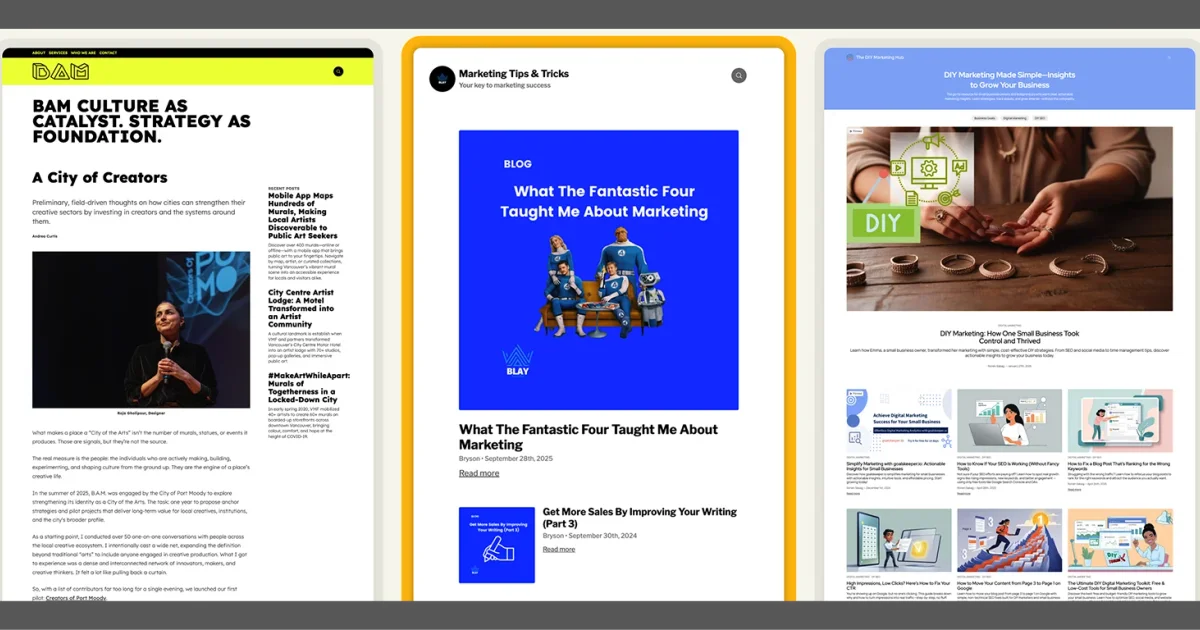
Add a fully hosted, SEO-ready blog to any website with Blogmaker—no plugins, separate hosting, updates, or maintenance.
TL;DR
TL;DR: Blogmaker embeds a SEO-optimized, fully-hosted blog onto any existing website via a small script tag—no CMS migration, no plugin management, and no separate hosting to maintain.
Source and Accuracy Notes
- Project page: blogmaker.app — visited and verified
- Source: no public repo (this is a hosted SaaS product)
- License: proprietary SaaS (no open-source license)
What Is Blogmaker?
Blogmaker is a standalone blogging layer that plugs into an existing site via a script tag. Instead of migrating your whole site to a CMS or maintaining a WordPress installation, you add a lightweight embed that delivers a full blog at [yourdomain.com]/blog.
From the product description on the site:
“Add a fully hosted, SEO-ready blog to any website with Blogmaker—no plugins, separate hosting, updates, or maintenance.”
The creator posted on HN that the project is five years in, built as a solo effort with a focus on eliminating the operational overhead of running a separate blog infrastructure.
Setup Workflow
Step 1: Create Your Blog Account
Sign up at blogmaker.app and create your blog. You will receive a small JavaScript snippet to embed.
Step 2: Add the Embed Script
Place the provided script tag in the <head> or <body> of your existing site:
<script src="https://blogmaker.app/embed.js" data-blog="your-blog-id"></script>This is the only integration step required on the host site.
Step 3: Configure Your Blog
In the Blogmaker dashboard you can:
- Set your blog name, description, and branding
- Write posts using their editor or import existing content
- Connect a custom domain if you want blog.yourdomain.com instead of a subdomain on blogmaker.app
Deeper Analysis
SEO model: Blogmaker serves blog posts on your own domain rather than on a blogmaker.app subdomain. This matters for SEO—a blog at yoursite.com/blog passes domain authority directly, while a subdomain on a third-party domain does not.
No database to manage: Posts and assets live on Blogmaker’s infrastructure. You do not patch a CMS, manage a database, or handle plugin updates.
Import support: The platform supports importing posts, which reduces the friction of moving an existing blog.
Limitation: Because the blog is served via a JavaScript embed, the content is not present in the initial HTML response unless Blogmaker supports server-side rendering (SSR) or preloading. For content that must be crawlable on first byte (e.g., for Googlebot), this is worth verifying directly with Blogmaker’s documentation.
Practical Evaluation Checklist
- Does it work on static site generators (Next.js, Astro, Hugo)? Yes, via script embed.
- Can you use a custom domain? Yes, configurable in dashboard.
- Is there a free tier? Check blogmaker.app pricing page for current plans.
- Does it work without JavaScript? Content delivery depends on the embed loading—this is the main technical risk for SEO-sensitive use cases.
FAQ
Q: Does Blogmaker work with Next.js or Astro? A: Yes, the embed script works on any HTML page. For single-page applications you may need to ensure the script initializes correctly after hydration.
Q: Can I use my own domain for the blog? A: Yes, Blogmaker supports custom domain configuration. Check your dashboard for DNS setup instructions.
Q: Is the content indexed by Google properly? A: This depends on whether Blogmaker’s embed delivers content server-side or only client-side. If content loads via JavaScript after page load, crawlers that do not execute JS may not see it. Verify with a fetch-and-render test in Google Search Console.
Q: How does this compare to writing a blog on Substack or Medium? A: Unlike Substack or Medium, Blogmaker keeps the blog on your own domain. You own the traffic and the SEO equity. The tradeoff is that you are relying on a third-party service for hosting rather than owning the infrastructure outright.
Conclusion
Blogmaker targets a specific pain point: adding a blog to a site that was not built with a CMS, without the operational overhead of running a separate blogging system. The embed model works for static and dynamic sites alike, and serving content on your own domain preserves SEO value.
If you have been avoiding adding a blog to your project because the CMS migration looked painful, Blogmaker is worth a look. The five-year solo development track suggests the author has been serious about solving this problem for a while.
Check current pricing and feature limits at blogmaker.app.
Related Posts
dev-tools
AgentMesh – Define AI Agent Teams in YAML
Define multi-agent AI workflows in YAML and run them locally with one command. AgentMesh brings Docker Compose patterns to AI agent orchestration.
5/28/2026
ai-setup
Prism – AI Video Workspace and API for Creators (YC X25)
Prism is a YC X25 AI video platform combining generation, editing, and an API for workflow automation. Generate assets, edit on a timeline, and integrate via.
5/28/2026
review
Mosaic – Agentic Video Editing With a Node-Based Canvas
Mosaic lets you build and run multimodal AI video editing agents on a node-based canvas. Upload raw footage, design a workflow, and let AI handle the heavy.
5/28/2026