BBRouter: a 3D breadboard simulator that runs as you wire
BBRouter is a 3D breadboard simulator in the browser: it runs the circuit as you wire it, flags missing resistors, and prints a build sheet.
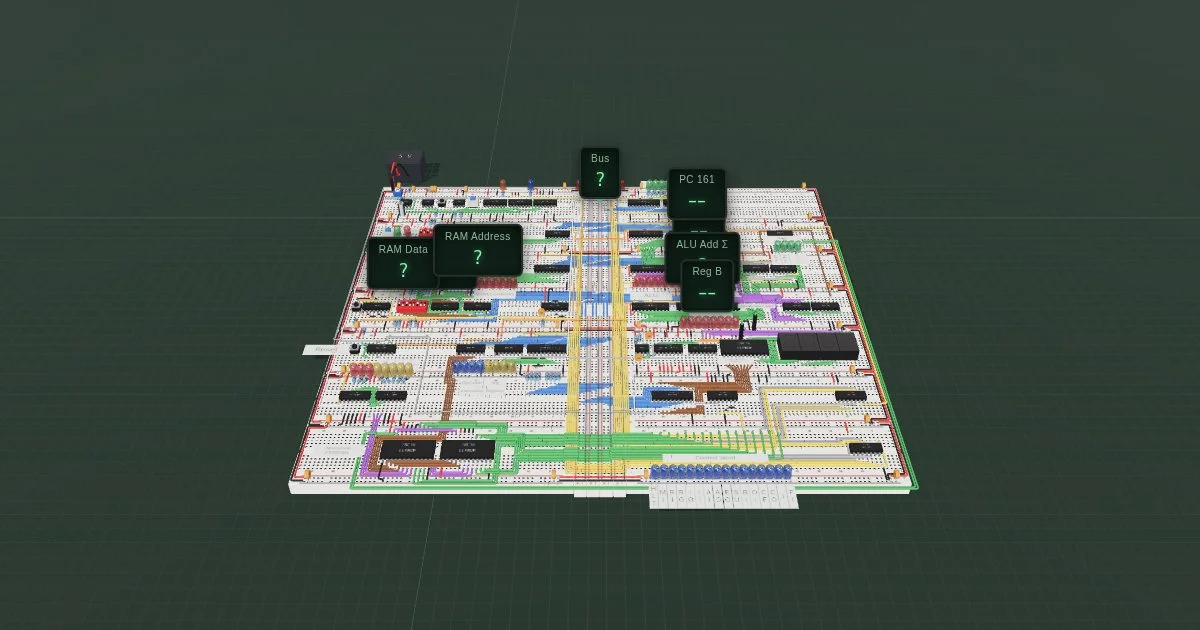
TL;DR: BBRouter puts a 3D breadboard in the browser and runs the circuit while you wire it, so a missing resistor or a floating reset line shows up before you cut anything. The build sheet it prints tells you each part’s pin-1 hole and the length to cut every lead, and a four-lane scope sits beside the board. It is a hosted service with no public source, and the free plan covers five projects.
What it is
BBRouter is a breadboard editor that doubles as a circuit simulator. You lay out boards in 3D, drop chips and parts into the holes, run wire from hole to hole, and the circuit keeps running the whole time you build. There is no separate simulator window and no export step. The board is the simulation.
That framing matters because a breadboard is not a schematic. Chips sit in rows, legs bend down into the holes, and a jumper reaching across three parts has to clear whatever is in the way. BBRouter models that geometry. Wires are solid core, 22 to 30 AWG, and each one reports the length it needs to be, climbs included, which is the number you would otherwise discover after cutting eight wires the wrong length.
The featured project on the front page is Ben Eater’s SAP-1, an 8-bit computer you can build one 74LS chip at a time. The whole build is available to open and run: the clock module, the SAP-1 itself, and the EEPROM programmer.
Why it matters
Breadboard mistakes are quiet. A 74LS04 with no decoupling capacitor works fine until it does not. An LED wired straight to a logic pin pulls far more current than that pin should give, and nothing happens until the chip gets hot. A reset input left floating means the board resets when the room is quiet enough.
None of that shows up in a schematic, because a schematic has no resistor in the wrong place and no floating pin. BBRouter keeps the wiring in the physical domain, so it can check these things. While the circuit runs, the Warnings panel lists what a real build gets wrong and the fix for each one. Shorted and floating lines are counted and ringed directly on the board, and the current through an LED is shown next to it.
The build sheet is the other thing it replaces. Once a layout works, the project exports:
- Build sheet, with each board’s parts listed by reference and pin-1 hole
- Bill of materials as CSV
- Schematic as SVG for one sheet, or PDF for the whole thing
- Perma-Proto map, for when the breadboard has served its purpose
- Wires for fabrication, so the lengths survive the move to perfboard
You follow that instead of squinting at a photograph of someone else’s breadboard.
Getting it running
There is nothing to install. Open bbrouter.com and either try it without an account or register for one. The free plan is enough for the 555 astable that is running on the front page.
If you already design somewhere else, export a netlist and import it. BBRouter reads netlists from KiCad, EasyEDA, Digital, Logisim and SPICE. From KiCad the command line export is:
kicad-cli sch export netlist --format kicadsexpr --output sap1.netlist sap1.kicad_schImport that file and BBRouter places the parts and works out what the wiring still lacks. What is missing is drawn as tape across the board, pin to pin, and Auto-route lays it in one click, flat on the hole grid and rounded around whatever is already there.
Once a project is worth keeping you can hand it to an AI assistant. BBRouter runs an MCP server over HTTP with OAuth sign-in, and the assistant acts as you, on your projects only. In Claude Code, copy the server address from the app, type /mcp, pick bbrouter and choose Authenticate. Any client that takes a remote MCP server takes the same address:
{
  "mcpServers": {
    "bbrouter": {
      "type": "http",
      "url": "https://your-bbrouter-mcp-address/mcp"
    }
  }
}
The mistakes it catches
The Warnings panel is the part worth paying for. It knows four classes of mistake that a real build gets wrong:
| Warning | What actually goes wrong |
|---|---|
| LED with no resistor | The pin is driven at full logic current, the LED is overloaded, and one of them dies |
| Chip with no decoupling capacitor | Rail spikes cause erratic behaviour that looks like a logic bug |
| Switch clocking a chip with no debounce | One press produces several edges, so the counter advances more than once |
| Reset or gate input left on nothing | A floating input picks up noise and resets the circuit on its own |
The scope is the other half. Four probes on the free plan, zoom from 10 µs to 60 s, cursors, Measure columns and triggers. UART, SPI and I²C decoders over the lanes, and captures exported as PNG, CSV or VCD, sit on the Maker plan. You can slow the simulation to a tenth, a hundredth or a thousandth of real time, or step it a tick at a time and watch each edge arrive. Registers, counters, RAM and the EEPROM are read and written while the circuit runs, so you can poke a value into memory and see what the program does with it.
On the SAP-1, the scope shows the clock module running: three 555s, a 74LS04, a 74LS08 and a 74LS32, with the astable on the front page measuring 2.988 Hz from the clock output.
There is a full KiCad-style schematic editor as well. Hierarchical sheets with boxes and labels, local, global and power labels, logic chips drawn whole or as their gates, De Morgan forms, and export of one sheet as SVG or the whole schematic as PDF. It uses KiCad’s own key bindings and right-click menu, so if you have drawn in KiCad you already know it. The app runs on a phone too: two fingers pan, pinch zooms, and the schematic is editable by touch.
What to watch for
BBRouter is a hosted service with no public repository, so your projects live on their servers. The free plan covers five projects, one of them private, with limits of 200 parts, 42 boards, 1,500 wires and 25 MB per project.
| Free | Maker | |
|---|---|---|
| Price | $0 | $7 a month, or $60 a year |
| Projects | 5 | as many as you need |
| Size per project | 200 parts, 42 boards, 1,500 wires, 25 MB | 1,000 parts, 200 boards, 10,000 wires, 1 GB |
| Scope | 4 lanes | as many lanes as you need, with UART, SPI and I²C decoders |
| MCP server | no | yes |
| Branches and diffs | no | yes |
Maker is where the MCP server, the extra scope lanes and the decoders live. A Classroom tier for schools is listed as coming soon.
The simulation is built around digital logic, 555s, EEPROMs, RAM and Arduinos. Uno, Nano and Mega boards run a sketch uploaded straight from the Arduino IDE. If you need analog behaviour that SPICE would normally give you, check how your specific parts are modelled before you trust a number.
Three languages ship: English, Français and Español.
Source and accuracy notes
- Project page: https://bbrouter.com/bbrouter/ben-eater-sap-1 (verified by direct visit on 2026-11-01)
- Product page and pricing: https://bbrouter.com and https://www.bbrouter.com/pricing (verified by direct visit on 2026-11-01)
- KiCad netlist export command: https://docs.kicad.org/9.0/en/cli/cli.html
- Source repository: none published. The site links no GitHub or GitLab repository.
- HN launch thread: https://news.ycombinator.com/item?id=50321522 (31 points, 2026-11-01)
Related Posts
dev-tools
Automotive Skills Suite for AI Engineering
Evaluate Automotive Skills Suite for APQP, ASPICE, HARA, safety-plan, and DIA workflows with setup notes, governance risks, and SME review guidance.
5/28/2026
dev-tools
awesome-agentic-ai-zh Roadmap Guide
Explore awesome-agentic-ai-zh as a Chinese agentic AI learning roadmap, with setup notes, track selection, study workflow, and evaluation guidance.
5/28/2026
dev-tools
Baguette iOS Simulator Automation Guide
Set up Baguette for iOS Simulator automation, web dashboards, device farms, gesture input, streaming, and camera testing with Xcode caveats.
5/28/2026